The Wiert Corner – irregular stream of stuff

Jeroen W. Pluimers on .NET, C#, Delphi, databases, and personal interests

  • My badges

  • Twitter Updates

  • My Flickr Stream

  • Pages

  • All categories

  • Enter your email address to subscribe to this blog and receive notifications of new posts by email.

    Join 1,860 other subscribers

Archive for the ‘Visual Studio 2015’ Category

Some winget packages that will get you x86 or x64 versions of vcredist140

Posted by jpluimers on 2024/10/15

A while ago I downloaded some internal tooling that required vcredist140.dll (and related DLLs).

From the name you cannot see if that is a 32-bit (x86) or 64-bit (x64) dependency so you often have to trial and error to figure out which one you need.

I adopted some winget package install command-lines with package IDs current at the time of writing this blog post; similar should be available at the time of publication:

Read the rest of this entry »

Posted in .NET, C++, Development, Software Development, Visual Studio 2015, Visual Studio 2017, Visual Studio 2019, Visual Studio 2022, Visual Studio and tools, Visual Studio C++ | Leave a Comment »

Need to look at monospaced programmers fonts again

Posted by jpluimers on 2020/05/27

At the time of looking, FiraCode would not work in Delphi but would in Visual Studio. Reminder for me to look at it again: [WayBack] GitHub – tonsky/FiraCode: Monospaced font with programming ligatures.

A cool feature of the font is that it has ligatures for common multi-character combinations like := or ...

Back when scheduling this, I was still at Lucida Console because of its large x-height and small line spacing.

It is time to revisit my font choice, so lets include at least these candidates:

–jeroen

related:

Edit 20200527: observations by Uwe Schuster

Posted in .NET, Delphi, Development, Font, Power User, Programmers Font, Software Development, Visual Studio 2015, Visual Studio and tools, vscode Visual Studio Code | Leave a Comment »

emulation – How to safely remove/uninstall Android Virtual Device .img files added by Visual Studio Emulator for Android – Stack Overflow

Posted by jpluimers on 2020/02/26

Me at [WayBack] emulation – How to safely remove/uninstall Android Virtual Device .img files added by Visual Studio Emulator for Android – Stack Overflow:

Since after uninstalling the “Visual Studio Emulator for Android” component, you cannot get to the “AVD Manager” any more, you have to manually delete this directory:

%LocalAppData%\Microsoft\VisualStudioEmulator

This works for both Visual Studio 2017 and Visual Studio 2015.

In addition, you might want to run “AppWiz.cpl“, then remove “Android SDK Tools”, which is also not automatically removed by the Visual Studio installer (at least not in Visual Studio 2015).

This will get rid of the multi-gigabyte folder %ProgramFiles(x86)%\Android\android-sdk\

If you still need Android emulation, read these:

–jeroen

Posted in .NET, Development, Software Development, Visual Studio 2015, Visual Studio 2017, Visual Studio and tools | Leave a Comment »

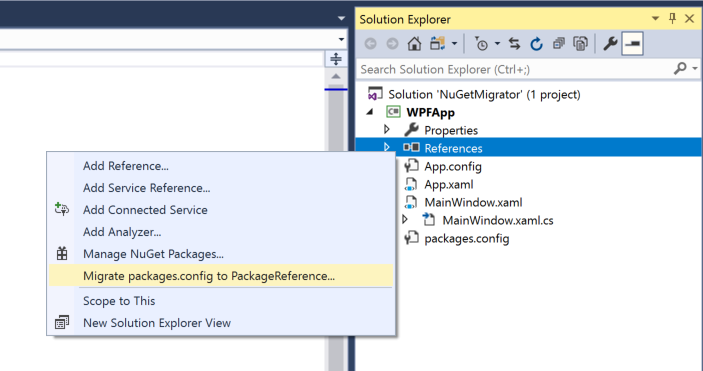
NuGet: migrate from packages.config to PackageReference with 3 clicks

Posted by jpluimers on 2020/02/19

Since I often forget to cleanup some bits of a migration: [WayBack] Migrate to PackageReference with 3 clicks:

Related:

–jeroen

Posted in .NET, Development, Software Development, Visual Studio 2015, Visual Studio 2017, Visual Studio and tools | Leave a Comment »

Visual Studio: show whitespace and configure spaces instead of tabs

Posted by jpluimers on 2019/07/11

As I always forgets this and fresh Visual Studio installations favour tabs over spaces, here is how to get it into sane mode:

Related: [WayBackWhitespace: The Silent Killer

–jeroen

Read the rest of this entry »

Posted in .NET, Development, Software Development, Visual Studio 2012, Visual Studio 2013, Visual Studio 2014, Visual Studio 2015, Visual Studio and tools | Leave a Comment »

from a WSDL import: empty “Reference.cs” – Google Search

Posted by jpluimers on 2019/01/10

A search for empty “Reference.cs” – Google Search seems to indicate this happens with referenced types that – despite turning off that option – from the Visual Studio 2017 IDE sometimes results in an empty Reference.cs.

My solution: import in an empty project, then move the reference to the existing project and add it.

[WayBack] c# – Sometimes adding a WCF Service Reference generates an empty reference.cs – Stack Overflow

–jeroen

Posted in .NET, C#, Development, Software Development, Visual Studio 2015, Visual Studio 2017, Visual Studio and tools | Leave a Comment »

.net – How to generate service reference with only physical wsdl file – Stack Overflow

Posted by jpluimers on 2018/08/28

Since I always forget that you can add a service reference by hand-pasting the full path to a local WSDL file, then hit Go: [WayBack] .net – How to generate service reference with only physical wsdl file – Stack Overflow

–jeroen

Read the rest of this entry »

Posted in .NET, Development, Software Development, Visual Studio 2015, Visual Studio and tools | Leave a Comment »

Visual studio (2015) emulator for android not working – XDE.exe – Exit Code 3 – Stack Overflow

Posted by jpluimers on 2018/03/07

In cast I ever want to do Android work again in Visual Studio [WayBackVisual studio (2015) emulator for android not working – XDE.exe – Exit Code 3 – Stack Overflow

Getting the Android Emulator to run is tough because Hyper-V and networking is awful and running this all in a Windows VM makes it even more complicated.

–jeroen

Posted in .NET, Android, Development, Mobile Development, Software Development, Visual Studio 2015, Visual Studio and tools, Xamarin Studio | Leave a Comment »

Anyone having a solution for “Microsoft Visual Studio” throwing “The operation could not be completed” when including a file in a PowerShell project?

Posted by jpluimers on 2017/06/22

The operation could not be completed.

The operation could not be completed.

Include In Project

Include In Project

I’ve got a bunch of PowerShell projects in a solution. In some of them, I can include new files, in others I get the below error.

The diff of a good/bad project is below as well.

Two questions:

  1. Does anybody know how to work around this?
  2. Does anybody know how to find the actual error for this?

---------------------------
Microsoft Visual Studio
---------------------------
The operation could not be completed
---------------------------
OK
---------------------------

Good file: WindowsLogsCbsInquiry.pssproj

Bad file: WindowsTempInquiry.pssproj

–jeroen

Read the rest of this entry »

Posted in CommandLine, Development, PowerShell, Software Development, Visual Studio 2015, Visual Studio and tools | Leave a Comment »

[CMake] choose 32bit or 64bit in visual studio

Posted by jpluimers on 2017/05/03

This might be obvious for CMake regulars, but given the help, I would never have guessed this.

Generate x64:

cmake .. -G"Visual Studio 14 Win64"

Generate x86 is just leaving out the platform away:

cmake .. -G"Visual Studio 14"

In this case they are for Visual Studio 2015 (internally named 14).

The help:

The following generators are available on this platform:
  Visual Studio 14 2015 [arch] = Generates Visual Studio 2015 project files.
                                 Optional [arch] can be "Win64" or "ARM".
  Visual Studio 12 2013 [arch] = Generates Visual Studio 2013 project files.
                                 Optional [arch] can be "Win64" or "ARM".
  Visual Studio 11 2012 [arch] = Generates Visual Studio 2012 project files.
                                 Optional [arch] can be "Win64" or "ARM".
  Visual Studio 10 2010 [arch] = Generates Visual Studio 2010 project files.
                                 Optional [arch] can be "Win64" or "IA64".
  Visual Studio 9 2008 [arch]  = Generates Visual Studio 2008 project files.
                                 Optional [arch] can be "Win64" or "IA64".
  Visual Studio 8 2005 [arch]  = Generates Visual Studio 2005 project files.
                                 Optional [arch] can be "Win64".
  Visual Studio 7 .NET 2003    = Deprecated.  Generates Visual Studio .NET
                                 2003 project files.

–jeroen

Adopted from: [CMake] choose 32bit or 64bit in visual studio

Posted in .NET, Development, Software Development, Visual Studio 11, Visual Studio 2002, Visual Studio 2003, Visual Studio 2005, Visual Studio 2008, Visual Studio 2010, Visual Studio 2012, Visual Studio 2013, Visual Studio 2014, Visual Studio 2015, Visual Studio and tools | Leave a Comment »