Archive for the ‘Visual Studio 2015’ Category
Posted by jpluimers on 2017/05/02
Sometimes msbuild will throw an error like this for an x86 project:
"C:\Users\Developer\Versioned\libssh2\build\libssh2.sln" (default target) (1) ->

(ValidateSolutionConfiguration target) ->

C:\Users\Developer\Versioned\libssh2\build\libssh2.sln.metaproj : error MSB4126: The specified solution configuration "Debug|X64" is invalid. Please specify a valid solution configuration using the Configuration and Platform properties

form="Any CPU") or leave those properties blank to use the default solution configuration. [C:\Users\Developer\Versioned\libssh2\build\libssh2.sln]
Cause:
vsvars64.bat will set the environment variable Platform=x64 but vsvars32.bat will not empty this environment variable.
Easiest is to run set Platform= then run vsvars32.bat.
Adopted from MSBuild creating an x64 solution configuration via sln.metaproj – Stack Overflow [WayBack]:
If you are running this in the Visual Studio x64 command window it will set an environment variable Platform=x64 that will be used by msbuild. You can verify this by running echo in the command prompt you are using.
echo %platform%
So you will need to override the default when using x64 cmd, or run from the x86 cmd.
malexander
–jeroen
Posted in .NET, C++, Development, Software Development, Visual Studio 2015, Visual Studio and tools, Visual Studio C++ | Leave a Comment »
Posted by jpluimers on 2017/01/17
This is still one of my gripes from Visual Studio: when a changeset is linked to an incorrect work item, you still have to change this from the work item side:
You cannot change it from the changeset UI, but you can change it from most work item UI’s. You can just add a link to a the specific changeset and the changeset will show the link as well.
You have to be careful with the steps too:
- Link it from the correct work item as a changeset link
- Unlink it from the wrong work item
If you do it in reverse order, and get the changeset number wrong, you will have an orphan changeset.
–jeroen
Source: visual studio 2010 – In TFS how can I correct the links to work items on an existing changeset – Stack Overflow
Posted in Development, Software Development, Source Code Management, TFS (Team Foundation System), Visual Studio 2010, Visual Studio 2012, Visual Studio 2013, Visual Studio 2015, Visual Studio and tools | Leave a Comment »
Posted by jpluimers on 2016/07/27
Just what I needed: Push a new local branch to a remote Git repository and track it too – Stack Overflow But watch the comments to this answer:
Answer:
In recent versions of Git (1.7.0 and later), you can checkout a new branch:
git checkout -b <branch>
Edit files, add and commit. Then push with the -u option:
git push -u origin <branch>
Git will set up the tracking information during the push.
Daniel Ruoso / Dan
Comments:
–jeroen
Posted in Development, DVCS - Distributed Version Control, git, Software Development, Source Code Management, Visual Studio 2013, Visual Studio 2014, Visual Studio 2015, Visual Studio and tools | Leave a Comment »
Posted by jpluimers on 2016/06/29
Every once in a while I do Command-line Building With csc.exe.
When building libraries, it throws this error:
The reason is that by default it wants to build a program.
Change this default by adding the /target:library parameter.
–jeroen
via: c# – Program does not contain a static ‘Main’ method suitable for an entry point – Stack Overflow.
Posted in .NET, .NET 1.x, .NET 2.0, .NET 3.0, .NET 3.5, .NET 4.0, .NET 4.5, Development, Software Development, Visual Studio 11, Visual Studio 2002, Visual Studio 2003, Visual Studio 2005, Visual Studio 2008, Visual Studio 2010, Visual Studio 2012, Visual Studio 2013, Visual Studio 2014, Visual Studio 2015, Visual Studio and tools | Leave a Comment »
Posted by jpluimers on 2016/06/28
The below batch file finds and runs the latest vsvars32.bat on a system.
vsvars32.bat initializes the path and other environment variables to run Visual Studio and command-line tools (like csc.exe, xsd.exe, editbin.exe).
The batch file employs a few tricks from:
  :: Run the most recent vsvars32.bat

  :: test these environment variables that have 110 or 120 in them (future enhancements: support more Visual Studio versions):
  :: Visual Studio .NET 2002: VS70COMNTOOLS=C:\Program Files (x86)\Microsoft Visual Studio .NET\Common7\Tools\
  :: Visual Studio .NET 2003: VS71COMNTOOLS=C:\Program Files (x86)\Microsoft Visual Studio .NET 2003\Common7\Tools\
  :: Visual Studio 2005: VS80COMNTOOLS=C:\Program Files (x86)\Microsoft Visual Studio 8\Common7\Tools\
  :: Visual Studio 2008: VS90COMNTOOLS=C:\Program Files (x86)\Microsoft Visual Studio 9.0\Common7\Tools\
  :: Visual Studio 2010: VS100COMNTOOLS=C:\Program Files (x86)\Microsoft Visual Studio 10.0\Common7\Tools\
  :: Visual Studio 2012: VS110COMNTOOLS=C:\Program Files (x86)\Microsoft Visual Studio 11.0\Common7\Tools\
  :: Visual Studio 2013: VS120COMNTOOLS=C:\Program Files (x86)\Microsoft Visual Studio 12.0\Common7\Tools\
  :: VS130COMNTOOLS was skipped: http://www.neowin.net/forum/topic/1215607-visual-studio-13-to-be-skipped-vnext-to-be-v14/
  :: Visual Studio 2015: VS130COMNTOOLS=C:\Program Files (x86)\Microsoft Visual Studio 14.0\Common7\Tools\
  :: They contain `vsvars32.bat` which will update the `PATH` so it includes where `xsd.exe`, `csc.exe`, `editbin.exe` and others reside
  :: Different examples: https://github.com/noop-dev/c-cgdk/blob/master/compile-vscpp.bat
  :: and https://code.google.com/p/xvid4psp/source/browse/trunk/bin/4Gb+patcher.bat
  :: or give it a go for any version: http://chess.eecs.berkeley.edu/ptexternal/src/ptII/ptolemy/actor/lib/fmi/fmus/template/sources/build_fmu.bat
  setlocal enabledelayedexpansion
  :: delayed expansion allows for the exclamation marks
  :: see http://ss64.com/nt/delayedexpansion.html
  :: see http://stackoverflow.com/questions/22857407/windows-batch-how-to-assign-variable-with-dynamic-name
  for %%v in (70 71 80 90 100 110 120 130) do if not [!VS%%vCOMNTOOLS!]==[] set VSCOMNTOOLS=!VS%%vCOMNTOOLS!
  :: http://stackoverflow.com/questions/28682268/assign-variables-past-endlocal-in-a-loop
  endlocal & call :do call "%VSCOMNTOOLS%vsvars32.bat"
  goto :eof

:do
  echo %*
  %*
  goto :eof
–jeroen
via: Finding the path of xsd.exe from your Visual Studio Build Events « The Wiert Corner – irregular stream of stuff.
Posted in .NET, .NET 1.x, .NET 2.0, .NET 3.0, .NET 3.5, .NET 4.0, .NET 4.5, Development, Software Development, Visual Studio 11, Visual Studio 2002, Visual Studio 2003, Visual Studio 2005, Visual Studio 2008, Visual Studio 2010, Visual Studio 2012, Visual Studio 2013, Visual Studio 2014, Visual Studio 2015, Visual Studio and tools | Leave a Comment »
Posted by jpluimers on 2016/06/20
Boy, don’t you dislike how hard it is to find direct download links…
Well, thanks to kenorb and jjlin (slightly edited):
Check: IE6, IE7, IE8, IE9, IE10, IE11 Offline Installers Download Links – kenorb Mar 20 ’15 at 13:39 – http://www.itechtics.com/download-internet-explorer-all-versions/ – note this does not provide hashes.
jjlin:
Try these Microsoft offline installer links:
These may refuse to work if you already have IE 11 installed, though. If it is refused, try this: http://stackoverflow.com/questions/20043971/how-to-downgrade-from-internet-explorer-11-to-internet-explorer-10
And in case these links ever stop working and you must obtain a copy from a non-Microsoft source, here are the SHA-512 hashes for posterity:
- 32-bit: d89ba3f9978be428ac05b182481198ab0f7b0c0651e4716e63cd0cf907d739cbc30f44ec9c444da683869473a548cd99e5c396467b2898f7c382b6345b3e70d2
- 64-bit: f1752bb6517fe15071e5f7a4fee4b8680da1bdad1df7054ab22bab78fe0f46aee177787f60ea2cfc86a2db2b08429e2cba3cfdd20ba6a2ab69e091c7784dfdae
Source: internet explorer 10 – Does Microsoft still have a link to download IE10 for Windows 7? – Super User
–jeroen
Posted in .NET, Development, Internet Explorer, Power User, Software Development, Visual Studio 2015, Visual Studio and tools, Web Browsers, Windows, Windows 7 | Leave a Comment »
Posted by jpluimers on 2016/06/15
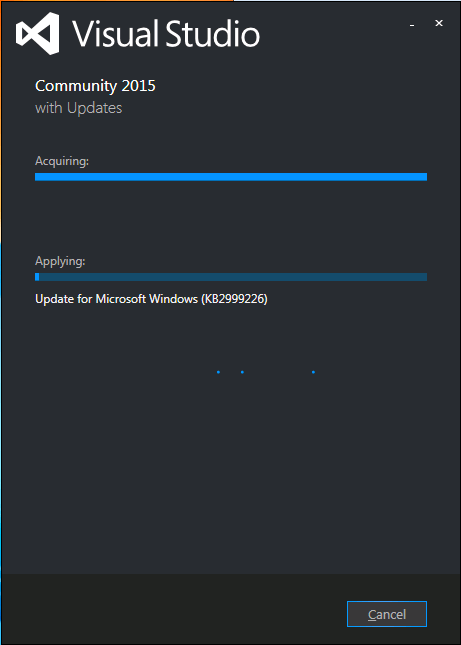
Visual Studio 2015 install stuck on “acquiring” KB2999226
I had exactly the same when installing Visual Studio 2015 on a Windows 7 x64 system: stuck on “Acquiring” the “Update for Microsoft Windows (KB2999226)”.
So as mentioned in the StackOverflow answers for the below question, I manually downloaded “Update for Windows 7 for x64-based Systems (KB2999226)” which you can get directly at https://download.microsoft.com/download/1/1/5/11565A9A-EA09-4F0A-A57E-520D5D138140/Windows6.1-KB2999226-x64.msu.
Be sure to quit both the Visual Studio 2015 installation as well as any (“automagically interfering” background Windows Updates), as otherwise you get this error:
If you still get that error, then
- try to stop/start the
wuauserv service: usually it gets rid of the error.
- When it still occurs, try a clean boot, then re-apply the KB.
Applying the KB can take a long while, even on fast hardware.
–jeroen
Source: Stuck while installing Visual Studio 2015 (Update for Microsoft Windows (KB2999226)) – Stack Overflow
Posted in .NET, Development, Software Development, Visual Studio 2015, Visual Studio and tools | Leave a Comment »
Posted by jpluimers on 2016/04/19
The good news: Delphi 10.1 Berlin is out and released in Berlin (note: you might want to rename Delphi 10 Seattle into Delphi 10.0 Seattle).
Some links:
The not so good thing: I won’t be using it for a while as now for like 6 weeks or so, all the embarcadero HTTPS sites have been vulnerable to the DROWN man-in-the-middle attack that has been discovered 20160301.
Which means that even without going around the non-HTTPS partner site, I won’t be able to make a secure connection and install it.
Which gives me more time to play with the Xamarin Visual Studio 2015 integration, the cool stuff that MvvmCross offers and some of the other .NET Goodness at BUILD 2016 – .NET ALL THE THINGS! | Beth Massi
Read the rest of this entry »
Posted in Delphi, Delphi 10 Seattle, Delphi 10.1 Berlin (BigBen), Development, QC, Software Development, Visual Studio 2015, Visual Studio and tools | 6 Comments »


 The Wiert Corner - irregular stream of stuff
git push -uwas introduced in Git 1.7.0 (2010-02-12). – Chris Johnsen Jun 4 ’11 at 4:16-uis short for--set-upstream—for what it does and why it’s needed I wouldn’t mind some explanation, too. :) – Anton Strogonoff Mar 9 ’14 at 6:07push.defaultis set toupstream, this will not do what you think it will do. It will try to push over the existing tracking branch. Use:git push -u origin mynewfeature:mynewfeatureor dogit branch --unset-upstreamfirst. – void.pointer May 19 ’14 at 18:07