From a while back, but still so very relevant: [WayBack] Any idea why Delphi (At least since Seattle) does this to Dproj files: <DeployClass …> nodes change places – Tommi Prami – Google+.
Luckily most of the thread is archived by now, as G+ is dead.
This thread brought DProjNormalizer to my attention, but by now you should be better using Project Magician.
DProjNormalizer normalizes the XML structure of Delphi .dproj files, both during IDE save actions, and manually using the command-line tool DprojNormalizerCmd.exe too.
Note that the manual tool does an in-place modification of your .dproj files, so better use version control, have good backups, or use InplaceExeWrapper .
In the mean time, Project Magician has been released that too has a command-line tool ProjectMagicianCmd.exe:
The general usage is:
ProjectMagicianCmd [-v:<version> | -n | -r | -x | -f] [<filepath>]<filename> [-l:<logfile>] [-s]
The parameters have the following meaning:
-v = Sets VersionInfo in dproj files to a given value. Clears all version info entries in child build configurations.
<version> up to 4 numbers separated by dots-n = Normalize-r = Removes unused platforms-x = Removes “Excluded Packages”-f = Refreshes and adds missing form type entries<filename> may contain wildcards. If no extension is given .dproj is assumed
Project Magician adds more functionality, including the ability to specify settings on project, project group and global levels. An explanation of settings is at [WayBack] Keep Your Project Files Clean With Project Magician – The Art of Delphi Programming.
These are my global default settings from the Tools -> Options menu option, then following these bits of the tree :
:

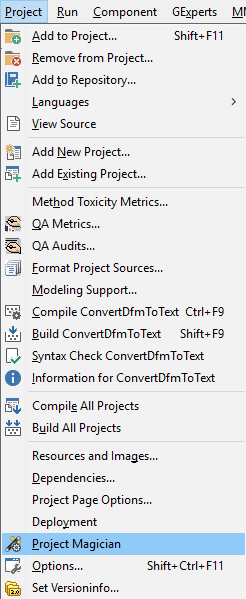 You can get to all levels via the Project -> Project Magician menu option, then following the various tabs:
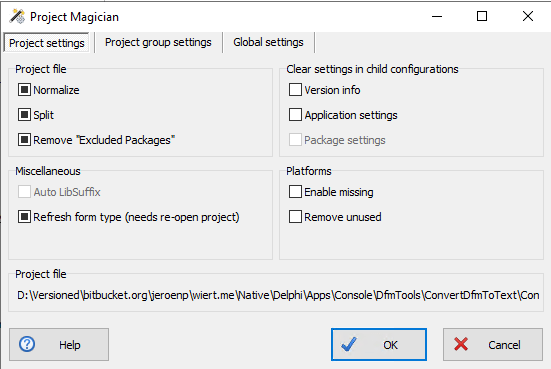
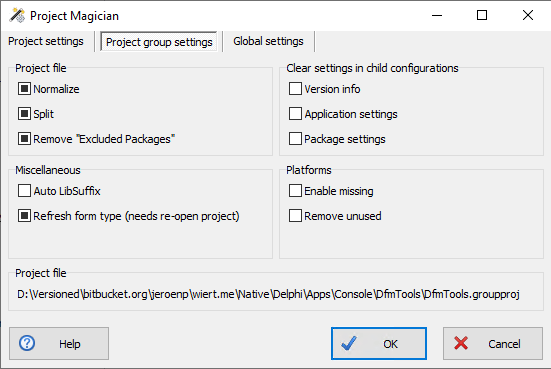
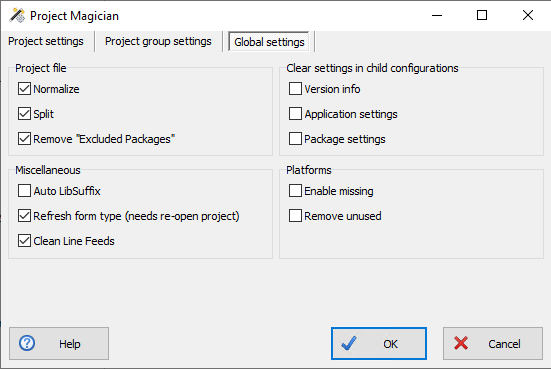
Note that if you have combinations of installed previous versions before, that you should ensure you install the most recent versions of these, as there have been incompatibility issues between them:
ProjectMagician (or DProjNormalizer)SelectiveDebugging
Related searches
Thread


+Jeroen Wiert Pluimers No, but interesting idea. I suppose you’re probably aware that the JEDI JCL/JVCL takes a somewhat similar (ish) related approach, in that it generates project and package files that are compatible with every desired version of Delphi from minimalist (XML) template files. Every so often I think it might be worth looking whether one can re-use the code from there easily but haven’t gotten around to it. Always something else to do first. :/
-
+Walter Prins no I didn’t. Where should I start reading on that minimalist template approach?
-
+Jeroen Wiert Pluimers Sorry I see I missed out the word installer in my comment: It’s the Jedi JCL/JVCL installers that uses xml templates etc.
But the point stands: I guess it should be (perhaps) possible to reuse its infrastructure for ones own projects, though as I say I keep meaning to look into this but haven’t really done so.
(BTW I’m assuming you are familiar with the JCL/JVCL and in in particular their installers that bootstrap from source code? If not then perhaps my comments may not be that useful?)
Anyway, not sure if or where there’s particular documentation about this (kind of doubt it), but if you have the JCL/JVCL installed somewhere, then first of all have a look at the “xml” folders e.g. “<jclroot>\jcl\packages\xmls” and “<jvclroot>\jvcl\packages\xml“.
These files appear to define projects and packages in a seemingly abstract/somewhat minimal way using XML. This seemingly is then used to automatically produce .dproj and .dpk files which are placed in e.g. “<jclroot>\jcl\packages\dXX” and “<jvclroot>\jvcl\packages\dXX” where dXX corresponds to a folder for each of the supported Delphi versions and compiled/used during installation.
Having just looked into this briefly a bit further as a result of this conversation: Key units here (in the case of JVCL) seems to be “jvclroot>\devtools\PackagesGenerator\PackageGenerator.pas“, “<jvclroot>\install\JVCLInstall\PackageUtils.pas” and “jvclroot>\devtools\common\PackageInformation.pas” (used predictably by <jvclroot>\JVCLInstall.dproj)
(Additionally, having looked at this a bit more closely, it also appears that the JCL does not actually replace all or even most of its .dproj and .dpk files after all, but ships version specific .dproj and .dpk files in most cases, though the JVCL does appear to mostly do so. )
Edit: The JCL also has this interesting sounding unit “<jclroot>\source\windows\JclMsBuild.pas” which appears to be an MSBuild project file parser…
-
+Walter Prins I was aware of the bootstrap and it’s been on my “eventually I’ll take a look” list like forever. One day…
-
Same as me then basically, ha. ^^
–jeroen









 The Wiert Corner - irregular stream of stuff
Yep, I can see this problem as well. I believe the problem (bug) has indeed always existed.

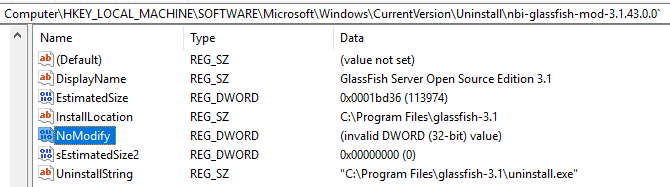
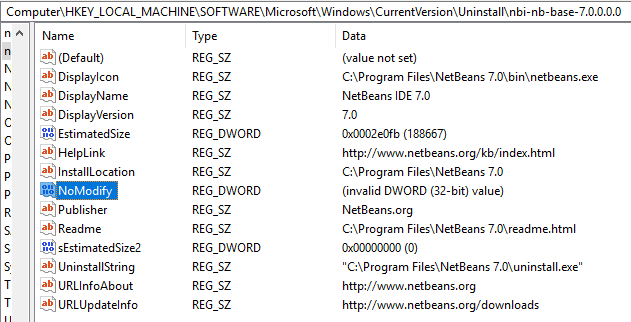
What happens is that someone (in this case NetBeans Installer) has put an 8-byte value into a Registry field that should only contain a 4-byte value. DWORDs are 4-byte.

If you use Registry Editor you can clearly see the problem if you look at something NBI has installed. You must look under either
HKEY_LOCAL_MACHINE\SOFTWARE\Microsoft\Windows\CurrentVersion\Uninstall (64-bit installers) or HKEY_LOCAL_MACHINE\SOFTWARE\Wow6432Node\Microsoft\Windows\CurrentVersion\Uninstall (32-bit installers). For some reason I don't see the problem for those NBI applications installed with a 32-bit installer, meaning the stuff in HKEY_LOCAL_MACHINE\SOFTWARE\Wow6432Node\Microsoft\Windows\CurrentVersion\Uninstall. This can probably be explained when you read the next bit.

NBI actually sets a number of Registry key values but all of them are strings, with the exception of NoModify value. As far as I know this value already defaults to true (=1) if not present so the fact that Windows cannot interpret what NBI has put into the Registry does not have much effect .... until all other kinds of tools will start to explain as you've encountered.

So, what's the problem?  As far as I can see this is really just a very simple bug. In the NBI project (NetBeans Platform source) you have a file called jni_WindowsRegistry.c which defines various JNI methods that can then be used from within Java. One of these is called 'set32BitValue0(....)'.

It looks like this:

JNIEXPORT void JNICALL Java_org_netbeans_installer_utils_system_windows_WindowsRegistry_set32BitValue0(JNIEnv *jEnv, jobject jObject, jint jMode, jint jSection, jstring jKey, jstring jName, jint jValue) {
    unsigned short*  key       = getWideChars(jEnv, jKey);
    unsigned short*  name      = getWideChars(jEnv, jName);
    DWORD  dword     = (DWORD) jValue;
    LPBYTE byteValue = (LPBYTE) &dword;

    if (!setValue(getMode(jMode),getHKEY(jSection), key, name, REG_DWORD, byteValue, sizeof(name), 0)) {
        throwException(jEnv, "Cannot set value");
    }

    FREE(key);
    FREE(name);
}

One of the parameters passed to the setValue() function is the size (bytes) of the value. Unfortunately whoever made this has made a blunder by using 'sizeof(name)' for that parameter. It should have been the size of the value, not the size of the name, meaning sizeof(dword) or just a hard-coded value of 4.  Just imagine what sizeof(name) will give you if name happens to be 'NoModify'. Yep, that's right: It will be 8.

As I said, I believe this blunder has been in the code from the very beginning. It just hasn't had much effect until now.