The Wiert Corner – irregular stream of stuff

Jeroen W. Pluimers on .NET, C#, Delphi, databases, and personal interests

  • My badges

  • Twitter Updates

  • My Flickr Stream

  • Pages

  • All categories

  • Enter your email address to subscribe to this blog and receive notifications of new posts by email.

    Join 1,854 other subscribers

Archive for the ‘Software Development’ Category

A few tools on my list for research: fswatch, entr, ack and ag

Posted by jpluimers on 2022/01/12

Based on the below tweet and replies, these tools are not on my research list:

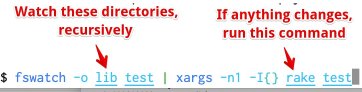
[Archive.is] Aaron Patterson on Twitter: “Here is my “autotest for lazy people”. It watches for changes in the lib or test directory, and runs rake test on change. There are definitely better, purpose built tools for this. But I am lazy…”

–jeroen

Posted in *nix, *nix-tools, Development, fgrep, find, grep, Power User, Scripting, Software Development | Leave a Comment »

Delphi SetRoundMode: gets sets part of the 8087 control word (related: GetRoundMode and TFPURoundingMode)

Posted by jpluimers on 2022/01/12

I thought I had written about this a long time ago, as Math.SetRoundMode (and now System.Math.SetRoundMode) has been introduced since at least Delphi 2007. There are also related GetRoundMode and TFPURoundingMode.

Delphi 2009 also introduced TFPUPrecisionMode, GetPrecisionMode and SetPrecisionMode.

Delphi 2010 also introduced TFPUException, TFPUExceptionMask, TFPUPrecisionMode, TFPURoundingMode, ClearExceptions, GetExceptionMask, and SetExceptionMask.

Delphi XE2 introduced namespaces, so prepended the unit Math with the namespace System. to become unit System.Math. It also introduced $EXCESSPRECISION (for x64), GetMXCSR, SetMXCSR, ResetMXCSRClearFPUExceptionsTSSEException, TSSEExceptionMask, GetSSEExceptionMask, SetSSEExceptionMask, ClearSSEExceptions, TSSERoundingMode, GetSSERoundMode, SetSSERoundMode.

The documentation basically only had formatting changes. This is the most important part of SetRoundMode:

function SetRoundMode(const RoundMode: TFPURoundingMode): TFPURoundingMode;

Call SetRoundingMode to specify how the FPU handles rounding issues. The rounding mode can be any of the following values:

Value
Meaning
rmNearest
Rounds to the closest value.
rmDown
Rounds toward negative infinity.
rmUp
Rounds toward positive infinity.
rmTruncate
Truncates the value, rounding positive numbers down and negative numbers up.

This is the most important bit of SetPrecisionMode:

function SetPrecisionMode(const Precision: TFPUPrecisionMode): TFPUPrecisionMode;

Call SetPrecisionMode to specify the level of precision that the FPU (floating-point unit) uses for floating-point calculations. The precision control mode can be any of the following values:

Value
Meaning
pmSingle
single precision
pmReserved
not used
pmDouble
double precision
pmExtended
extended precision

SetPrecisionMode returns the previous precision control mode.

Both are functions, so so they return the previous value which you can use to set it back later: this is important as it is a process wide. SetPrecisionMode documents this, but SetRoundMode does not!

Global side effects and avoiding them

Since SetRoundMode and SetPrecisionMode set the 8087 CW (and on XE2 and up SetMXCSR), it means all usual Set8087CW caveats apply: changing the global 8087 CW setting impacts all running code, which means that threads, DLLs (especially ones written in other languages), etc might malfunction. You can find some of the caveat effects on my bog by searching for [Wayback] Set8087CW site:wiert.me – Google Search.

If you want to avoid global side effects, you might try the solution in [Wayback] c# – What is the equivalent of Math.Round() with MidpointRounding.AwayFromZero in Delphi? – Stack Overflow by [Wayback] Andreas Rejbrand.

On MXCSR

[Wayback/Archive.is] SSE Instruction Set (not sure why Embarcadero used this as reference material from their docwiki, but hey, Intel documentation is likely outdated):

SSE — MXCSR

The MXCSR register is a 32-bit register containing flags for control and status information regarding SSE instructions. As of SSE3, only bits 0-15 have been defined.

Pnemonic Bit Location Description
FZ bit 15 Flush To Zero
R+ bit 14 Round Positive
R- bit 13 Round Negative
RZ bits 13 and 14 Round To Zero
RN bits 13 and 14 are 0 Round To Nearest
PM bit 12 Precision Mask
UM bit 11 Underflow Mask
OM bit 10 Overflow Mask
ZM bit 9 Divide By Zero Mask
DM bit 8 Denormal Mask
IM bit 7 Invalid Operation Mask
DAZ bit 6 Denormals Are Zero
PE bit 5 Precision Flag
UE bit 4 Underflow Flag
OE bit 3 Overflow Flag
ZE bit 2 Divide By Zero Flag
DE bit 1 Denormal Flag
IE bit 0 Invalid Operation Flag

FZ mode causes all underflowing operations to simply go to zero. This saves some processing time, but loses precision.

The R+R-RN, and RZ rounding modes determine how the lowest bit is generated. Normally, RN is used.

PMUMMMZMDM, and IM are masks that tell the processor to ignore the exceptions that happen, if they do. This keeps the program from having to deal with problems, but might cause invalid results.

DAZ tells the CPU to force all Denormals to zero. A Denormal is a number that is so small that FPU can’t renormalize it due to limited exponent ranges. They’re just like normal numbers, but they take considerably longer to process. Note that not all processors support DAZ.

PEUEMEZEDE, and IE are the exception flags that are set if they happen, and aren’t unmasked. Programs can check these to see if something interesting happened. These bits are “sticky”, which means that once they’re set, they stay set forever until the program clears them. This means that the indicated exception could have happened several operations ago, but nobody bothered to clear it.

DAZ wasn’t available in the first version of SSE. Since setting a reserved bit in MXCSR causes a general protection fault, we need to be able to check the availability of this feature without causing problems. To do this, one needs to set up a 512-byte area of memory to save the SSE state to, using fxsave, and then one needs to inspect bytes 28 through 31 for the MXCSR_MASK value. If bit 6 is set, DAZ is supported, otherwise, it isn’t.

Architectures Software Developer’s Manual: Intel® 64 and IA-32 includes supporting processors programming environment and architecture.

[Wayback] Intel® 64 and IA-32 Architectures Developer’s Manual: Vol. 1

[Wayback]

https://web.archive.org/web/20130603170547/http://www.intel.com/content/dam/www/public/us/en/documents/manuals/64-ia-32-architectures-software-developer-vol-1-manual.pdf

Documentation links

Some of the documentation links (that regrettably do not explain what happens behind the scenes with the 8087 CW) are these:


–jeroen

Posted in Delphi, Development, Software Development | Leave a Comment »

Twitter: find my new-style retweets that have images

Posted by jpluimers on 2022/01/11

This gets the tweets I retweeted and have images in them:

from:@jpluimers filter:images filter:nativeretweets

Based on:

  • [Wayback] twitter – How do I find my retweets of a certain account? – Web Applications Stack Exchange
    from:@someone filter:nativeretweets [KEYWORD(s)]
    

    This shows all retweets of @someone (including the optional KEYWORD(s)). If you retweeted the same tweet you can use @yourtwittername instead of @someone.

  • This article gives you a robust overview of everything you need to know about advanced TweetDeck features.[Wayback] About advanced TweetDeck features

    To search for mentions of #space from verified accounts, excluding Retweets, type the following in the search box: #space filter:verified -filter:nativeretweets

  • [Wayback] Difference between -filter:retweet and -filter:nativeretweets in Twitter Search API 1.1 – Stack Overflow

    I believe per TweetDeck documentation (https://support.twitter.com/articles/20170322) this is the difference:

    filter:nativeretweets shows retweets from users who have hit the retweet button. filter:retweets shows old style retweets (“RT”) + quoted tweets.

    Those are filtering FOR those types of results, but as you’ve done, the – is necessary to filter them out -filter:nativeretweets or -filter:retweets

  • [Wayback/Archive.is] Twitter API 1.1 tweets / favorites (likes) / following / followers backup in web browser
    /* Twitter API 1.1 tweets / favorites (likes) / following / followers backup in web browser
     * Get your access keys to use Twitter API 1.1: https://dev.twitter.com/docs/auth/tokens-devtwittercom
     * You can change Twitter API URL and Twitter screen_name, then execute script from a trusted web page without CSP protection like about:blank in a web browser console (F12 or Ctrl+Shift+K shortcut)
     * A textarea will appear so you can copy/paste to save data as a CSV file or search tweets / users in your web browser (Ctrl+F shortcut)
     * You can then view your backup in a spreadsheet editor like LibreOffice Calc
     * You can also compare the backup with another one to see who unfollowed you, who changed their Twitter username by looking at the user ID or which tweet you retweeted / favorited was deleted (e.g. with the Linux diff command)
     * 
     * Note about the tweets backup:
     * Usually you will search tweets that you retweeted using Twitter web version (https://twitter.com/search) with a search like "from:your_username filter:nativeretweets keyword"
     * But it is limited to the retweets of the last 7 days, like for the free version of the search API (https://developer.twitter.com/en/docs/tweets/search/overview/standard)
     * An alternative is to search tweets in your user timeline with this script but it is limited to your last 3200 tweets (including retweets and replies)
     * This script can be combined with the Twitter feature to backup data, which is not limited to your last 3200 tweets but you can only request a backup every 30 days
     * To find tweets that you retweeted or favorited / liked from a specific person, you can open the CSV file with LibreOffice Calc, click on the column you want to search and press Ctrl+H to search a username
    */

–jeroen

Posted in Development, JavaScript/ECMAScript, Power User, Scripting, SocialMedia, Software Development, Twitter | Leave a Comment »

When MySQL characterset ‘utf’ does not allow you to enter some Unicode code points

Posted by jpluimers on 2022/01/06

Contrary to what many believe is that MySQL utf8 is not always full blown UTF-8 support, but actually utf8mb3, which has been deprecated for a while now.

Only utf8mb4 will give you full blown UTF-8 support.

This when someone reminded me of this in a Delphi application:

When I insert :joy: emoji into mysql varchar filed I got an error :
#22007 Incorrect string value: '\xF0\x9F\x98\x82' for column 'remarks' at row 1

database charset is utf8

Note that the :joy: emoji is 😂 and has Unicode code point U+1F602 which is outside the basic multilingual plane.

See:

–jeroen

Posted in Conference Topics, Conferences, Database Development, Delphi, Development, Encoding, Event, MySQL, Software Development, UTF-8, UTF8 | Leave a Comment »

LIDL Radio Controlled Wall Clock IAN 100489 English manual

Posted by jpluimers on 2022/01/06

Model 100489-14-01 wall clock

Model 100489-14-01 wall clock

Just in case I need it again.

The signal quality fluctuates during the day (it is a lot better at night when there is less inionisation in the atmosphere), and is worsened by concrete walls (like our home).

Best way to get prolonged reception is at night, on the top floor behind a window or outside.

The clock usually needs between 3 and 10 minutes to pick up the DCF77 signal from the transmitter.

Wall clock manual: [Wayback] 100489_EN.pdf of which this abstract:

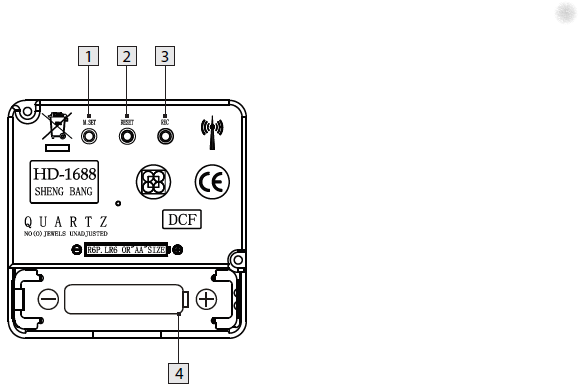
DCF77 HD-1688 clock mechanism

DCF77 HD-1688 clock mechanism

Numbers:

  1. M.SET button
    • Press and keep pressed the M.SET button 1 at least 3 seconds. The wall clock switches into manual mode.
    • Press and keep pressed the M.SET button again until the hands reach the correct position for you to set the time.
    • Briefly pressing the M.SET button moves the hands forward in one minute steps to enable you to set the current time manually.
      Note: After 8 seconds without pressing the M.SET button, the wall clock switches out of manual mode and keeps the time as normal. The manually set value is overwritten as soon as reception of the DCF radio time signal is successful.
  2. RESET button
    • Press the RESET button 2 to reset the radio clock settings. Alternatively, remove the batteries from the device and insert them again.
    • The product now automatically starts to search for the DCF radio time signal.
  3. REC button
    • Press and keep pressed the REC button 3 at least 5 seconds. The wall clock attempts to receive the DCF radio time signal. This process takes a few minutes to complete.
  4. Battery compartment
    • Battery type: 1 x 1.5 V ⎓ AA, LR6


More on the signal, transmitter and encoding: DCF77 – Wikipedia, where the below images are from:

DCF77 reception area from Mainflingen

DCF77 signal strength over a 24-hour period measured in Nerja, on the south coast of Spain 1,801 km (1,119 mi) from the transmitter. Around 1 AM it peaks at ≈ 100 µV/m signal strength. During the day, the signal is weakened by ionization of the ionosphere due to solar activity.

Another DCF77 clock I have: CSL Bearware 302658 DCF clock manual

–jeroen

Posted in Development, Encoding, Hardware Development, LifeHacker, Power User, Software Development | 2 Comments »

Work Chronicles | Comics about Work on Twitter: “Fast-paced Environment… “

Posted by jpluimers on 2022/01/05

Even when young, this transcript should raise all the red flags:

  1. Recruiter: At this job, you will get to work at a fast paced environment.
  2. Recruiter: You will get to thrive under pressure.
  3. Recruiter: And you will be part of a dynamic team.
  4. Applicant: Great, new that you’ve outlined the cons, what are the pros?

[Archive.is] Work Chronicles | Comics about Work on Twitter: “Fast-paced Environment… “ and [Wayback] Fast-paced Environment | Work Chronicles:

–jeroen

Read the rest of this entry »

Posted in About, Development, LifeHacker, Personal, Power User, Software Development | Leave a Comment »

Valetudo | Cloud-free control webinterface for Xiaomi vacuum robots

Posted by jpluimers on 2022/01/04

[Wayback] Valetudo | Cloud-free control webinterface for vacuum robots

Valetudo is a standalone binary which runs on rooted Vacuums of the Xiaomi ecosystem and aims to enable the user to operate the robot vacuum without any Cloud Connection whatsoever.

You can even use it to make a WiFi heat map of the floors in your home: the Valeroni app can do that for you.

The Valeroni app is open source too: [Wayback/Archive.is] ccoors/Valeronoi: A WiFi mapping companion app for Valetudo

Via [Archive.is] Kristian Köhntopp on Twitter: “Paging @sys_adm_ama: … Alternative Firmware für Robot-Staubsauger … Alternative Firmware für Robot-Staubsauger verwenden, um das Wifi im Haus zu mappen (und Staub zu saugen)”

–jeroen

Read the rest of this entry »

Posted in C++, Development, Hardware, LifeHacker, Power User, Software Development, WiFi | Leave a Comment »

Visual Studio Code: some notes on marco tools for vscode

Posted by jpluimers on 2022/01/03

In Visual Studio Code: blazingly fast text expansion with Emmet I wrote:

One of my behaviours I wanted to get rid of is heavily use of keyboard macros, so when doing more web-stuff, I bumped into Emmet (that in the past was called Zen Code).

That didn’t fully cut it, not even in combination with regular expression based search/replace, so I finally to some time to look at some links that might help me out with keyboard macros.

The links for my archive, most via [Wayback/Archive] vscode macro recorder – Google Search:

–jeroen

Posted in Development, Software Development, vscode Visual Studio Code | Leave a Comment »

Winbox configuration files

Posted by jpluimers on 2021/12/31

A few notes:

  • WinBox configuration files are under %APPDATA%\Mikrotik\Winbox
    • The subdirectory sessions contains binary *.viw files that seem to represent “view” configurations (the positions, dimensions and other properties of the open Windows in a Winbox session) where the * of the name seems to be an IPv4 address of a machine.
    • Directories named like 6.40.3-2932358209 and 6.43.13-695307561 contain configuration files that seem to determine what WinBox features a certain RouterOS version should reveal; files in those directories seem to always be these:
      • advtool.crc / advtool.jg
      • dhcp.crc / dhcp.jg
      • hotspot.crc / hotspot.jg
      • icons.crc / icons.png
      • mpls.crc / mpls.jg
      • ppp.crc / ppp.jg
      • roteros.crc / roteros.jg
      • roting4.crc / roting4.jg
      • secure.crc / secure.jg
      • wlan6.crc / wlan6.jg
    • There are binary files Addresses.cdb and settings.cfg.viw
    • A text file named sessionpath contains the expanded path %APPDATA%\Mikrotik\Winbox\sessions

The *.crc files contain a CRC code, presumably on the contents of the correspoding *.jg file. The *.jg files seem to contain some kind of JSON.

Some links I found:

–jeroen

Posted in Development, Internet, MikroTik, Power User, RouterOS, routers, Scripting, Software Development | Leave a Comment »

Productivity tips by Florian Haas and David Moreau-Simard: the mottos you work by

Posted by jpluimers on 2021/12/30

My own motto: learn new things every day.

Florian:

[Archive.is] Florian Haas 🇪🇺 on Twitter: “Docs or it didn’t happen.… “

David:

[Archive.is] ☁David Moreau-Simard on Twitter: “Hey software and system folks, I’m curious: what are some of the mottos you work by ? I’ll start:

Via Florian’s pinned Twitter post I found while writing media.ccc.de – No, we won’t have a video call for that! (Communications in distributed teams by Florian Haas).

–jeroen

Posted in Development, DevOps, Software Development | 1 Comment »