


Just in case I need to do performance troubleshooting in Rails some day: [Archive.is] hey on Twitter: “@shelbyspees @honeycombio From a browser. Thinking is we had trouble even narrowing it down to a section of the site. Thinking if we could see that most of the load was in some_controller we could maybe dig in there. I don’t want to take up too much of your time, but how would a double request show up?” / Twitter
Archive for the ‘Software Development’ Category
In case I ever need rails performance troubleshooting: I feel like I should be able to ask @datadoghq “What’s the CPU load across all our Rails controllers”, but have no idea where to start with that.
Posted by jpluimers on 2021/12/08

Posted in Development, Ruby, Software Development | Leave a Comment »
Chrome Print dialogue not offering fit to page, landscape, other printing options ( I’m looking at you @OHRA )
Posted by jpluimers on 2021/12/08
Some sites manage to disable various printing options (including layout, so you cannot choose between landscape and portrait any more, or force landscape when portrait works better or vice versa).
Googling this got me into a web of things that didn’t help me (see links below), but those led me to this query [Wayback] chrome save as pdf layout missing portrait landscape – Google Search.
That returned a helpful result at [Archive.is/Wayback] Chrome Print dialogue not offering fit to page, landscape, other printing options – Google Chrome Community:
It’s about the extension [Archive.is] Stylus – Chrome Web Store
Redesign the web with Stylus, a user styles manager. Stylus allows you to easily install themes and skins for many popular sites.
I reconfigured the OHRA Mijn Zorg site to force re-enabling of layout by adding @page { size: auto !important; } for https://mijn.ohrazv.nl/ (click the Save button to save this change permanently):
Share this:

Posted in Chrome, CSS, Development, Google, HTML, Power User, Software Development, Web Development | Leave a Comment »
How to build a CD ISO image file from the windows command line? – Stack Overflow
Posted by jpluimers on 2021/12/07
As I might need this in the future, some highlights from [Wayback] How to build a CD ISO image file from the windows command line? – Stack Overflow:
mkisofs, part of [Wayback] cdrtools (formerly cdrecord) with separately hosted [Wayback] win32 builds (and some win64) and [Wayback] sources on sourceforge.net (it is also available for many other platforms).
Examples:
mkisofs -v -dvd-video -V "VOLUME_NAME" -o "c:\my movies\iso\movie.iso" "c:\my movies\dvd" mkisofs -r -R -J -l -L -o image-file.iso c:\project\install- The GitHub hosted open source .NET Core project [WayBack] DiscUtils that besides the ISO file system also supports many other file systems (like UDF, FAT and NTFS) and disc formats (like VHD, VDI, XVA, VMDK, etc).
- The commandline part
cdbxpcmdof [Wayback] cdburnerxp.
With some examples:
cdbxpcmd --burn-data -folder:input -iso:output.iso -format:iso -changefiledatescdbxpcmd --burn-data -layout:mycompilation.dxp -iso:output.iso -format:iso - The built-in Windows API IMAPI which [Wayback] can be found in MSDN with some examples at:
- [Wayback] com – Create ISO image using PowerShell: how to save IStream to file? – Stack Overflow
- [Wayback] Demo for PowerShell script to create ISO using IMAPI COM component, as a simplification for StackOverflow answer http://stackoverflow.com/a/8325316/223837
- [Wayback] https://stackoverflow.com/a/46068167
–jeroen
Share this:
Posted in Development, Power User, Software Development, Windows, Windows Development | Leave a Comment »
On TStrings (and TStringList) sorting: what the default Sort behaviour is and how to change sorting order
Posted by jpluimers on 2021/12/07
Because I need this eventually, here the full quote of my answer in [Wayback] sorting – How can I get TStringList to sort differently in Delphi – Stack Overflow (The default Sort behaviour is to accommodate i18n sorting in natural order):
Share this:
Posted in Conference Topics, Conferences, Delphi, Development, Event, Software Development, Undocumented Delphi | Leave a Comment »
Github markdown: red text
Posted by jpluimers on 2021/12/02
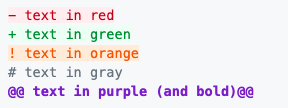
Github officially does not support coloured text, but with a small trick, you can get a few colours by including a diff file in the markdown.
I did it when I had to put on hold open source projects due to rectum cancer recovery, for instance [Wayback] this fritzcap diff added the [Wayback] text:

which [Wayback] rendered becomes a kind of red bulleted list:

I learned this trick via [Wayback] How to add color to Github’s README.md file – Stack Overflow (thanks to [Wayback] revisions by [Wayback] craigmichaelmartin, [Wayback] Noam Manos and [Wayback] GalaxyCat105):
You can use the
difflanguage tag to generate some colored text:```diff - text in red + text in green ! text in orange # text in gray @@ text in purple (and bold)@@ ```However, it adds it as a new line starting with either
- + ! #or starts and ends with@@
This issue was raised in [Wayback] github markup #369, but they haven’t made any change in decision since then (2014).
By now there is a new issue, again with little progress: [Wayback] Color text in markdown · Issue #1440 · github/markup
–jeroen
Share this:

Posted in Color (software development), Development, Lightweight markup language, MarkDown, Software Development | Leave a Comment »
LanguageTool – Online Grammar, Style & Spell Checker (English, German, Dutch, French, …)
Posted by jpluimers on 2021/12/02
Cool when writing texts in languages I don’t often write in, so I can read them better than I write them:
[Wayback/Archive.is] LanguageTool – Online Grammar, Style & Spell Checker
It supports English (many variations, including US and UK English), German (Swiss and Austrian German too!), Dutch, and many other languages.
–jeroen
Share this:
Posted in Development, LifeHacker, Power User, Software Development | Leave a Comment »
parsing – delphi – strip out all non standard text characers from string – Stack Overflow
Posted by jpluimers on 2021/12/02
From a while back a totally non-optimised code example by me (intentionally limiting to AnsiStr as it was about filtering ASCII, and UniCode has way many code points for the Latin script).
// For those who need a disclaimer:
// This code is meant as a sample to show you how the basic check for non-ASCII characters goes
// It will give low performance with long strings that are called often.
// Use a TStringBuilder, or SetLength & Integer loop index to optimize.
// If you need really optimized code, pass this on to the FastCode people.
function StripNonAsciiExceptCRLF(const Value: AnsiString): AnsiString;
var
  AnsiCh: AnsiChar;
begin
  for AnsiCh in Value do
    if (AnsiCh >= #32) and (AnsiCh <= #127) and (AnsiCh <> #13) and (AnsiCh <> #10) then
      Result := Result + AnsiCh;
end;
and an optimised one by [WayBack] David Heffernan
function StrippedOfNonAscii(const s: string): string;
var
  i, Count: Integer;
begin
  SetLength(Result, Length(s));
  Count := 0;
  for i := 1 to Length(s) do begin
    if ((s[i] >= #32) and (s[i] <= #127)) or (s[i] in [#10, #13]) then begin
      inc(Count);
      Result[Count] := s[i];
    end;
  end;
  SetLength(Result, Count);
end;
Even when “trivial”, I usually do not prematurely optimise as optimised code is almost always less readable than non-optimised code.
Source: [Wayback] parsing – delphi – strip out all non standard text characers from string – Stack Overflow
–jeroen
Share this:
Posted in Delphi, Development, Software Development | Leave a Comment »
console convert pcap to wav: not easily possible; use the WireShark GUI to do
Posted by jpluimers on 2021/12/01
Wanting a simple way on the console to convert a .pcap file to a .wav file, I searched for [Wayback] console convert pcap to wav – Google Search.
The reason is that [Wayback] fritzcap (written in Python) sometimes crashes while doing the conversion of a phone recording, so then only the .pcap file is available. I still want to figure this out, but given my health situation, I might not be able to in time.
Share this:
Posted in *nix, *nix-tools, Audio, Development, ffmpeg, Fritz!, Fritz!Box, fritzcap, Hardware, Media, Network-and-equipment, Power User, Python, Scripting, Software Development, Wireshark | Leave a Comment »
Some notes on forwardemail.net
Posted by jpluimers on 2021/12/01
Some notes, as I’m looking to a stable, simple to maintain email forwarding system that is also secure and – yes – can cost money.
I need to leave IT-infrastructure behind that is easy to maintain for my heirs.
Some links:
- [Archive.is] mausdompteur 💉 on Twitter: “Email! Yes, Email. Need to Set Email for a domain, basically forward only. Has anyone ever heard of https://t.co/v29TbMXrrl? Is it good? Any alternatives I should consider?”
- [Wayback] The Best Free Email Forwarding Service for Custom Domains | Forward Email
The best open-source and free email forwarding service for custom domains. We do not keep logs nor store emails. We don’t track you. Unlimited aliases, catch-alls, wildcards, API access, and disposable addresses. Built-in support for DKIM, SRS, SPF, ARC, DMARC, and more. No credit card required.
- [Wayback] FAQ | Forward Email has a truckload of information, but the main points for me are these:
What is the max email size limit
We default to a 50MB size limit, which includes content, headers, and attachments. Note that services such as Gmail and Outlook allow only 25MB size limit, and if you exceed the limit when sending to addresses at those providers you will receive an error message.
An error with the proper response code is returned if the file size limit is exceeded.
…
What is the difference between Free and Enhanced Protection
The Free plan requires you to use public DNS records to store your forwarding configuration. Anyone with a computer can lookup your forwarding configuration in a terminal if you are on the Free plan. Unlike the Free plan, the Enhanced Protection plan uses a cryptographically generated random string to store your forwarding configuration privately.
Free Plan Enhanced Protection Plan forward-email=user@gmail.comforward-email-site-verification=m8d7o8K4Il - [Wayback] About | Forward Email with this very important point for me:
Privacy
We have a “zero tolerance policy” privacy policy, which states that we don’t store logs nor emails, and we don’t track users. Our statement clearly states that we do not collect nor store forwarded emails, metadata, server-side nor client-side logs, IP addresses, or browser information.
Only an email address is required to create and configure the Enhanced Protection Plan, which hides DNS email alias information on the free plan through a managed and hosted service.
User’s accounts, domains, and all related information can be permanently deleted at any time by the user.
- [Wayback] Pricing | Forward Email (levels: free / enhanced protection / team / enterprise)
Free email forwarding for domains with features including Custom Domain Email Forwarding, Disposable Addresses, Multiple Recipients, Wildcards, and more!
- It’s open source too (written in JavaScript using Node.js), but running it requires you to keep up with versions and security: [Wayback/Archive.is] forwardemail/free-email-forwarding: The best free email forwarding for custom domains. Visit our website to get started (SMTP server)
–jeroen
Share this:
Posted in Development, eMail, JavaScript/ECMAScript, Node.js, Power User, Scripting, SocialMedia, Software Development, Web Development | Leave a Comment »
Manually installing or updating xcode (was: ruby – Error Message “Xcode alone is not sufficient on Sierra” – Stack Overflow)
Posted by jpluimers on 2021/12/01
If you ever get error messages like this (Sierra can bey any MacOS version name):
-
Error: Xcode alone is not sufficient on Sierra. -
Xcode alone is not sufficient on Sierra.
Then run this on the terminal:
xcode-select --install
This works even if it is already installed, as the message will also show up when the current install is outdated.
Note from [Wayback] `xcode-select –install` required for OS X 10.9 Xcode command-line tools (like `zlib-devel`) « The Wiert Corner – irregular stream of stuff
There is one catch though: it might fail as you first have to start Xcode once and accept the license agreement.
–jeroen
Via my answer on [Wayback] ruby – Error Message “Xcode alone is not sufficient on Sierra” – Stack Overflow
Share this:
Posted in Development, Software Development, xCode/Mac/iPad/iPhone/iOS/cocoa | Leave a Comment »
 The Wiert Corner - irregular stream of stuff