


For my link archive initiated because I was trying to find out why ADS-B Exchange does not list originating and destination airports for flights, then on how to get at that data.
It is grouped in a few parts, starting with:
Posted by jpluimers on 2025/10/28
For my link archive initiated because I was trying to find out why ADS-B Exchange does not list originating and destination airports for flights, then on how to get at that data.
It is grouped in a few parts, starting with:

Posted in Communications Development, Development, HTTP, Internet protocol suite, JavaScript/ECMAScript, JSON, REST, Scripting, Software Development, TCP, Web Development | Leave a Comment »
Posted by jpluimers on 2025/07/01
Since this question keeps popping up around me every now and then, despite JSON being around for like 25 years now, this statement from the original designer Douglas Crockford:
[Wayback/Archive] Douglas Crockford – Google+ – Comments in JSON …
I removed comments from JSON because I saw people were using them to hold parsing directives, a practice which would have destroyed interoperability. I know that the lack of comments makes some people sad, but it shouldn’t.
Suppose you are using JSON to keep configuration files, which you would like to annotate. Go ahead and insert all the comments you like. Then pipe it through JSMin before handing it to your JSON parser.
Yup, Google+ has been dead for more than 6 years now, so it is important to quote these insights for posterity to find them back.
Related:
json.orgVia: [Wayback/Archive] Can comments be used in JSON? – Stack Overflow with several answers mentioning the above G+ post.
Query: [Wayback/Archive] json comment – Google Search
--jeroen
Posted in Development, JavaScript/ECMAScript, JSON, Scripting, Software Development | Leave a Comment »
Posted by jpluimers on 2025/03/06
Two sites that can help you out getting weather info on the console:
wttr.in is developed by [Wayback/Archive] Igor Chubin (@igor_chubin) / X and looks at the request header to figure out what kind of output it sends.
It supports various output formats, so on my TODO list is to see how they do their mapping: always an opportunity to learn (it’s based on Python and Go so I am curious what libraries they use as well).
From the documentation:
wttr.in currently supports five output formats:
- ANSI for the terminal;
- Plain-text for the terminal and scripts;
- HTML for the browser;
- PNG for the graphical viewers;
- JSON for scripts and APIs;
- Prometheus metrics for scripts and APIs.
The ANSI and HTML formats are selected based on the User-Agent string.
There are more parameters in the documentation on the main page of the repository and through this command:
curl wttr.in/:help
The idea is derived from [Wayback/Archive] GitHub – schachmat/wego: weather app for the terminal.
Oh: Igor has more repositories at [Wayback/Archive] chubin (Igor Chubin) · GitHub (including [Wayback/Archive] GitHub – chubin/cheat.sh: the only cheat sheet you need which is hosted at [Wayback/Archive] cheat.sh; I thought I had blogged about that before, but found it only in a draft note mentioning that I got it via [WaybackSave/Archive] Nicolas Krassas on X: “The only cheat sheet you need cheat.sh“)
A 7 timer JSON usage example is at [Wayback/Archive] Get Weather from 7Timer! · GitHub
It has documentation at
Output formats can be chosen from HTML, PNG, XML and JSON.
[Wayback/Archive] Hacker Public Radio – hpr4266 :: What’s the weather?
Lee writes a script to check what the weather is like ~ The Technology Community Podcast
HPR is a great podcast series!
--jeroen
Posted in *nix, *nix-tools, ash/dash, bash, bash, Development, Go (golang), JavaScript/ECMAScript, JSON, Power User, Python, Scripting, Software Development, Web Development, XML/XSD | Leave a Comment »
Posted by jpluimers on 2024/12/17
Finally an easier way to convert Office documents (and other formats) to markdown: [Wayback/Archive] GitHub – microsoft/markitdown: Python tool for converting files and office documents to Markdown. (after Google added a Markdown export feature to Google Docs about half a year ago, and basic Markdown formatting about 2 years ago – see below):
There are quite a few dependencies in [Wayback/Archive] markitdown/pyproject.toml at main · microsoft/markitdown · GitHub, so be prepared for that.
Supported formats (added links for clarity):
The MarkItDown library is a utility tool for converting various files to Markdown (e.g., for indexing, text analysis, etc.)It presently supports:
Google was first though:
There is speculation on why Microsoft introduced it just now ranging from “they need it for AI training” to “just late to the game”. I’m with the latter. Apple is even later, so if you want to convert Apple Notes to markdown, then you can use [Wayback/Archive] Import from Apple Notes – Obsidian Help.
Via various sources, including:
Posted in CSV, Development, Excel, HTML, HTML5, JSON, Lightweight markup language, MarkDown, Office, PDF, Power Point, Power User, Software Development, Word, XML/XSD | Tagged: MarkDown, Python | Leave a Comment »
Posted by jpluimers on 2023/10/26
Need to try this out: [Wayback/Archive] Code from https://twitter.com/baekdal/status/1279123542144094208 and https://twitter.com/baekdal/status/1279123544052563968 (find tweets you retweeted by someone else)

Posted in Development, JavaScript/ECMAScript, JSON, Python, Scripting, SocialMedia, Software Development, Twitter | Leave a Comment »
Posted by jpluimers on 2023/10/17
I already knew about jq and jo (output: the echo for JSON), but not yet about jc for JSON.
Like jq is for querying (the sed for JSON), jc tries to be the universal parser of common command-line tools into JSON:
[Wayback/Archive] kellyjonbrazil/jc: CLI tool and python library that converts the output of popular command-line tools and file-types to JSON or Dictionaries. This allows piping of output to tools like jq and simplifying automation scripts.
Via [Wayback/Archive] Kris on Twitter: ““Jc” verwandelt den Output von üblichen Linux Kommandozeilen Tools in JSON. “Jc” kann auch als Import in Python Programmen verwendet werden und mit subprocess kombiniert werden. Danke, @janwalzer und @the_mutax für den Tip. “
A few weeks later though, Kris discovered that command-line tools aren’t that portable in their output format: [Wayback/Archive] Kris on Twitter: “As much as I love the idea of @kellyjonbrazil’s jc, this is not a winnable game. sigh Probably still better than a self-cooked parser, but the slightest bit of extra makes it catch fire in multiple possible ways …”
Posted in *nix, *nix-tools, bash, bash, Development, JavaScript/ECMAScript, jo, jq, JSON, man/manual pages, mankier, Power User, Python, Scripting, Software Development | Leave a Comment »
Posted by jpluimers on 2023/08/30
Stumbled across something that goes well with jq (the sed for JSON of which I wrote about before), [Wayback/Archive] Jan-Piet Mens :: A shell command to create JSON: jo:
Posted in Development, JavaScript/ECMAScript, jo, jq, JSON, Scripting, Software Development | Leave a Comment »
Posted by jpluimers on 2023/08/29
Often the power is in the combinations of tools.
Read until the epilogue…
In this case, I needed to be able to query the JSON results of calls to REST services from the command-line so I could process them in Batch files.
Since I could not find anything readily available, I originally Originally I opted for the PowerShell command-line scripting tool, as that ships with recent Windows versions and can re-use anything that .NET brings. But though [Wayback/Archive] .NET has built in JSON serialization support, there is [Wayback/Archive] no querying support in it.
Then I thought about Delphi, as it [Wayback/Archive] too has a built-in JSON parser, but even the well known [Wayback/Archive] JSON SuperObject library has no query support.
Back to .NET, which – like Delphi – has a well known and respected third party JSON library as well: [Wayback/Archive] NewtonSoft JSON aka JSON.net and that one [Wayback/Archive] does have support for querying JSON with the SelectToken function.
That’s the fundament of the rest of this article, with the potential to be used in a cross-platform as well.
So no need for a plan B.
Posted in *nix, *nix-tools, .NET, Batch-Files, Conference Topics, Conferences, Development, Event, JavaScript/ECMAScript, jq, JSON, Power User, Scripting, Software Development, Windows, Windows Development | Leave a Comment »
Posted by jpluimers on 2021/11/23
Cool tool for when you ever need random users to test a system [Wayback] Random User Generator | Home:
Random user generator is a FREE API for generating placeholder user information. Get profile photos, names, and more. It’s like Lorem Ipsum, for people.
This was used when extracting Parler data to substantiate evidence around the 20210106 USA Capitol riots.
You can even use a simple HTTP GET like [Wayback] randomuser.me/api and get a JSON result like this.
{"results":[{"gender":"female","name":{"title":"Miss","first":"Malou","last":"Mortensen"},"location":{"street":{"number":2669,"name":"Lyngbyvej"},"city":"Sundby","state":"Syddanmark","country":"Denmark","postcode":48047,"coordinates":{"latitude":"-35.1307","longitude":"113.7480"},"timezone":{"offset":"+1:00","description":"Brussels, Copenhagen, Madrid, Paris"}},"email":"malou.mortensen@example.com","login":{"uuid":"981747de-66fe-40b0-87ea-adfe403fe1be","username":"purpleostrich871","password":"sweets","salt":"x86aQbIB","md5":"55497ac53530b428f98b9d36267ceeef","sha1":"358b94ffabe7d827c34da15791e5d6717c594428","sha256":"6e357e887877e29b7e6d53073f648174382c53c24f83479e25fed9c82075ed32"},"dob":{"date":"1995-06-05T04:50:35.145Z","age":26},"registered":{"date":"2018-07-21T00:59:50.523Z","age":3},"phone":"02990797","cell":"94800012","id":{"name":"CPR","value":"050695-9954"},"picture":{"large":"https://randomuser.me/api/portraits/women/27.jpg","medium":"https://randomuser.me/api/portraits/med/women/27.jpg","thumbnail":"https://randomuser.me/api/portraits/thumb/women/27.jpg"},"nat":"DK"}],"info":{"seed":"8971869bb62b73d7","results":1,"page":1,"version":"1.3"}}
Via:
–jeroen
Posted in Communications Development, Development, HTTP, Internet protocol suite, JavaScript/ECMAScript, JSON, Python, REST, Scripting, Software Development, TCP | Leave a Comment »
Posted by jpluimers on 2021/03/25
A great way for testing REST JSON calls is using the [WayBack] JSONPlaceholder – Fake online REST API for developers:
Fake Online REST API for Testing and Prototyping
Serving ~200M requests per month
Powered by JSON Server [WayBack] + LowDB [WayBack]
It is like [WayBack] Placeholder.com: Placeholder Images Done For You [JPG, GIF & PNG] but for JSON and supports both CORS and JSON-P for cross domain requests.
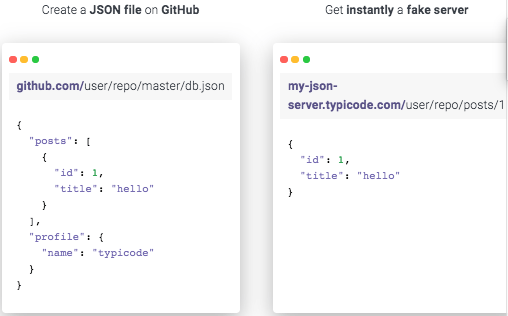
You can either use that site (which has a predefined set of REST calls) or the basic [WayBack] My JSON Server – Fake online REST server for teams that allows you to respond it to a db.json file from github:
Fake Online REST server for teams
Create a JSON file on GitHub
github.com/user/repo/master/db.json{ "posts": [ { "id": 1, "title": "hello" } ], "profile": { "name": "typicode" } }Get instantly a fake server
my-json-server.typicode.com/user/repo/posts/1{ "id": 1, "title": "hello" }
There is basic documentation at the repository [WayBack] GitHub – typicode/jsonplaceholder: A simple online fake REST API server:

Posted in Communications Development, Development, HTTP, Internet protocol suite, JavaScript/ECMAScript, JSON, REST, Scripting, Software Development, TCP | Leave a Comment »
 The Wiert Corner - irregular stream of stuff