The Wiert Corner – irregular stream of stuff

Jeroen W. Pluimers on .NET, C#, Delphi, databases, and personal interests

  • My badges

  • Twitter Updates

  • My Flickr Stream

  • Pages

  • All categories

  • Enter your email address to subscribe to this blog and receive notifications of new posts by email.

    Join 1,861 other subscribers

Archive for the ‘Scripting’ Category

reg query and batch file for loop tricks that refreshes the cmd environment from the registry settings: choco/RefreshEnv.cmd at master · chocolatey/choco · GitHub

Posted by jpluimers on 2021/03/04

I bumped into a very interesting [WayBack] choco/RefreshEnv.cmd at master · chocolatey/choco · GitHub.

It allows you to refresh your cmd environment from new settings that were only applied to the registry using the SET command.

Note there is a PowerShell counterpart too: [WayBack] choco/Update-SessionEnvironment.ps1 at master · chocolatey/choco · GitHub

There are many cool tricks in it, most of which you can see in the [WayBack] new commit history, and a few you can find back in the [WayBack] old commit history of the previous repository (I have no idea why those histories have never been merged).

Intermediate batch files

The basic structure is to first create some intermediate batch files, then delete them afterwards:

  • "%TEMP%\_envget.tmp"
    • is used in :GetRegEnv to get all environment variables for the MACHINE or USER level, then loop through them and call :SetFromReg during each iteration (except for the Path environment variable which is skipped).
  • "%TEMP%\_envset.tmp"
    • is used in :SetFromReg to emit one line of SET code to "%TEMP%\_env.cmd".
  • "%TEMP%\_env.cmd"
    • Contains the SET commands for the new environment variable values.

All the above methods use quoting to ensure that environment variables having names or values containing spaces are handled correctly.

Echo without newline

I like the echo | set /p trick to echo a string without a newline allows it to start as this:

C:\>RefreshEnv
Refreshing environment variables from registry for cmd.exe. Please wait...

then finish like this by appending another string to it:

C:\>RefreshEnv
Refreshing environment variables from registry for cmd.exe. Please wait...Finished..

It is explained in the old history at [WayBack] (GH-153)(GH-134) Update PATH on cmd.exe · chocolatey/chocolatey@a09e158 · GitHub.

There is an even more interesting example of this trick in [WayBack] windows – What does /p mean in set /p? – Stack Overflow:

<nul set /p=This will not generate a new line

Spaces, what spaces

One hard thing in scripting is taking into account that path names can contain spaces. This means you need to carefully quote path names, but not overdo the quotes, otherwise the quoting works against you.

Two commits from the commit history show there were two weak spots that had to be changed in [WayBack] (GH-1227) Fix: RefreshEnv doesn’t set path w/spaces · chocolatey/choco@fdfcd06 · GitHub.

The environment has a MACHINE and USER part

Environment variables can come from two places in the registry:

  • HKLM\System\CurrentControlSet\Control\Session Manager\Environment
  • HKCU\Environment

Normally, the second overrides the first.

This means they are grabbed from the registry MACHINE and USER order, then applied to the cmd environment.

Special case PATH

The PATH environment variable is special for two reasons:

  1. In the registry it is called Path, but in the environment it is usually called PATH (this is true for both the MACHINE and USER parts of the registry). New values are applied with the Path environment variable name, so after executing RefreshEnv once, they are called Path in the cmd.exe environment too.
  2. PATH is a combination from two PATH entries in the registry in the MACHINE and USER level, so it needs to be combined as you can see in [WayBack] choco/RefreshEnv.cmd at master · chocolatey/choco · GitHub.:
    :: Caution: do not insert space-chars before >> redirection sign
    echo/set "Path=%%Path_HKLM%%;%%Path_HKCU%%" >> "%TEMP%\_env.cmd"

I am not sure why there is a space before the >>, given there is a comment above it there should not be one.

The SET command however, puts the MACHINE PATH in front of the USER PATH.

Special case USERNAME, and collateral PROCESSOR_ARCHITECTURE

The USERNAME environment variable special too. In the registry, it is only in the MACHINE part, but with a value SYSTEM.

In cmd.exe, it is actually filled with the current username, so it should not be overwritten with the one in the MACHINE part.

Currently this is resolved by storing a copy of the old value of USERNAME and PROCESSOR_ARCHITECTURE in [WayBack] (GH-902) Fix: User changed to SYSTEM during env update · chocolatey/choco@cb6b92c · GitHub.

I am not sure why PROCESSOR_ARCHITECTURE is also stores.

In any case, this means that setting a USERNAME or PROCESSOR_ARCHITECTURE in the USER part of the registry, will not be reflected by RefreshEnv.

I am not sure yet when that can cause problems, so this is a reminder to myself that if ever it does, then this logic needs to be changed.

–jeroen

Posted in Batch-Files, Development, Scripting, Software Development | Leave a Comment »

Python: saving a web page to a jpeg image file by using the Google base64url encoded screenshot of it

Posted by jpluimers on 2021/02/19

As a follow-up on Still looking for base64url decoding tools, both on-line and for MacOS homebrew: this is in Python, works on MacOS, Linux and Windows, and can be integrated in a web page.

It is based on the ideas in [WayBack] Python-Twitter-Hacks/websiteScreenshot.py at master · edent/Python-Twitter-Hacks · GitHub, which was more like a code snippet with hard coded literals.

It downloads a jpeg web-site screenshot using the Google PageSpeed API V1, which generates the screenshot as a base64url encoded blob inside a JSON structure.

Python does not have native Python base64url support, but the concept of it is fairly straightforward: [WayBack] RFC 4648 – The Base16, Base32, and Base64 Data Encodings: Base 64 Encoding with URL and Filename Safe Alphabet, which allows data to be passed inside URLs without reverting to [WayBack] Percent-encoding – Wikipedia.

My changes work, but are by no means in canonical form or Idiomatic Python. I have a long way to go to reach that level of Python.

So I forked the repository, and fixed the script basing it on Python 3.

I might make it V2 compatible in the future. More information on V2 in [WayBack] Google APIs Explorer: Services > PageSpeed Insights API v2 > pagespeedonline.pagespeedapi.runpagespeed

Content is in the below gist.

–jeroen

Read the rest of this entry »

Posted in base64, base64url, Development, Encoding, Python, Scripting, Software Development | Leave a Comment »

PowerShell: avoid Write-Output, use Return only for ending execution, use $Output variable for returning additional output

Posted by jpluimers on 2021/02/18

Recently, I bumped into [WayBack] Write-Output confusion for the upteenth time.

Luckily I had the below links archived, basically invalidating the use of Write-Output, and invalidating the answer at [WayBack] powershell – What’s the difference between “Write-Host”, “Write-Output”, or “[console]::WriteLine”? – Stack Overflow.

Read the rest of this entry »

Posted in CommandLine, Development, PowerShell, PowerShell, Scripting, Software Development | Leave a Comment »

explainshell.com: parse and explain just about any shell command

Posted by jpluimers on 2021/02/17

I bumped into the tremendously site [WayBack] explainshell.com – match command-line arguments to their help text only after documenting the relevant cURL options of yesterdays post on checking your CertBot domain expiration dates.

The site allows put in a shell command-line to see the help text that, including matches for each argument.

It works so well because it parses both the shell command-line and the man pages, then constructs a web-page linking the relevant man page content to the shell command-line in the correct shell command-line order.

The explainshell has a counterpart showthedocs (both are open source) for explaining other languages (on the one hand more extended as it goes much deeper into parsing for instance SQL, on the other hand more limited as it only supports a few languages). More on showthedocs later.

The links

The parsing results

The first bit below is just the text output, and the second bit the screenshot, of a relatively simple command like [WayBack] explainshell.com – curl -fsSL example.org:

curl(1) -fsSL example.org
transfer a URL
-f, --fail
       (HTTP)  Fail  silently  (no  output at all) on server errors. This is mostly done to better enable
       scripts etc to better deal with failed attempts. In normal cases  when  a  HTTP  server  fails  to
       deliver  a  document,  it  returns an HTML document stating so (which often also describes why and
       more). This flag will prevent curl from outputting that and return error 22.

       This method is not fail-safe and there are occasions where non-successful response codes will slip
       through, especially when authentication is involved (response codes 401 and 407).
-s, --silent
       Silent or quiet mode. Don't show progress meter or error messages.  Makes Curl mute.
-S, --show-error
       When used with -s it makes curl show an error message if it fails.
-L, --location
       (HTTP/HTTPS) If the server reports that the requested page  has  moved  to  a  different  location
       (indicated  with  a Location: header and a 3XX response code), this option will make curl redo the
       request on the new place. If used together with -i, --include or  -I,  --head,  headers  from  all
       requested pages will be shown. When authentication is used, curl only sends its credentials to the
       initial host. If a redirect takes curl to a different host, it won't  be  able  to  intercept  the
       user+password.  See  also  --location-trusted  on  how to change this. You can limit the amount of
       redirects to follow by using the --max-redirs option.

       When curl follows a redirect and the request is not a plain GET (for example POST or PUT), it will
       do  the  following  request  with a GET if the HTTP response was 301, 302, or 303. If the response
       code was any other 3xx code, curl will re-send the following request  using  the  same  unmodified
       method.
source manpages: curl

The screenshot is even more impressive:

Read the rest of this entry »

Posted in *nix, *nix-tools, bash, bash, Development, Power User, Scripting, Software Development | Leave a Comment »

Checking expiration dates for your certbot certificates

Posted by jpluimers on 2021/02/16

I have these two little aliases in my toolbox:

alias "certbot-check-all-by-file=bash <(curl -fsSL https://raw.githubusercontent.com/srvrco/checkssl/master/checkssl) --location /etc/letsencrypt/live"
alias "certbot-check-all-by-config=bash <(curl -fsSL https://raw.githubusercontent.com/srvrco/checkssl/master/checkssl) --server ISPconfig"

First a big fat warning

do not run just any script downloaded through curl. Plenty of reasons why this is dangerous:

  1. [WayBack] Detecting the use of “curl | bash” server side | Application Security
  2. [WayBack] One way “curl pipe sh” install scripts can be dangerous [proof of concept] / Jordan Eldredge: script content differs depending on user agent
  3. [WayBack] sean cassidy : Don’t Pipe to your Shell: scripts having different behaviour when executed partially
  4. [WayBack] Why using curl | sudo sh is not advised? – Stack Overflow:

    You can proof your scripts against partial execution by putting the whole thing into the body of a function, and executing that function on the last line. If you know a script is defined like that, it’s exactly as secure as downloading and then executing some installer.

The first three can mostly prevented by using your own fork of the script repository, then checking each modification of the script, combined with ensuring your fork location does not throw tricks 1 or 2 on you.

That’s why I run the above alias only from a checkssl fork which I can inspect.

Back to the alias

The aliases use quite a few tricks:

  1. Having curl download a command minimising
    curl -fsSL https://raw.githubusercontent.com/srvrco/checkssl/master/checkssl

    Via: [WayBack] The missing package manager for macOS (or Linux) — The missing package manager for macOS (or Linux)

  2. Running that command through bash as if the download were a file by wrapping wrapping it in parenthesis and a less than sign .
    bash <(curl -fsSL https://raw.githubusercontent.com/srvrco/checkssl/master/checkssl)

    Via: [WayBack] linux – Execute bash script from URL – Stack Overflow

  3. Passing arguments to the bash command by appending this to the command just like from the regular command-line:
    bash <(curl -fsSL https://raw.githubusercontent.com/srvrco/checkssl/master/checkssl) --location /etc/letsencrypt/live
  4. An alias [WayBack] with double-quotes around the whole statement:
    alias "certbot-check-all-by-file=bash <(curl -fsSL https://raw.githubusercontent.com/srvrco/checkssl/master/checkssl) --location /etc/letsencrypt/live"
  5. Either use the certbot configuration file or apache2 (via ISPconfig as the apache2 parameter value is not yet supported) domain configuration:
    alias "certbot-check-all-by-file=bash <(curl -fsSL https://raw.githubusercontent.com/srvrco/checkssl/master/checkssl) --location /etc/letsencrypt/live"
    alias "certbot-check-all-by-config=bash <(curl -fsSL https://raw.githubusercontent.com/srvrco/checkssl/master/checkssl) --server ISPconfig"

Using source instead of bash

Note that an alternative alias is this one:

alias "certbot-check-all-by-file=(source <(curl -s https://raw.githubusercontent.com/srvrco/checkssl/master/checkssl) --location /etc/letsencrypt/live)"

However, that needs an extra set of parenthesis, otherwise you will get bumped out of your current shell.

The reason is that bash runs in a [WayBack] subshell, whereas [WayBack] source (and the equivalent [WayBack] “dot” command .) runs in the current shell, but the script performs a gracefull_exit or error_exit which end in an exit [WayBack] terminating the current shell.

The [WayBack] () parenthesis around the source command ensure it runs in a sub-shell.

In this case, you can still pass the --location /etc/letsencrypt/live parameters, as bash is the only shell allowing this: [WayBack] source – Passing variables to a bash script when sourcing it – Unix & Linux Stack Exchange.

References

Related [WayBack] Advanced Bash-Scripting Guide topics:

Related cURL options from [WayBack] curl – How To Use:

  • -f: [WayBack] -f, --fail

    (HTTP) Fail silently (no output at all) on server errors. This is mostly done to better enable scripts etc to better deal with failed attempts. In normal cases when an HTTP server fails to deliver a document, it returns an HTML document stating so (which often also describes why and more). This flag will prevent curl from outputting that and return error 22.

    This method is not fail-safe and there are occasions where non-successful response codes will slip through, especially when authentication is involved (response codes 401 and 407).

  • -s: [WayBack] -s, --silent:

    Silent or quiet mode. Don’t show progress meter or error messages. Makes Curl mute. It will still output the data you ask for, potentially even to the terminal/stdout unless you redirect it.

    Use -S, –show-error in addition to this option to disable progress meter but still show error messages.

    See also -v, –verbose and –stderr.

  • -S: [WayBack] -S, --show-errors:

    When used with -s, –silent, it makes curl show an error message if it fails.

  • -L: [WayBack] -L, --location:

    (HTTP) If the server reports that the requested page has moved to a different location (indicated with a Location: header and a 3XX response code), this option will make curl redo the request on the new place. If used together with -i, –include or -I, –head, headers from all requested pages will be shown. When authentication is used, curl only sends its credentials to the initial host. If a redirect takes curl to a different host, it won’t be able to intercept the user+password. See also –location-trusted on how to change this. You can limit the amount of redirects to follow by using the –max-redirs option.

    When curl follows a redirect and the request is not a plain GET (for example POST or PUT), it will do the following request with a GET if the HTTP response was 301, 302, or 303. If the response code was any other 3xx code, curl will re-send the following request using the same unmodified method.

    You can tell curl to not change the non-GET request method to GET after a 30x response by using the dedicated options for that: –post301–post302 and –post303.

Reminders

Reminder to self: see if JSON output is viable. This commit might help.

–jeroen

Posted in bash, Conference Topics, Conferences, Development, Event, Scripting, Software Development | Leave a Comment »

How do I pretty-print JSON in Delphi? – Stack Overflow

Posted by jpluimers on 2021/02/09

For my archive: the [WayBack] How do I pretty-print JSON in Delphi? – Stack Overflow answer by [WayBack] Bob:

If you do not want to use any external library, and you’re using a Delphi XE5 or newer, there is a very handy TJson.Format() function in the REST.Json unit.

uses json, REST.Json;

{ ... }    

function FormatJSON(json: String): String;
var
  tmpJson: TJsonObject;
begin
  tmpJson := TJSONObject.ParseJSONValue(json);
  Result := TJson.Format(tmpJson);

  FreeAndNil(tmpJson);
end;

–jeroen

Posted in Delphi, Development, JavaScript/ECMAScript, JSON, Scripting, Software Development | 2 Comments »

Forced routing of selective emails to ISP SMTP via Mikrotik Routing | Syed Jahanzaib Personal Blog to Share Knowledge !

Posted by jpluimers on 2021/01/14

For my link archive: [WayBack] Forced routing of selective emails to ISP SMTP via Mikrotik Routing | Syed Jahanzaib Personal Blog to Share Knowledge !

–jeroen

Posted in Development, MikroTik, Power User, RouterOS, routers, Scripting, Software Development | Leave a Comment »

Automating the closing of the Creative Cloud signing and ABBY FindReader for ScanSnap 5.0 dialogs

Posted by jpluimers on 2021/01/06

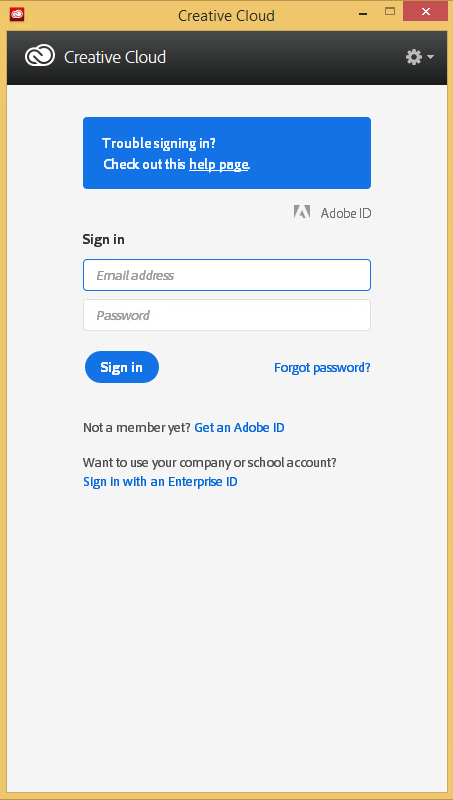
Every time my scan VM logs on I get the dialog on the right.
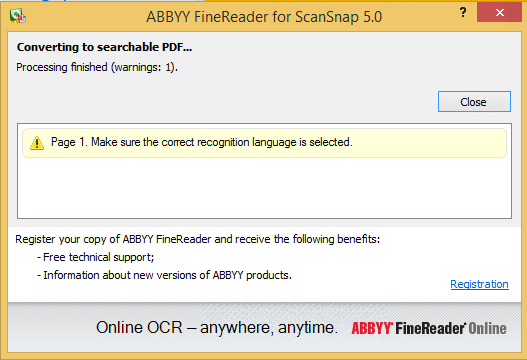
Every time I finish an OCR scan, I get the dialog below.

There are two reasons I want to close the ABBY dialog:

  1. While open, it will keep both the original PDF and OCR PDF files alive.When after a while, Windows updates auto-reboots the machine, before clicking the OK buttons I have to manually check if the conversion succeeded before removing the non-OCR PDF.This is time consuming.
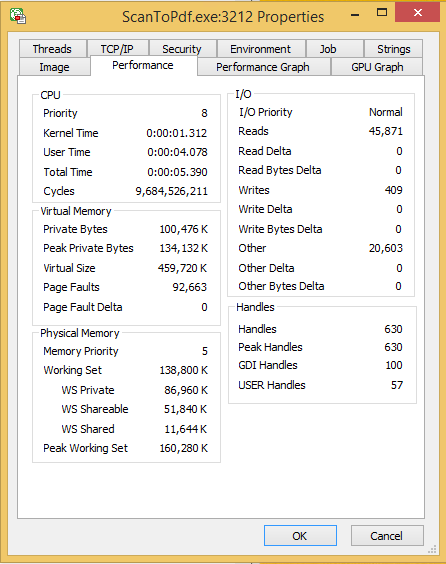
  2. While open, it still consumes a lot of system resources: about 100 megabyte for a simple single monochrome A4 page. Much more for complex, multi-page or colour documents.When scanning a lot of document this causes the system to run out of memory, after becoming much much slower because the truckload of Window handles and underlying threads drags Windows down.

I do not want to fully get rid of these dialogs, as often being aware of the progress is important, and I always forget how to re-enable things. If you can do without the dialogs, then try these:

Finding the Windows and controls

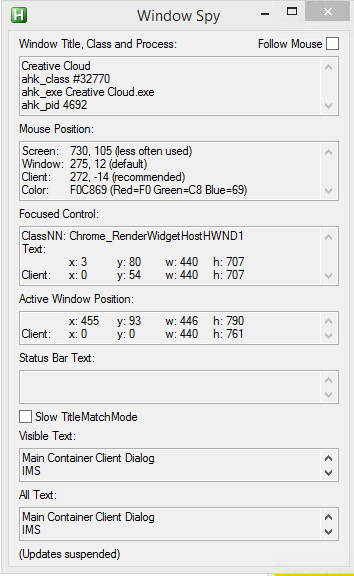
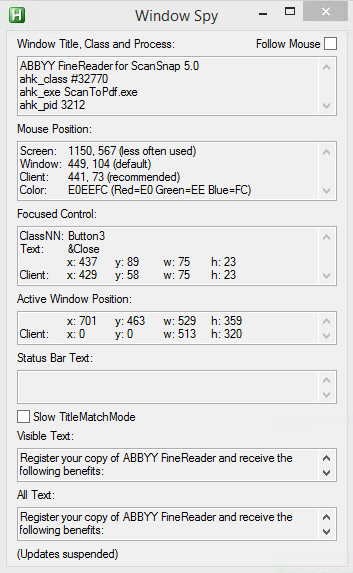
I did use one nice feature of AutoHotKey: their Windows Spy utility, which is implemented as a AHK script: [WayBack] AutoHotKey-scripts/WindowSpy.ahk at master · elig0n/AutoHotKey-scripts · GitHub. In the past this was a separate executable, so do not start looking for that any more. You can get it either after a full install of the [WayBack] Releases · Lexikos/AutoHotkey_L · GitHub, or by extracting from the most current AutoHotKey.zip from [Archive.is] AutoHotkey Downloads.

Related:

This gets these for the Create Cloud and ABBY windows:

Automating the click

I contemplated about using AutoIt (freeware, but closed source) or AutoHotKey_L (the current active fork of AutoHotKey).

AutoIt is now closed source, forked in the past as AutoHotKey, which has a lot of half backed – usually poorly documented – scripts needing you to learn a new API wrapper around existing Windows API functionality.

So I reverted back to using the Windows API using Delphi: a simple repeat loop, to check for the existence of the underlying processes, windows and controls, plus some logic to terminate then the user stops the application (Ctrl-C, Ctrl-Break), logs off, or Windows shuts down.

Releated Windows API  keywords and posts:


I could have used AutoHotKey with these hints to get it working:

MacOS

Note that when you run on MacOS, you need an alternative like for instance the video below shows via [WayBack] Stop ScanSnap From Prompting You When You Scan.

–jeroen

Read the rest of this entry »

Posted in Development, Fujitsu ScanSnap, Hardware, ix100, ix500, Power User, Scanners, Scripting, Software Development, Windows, Windows 10, Windows 8.1 | Leave a Comment »

Batch files: deleting first/middle/ending parts of environment variables

Posted by jpluimers on 2021/01/06

Batch files are often a pain to write, but you cannot always rewrite them in PowerShell.

The pain below is about deleting parts of environment variables in batch files.

I’ll just redirect to and quote from posts that can way better describe this than I do:

  • [WayBack] Check if Batch variable starts with “…” – Stack Overflow made me find
  • [WayBack] windows – Batch – Delete Characters in a String – Super User
  • [WayBack] CMD Variable edit replace – Windows CMD – SS64.com

    The variable _test containing 12345abcabc is used for all the following examples:

    ::Replace '12345' with 'Hello '
       SET _test=12345abcabc
       SET _result=%_test:12345=Hello %
       ECHO %_result%          =Hello abcabc
    
    ::Replace the character string 'ab' with 'xy'
       SET _test=12345abcabc
       SET _result=%_test:ab=xy%
       ECHO %_result%          =12345xycxyc
    
    ::Delete the character string 'ab'
       SET _test=12345abcabc
       SET _result=%_test:ab=%
       ECHO %_result%          =12345cc
    
    ::Delete the character string 'ab' and everything before it
       SET _test=12345abcabc
       SET _result=%_test:*ab=% 
       ECHO %_result%          =cabc
    
    ::Replace the character string 'ab' and everything before it with 'XY'
       SET _test=12345abcabc
       SET _result=%_test:*ab=XY% 
       ECHO %_result%          =XYcabc
    
    
    :: To remove characters from the right hand side of a string is 
    :: a two step process and requires the use of a CALL statement
    :: e.g.
    
       SET _test=The quick brown fox jumps over the lazy dog
    
       :: To delete everything after the string 'brown'  
       :: first delete 'brown' and everything before it
       SET _endbit=%_test:*brown=%
       Echo We dont want: [%_endbit%]
    
       ::Now remove this from the original string
       CALL SET _result=%%_test:%_endbit%=%%
       echo %_result%

    All the examples on this page assume the default Expansion of variables, if you are using DelayedExpansion then you can choose to change the variable references to !_variable! instead of %_variable%

    One advantage of DelayedExpansion is that it will allow you to replace the % character, it will still have to be escaped as %% but the replace action will then treat it like any other character:

    Replace the letter P with a percent symbol:
    Setlocal EnableDelayedExpansion
    _demo=somePdemoPtextP
    _demo=!_demo:P=%%!

    Remove spaces from a text string

    To delete space characters use the same syntax as above:

    SET _no_spaces=%_some_var: =%

–jeroen

Posted in Batch-Files, Development, Scripting, Software Development | Leave a Comment »

Batch file: check for (non-)existence of registry key

Posted by jpluimers on 2021/01/05

Small batch file that only deletes a registry key if it exists:

:DeleteKeyIfItExists
reg query %1 >nul 2>&1
if %errorlevel% equ 0 reg delete %1 /f
goto :eof

It is based on:

  • redirecting both stderr and stdout to nul (the >nul 2>&1 bit)
  • checking reg query with the appropriate errorlevel value for equality (equ operator) for 0 (existence); you can also use 1 for non-existence.

Based on:

–jeroen

Posted in Batch-Files, Development, Scripting, Software Development | Leave a Comment »