


If I ever cross a PHP project, this is my first requirement to pass: [WayBack] Check your PHP project for known security issues – SensioLabs Security Advisories Checker
–jeroen
Posted by jpluimers on 2020/02/05
If I ever cross a PHP project, this is my first requirement to pass: [WayBack] Check your PHP project for known security issues – SensioLabs Security Advisories Checker
–jeroen

Posted in Development, PHP, Scripting, Software Development | Leave a Comment »
Posted by jpluimers on 2020/01/15
Not sure why, but I checked a few of my systems and no file at %userprofile%\AppData\Roaming\Microsoft\Windows\PowerShell\PSReadline\ConsoleHost_history.txt
Heck: no ConsoleHost_history.txt files on those systems anywhere.
[WayBack] ρσℓα¢ķ͌͌͌͌͌͌͌͌͌͌͌͌͌͌ on Twitter : “The PowerShell console history file isn’t just useful for DFIR peeps, red team-ers should check it too! 4096 entries by default, here’s the path: %userprofile%\AppData\Roaming\Microsoft\Windows\PowerShell\PSReadline\ConsoleHost_history.txt”
–jeroen

Posted in CommandLine, Power User, PowerShell, PowerShell | Leave a Comment »
Posted by jpluimers on 2020/01/08
Sometimes simple examples are the best: [WayBack] Python – list transformation – Stack Overflow.
Interactive example (note you can run and save at repl.it in either [WayBack] Repl.it – Python 3 or [WayBack] Repl.it – Python 2; you can run but not save it at [WayBack] Welcome to Python.org: interactive Python shell):
# Links the documentation are Python 2, though everything works in Python 3 as well.

x = [1,2,3,4,5,11]
print("x: ", repr(x))

y = ['01','02','03','04','05','11']
print("y: ", repr(y))

# List comprehension https://docs.python.org/2/tutorial/datastructures.html#list-comprehensions
# ... using `str.format()` (Python >= 2.6): https://docs.python.org/2/library/stdtypes.html#str.format and https://docs.python.org/2/library/string.html#formatstrings
y = ["{0:0>2}".format(v) for v in x]
print("y: ", repr(y))

# ... using the traditional `%` formatting operator (Python < 2.6): https://docs.python.org/2/library/stdtypes.html#string-formatting y = ["%02d" % v for v in x] print("y: ", repr(y)) # ... using the format()` function (Python >= 2.6): https://docs.python.org/2/library/functions.html#format and https://docs.python.org/2/library/string.html#formatstrings
# this omits the "{0:...}" ceremony from the positional #0 parameter
y = [format(v, "0>2") for v in x]
print("y: ", repr(y))

# Note that for new style format strings, the positional argument (to specify argument #0) is optional (Python >= 2.7) https://docs.python.org/2/library/string.html#formatstrings
y = ["{:0>2}".format(v) for v in x]
print("y: ", repr(y))

# Using `lambda`
# ... Python < 3 return a list y = map(lambda v: "%02d" %v, x) print("y: ", repr(y)) # ... Python >= 3 return a map object to iterate over https://stackoverflow.com/questions/1303347/getting-a-map-to-return-a-list-in-python-3-x/1303354#1303354
y = list(map(lambda v: "%02d" %v, x))
print("y: ", repr(y))
Output:
Python 3 Python 2
–jeroen
Posted in Conference Topics, Conferences, Development, Event, Python, Scripting, Software Development | Leave a Comment »
Posted by jpluimers on 2020/01/02
list.sortsorts the list in place, i.e. it doesn’t return a new list. Just write
newList.sort()

return newList
The above answer is goden as performing return list.sort() bytes me often, because Python is usually an environment using the functional approach.
Answer from [WayBack] python – Why does “return list.sort()” return None, not the list? – Stack Overflow
Background information:
list.sort()
list.sort(cmp=None, key=None, reverse=False)- Sort the items of the list in place (the arguments can be used for sort customization, see
sorted()for their explanation).
list.sort()
list.sort(key=None, reverse=False)- Sort the items of the list in place (the arguments can be used for sort customization, see
sorted()for their explanation).
–jeroen
Posted in Development, Python, Scripting, Software Development | Leave a Comment »
Posted by jpluimers on 2020/01/01
[WayBack] __main__ — Top-level script environment — Python 3 documentation recommends code like this:
if __name__ == "__main__":
    # execute only if run as a script
    main()
This has many cool possibilities, including these that I like most as a beginning Python developer:
def main(): function in a separate source filereturn prematurely from your main function (you cannot do this from the main block)Related:
–jeroen
Posted in Conference Topics, Conferences, Development, Event, Python, Scripting, Software Development | Leave a Comment »
Posted by jpluimers on 2020/01/01
For my link archive step by step instruction on the command-line which can be automated:
Via:
–jeroen
Posted in 7zip, Batch-Files, Compression, Development, Power User, Scripting, Software Development | Leave a Comment »
Posted by jpluimers on 2019/12/31
A while back there were a few G+ threads sprouted by David Heffernan on decoding big files into line-ending splitted strings:
Code comparison:
Python:
with open(filename, 'r', encoding='utf-16-le') as f:
  for line in f:
    pass
Delphi:
for Line in TLineReader.FromFile(filename, TEncoding.Unicode) do
  ;
This spurred some nice observations and unfounded statements on which encodings should be used, so I posted a bit of history that is included below.
Some tips and observations from the links:
Though TLineReader is not part of the RTL, I think it is from [WayBack] For-in Enumeration – ADUG.
It doesn’t help that on the Windows Console, various encodings are used:
Good reading here is [WayBack] c++ – What unicode encoding (UTF-8, UTF-16, other) does Windows use for its Unicode data types? – Stack Overflow
+A. Bouchez I’m with +David Heffernan here:
At its release in 1993, Windows NT was very early in supporting Unicode. Development of Windows NT started in 1990 where they opted for UCS-2 having 2 bytes per character and had a non-required annex on UTF-1.
UTF-1 – that later evolved into UTF-8 – did not even exist at that time. Even UCS-2 was still young: it got designed in 1989. UTF-8 was outlined late 1992 and became a standard in 1993
Some references:
–jeroen
Posted in Delphi, Development, Encoding, PowerShell, PowerShell, Python, Scripting, Software Development, The Old New Thing, Unicode, UTF-16, UTF-8, Windows Development | Leave a Comment »
Posted by jpluimers on 2019/12/24
When learning Python, one of the terms to get used to is Pythonic, basically shorthand for a loosely defined idiomatic Python way of writing code.
Some links to help you get a feel for this:
The language’s core philosophy is summarized in the document The Zen of Python (PEP 20), which includes aphorismssuch as:[51]
- Beautiful is better than ugly
- Explicit is better than implicit
- Simple is better than complex
- Complex is better than complicated
- Readability counts
…
the Python philosophy rejects exuberant syntax (such as that of Perl) in favor of a simpler, less-cluttered grammar. As Alex Martelli put it: “To describe something as ‘clever’ is not considered a compliment in the Python culture.”
…
“there should be one—and preferably only one—obvious way to do it”
Sometime, I am going to dig into learning how to write Pythonic code for merging and joining dictionaries (preferably those of namedtuple entities). Hopefully these links will help me with that:
–jeroen
Posted in Development, Python, Software Development | Leave a Comment »
Posted by jpluimers on 2019/12/18
A few links and screenshots for my archive (assuming development on MacOS):


 , which will generate and open a
 launch.json file in the current workspace, remote the red dot and fill the drop down with debug configurations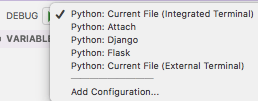
Via:
Select Interpreter
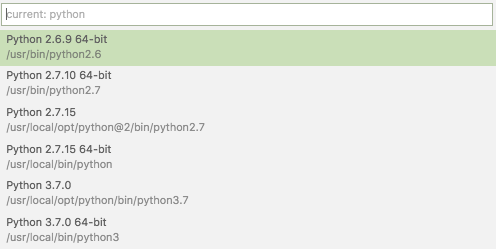
Via:
Commandline arguments are set in the same .vscode/launch.json file:
"args": [
    "--quiet", "--norepeat"
],
Though [WayBack] Python debugging configurations in Visual Studio Code: args could have been more clear that you should put that under the Python configuration section you are debugging with, for instance:
{
    // Use IntelliSense to learn about possible attributes.
    // Hover to view descriptions of existing attributes.
    // For more information, visit: https://go.microsoft.com/fwlink/?linkid=830387
    "version": "0.2.0",
    "configurations": [
        {
            "name": "Python: Current File (Integrated Terminal)",
            "type": "python",
            "request": "launch",
            "program": "${file}",
            "console": "integratedTerminal",
            "args": [
                "--quiet", "--norepeat"
            ]
        },
The page above also has a section on [WayBack] Python debugging configurations in Visual Studio Code: _troubleshooting that you can use to start the same script each time you debug, for instance your integration tests:
{
    // Use IntelliSense to learn about possible attributes.
    // Hover to view descriptions of existing attributes.
    // For more information, visit: https://go.microsoft.com/fwlink/?linkid=830387
    "version": "0.2.0",
    "configurations": [
        {
            "name": "Python: Current File (Integrated Terminal)",
            "type": "python",
            "request": "launch",
            // "program": "${file}",
            "program": "${workspaceFolder}/snapperListDeleteFailures.FileTests.py",
I should have read [WayBack] Get Started Tutorial for Python in Visual Studio Code first.
–jeroen

Posted in Development, Python, Scripting, Software Development | Leave a Comment »
Posted by jpluimers on 2019/12/17
It is very important to get the shebang correct. In case of Python, you both need env and the correct Python main version.
Answer
Correct usage for Python 3 scripts is:
#!/usr/bin/env python3This defaults to version 3.latest. For Python 2.7.latest use
python2in place ofpython3.Comment
envwill always be found in/usr/bin/, and its job is to locate bins (like python) usingPATH. No matter how python is installed, its path will be added to this variable, andenvwill find it (if not, python is not installed). That’s the job ofenv, that’s the whole reasonwhy it exists. It’s the thing that alerts the environment (set up env variables, including the install paths, and include paths).
Source: [WayBack] shell – Should I put #! (shebang) in Python scripts, and what form should it take? – Stack Overflow
Thanks GlassGhost and especially flornquake for the answer and Elias Van Ootegem for the comment!
The answer is based on [WayBack] PEP 394 — The “python” Command on Unix-Like Systems | Python.org.
The env is always in the same place, see env – Wikipedia and Shebang (Unix) – Wikipedia.
–jeroen
Posted in Development, Python, Scripting, Software Development | Leave a Comment »
 The Wiert Corner - irregular stream of stuff