The Wiert Corner – irregular stream of stuff

Jeroen W. Pluimers on .NET, C#, Delphi, databases, and personal interests

  • My badges

  • Twitter Updates

  • My Flickr Stream

  • Pages

  • All categories

  • Enter your email address to subscribe to this blog and receive notifications of new posts by email.

    Join 1,860 other subscribers

Archive for the ‘Python’ Category

Random User Generator | Home

Posted by jpluimers on 2021/11/23

Cool tool for when you ever need random users to test a system [Wayback] Random User Generator | Home:

Random user generator is a FREE API for generating placeholder user information. Get profile photos, names, and more. It’s like Lorem Ipsum, for people.

This was used when extracting Parler data to substantiate evidence around the 20210106 USA Capitol riots.

You can even use a simple HTTP GET like [Wayback] randomuser.me/api and get a JSON result like this.

{"results":[{"gender":"female","name":{"title":"Miss","first":"Malou","last":"Mortensen"},"location":{"street":{"number":2669,"name":"Lyngbyvej"},"city":"Sundby","state":"Syddanmark","country":"Denmark","postcode":48047,"coordinates":{"latitude":"-35.1307","longitude":"113.7480"},"timezone":{"offset":"+1:00","description":"Brussels, Copenhagen, Madrid, Paris"}},"email":"malou.mortensen@example.com","login":{"uuid":"981747de-66fe-40b0-87ea-adfe403fe1be","username":"purpleostrich871","password":"sweets","salt":"x86aQbIB","md5":"55497ac53530b428f98b9d36267ceeef","sha1":"358b94ffabe7d827c34da15791e5d6717c594428","sha256":"6e357e887877e29b7e6d53073f648174382c53c24f83479e25fed9c82075ed32"},"dob":{"date":"1995-06-05T04:50:35.145Z","age":26},"registered":{"date":"2018-07-21T00:59:50.523Z","age":3},"phone":"02990797","cell":"94800012","id":{"name":"CPR","value":"050695-9954"},"picture":{"large":"https://randomuser.me/api/portraits/women/27.jpg","medium":"https://randomuser.me/api/portraits/med/women/27.jpg","thumbnail":"https://randomuser.me/api/portraits/thumb/women/27.jpg"},"nat":"DK"}],"info":{"seed":"8971869bb62b73d7","results":1,"page":1,"version":"1.3"}}

Via:

–jeroen

Read the rest of this entry »

Posted in Communications Development, Development, HTTP, Internet protocol suite, JavaScript/ECMAScript, JSON, Python, REST, Scripting, Software Development, TCP | Leave a Comment »

On my list of things to try: Python with ESXi

Posted by jpluimers on 2021/10/28

After doing a lot of – historically grown – dash scripting for ESXi, I found out there is Python available on ESXi:

  • Python 3.5.10 on VMware ESXi 6.7.0 build-17700523 (VMware ESXi 6.7.0 Update 3)
  • Python 3.5.6 on VMware ESXi 6.5.0 build-13932383 (VMware ESXi 6.5.0 Update 3)
  • VMware 7: to be determined.

Yes I know that Python 3.5 is end-of-life (and 3.5.10 was the latest version), but it is a lot better than shell scripts.

So now some links for my list of things to try in order to use Python for scripting ESXi operations:

–jeroen

Posted in *nix, *nix-tools, ash/dash, ash/dash development, Development, Power User, Python, Scripting, Software Development | Leave a Comment »

Twitter thread by thread by @0xdade; More unicode shit: zero width space and a zero width nonjoiner in filenames

Posted by jpluimers on 2021/09/22

[WayBack] Thread by @0xdade: Today I learned that you can put zero width spaces in file names on Linux. Have fun. I’m playing with this because punycode/IDN is fascinati…

Today I learned that you can put zero width spaces in file names on Linux. Have fun.

I’m playing with this because punycode/IDN is fascinating, and I wanted to know what happened when I started shoving unicode in the path portion of the url, which isn’t part of how browsers try to protect URLs, as far as I can tell

wiki.mozilla.org/IDN_Display_Al…

I think it’s more entertaining to have a file that is named *only* a zero width space, but I think using them throughout a filename is better to break tab completion and not stand out too much. A filename that is just blank looks strange in ls output.
Thank goodness adduser is looking out for our best interests.
Oooh this one is pretty subtle.
Just about pissed myself with this one.

Not related to the terminal fun, but related to zero width characters:

You can:
– Break url previews https://0xda​​​​​​.​de
– @​0xdade without tagging
– Make a word like system​d not searchable twitter.com/search?q=from%…

Okay but back to command line crap. I really like this one. Create a directory named .[ZWS]

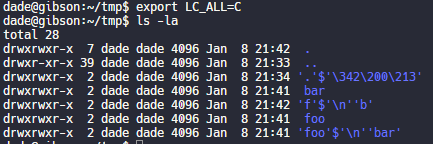
One thing that is cool about using zero width spaces is that “ls” has a flag, “-b”, that is meant to escape non-graphic characters. Inserting a newline, for instance, would be escaped to \n. But the zero width space is technically a graphic character, so nothing happens.

Fun.

Have no fear, though. It’s not unbeatable. It’s only fun if the language and LC settings are set to support utf-8. If you set LC_ALL=C or whatever that isn’t utf-8, then it looks like this.

Putting a link to this tweet here so that I don’t lose it again in the future.

dade@0xdade

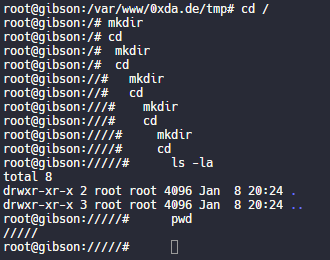
My god, it is beautiful. I mean except all the whitespace I can’t get rid of before the command lmao.

View image on Twitter
But on the other hand if you just have a search for the zws, then whatever you find is probably worth investigating. 
I guess I’ll start the hashtag before @QW5kcmV3 does for #irresponsibleutf8 🤭😏😂 

And these tweets:

[WayBack] Thread by @Plazmaz: @0xdade Was doing some real fucking around with urls recently: gist.github.com/Plazmaz/565a5c… (was gonna flesh it out more but didn’t find…:

mentions Was doing some real fucking around with urls recently:
mentions This one is my fave:
‘⁄’ (\u2044)
or
‘∕’ (\u2215)
Allow for this:
google.com⁄search⁄query⁄.example.com
google.com⁄search⁄query⁄@example.com 

[WayBack] url-screwiness.md · GitHub:

This is a list of methods for messing with urls. These are often useful for bypassing filters, SSRF, or creating convincing links that are difficult to differentiate from legitimate urls.

And a bit of documentation links:

–jeroen


Posted in *nix, .NET, C#, Development, NTFS, Power User, Python, Scripting, Software Development, Windows | Leave a Comment »

Overview of Client Libraries · Internet Archive

Posted by jpluimers on 2021/09/14

Besides manual upload at [Archive.is] Upload to Internet Archive, there are also automated ways of uploading content.

One day I need this to archive pages or sites into the WayBack machine: [WayBack] Overview of Client Libraries · Internet Archive (most of which is Python based):

Read the rest of this entry »

Posted in Bookmarklet, Development, Internet, InternetArchive, Power User, Python, Scripting, Software Development, WayBack machine, Web Browsers | Leave a Comment »

Coming Back to Old Problems: How I Finally Wrote a Sudoku Solving Algorithm – DEV Community 👩‍💻👨‍💻

Posted by jpluimers on 2021/09/02

It is always fun to see how Sudoku solving algorithms are created and implemented. This is no exception: [WayBack] Coming Back to Old Problems: How I Finally Wrote a Sudoku Solving Algorithm – DEV Community 👩‍💻👨‍💻

(backtracking image from Wikimedia commons)

For a visual Sudoku solver, I usually take [WayBack] Sudoku Solver by Andrew Stuart. Shows the logic behind solving Sudoku square by square which is part of [WayBack] SudokuWiki.org – Getting Started having many visual explanations on how to solve these puzzles, for instance:

It’s a kind of sudo ku, but visually and never failed me solve one.

–jeroen

Posted in Algorithms, Development, Python, Scripting, Software Development | Leave a Comment »

Fixing hg.exe “ImportError: DLL load failed: %1 is not a valid Win32 application.”

Posted by jpluimers on 2021/07/21

If you get the below error when running hg.exe, then you are mixing a 64-bit Mercurial with 32-bit dependencies:

C:\>hg --version
Traceback (most recent call last):
  File "hg", line 43, in 
  File "hgdemandimport\demandimportpy2.pyc", line 150, in __getattr__
  File "hgdemandimport\demandimportpy2.pyc", line 94, in _load
  File "hgdemandimport\demandimportpy2.pyc", line 43, in _hgextimport
  File "mercurial\dispatch.pyc", line 22, in 
  File "hgdemandimport\demandimportpy2.pyc", line 248, in _demandimport
  File "hgdemandimport\demandimportpy2.pyc", line 43, in _hgextimport
  File "mercurial\i18n.pyc", line 28, in 
  File "hgdemandimport\demandimportpy2.pyc", line 150, in __getattr__
  File "hgdemandimport\demandimportpy2.pyc", line 94, in _load
  File "hgdemandimport\demandimportpy2.pyc", line 43, in _hgextimport
  File "mercurial\encoding.pyc", line 24, in 
  File "mercurial\policy.pyc", line 101, in importmod
  File "mercurial\policy.pyc", line 63, in _importfrom
  File "hgdemandimport\demandimportpy2.pyc", line 164, in __doc__
  File "hgdemandimport\demandimportpy2.pyc", line 94, in _load
  File "hgdemandimport\demandimportpy2.pyc", line 43, in _hgextimport
  File "mercurial\cext\parsers.pyc", line 12, in 
  File "mercurial\cext\parsers.pyc", line 10, in __load
ImportError: DLL load failed: %1 is geen geldige Win32-toepassing.

The equivalent English error is [WayBack] ImportError: DLL load failed: %1 is not a valid Win32 application.” – Google Search.

The problem is the bitness of hg.exe: [WayBack] python – Error while installing Mercurial on IIS7 64bit: “DLL Load Failed: %1 is not a valid Win32 application” – Stack Overflow

You can quickly figure out the bitness of hg.exe:

C:\>where hg
C:\Program Files\Mercurial\hg.exe

C:\>sigcheck "C:\Program Files\Mercurial\hg.exe"

Sigcheck v2.72 - File version and signature viewer
Copyright (C) 2004-2019 Mark Russinovich
Sysinternals - www.sysinternals.com

c:\program files\mercurial\hg.exe:
        Verified:       Unsigned
        Link date:      17:49 9-7-2019
        Publisher:      n/a
        Company:        n/a
        Description:    Fast scalable distributed SCM (revision control, version control) system
        Product:        mercurial
        Prod version:   5.0.2
        File version:   5.0.2
        MachineType:    64-bit

Forcing x86 of Mercurial

Since I use chocolatey for most my installs, I forced x86 the Chocolatey way:

So after these:

choco uninstall --yes hg
choco install --yes --force86 hg

I got this signature check:

C:\>sigcheck "C:\Program Files (x86)\Mercurial\hg.exe"

Sigcheck v2.72 - File version and signature viewer
Copyright (C) 2004-2019 Mark Russinovich
Sysinternals - www.sysinternals.com

c:\program files (x86)\mercurial\hg.exe:
        Verified:       Unsigned
        Link date:      17:50 9-7-2019
        Publisher:      n/a
        Company:        n/a
        Description:    Fast scalable distributed SCM (revision control, version control) system
        Product:        mercurial
        Prod version:   5.0.2
        File version:   5.0.2
        MachineType:    32-bit

–jeroen

Posted in Development, DVCS - Distributed Version Control, Encoding, Mercurial/Hg, Python, Scripting, Software Development, Source Code Management | Leave a Comment »

GitHub – jjjake/internetarchive: A Python and Command-Line Interface to Archive.org

Posted by jpluimers on 2021/06/16

On my list of things to play with: [WayBack] GitHub – jjjake/internetarchive: A Python and Command-Line Interface to Archive.org.

Via:

Related:

  • [WayBack] The Internet Archive Python Library — Internet Archive item APIs 1.8.5 documentation
  • [WayBack] Command-Line Interface — Internet Archive item APIs 1.8.5 documentation
  • [WayBack] Quickstart — Internet Archive item APIs 1.8.5 documentation, including:

    Configuring

    Certain functionality of the internetarchive Python library requires your archive.org credentials. Your IA-S3 keys are required for uploading, searching, and modifying metadata, and your archive.org logged-in cookies are required for downloading access-restricted content and viewing your task history. To automatically create a config file with your archive.org credentials, you can use the ia command-line tool:

    $ ia configure
    Enter your archive.org credentials below to configure 'ia'.
    
    Email address: user@example.com
    Password:
    
    Config saved to: /home/user/.config/ia.ini
    

    Your config file will be saved to $HOME/.config/ia.ini, or $HOME/.ia if you do not have a .configdirectory in $HOME. Alternatively, you can specify your own path to save the config to via ia --config-file '~/.ia-custom-config' configure.

    If you have a netc file with your archive.org credentials in it, you can simply run ia configure --netrc. Note that Python’s netrc library does not currently support passphrases, or passwords with spaces in them, and therefore not currently suported here.

–jeroen

Read the rest of this entry »

Posted in Development, Internet, InternetArchive, Power User, Python, Scripting, Software Development, WayBack machine | Leave a Comment »

GitHub – pastpages/savepagenow: A simple Python wrapper for archive.org’s “Save Page Now” capturing service

Posted by jpluimers on 2021/03/11

This makes it way easier to save WayBack content:

[WayBack] GitHub – pastpages/savepagenow: A simple Python wrapper for archive.org’s “Save Page Now” capturing service

A poor-mans alternative is the below bash script from [WayBack] Saving of public Google+ content at the Internet Archive’s Wayback Machine by the Archive Team has begun : plexodus:

For Linux, MacOS / OSX, BSD, and other Unix-like operating systems (including Android with Termux, or Windows, with a Unix/Linux environment), the following script (I’ve saved this as archive-url) will archive the requested URL:

#!/bin/bash
# archive-url
# Archive selected URL at the Internet Archive

curl -s -I -H "Accept: application/json" "https://web.archive.org/save/${1}" |
grep '^x-cache-key:' | sed "s,https,&://,; s,\(${1}\).*$,\1,"

Save that to your execution path (I’ve chosen ~/bin, you might use /usr/local/bin or another location on your $PATH, and invoke as, say (again referring to the G+MM homepage):

$ archive-url https://plus.google.com/communities/112164273001338979772

If you have a list of URLs in a file (or pipelined from command output), you can request all of them to be archived in a simple bash loop. I’m using xargs here to run ten simultaneous requests from the file gplus-urllist:

cat gplus_urllist | while read url do xargs -I{} -P 10 archive-url {}; done

I’ve run this on over 10,000 URLs over a modest residential broadband connection in a hair over two hours.

Note that such requests trigger an archive by the Internet Archive from one of its archiving nodes, you’re not sending the page to the Archive yourself. In particular, archival from regions defaulting to another language may result in the Google+ site content (but not post or comments) being in a different language. I’ve frequently seen my pages turning up in Japanese, for instance.

–jeroen

Posted in bash, Development, Python, Scripting, Software Development | Leave a Comment »

Python: saving a web page to a jpeg image file by using the Google base64url encoded screenshot of it

Posted by jpluimers on 2021/02/19

As a follow-up on Still looking for base64url decoding tools, both on-line and for MacOS homebrew: this is in Python, works on MacOS, Linux and Windows, and can be integrated in a web page.

It is based on the ideas in [WayBack] Python-Twitter-Hacks/websiteScreenshot.py at master · edent/Python-Twitter-Hacks · GitHub, which was more like a code snippet with hard coded literals.

It downloads a jpeg web-site screenshot using the Google PageSpeed API V1, which generates the screenshot as a base64url encoded blob inside a JSON structure.

Python does not have native Python base64url support, but the concept of it is fairly straightforward: [WayBack] RFC 4648 – The Base16, Base32, and Base64 Data Encodings: Base 64 Encoding with URL and Filename Safe Alphabet, which allows data to be passed inside URLs without reverting to [WayBack] Percent-encoding – Wikipedia.

My changes work, but are by no means in canonical form or Idiomatic Python. I have a long way to go to reach that level of Python.

So I forked the repository, and fixed the script basing it on Python 3.

I might make it V2 compatible in the future. More information on V2 in [WayBack] Google APIs Explorer: Services > PageSpeed Insights API v2 > pagespeedonline.pagespeedapi.runpagespeed

Content is in the below gist.

–jeroen

Read the rest of this entry »

Posted in base64, base64url, Development, Encoding, Python, Scripting, Software Development | Leave a Comment »

Making it dead simple to implement @haveibeenpwnd in your applications, including strength warning if found in @troyhunt’s password collection.

Posted by jpluimers on 2020/12/02

I wasn’t aware that Troy Hunt created an API [WayBack] for [WayBack] Have I Been Pwned: Check if your email has been compromised in a data breach.

He did, as I noticed through [WayBack] Michelangelo van Dam on Twitter: “Making it dead simple to implement @haveibeenpwnd in my applications, including strength warning if found in @troyhunt’s password collection. Check out to try it out yourself. #ImproveSecurity #haveibeenpwnd”.

There are in fact plenty of other packages, web-sites and apps using the API as seen on [WayBack] Have I Been Pwned: API consumers.

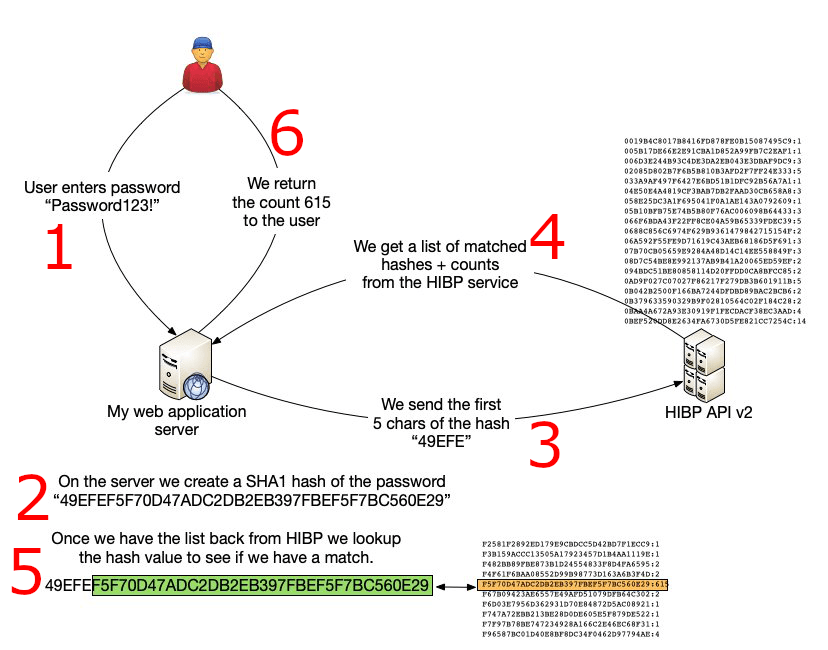
Many people ask “if it is safe” (often assuming passwords are sent in clear, or hashes are sent in full; my fear is that those people implement security somewhere).

It is safe:

PHP source is at [WayBack] GitHub – DragonBe/hibp: A composer package to verify if a password was previously used in a breach using Have I Been Pwned API.

There is also a [WayBack] composer package at [WayBack] dragonbe/hibp – Packagist.

A really cool thing on it is this:

This project was also the subject of my talk [WayBack] Mutation Testing with Infection where the code base was not only covered by unit tests, but also was subjected to Mutation Testing using [WayBack] Infection to ensure no coding mistakes could slip into the codebase.

Apart from the tests, the most important source is at [WayBack] hibp/Hibp.php at master · DragonBe/hibp · GitHub

Related:

–jeroen

Posted in Development, Mobile Development, PHP, Python, Scripting, Software Development, Web Development | Leave a Comment »