The Wiert Corner – irregular stream of stuff

Jeroen W. Pluimers on .NET, C#, Delphi, databases, and personal interests

  • My badges

  • Twitter Updates

  • My Flickr Stream

  • Pages

  • All categories

  • Enter your email address to subscribe to this blog and receive notifications of new posts by email.

    Join 1,839 other subscribers

Archive for the ‘Windows Development’ Category

When an installer errors out with “Please re-run this installer as a normal user instead of”…

Posted by jpluimers on 2019/08/12

Via [WayBack] Anyone with a hint on how to work around this: … “Please re-run this installer as a normal user instead of”… – Jeroen Wiert Pluimers – Google+

This happened for instance when trying to install Source Tree 2.x on Windows (1.9.x works fine):
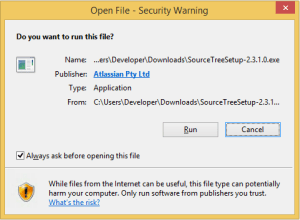
[Window Title]
SourceTreeSetup-2.3.1.0.exe

[Main Instruction]
Installation has failed

[Content]
Please re-run this installer as a normal user instead of “Run as Administrator”.

[Close]

The problem was by accident the machine got in a state to run commands without UAC approval, so the run dialog would already look have “This task will be created with administrative privileges”:

It was odd, as the machine didn’t have it enabled in the security policy (secpo.msc):

So I did a bit more digging, bumped into [WayBack] Why does my Run dialog say that tasks will created with administrative privileges? – The Old New Thing and had one of those #facepalm moments: Explorer had crashed, and I had started it from Process Explorer, forgetting Process Explorer had an UAC token.

The solution is easy:

  1. Logoff / Logon
  2. Verify the Windows-R shows a “normal” run:

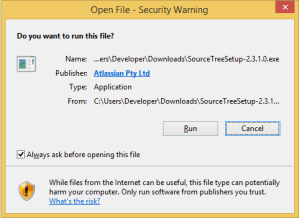
Then you can just run the installer:
–jeroen

Posted in Batch-Files, Console (command prompt window), Development, Power User, Scripting, Software Development, The Old New Thing, Windows, Windows Development | Leave a Comment »

Using PE Flags in Delphi – twm’s blog

Posted by jpluimers on 2019/08/08

For my link archive: [WayBackUsing PE Flags in Delphi – twm’s blog with information about and links to:

The flags themselves are documented at [WayBack] IMAGE_FILE_HEADER structure (Windows)

–jeroen

Via: [WayBack] There was a discussion about using the PE flag IMAGE_FILE_LARGE_ADDRESS_AWARE… – Thomas Mueller (dummzeuch) – Google+

Posted in Delphi, Development, Software Development, Windows Development | Leave a Comment »

A COM Object Collection (IEnumVARIANT) – Delphi Tips – CJC Delphi (Cool Delphi Tips)

Posted by jpluimers on 2019/07/04

Summary of [WayBack] A COM Object Collection (IEnumVARIANT) – Delphi Tips – CJC Delphi (Cool Delphi Tips)

Question: How to implements object collection that support Visual Basic’s For Each construct ?

Answer:
In order to implements an object collection your object has to return  IEnumVariant pointer from a special property named _NewEnum.

Via: [WayBack] What interface to I need to implement to allow ForEach in VBA on a COM object written in delphi? – Stack Overflow

–jeroen

Posted in COM/DCOM/COM+, Delphi, Development, Software Development, Windows Development | Leave a Comment »

Detecting if a debugger is present is different from detecting if an IDE is present.

Posted by jpluimers on 2019/04/04

I have seen this happen in various environments: people wanting to detect if their debugger is present, but trying to detect their IDE, or vice versa.

Similar reasoning is for detecting for being running on a console, or your project having been built to run on a console.

People use these decisions, for instance to determine if their application should behave as a service, or as a regular process.

Ways to determine the various permutation points:

  • Running inside a debugger: use the [WayBackIsDebuggerPresent function (which can be true, even if Delphi DebugHook stays zero).
  • Check for the IDE: tricky; as IDEs have different behaviour over time. For Delphi, check for any TAppBuilder Window class with the [WayBack] FindWindow function.
  • Compiled for console: for Delphi check IsConsole, for .NET I could not find good information.
  • Running on a console: check if you can allocate a handle to stdout
  • Running as a service: check the hosting assembly or hosting process

Related links:

–jeroen

Posted in .NET, Delphi, Development, Software Development, Windows Development | Leave a Comment »

sorting – Is there a Windows equivalent to the Unix uniq? – Super User

Posted by jpluimers on 2019/03/08

TL;DR:

  • Windows 10 has an undocumented /unique switch for sort
  • git for Windows ships with uniq (in a default x64 install, it is at C:\Program Files\Git\usr\bin\uniq.exe)

From [WayBack] sorting – Is there a Windows equivalent to the Unix uniq? – Super User

This works fine:

dir /s /b *0*.pas *1*.pas *2*.pas *3*.pas *4*.pas *5*.pas *6*.pas *7*.pas*8*.pas *9*.pas | sort /unique > pas-files-with-numeric-names.txt

I need remove duplicate lines from a text file, it is simple in Linux usingcat file.txt |sort | uniqwhen file.txt containsaaabbbaaacccIt will output aaabbbcccIs there a Windows


Posted in Development, Power User, Software Development, Windows, Windows Development | Leave a Comment »

Breaking in the Delphi debugger without a breakpoint

Posted by jpluimers on 2019/02/20

You can fire a debugger breakpoint using either of these two:

  • asm int 3 end which is the x86 debug interrupt
  • DebugBreak() which is the Windows API function wrapping the above interrupt

I’m not sure how accurate it is (in the past it would fail under some debuggers other than the Delphi IDE), but as of Delphi 2, there is a DebugHook variable that is non-zero when running under the Delphi debugger, so you can protect your code.

Via [WayBackI remember some time ago, Jeroen Pluijmers posted a snippet of how to place a breakpoint directly in the Delphi source without relying on the F5 key. – Alberto Paganini – Google+

Related:

–jeroen

Posted in Delphi, Development, Software Development, Windows Development | Leave a Comment »

A 90-byte “whereis” program – The Old New Thing

Posted by jpluimers on 2018/11/23

I needed a “get only the first result” of WHERE (which is present after Windows 2000, so XP, Server 2003 and up), so based on [WayBackA 90-byte “whereis” program – The Old New Thing I came up with this:

@echo off
:: based on https://blogs.msdn.microsoft.com/oldnewthing/20050120-00/?p=36653
::for %%f in (%1) do @echo.%%~$PATH:f
for %%e in (%PATHEXT%) do @for %%i in (%1 %~n1%%e) do (
  @if NOT "%%~$PATH:i"=="" (
    echo %%~$PATH:i
    goto :eof
  )
)
:: note: WHERE lists all occurrences of a file on the PATH in PATH order
goto :eof

Two changes:

  • it takes into account the extension if you specify it (unlike WHERE.EXE)
  • it bails out at the first match (like WHERE.EXE)

References:

–jeroen

Posted in Batch-Files, Development, Power User, Scripting, Software Development, The Old New Thing, Windows, Windows Development | Leave a Comment »

Solution for Delphi – post-build event with multiple if/copy combinations only execute if first file does not exist – Stack Overflow

Posted by jpluimers on 2018/11/15

My solution in [WayBack] delphi – post-build event with multiple if/copy combinations only execute if first file does not exist – Stack Overflow is an addendum to my 2014 post Delphi prebuild/prelink/postbuild events.

Here we go:

Read the rest of this entry »

Posted in Conference Topics, Conferences, Delphi, Development, Event, Software Development, The Old New Thing, Windows Development | Leave a Comment »

Batch files and parentheses

Posted by jpluimers on 2018/10/31

Answering [WayBack] delphi – post-build event with multiple if/copy combinations only execute if first file does not exist – Stack Overflow made me do a quick search for parentheses handling in batch files. TL;DR: it is a mess.

But it reveals some interesting links:

–jeroen

Posted in Batch-Files, Conference Topics, Conferences, Development, Event, Scripting, Software Development, Windows Development | Leave a Comment »

Finding your program with an “Access Denied” (Error code 5) after lunch break…

Posted by jpluimers on 2018/10/24

Via: [WayBack] I just returned from lunch break and found my program faulted with an “Access Denied” (Error code 5) error in a call to Mouse.GetCoursorPos and was wond… – Thomas Mueller (dummzeuch) – Google+:

All of [WayBackGetCursorPos, [WayBackGetCursorInfo and [WayBack] GetKeyState can cause an “Access Denied” (Error code 5) when they do not have permission for the current desktop (for instance the logon desktop when a screen-saver has kicked in).

Solution: write a wrapper around it then [WayBack] patch calls going to the original into the patch [WayBack] delphi – Explain errors from GetKeyState / GetCursorPos – Stack Overflow

–jeroen

Posted in .NET, C#, C++, Delphi, Development, Software Development, Windows Development | Leave a Comment »