Archive for the ‘DVCS – Distributed Version Control’ Category
Posted by jpluimers on 2016/07/06
via: Lesson Learned – I Can’t Get My Git Repo Clean! | DrupalEasy
One file kept getting added to the git modified list: service/src/main/MySOAPdefinition.pas.
It was part of a repository that had been migrated from SVN (more on that in a future blog post) and along the way been renamed in directory service/src/main from MySOAPdefinition.pas to MySoapDefinition.pas. SVN (and TortoiseSVN) don’t object to this. But git does.
You’d see this on the command-line:
>git status
On branch develop
Your branch is up-to-date with 'origin/develop'.
Changes not staged for commit:
  (use "git add ..." to update what will be committed)
  (use "git checkout -- ..." to discard changes in working directory)

        modified:   service/src/main/MySOAPdefinition.pas

no changes added to commit (use "git add" and/or "git commit -a")

>git add service\src\main\MySoapDefinition.pas

>git status
On branch develop
Your branch is up-to-date with 'origin/develop'.
Changes not staged for commit:
  (use "git add ..." to update what will be committed)
  (use "git checkout -- ..." to discard changes in working directory)

        modified:   service/src/main/MySOAPdefinition.pas

no changes added to commit (use "git add" and/or "git commit -a")
Basically the add would do nothing.
On Windows, this is how to get around this:
Read the rest of this entry »
Posted in Delphi, Delphi XE8, Development, git, Mac OS X / OS X / MacOS, OS X 10.9 Mavericks, Power User, Software Development, Source Code Management, SourceTree, Windows, Windows 7 | 1 Comment »
Posted by jpluimers on 2016/07/05
Not on the terminal, but only in SourceTree I got this error (full text below):
Can't locate SVN/Core.pm in @INC
Well, the Xcode binaries were here:
$ xcode-select -p

/Applications/Xcode.app/Contents/Developer
On Mavericks, perl is this version:
$ perl --version | grep -w for

This is perl 5, version 16, subversion 2 (v5.16.2) built for darwin-thread-multi-2level

(with 3 registered patches, see perl -V for more detail)
and git is this:
$ git --version

git version 1.9.5 (Apple Git-50.3)
Steps for fixing are at these blog entries:
All these solutions point you to change the system Perl installation, but since on my system it failed only on SourceTree, but from the terminal, I wanted to fix SourceTree.
Read the rest of this entry »
Posted in Apple, Development, DVCS - Distributed Version Control, git, Mac OS X / OS X / MacOS, OS X 10.9 Mavericks, Power User, Source Code Management, Subversion/SVN | 4 Comments »
Posted by jpluimers on 2016/06/28
At first you’d think that gists can only hold text files. That’s not true, and I hinted to this last week in Hosting an HTML gist containing JavaScript.
As gists are git repositories, you can put any file in it through git, even binary files, though the gist UI nor a lot of the tools – including gist(1) – support uploading binary files in a gist.
This post – though old, so the screenshots are not current any more, but the commands still are current – explains how to clone the gist and add binaries (in this case images): How To Upload Image / Binary File to Gist | Hanxue and IT
This is for instance how I created a gist containing openssl Darwin binaries to help solve https://github.com/drwetter/testssl.sh/issues/362.
–jeroen
Posted in Development, DVCS - Distributed Version Control, gist, git, GitHub, Source Code Management | Leave a Comment »
Posted by jpluimers on 2016/06/22
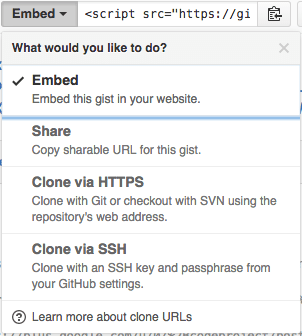
The “embed” dropdown allows to get URLs for sharing and git cloning.
Recently I did my very first JavaScript in HTML development. Since it was a one page experiment, I didn’t want to put it in an official repository of it’s own.
I will explain about the content in a future post, but first about getting it on-line as a HTML file that can run JavaScript.
This is the hosted page: Work around G+ “403. That’s an error.” errors.
Gists are the base
Gists are pretty amazing. They have history, syntax highlighting (which you can embed on your own page, see Using Github as a Syntax Highlighter for Your Blog or Website), can show an overview of files or even raw content. This holds for public and secret gists.
The history of all the files comes from a repository: in fact all gists are in fact git repositories of which you can get the URL (be it https or ssh) is under the “Embed” dropdown: see the screenshot on the right.
So the gist itself is available under these URLs:
- gist
- syntax highlight script
- git https
- git ssh
The individual files can either be viewed as syntax highlighted (when they’re small enough, not binary and github knows how to highlight them), or as raw files:
Read the rest of this entry »
Posted in Development, DVCS - Distributed Version Control, gist, git, GitHub, rawgit, Source Code Management | 2 Comments »
Posted by jpluimers on 2016/06/16

HTTP Error 404.0 – Not Found
Had this on a fresh Bonobo Git Server on a relatively fresh Windows 7 installation:
HTTP Error 404.0 – Not Found
At first I thought it was missing ASP because of the “StaticFile” in the error information, so I enabled it:

ASP is not enabled by default

Enable ASP
That didn’t help, so I searched for “MapRequestHandler” “HTTP Error 404.0 – Not Found” and found:
- HTTP Error 404.0 – Not Found (MapRequestHandler / StaticFile) when deploying WCF Web API on IIS 7.x | Alexander Zeitler
- aspnet_regiis.exe -i is still a solution : Fixing HTTP Error 404.0 – Not Found (MapRequestHandler / StaticFile) when deploying an application in IIS 7.x | Michael Hidalgo
Though ASP.NET was clearly enabled according to the Windows features, this was apparently for an old ASP.NET version so I manually re-registered ASP.NET (but now for Version 4: I had 4.6.1 installed):
C:\Windows\System32>%windir%\Microsoft.NET\Framework\v4.0.30319\aspnet_regiis.exe -ir
Microsoft (R) ASP.NET RegIIS version 4.0.30319.0
Administration utility to install and uninstall ASP.NET on the local machine.
Copyright (C) Microsoft Corporation. All rights reserved.
Start installing ASP.NET (4.0.30319.0) without changing existing web applications to use this version of ASP.Net.
.....
Finished installing ASP.NET (4.0.30319.0) without changing existing web applications to use this version of ASP.Net.
Windows 7 is .NET 2.0 all over the place…
Then it still didn’t work, but the second tip above also mentioned the application pool. And since Bonobo insists installing in wwwwroot, it’s using the default application which on Windows 7 – surprise! – is ASP.NET 2.0:

Default Windows 7 application pool for wwwroot uses ASP.NET 2.0

ASP.NET 4.0 needs to be the default.
Changing that to ASP.NET 4.0 made it all work.
Read the prerequisites
Too bad that ASP.NET registration part is only prominently visible in the readme.md on github, but not in the installation instructions of the web-site with a tiny link (overwhelmed by the screenshots) to prerequisites.
Same for the default credentials:
- username admin
- password admin
–jeroen
Posted in .NET, ASP.NET, Development, DVCS - Distributed Version Control, git, Software Development, Source Code Management | Leave a Comment »
Posted by jpluimers on 2016/06/12
I found a working solution here.It works by using hg strip from the mq extension:$ hg strip my_pruned_branchAs mentioned in the comments, this should only be used for unpublished changesets.
Source: mercurial – Remove experimental branch – Stack Overflow
You need mercurial strip for that which ships with Mercurial 2.8 and up but isn’t enabled by default.
Enabling is easy and can be done globally or on a per-repository base which I like better: just edit your .hg/hgrc file inside your repository and add these lines:
[extensions]

strip =
The source StripExtension – Mercurial forgets to mention you can enable this on a repository base.
I used it to delete an experimental branch that I hadn’t yet pushed to the outside world.
–jeroen
Posted in Development, DVCS - Distributed Version Control, Mercurial/Hg, Source Code Management | Leave a Comment »
Posted by jpluimers on 2016/05/31
Always handy to have at hand as the git-reset documentation is toooooo long:
Undo a commit and redo
$ git commit ...              (1)
$ git reset --soft HEAD~1     (2)
<< edit files as necessary >> (3)
$ git add ....                (4)
$ git commit -c ORIG_HEAD     (5)
- This is what you want to undo
- This is most often done when you remembered what you just committed is incomplete, or you misspelled your commit message1, or both. Leaves working tree as it was before “commit”.
- Make corrections to working tree files.
- Stage changes for commit.
- Commit the changes, reusing the old commit message.
reset copied the old head to .git/ORIG_HEAD; commit with -c ORIG_HEAD will open an editor, which initially contains the log message from the old commit and allows you to edit it. If you do not need to edit the message, you could use the -C option instead.
–jeroen
via: git – How to undo the last commit? – Stack Overflow.
Posted in Development, DVCS - Distributed Version Control, git, Software Development, Source Code Management | Leave a Comment »
Posted by jpluimers on 2016/05/25
There are so many ways to view the last Git commit on the command-line.
On the one hand this shows the versatility of Git. On the other hand there are so many trees in the forrest, that it is hard for people to find how to do simple things.
The one I like most is this:
git show --name-status --oneline
Others:
git log --name-status HEAD^..HEAD

git log -1

git show

git diff

git show --name-status

git log --stat -n 1
–jeroen
via: Git: See my last commit – Stack Overflow.
Posted in Development, DVCS - Distributed Version Control, git, Source Code Management | Leave a Comment »
Posted by jpluimers on 2016/03/15
[WayBack] git-extras is awesome: it adds many [WayBack] useful commands to git. Like [WayBack] git ignore and [WayBack] git-info.
For instance, this adds README.md~ to the .gitignore file:
git ignore README.md~
It makes command-line git much more usable, even so much that it lessens the needs of SourceTree and other UIs tools.
You can get it at the GitHub repository [WayBack] tj/git-extras.
Lots of help is at [WayBack] git-extras/Commands.md: it explains all the commands that git-extras adds.
Thanks [WayBack] nifr for posting about git-extras at [WayBack] Is there an ignore command for git like there is for svn? – Stack Overflow.
–jeroen
Posted in Development, DVCS - Distributed Version Control, git, GitHub, Software Development, Source Code Management, SourceTree | Leave a Comment »
Posted by jpluimers on 2016/01/05
The GitHub Contributions Archive is based on the GitHub Archive (see below) and provides insight in anyones contributions. I discovered through a recent post by Ilya Grigorik:
Handy new tool (built on top of githubarchive.org dataset!) that aggregates all of your GitHub activity: bit.ly/1mraQyT.Apparently I’ve contributed to… – Ilya Grigorik – Google+
The GitHub Archive is amazing as it provides way more history than Github does by itself:
GitHub Archive is a project to record the public GitHub timeline, archive it, and make it easily accessible for further analysis.
Researching that data can provide tons of information, for instance about behaviour. It is also available through Google BigQuery so you can write your own queries for it.
The GitHub Contributions Archive – built by Liam Bowen – provides one (very usable) kind of insight: contributions, but there is much much more as quite some research, visualizations and talks have shown.
Interesting stuff!
–jeroen
Posted in Development, DVCS - Distributed Version Control, git, GitHub, Power User, Software Development, Source Code Management | Leave a Comment »


 The Wiert Corner - irregular stream of stuff