The Wiert Corner – irregular stream of stuff

Jeroen W. Pluimers on .NET, C#, Delphi, databases, and personal interests

  • My badges

  • Twitter Updates

  • Pages

  • All categories

  • Enter your email address to subscribe to this blog and receive notifications of new posts by email.

    Join 1,839 other subscribers

Archive for the ‘DVCS – Distributed Version Control’ Category

Git Explorer: a cool tool to visually learn git commands

Posted by jpluimers on 2022/03/03

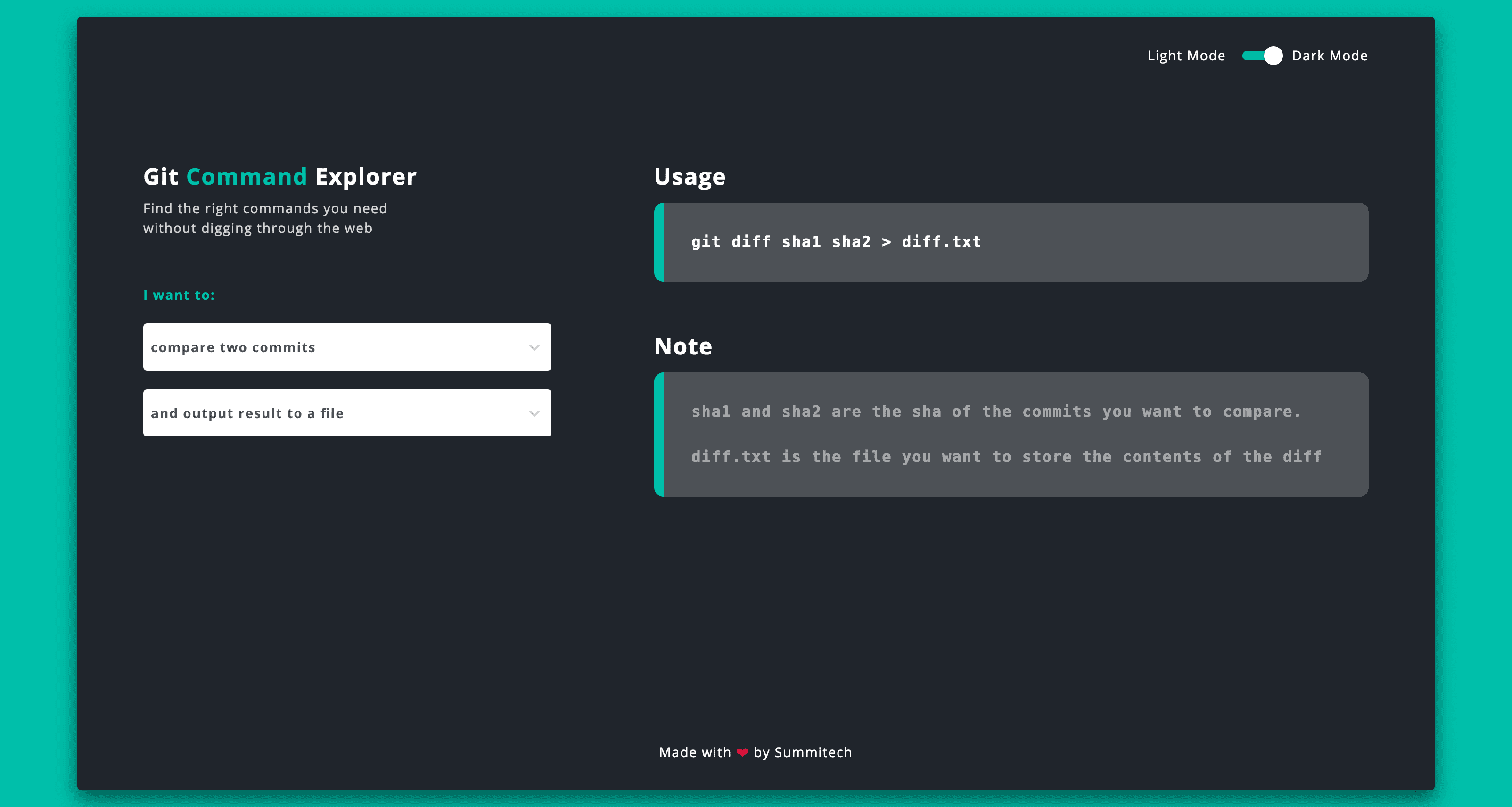
This is sooooo cool: [Wayback] Git Explorer

GitExplorer: Find the right git commands you need without digging through the web

What I like is the simple clean UI with a two step selection of what git functionality you want to use followed by a simple usage and explanation.

Very well suites for both referencing and interactive learning.

Bonus: it is open source at [Wayback/Archive.is] summitech/gitexplorer: Find the right git commands without digging through the web..

Via: [Archive.is] Marko โšก Denic on Twitter: “You can find the right git commands without digging through the web. “

–jeroen

Posted in Development, DVCS - Distributed Version Control, git, GitHub, Software Development, Versioning | Leave a Comment »

Great git videos on YouTube by @shanselman (thanks @simongeering)

Posted by jpluimers on 2021/11/11

[Archive.is] simon geering on Twitter: “Thanks to @shanselman for creating these great Git Videos. As a senior dev starting to mentor/teach tech skills this is very helpful. What tool do you use for the green arrows and other overlays please? Git 101; GitHub PRs “:

Embedded videos below the fold.

–jeroen

Read the rest of this entry »

Posted in Development, DVCS - Distributed Version Control, git, GitHub, Software Development, Source Code Management | Leave a Comment »

@adamsand0r drew up a few sketches of design decisions needed to be taken when building a #gitops-based CD pipeline

Posted by jpluimers on 2021/11/10

Great decision diagrams: [Archive.is] Thread by @adamsand0r: good morning Twitter! I drew up a few sketches of design decisions needed to be taken when building a #gitops-based CD pipeline. let me knowโ€ฆ

Via [Archive.is] Ian Miell on Twitter: “Oh man, these diagrams will make the hell of architecting GitOps pipelines easier to reason about… Thread ๐Ÿ‘‡โ€ฆ “

[Archive.is] รdรกm Sรกndor on Twitter: “good morning Twitter! I drew up a few sketches of design decisions needed to be taken when building a #gitops-based CD pipeline. let me know what do you think… #gitopsdecisions”

–jeroen

via

Posted in Development, DevOps, DVCS - Distributed Version Control, git, Source Code Management | Leave a Comment »

No GitHub: re-introducing an Inbox or Direct Messages is a bad idea!

Posted by jpluimers on 2021/08/18

Yesterday I published about Yet again, GitHub violates the Web Content Accessibility Guidelines by stealing a key: not it is the dot (.), and this week some feelers were put out for a kind of GitHub Inbox / Direct Message feature:

[Archive.is] GitHub Projects on Twitter: “What if there was ๐Ÿ“จ DM/inbox feature on GitHub?”

There already is gitter.im (which is public instant messaging around GitHub repositories), and people have enough trouble managing all their incoming private message streams (be it paper/email inbox, social media and others), in large part because of SPAM and harassment messages.

It wasn’t by accident that the Private Messaging at GitHub feature was ditched almost a decade ago during [Wayback/Archive.is] 2012 Spring Cleaning | The GitHub Blog:

Private Messaging, however, was a step backwards: nobody wants another inbox. And a sub-par one, at that. Email is still the best way to contact someone.

Today weโ€™re removing Private Messaging from GitHub. If you want people to contact you, pleaseย provide a public email address for your profile.

So I’m with all these:

Yes, I know [Archive.is] Tierney Cyren on Twitter: “A reminder that this account doesnโ€™t actually represent GitHub nor any feature planning GitHub is doingโ€ฆ “, but I want to make absolutely clear to GitHub that another private message feature is a very bad idea.

–jeroen

Posted in Development, DVCS - Distributed Version Control, GitHub, Source Code Management | Leave a Comment »

Frank A. Krueger on Twitter: “I made a build status IoT thing! Automatically polls @bitrise and is even Alexa controlled (for brightness and to turn off). Now I want to add github issue and PR counts. Just a $12 ESP32 and a $30 led matrix.”

Posted by jpluimers on 2021/07/28

[WayBack] Frank A. Krueger on Twitter: “I made a build status IoT thing! Automatically polls @bitrise and is even Alexa controlled (for brightness and to turn off). Now I want to add github issue and PR counts. Just a $12 ESP32 and a $30 led matrix.”

[WayBack]

https://web.archive.org/web/20190822202203/https://video.twimg.com/ext_tw_video/1164251716927156224/pu/vid/1280×720/Pn_rAACnrcUHfXol.mp4

–jeroen

Posted in Development, DVCS - Distributed Version Control, ESP32, GitHub, Hardware Development, Software Development, Source Code Management | Leave a Comment »

Fixing hg.exe “ImportError: DLL load failed: %1 is not a valid Win32 application.”

Posted by jpluimers on 2021/07/21

If you get the below error when running hg.exe, then you are mixing a 64-bit Mercurial with 32-bit dependencies:

C:\>hg --version
Traceback (most recent call last):
  File "hg", line 43, in 
  File "hgdemandimport\demandimportpy2.pyc", line 150, in __getattr__
  File "hgdemandimport\demandimportpy2.pyc", line 94, in _load
  File "hgdemandimport\demandimportpy2.pyc", line 43, in _hgextimport
  File "mercurial\dispatch.pyc", line 22, in 
  File "hgdemandimport\demandimportpy2.pyc", line 248, in _demandimport
  File "hgdemandimport\demandimportpy2.pyc", line 43, in _hgextimport
  File "mercurial\i18n.pyc", line 28, in 
  File "hgdemandimport\demandimportpy2.pyc", line 150, in __getattr__
  File "hgdemandimport\demandimportpy2.pyc", line 94, in _load
  File "hgdemandimport\demandimportpy2.pyc", line 43, in _hgextimport
  File "mercurial\encoding.pyc", line 24, in 
  File "mercurial\policy.pyc", line 101, in importmod
  File "mercurial\policy.pyc", line 63, in _importfrom
  File "hgdemandimport\demandimportpy2.pyc", line 164, in __doc__
  File "hgdemandimport\demandimportpy2.pyc", line 94, in _load
  File "hgdemandimport\demandimportpy2.pyc", line 43, in _hgextimport
  File "mercurial\cext\parsers.pyc", line 12, in 
  File "mercurial\cext\parsers.pyc", line 10, in __load
ImportError: DLL load failed: %1 is geen geldige Win32-toepassing.

The equivalent English error is [WayBack] ImportError: DLL load failed: %1 is not a valid Win32 application.” – Google Search.

The problem is the bitness of hg.exe: [WayBack] python – Error while installing Mercurial on IIS7 64bit: “DLL Load Failed: %1 is not a valid Win32 application” – Stack Overflow

You can quickly figure out the bitness of hg.exe:

C:\>where hg
C:\Program Files\Mercurial\hg.exe

C:\>sigcheck "C:\Program Files\Mercurial\hg.exe"

Sigcheck v2.72 - File version and signature viewer
Copyright (C) 2004-2019 Mark Russinovich
Sysinternals - www.sysinternals.com

c:\program files\mercurial\hg.exe:
        Verified:       Unsigned
        Link date:      17:49 9-7-2019
        Publisher:      n/a
        Company:        n/a
        Description:    Fast scalable distributed SCM (revision control, version control) system
        Product:        mercurial
        Prod version:   5.0.2
        File version:   5.0.2
        MachineType:    64-bit

Forcing x86 of Mercurial

Since I use chocolatey for most my installs, I forced x86 the Chocolatey way:

So after these:

choco uninstall --yes hg
choco install --yes --force86 hg

I got this signature check:

C:\>sigcheck "C:\Program Files (x86)\Mercurial\hg.exe"

Sigcheck v2.72 - File version and signature viewer
Copyright (C) 2004-2019 Mark Russinovich
Sysinternals - www.sysinternals.com

c:\program files (x86)\mercurial\hg.exe:
        Verified:       Unsigned
        Link date:      17:50 9-7-2019
        Publisher:      n/a
        Company:        n/a
        Description:    Fast scalable distributed SCM (revision control, version control) system
        Product:        mercurial
        Prod version:   5.0.2
        File version:   5.0.2
        MachineType:    32-bit

–jeroen

Posted in Development, DVCS - Distributed Version Control, Encoding, Mercurial/Hg, Python, Scripting, Software Development, Source Code Management | Leave a Comment »

Chocolatey: installing Oracle SQL Developer and updating the chocolatey package

Posted by jpluimers on 2021/05/13

Sometimes an install is not just as simple as C:\>choco install --yes oracle-sql-developer.

Edit 20210514:

Note that most of the below pain will be moot in the future as per [Archive.is] Jeff Smith ๐Ÿป on Twitter: “we’re working on removing the SSO requirement, it’s already done for @oraclesqlcl – see here โ€ฆ “ referring to [Wayback] SQLcl now under the Oracle Free Use Terms and Conditions license | Oracle Database Insider Blog

SQLcl, the modern command-line interface for the Oracle Database, can now be downloaded directly from the web without any click-through license agreement.

It means the Oracle acount restriction will be lifted, and downloads will be a lot simpler.

I started with the below failing command, tried a lot of things, then finally almost gave up: Oracle stuff does not want to be automated, which means I should try to less of their stuff.

First of all you need an Oracle account (I dislike companies doing that for free product installs; I’m looking at Embarcadero too) by going to profile.oracle.com:

[WayBack] Chocolatey Gallery | Oracle SQL Developer 18.4.0 (also: gist.github.com/search?l=XML&q=oracle-sql-developer)

Notes

  • This version supports both 32bit and 64bit and subsequently does not have a JDK bundled with it. It has a
    dependency on theย jdk8ย package to meet the application’s JDK requirement.
  • An Oracle account is requiredย to download this package. See the “Package Parameters” section below for
    details on how to provide your Oracle credentials to the installer. If you don’t have an existing account, you can
    create one for free here:ย https://profile.oracle.com/myprofile/account/create-account.jspx

Package Parameters

The following package parameters are required:

*ย /Username:ย – Oracle username
*ย /Password:ย – Oracle password

(e.g.ย choco install oracle-sql-developer --params "'/Username:MyUsername /Password:MyPassword'")

To have choco remember parameters on upgrade, be sure to setย choco feature enable -n=useRememberedArgumentsForUpgrades.

Then the installation failed fail again: ERROR: The response content cannot be parsed because the Internet Explorer engine is not available, or Internet Explorer's first-launch configuration is not complete. Specify the UseBasicParsing parameter and try again.

The trick is to RUN IEXPLORE.EXE AS ADMINISTRATOR ONCE BEFORE INSTALLING FROM CHOCOLATEY. Who would believe that.

The reason is that the package uses Invoke-WebRequest which requires Internet Explorer and PowerShell 3. Chocolatey packages however need to be able to run on just PowerShell 2 without Invoke-WebRequest.

Maybe using cURL can remedy that; adding a dependency to is is possible, as cURL can be installed via chocolatey: [WayBack] How to Install cURL on Windows – I Don’t Know, Read The Manual. Another alternative might be [WayBack] Replace Invoke-RestMethod in PowerShell 2.0 to use [WayBack] WebRequest Class (System.Net) | Microsoft Docs.

Read the rest of this entry »

Posted in CertUtil, Chocolatey, CommandLine, Database Development, Development, DVCS - Distributed Version Control, git, Hashing, OracleDB, Power User, PowerShell, Security, SHA, SHA-1, Software Development, Source Code Management, Windows, XML, XML/XSD | Leave a Comment »

How to Convert a Mercurial Repository to Git on Windows

Posted by jpluimers on 2021/03/30

For my link archive: [WayBack] How to Convert a Mercurial Repository to Git on Windows.

Let’s see how this maps to MacOS or Linux…

It is based on hg-git:

Other solutions are based onย  [WayBack]fast-export or [WayBack] gitifyhg.

If I am going to do this beyond a one-off conversion, I need to figure out their differences.

Related:


–jeroen

Posted in Development, DVCS - Distributed Version Control, git, Mercurial/Hg, Software Development, Source Code Management | Leave a Comment »

Thread by @mathdroid: “I now have the most swagger @github profile, EVER Sorry, your browser doesn’t support embedded videos @github Method: Download and install G [โ€ฆ]”

Posted by jpluimers on 2021/03/24

That was such a cool idea: rickrolling your own git profile. [WayBack] Thread by @mathdroid: “I now have the most swagger @github profile, EVER [โ€ฆ]”.

Github profile (which in the mean time changed): [WayBack] mathdroid (Odi) ยท GitHub.

–jeroen

Read the rest of this entry »

Posted in Development, DVCS - Distributed Version Control, Fun, GitHub, Source Code Management | Leave a Comment »

Applying .patch File From Git โ€“ Easyread โ€“ Medium

Posted by jpluimers on 2021/03/10

Next time I need to apply a patch file directly from git itself, I need to re-read [WayBack] Applying .patch File From Git โ€“ Easyread โ€“ Medium.

Without git, just run the patch command as per [WayBack] What is a patch in git version control? – Stack Overflow

The git workflow for the above git scenario is this one:

–jeroen

Posted in Development, DVCS - Distributed Version Control, git, Software Development, Source Code Management | Leave a Comment »