Archive for the ‘GitHub’ Category
Posted by jpluimers on 2016/09/14

Adobe marketing scam
I don’t want Acrobat/Adobe Reader on my Mac. Period.
But Preview will show some PDF files as “For the best experience, open this PDF portfolio in Acrobat 9 or Adobe Reader 9, or later.” or “For the best experience, open this PDF portfolio in Acrobat X or Adobe Reader X, or later.”
This is some Adobe marketing scam where they generate a PDF file actually as a portfolio of PDF files having the first PDF being “marketing” message.
So I needed the pdf-tools on my Mac for which many sites suggest to use brew install pdf-tools. That worked not so well:
$ brew install pdf-tools
Error: No available formula with the name "pdf-tools"
==> Searching for similarly named formulae...
This similarly named formula was found:
mupdf-tools
To install it, run:
  brew install mupdf-tools
==> Searching taps...
This formula was found in a tap:
homebrew/emacs/pdf-tools
To install it, run:
  brew install homebrew/emacs/pdf-tools
Searching for “Error: No available formula with the name” “pdf-tools” didn’t return useful results but looking for brew “pdf-tools” gone revealed pdf-tools: move to homebrew/emacs · wingyplus/homebrew@6e73af9 indicating the command should indeed be brew install homebrew/emacs/pdf-tools however that also ended up failing, in fact with multiple errors:
==> make server/epdfinfo
Error: No available formula with the name "homebrew/dupes/tcl-tk"
Please tap it and then try again: brew tap homebrew/dupes
==> Searching for similarly named formulae...
Error: No similarly named formulae found.
==> Searching taps...
Error: No formulae found in taps.
After doing abrew tap homebrew/dupes it finally worked.
Read the rest of this entry »
Posted in Apple, Development, DVCS - Distributed Version Control, git, GitHub, Home brew / homebrew, Power User, Source Code Management | Leave a Comment »
Posted by jpluimers on 2016/07/08
I’m not yet sure what the exact cause is, but at irregular intervals when clicking on Google Plus links, they show as “403. That’s an error.”.
They appear both when I have multiple WAN connections or a single WAN connection, which leads me to suspect that G+ doesn’t cope well when
- you have a lot (dozens) of Google related pages open (Drive, Mail, Search, Documents, etc) as Google Plus is embedded in each of them
- you rapidly browse through your G+ backlog (the G+ counter is > 50 since you follow a lot of people/communities and you quickly do catch-up on them)
In a future post, I will explain how I created the workaround, but here it is:
Work around G+ “403. That’s an error.” errors
Basically it translates links
The latter was the original link I clicked in the first place. The former what G+ comes up with.
After a while, G+ comes back to its senses and allows the latter links again, so the page allows you to parse the former then put them in a list like this:

One decoded URL per list-item.
–jeroen _ _ _ _
Posted in Development, G+: GooglePlus, gist, GitHub, Google, Power User, rawgit, SocialMedia, Source Code Management | Leave a Comment »
Posted by jpluimers on 2016/06/28
At first you’d think that gists can only hold text files. That’s not true, and I hinted to this last week in Hosting an HTML gist containing JavaScript.
As gists are git repositories, you can put any file in it through git, even binary files, though the gist UI nor a lot of the tools – including gist(1) – support uploading binary files in a gist.
This post – though old, so the screenshots are not current any more, but the commands still are current – explains how to clone the gist and add binaries (in this case images): How To Upload Image / Binary File to Gist | Hanxue and IT
This is for instance how I created a gist containing openssl Darwin binaries to help solve https://github.com/drwetter/testssl.sh/issues/362.
–jeroen
Posted in Development, DVCS - Distributed Version Control, gist, git, GitHub, Source Code Management | Leave a Comment »
Posted by jpluimers on 2016/06/22
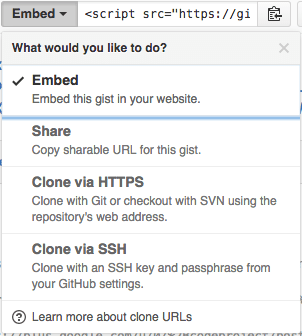
The “embed” dropdown allows to get URLs for sharing and git cloning.
Recently I did my very first JavaScript in HTML development. Since it was a one page experiment, I didn’t want to put it in an official repository of it’s own.
I will explain about the content in a future post, but first about getting it on-line as a HTML file that can run JavaScript.
This is the hosted page: Work around G+ “403. That’s an error.” errors.
Gists are the base
Gists are pretty amazing. They have history, syntax highlighting (which you can embed on your own page, see Using Github as a Syntax Highlighter for Your Blog or Website), can show an overview of files or even raw content. This holds for public and secret gists.
The history of all the files comes from a repository: in fact all gists are in fact git repositories of which you can get the URL (be it https or ssh) is under the “Embed” dropdown: see the screenshot on the right.
So the gist itself is available under these URLs:
- gist
- syntax highlight script
- git https
- git ssh
The individual files can either be viewed as syntax highlighted (when they’re small enough, not binary and github knows how to highlight them), or as raw files:
Read the rest of this entry »
Posted in Development, DVCS - Distributed Version Control, gist, git, GitHub, rawgit, Source Code Management | 2 Comments »
Posted by jpluimers on 2016/03/15
[WayBack] git-extras is awesome: it adds many [WayBack] useful commands to git. Like [WayBack] git ignore and [WayBack] git-info.
For instance, this adds README.md~ to the .gitignore file:
git ignore README.md~
It makes command-line git much more usable, even so much that it lessens the needs of SourceTree and other UIs tools.
You can get it at the GitHub repository [WayBack] tj/git-extras.
Lots of help is at [WayBack] git-extras/Commands.md: it explains all the commands that git-extras adds.
Thanks [WayBack] nifr for posting about git-extras at [WayBack] Is there an ignore command for git like there is for svn? – Stack Overflow.
–jeroen
Posted in Development, DVCS - Distributed Version Control, git, GitHub, Software Development, Source Code Management, SourceTree | Leave a Comment »
Posted by jpluimers on 2016/01/05
The GitHub Contributions Archive is based on the GitHub Archive (see below) and provides insight in anyones contributions. I discovered through a recent post by Ilya Grigorik:
Handy new tool (built on top of githubarchive.org dataset!) that aggregates all of your GitHub activity: bit.ly/1mraQyT.Apparently I’ve contributed to… – Ilya Grigorik – Google+
The GitHub Archive is amazing as it provides way more history than Github does by itself:
GitHub Archive is a project to record the public GitHub timeline, archive it, and make it easily accessible for further analysis.
Researching that data can provide tons of information, for instance about behaviour. It is also available through Google BigQuery so you can write your own queries for it.
The GitHub Contributions Archive – built by Liam Bowen – provides one (very usable) kind of insight: contributions, but there is much much more as quite some research, visualizations and talks have shown.
Interesting stuff!
–jeroen
Posted in Development, DVCS - Distributed Version Control, git, GitHub, Power User, Software Development, Source Code Management | Leave a Comment »
Posted by jpluimers on 2015/06/10
After reading Converting Hg repositories to Git directed me into reading Bitbucket: Converting Hg repositories to Git I hoped moving my Mercurial repository on BitBucket to a Git repository would be something like following the steps.
It wasn’t.
First of all, hg-git on a Windows system requires Python or TortoiseHg. Neither of these I wanted to install for a one-off conversion.
So I took a throw-away Linux VM, and did the steps below. But let me first explain why.
Motivation
My motivation for moving away from BitBucket to GitHub, especially for projects containing markdown documentation.
When writing documentation in Markdown, being able to in-line reference pictures or have relative-references to other documents. This works perfectly in local Markdown tools (like MarkdownPad 2 or LightPaper).
Read the rest of this entry »
Posted in *nix, *nix-tools, BitBucket, Development, DVCS - Distributed Version Control, git, GitHub, Linux, Mercurial/Hg, openSuSE, Power User, Source Code Management, SuSE Linux | Leave a Comment »
Posted by jpluimers on 2015/06/09
Now that github stopped showing my README.rst as reStructuredText here is the htmlpreview link of the pandoc rendered reStructuredText:
revue: getting Tumbleweed on it.
It is about installing and configuring Tumbleweed which is a tad bit more frustrating than I hoped for.
In practice unixoids aren’t as heavenly as many geeks pretend them to be.
I got the htmlpreview solution via css – How to see an html page on github as a normal rendered html page to see preview in browser, without downloading? – Stack Overflow.
I might try the github pages in the future.
Sourcecode of htmlpreview is at htmlpreview/htmlpreview.github.com.
–jeroen
via:
Posted in *nix, Development, DVCS - Distributed Version Control, git, GitHub, Linux, openSuSE, Power User, Software Development, Source Code Management, SuSE Linux | Leave a Comment »


 The Wiert Corner - irregular stream of stuff