The Wiert Corner – irregular stream of stuff

Jeroen W. Pluimers on .NET, C#, Delphi, databases, and personal interests

  • My badges

  • Twitter Updates

  • My Flickr Stream

  • Pages

  • All categories

  • Enter your email address to subscribe to this blog and receive notifications of new posts by email.

    Join 1,861 other subscribers

Archive for the ‘User Experience (ux)’ Category

Reminder to self: you cannot repeatedly draw anti-aliased text without damaging the background

Posted by jpluimers on 2013/04/11

A small duh moment when I found this out myself the hard way: when repeatedly drawing anti-aliased text, it will alter the background on each draw.

So you cannot do that. Not in Delphi, not in .NET, not in Cocoa, nowhere (:

–jeroen

via: delphi – “Additive” text rendering on TCanvas? – Stack Overflow.

Posted in .NET, Delphi, Development, FireMonkey, Software Development, User Experience (ux), WinForms, WPF, XNA | 7 Comments »

Het Agentschap NL moet nog wat S&O doen naar e-mail templates (Bevestiging Mededeling WBSO RDA 2012)

Posted by jpluimers on 2013/03/22

Als je een mail krijgt als onderstaande, dan weet je dat er iemand niet heeft opgelet bij het maken en controleren van de e-mail templates:

from: noreply@agentschapnl.nl

Geachte ${naam},

Uw mededeling WBSO/RDA 2012 voor is ontvangen op 22-03-2013 18:11.
Alleen als er sprake is van een correctie op de afgegeven WBSO verklaringen en/of RDA beschikkingen ontvangt u hiervan schriftelijk bericht.

In uw ingediende mededeling kunt u zien of er sprake is van een correctie.

Met vriendelijke groet,
Agentschap NL

(Deze e-mail is automatisch gegenereerd en kan niet worden beantwoord.)

–jeroen

via Bevestiging Mededeling WBSO RDA 2012 – jeroen.pluimers.com@gmail.com – Gmail.

Posted in User Experience (ux) | Leave a Comment »

eLoket (Profiel)

Posted by jpluimers on 2013/03/20

Fijne foutmelding:

Uw formulier voldoet niet aan de volgende controles:

!

U heeft geen correct telefoonnummer ingevoerd. Een telefoonnummer moet beginnen met een 0 of + , bestaat uit minimaal 10 cijfers en mag geen leestekens bevatten

U heeft geen correct telefoonnummer ingevoerd. Een telefoonnummer moet beginnen met een 0 of + , bestaat uit minimaal 10 cijfers en mag geen leestekens bevatten

Inderdaad twee velden: telefoon en mobiel.

Noem ze dan niet beide “telefoonnummer!”.

En hou je gewoon aan de ITU-T E.123 standaard waar spaties, haakjes en plus gewoon zijn toegestaan.

Het vervolg is nog meer bizar:

Let op: een aantal gegevens kunt u niet meer wijzigen nadat ze zijn opgeslagen.

Zijn uw gegevens correct ingevuld?

Uiteraard staat nergens aangegeven WELKE gegevens niet meer te wijzigen zijn.

Stel je voor!

–jeroen

via: eLoket (Profiel).

Posted in Development, Software Development, Usability, User Experience (ux) | Leave a Comment »

If your system is configured as Metric, then any app not honouring that have a UX #Fail

Posted by jpluimers on 2013/01/19

I love Google:

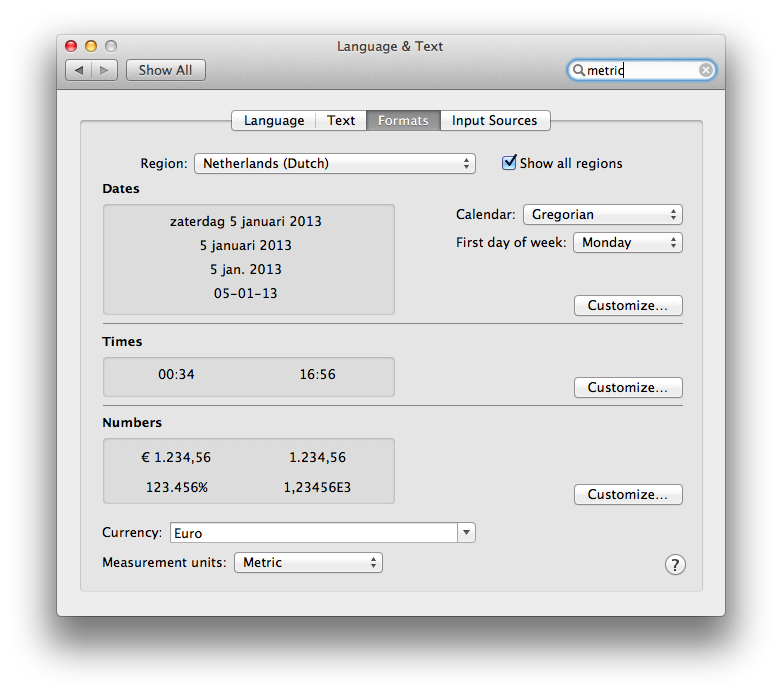
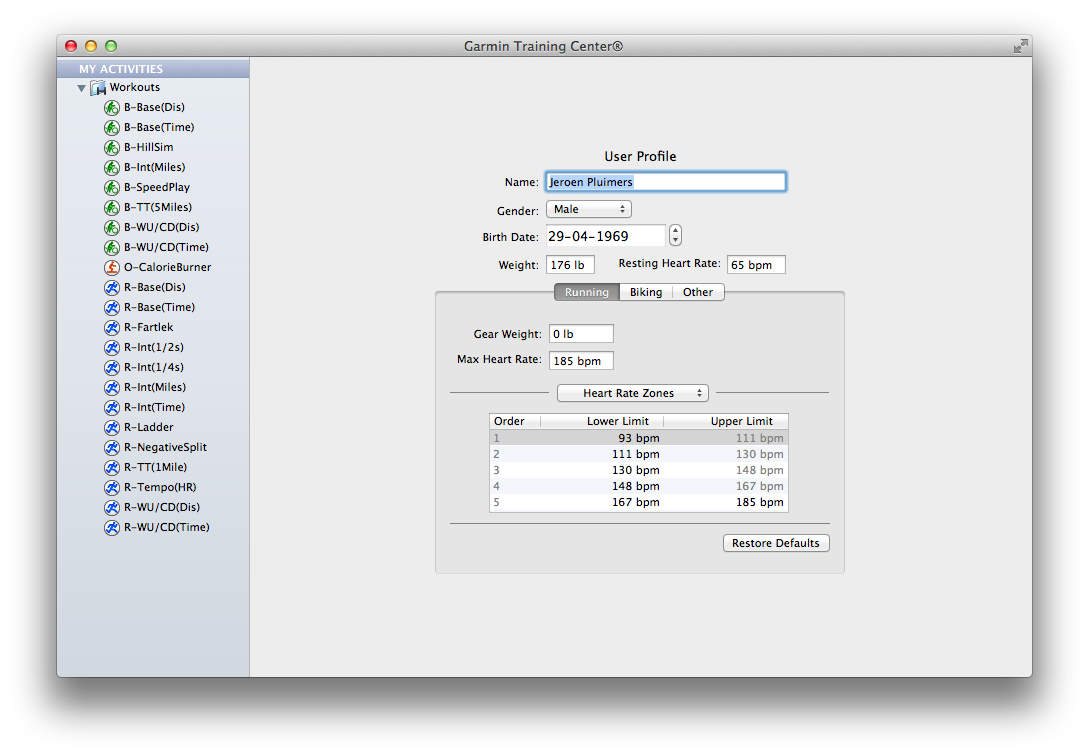
Especially since there is still software like Garmin Training Center for Mac on Mac OS X with – in the System Preferences – the Measurement Units set as Metric, insists on entering weight as lb, and workout distance in miles.

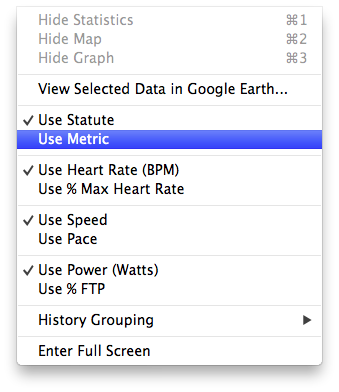
The reason is that Garmin Training Center on Mac OS X has its own “Measurement Units” settings. Where Mac OS lets the system wide setting be either “Metric”  or ” US”, Garmin choose between “Metric” and “Statute” (the latter is default, not the OS X setting).

The problem is twofold:

Garmin has head offices and most of their customers outside the USA, so why insist on US units being default, and why not link the setting to the Mac OS X Preference?

UX #fail.

Oh BTW: if you connect your Garmin device, and GTC still indicates “no fitness device was found”, then use a different USB Cable and don’t connect it through a hub: the device is very picky on talking over USB (charging over USB works with virtually any USB cable).

Garmin Training Center on Mac OS X insists in imperial units, even though the system is configured as metric.

Garmin Training Center on Mac OS X insists in imperial units, even though the system is configured as metric.

Garmin Training Center on Mac OS X has its own

Garmin Training Center on Mac OS X has its own “Measurement Units” settings. Where Mac OS lets the system wide setting be either “Metric” or ” US”, Garmin choose between “Metric” and “Statute” (the latter is default, not the OS X setting).

Even after setting the Garmin Training Center to

Even after setting the Garmin Training Center to “Metric”, it still lists “Miles” in your workouts.

–jeroen

Posted in Google, GoogleSearch, Opinions, Power User, User Experience (ux) | Tagged: , , , , , , , , , , , , | Leave a Comment »

.NET/C#: Generating a WordPress posting categories page – part 2

Posted by jpluimers on 2012/08/22

In Generating a WordPress posting categories page – part 1, you learned how to

  1. get the HTML with all the category information from your WordPress.com blog,
  2. convert that to XHTML,
  3. generate an XSD for the XHTML,
  4. generate C# classes from that XSD

This episode, you will learn how the data read from the XHTML can be transformed to a simple tree in HTML suited for a posting categories page like mine.

In the final post, the same data will be transferred into a real category cloud with font sizes indicating the frequency of the category usage.

From there, you can go into other directions (for instance generating squarified treemaps from the data).

That’s the cool thing about data: there are many ways to visualize, and this series was meant – next to some groundwork on how to get the data – as inspiration into some forms of visualization.
Hope you had fun reading it!

Getting a HTML tree from the optionType items

                StringBuilder outputHtml = new StringBuilder();
                string rootUrl = args[1];
                foreach (optionType item in select.option)
                {
                    if (item.Level == optionType.RootLevel)
                        continue;

                    // <a style="font-size: 100.3986332574%; padding: 1px; margin: 1px;" title="XML/XSD (23)" href="https://wiert.me/category/development/xmlxsd/">XML/XSD</a>
                    string url = String.Format("{0}/category{1}", rootUrl, item.HtmlPath);
                    string prefix = new string('.', item.Level * 5);// optionType.NbspEscaped.Repeat(item.Level);
                    outputHtml.AppendFormat("{0}<a title="{2}" href="{1}">{2} ({3})</a>", prefix, url, item.Category, item.Count);
                    outputHtml.AppendLine();
                }

One way of generating an HTML tree, is to prefix every node with a series of dots corresponding with the level of that node. Not the most pretty sight, but it will suffice for this episode.

Inside each node, I want to show the Category and Count.

Since the optionType as generated from the XSD only contains the below properties, a major portion on this posting is how to decode the Value so we can generate HTML like this:

...............<a href='https://wiert.me/category/development/software-development/net/c-' title='C#'>C#&nbsp;(118)</a>
....................<a href='https://wiert.me/category/development/software-development/net/c-/c--2-0' title='C# 2.0'>C# 2.0&nbsp;(46)</a>
....................<a href='https://wiert.me/category/development/software-development/net/c-/c--3-0' title='C# 3.0'>C# 3.0&nbsp;(33)</a>
....................<a href='https://wiert.me/category/development/software-development/net/c-/c--4-0' title='C# 4.0'>C# 4.0&nbsp;(31)</a>
....................<a href='https://wiert.me/category/development/software-development/net/c-/c--5-0' title='C# 5.0'>C# 5.0&nbsp;(2)</a>

Decoding the optionType Value property

optionType only contains the these properties:

  1. class
    • the class used to reference the style in the stylesheet
    • example value: “level-4”
  2. value
    • internal unique WordPress ID for the category (this allows you to alter the Slug and Value without breaking the links between posts and categories
    • example value: “45149061”
  3. Value
    • string that WordPress uses to make the category combobox look like a tree structure
    • example value: “&nbsp;&nbsp;&nbsp;&nbsp;&nbsp;&nbsp;&nbsp;&nbsp;&nbsp;&nbsp;&nbsp;&nbsp;C# 5.0&nbsp;&nbsp;(2)”

The extra properties needed for the HTML generation logic above are these:

  1. Category
    • the Value undone from leading non breaking space character escapes, and the trailing count information
    • example value: C# 5.0
  2. Count
    • the Value undone from leading non breaking space character escapes, Caption information, separator non breaking space character escapes, and surrounding parenthesis
    • example value: 2
  3. Level
    • the class undone from the level- prefix
    • example value: 4
  4. Slug
    • the category slug is the unique value for a category that WordPress uses to form category urls. It is auto-generated from the Category, but you can also edit it. I don’t, as it is not in the combobox HTML, so I derive it from the Category. Note there are also posting slugs used in the permalink of each post.
    • example value: c--5-0 (it consists of lowercase letters and hyphens derived from the Category)
  5. HtmlPath
  6. parent (used internally for making the HtmlPath code much easier

The really cool thing about XSD2Code is that it generated the optionType C# code as a partial class.
Which means we can extend the generated partial classes in a seperate C# file like the code fragments below (you can download it from the WordPressCategoriesDropDown.cs file at BeSharp.CodePlex.com)

    partial class optionType
    {
        public const int RootLevel = -1;

        private const string slash = "/";
        private const char hyphen = '-';
        public const string NbspEscaped = "&nbsp;";
        private const string emptyCountInParenthesis = "(-1)";

        public optionType parent { get; set; }

        public string Category
        {
            get
            {
                string result;
                string countInParenthesis;
                splitValue(out result, out countInParenthesis);
                return result;
            }
        }

        public int Count
        {
            get
            {
                string category;
                string countInParenthesis;
                splitValue(out category, out countInParenthesis);
                string count = countInParenthesis.Substring(1, countInParenthesis.Length - 2);
                int result = int.Parse(count);
                return result;
            }
        }

        public int Level
        {
            get
            {
                if (string.IsNullOrWhiteSpace(@class))
                    return RootLevel;
                string[] split = @class.Split(hyphen);
                string number = split[1];
                int result = int.Parse(number);
                return result;
            }
        }

        /// <summary>
        /// This is the HTML part that WordPress uses to reference a Category
        /// </summary>
        public string Slug
        {
            get
            {
                StringBuilder result = new StringBuilder();
                foreach (char item in Category)
                {
                    if (char.IsLetterOrDigit(item))
                        result.Append(item.ToString().ToLower());
                    else
                        if (result.Length > 0)
                            result.Append(hyphen);
                }
                return result.ToString();
            }
        }

        public string HtmlPath
        {
            get
            {
                if (RootLevel == Level)
                    return string.Empty;

                string result = Slug;
                if (null != parent)
                    result = parent.HtmlPath + slash + result;
                return result;
            }
        }

        private void splitValue(out string category, out string countInParenthesis)
        {
            // might want to do this using RegEx, but that is a write-only language https://wiert.me/category/development/software-development/regex/
            string result = Value;
            int nbspCountToStripFromLeftOfValue = Level * 3; // strip 3 &nbsp; for each Level
            for (int i = 0; i < nbspCountToStripFromLeftOfValue; i++)
            {
                int nbspEscapedLength = NbspEscaped.Length;
                if (result.StartsWith(NbspEscaped))
                    result = result.Substring(nbspEscapedLength, result.Length - nbspEscapedLength);
            }
            string doubleNbspEscaped = NbspEscaped + NbspEscaped;
            if (result.Contains(doubleNbspEscaped))
            {
                string[] separators = new string[] { doubleNbspEscaped };
                string[] split = result.Split(separators, StringSplitOptions.None);
                category = split[0];
                countInParenthesis = split[1];
            }
            else
            {
                category = result;
                countInParenthesis = emptyCountInParenthesis;
            }
        }

        public override string ToString()
        {
            string result = string.Format("Level {0}, Count {1}, Slug {2}, HtmlPath {3}, Category '{4}'", Level, Count, Slug, HtmlPath, Category);
            return result;
        }
    }

The bulk of the above code is in the splitValue method (that could have used RegEx, but I try to avoid RegEx when I can do without it).
Note that the HtmlPath propererty uses the parent property. Without it, the HtmlPath code would have been very complex. The value of the parent properties for all optionType instances is generated in the selectType.FixParents method below since the selectType instance contains all the optionType instances in its’ option property.

    partial class selectType
    {
        public void FixParents()
        {
            Stack<optionType> itemStack = new Stack<optionType>();
            optionType parent = null;
            int previousLevel = optionType.RootLevel;

            foreach (optionType item in option)
            {
                int itemLevel = item.Level;
                if (itemLevel == previousLevel)
                {
                    if (optionType.RootLevel != itemLevel)
                    {
                        itemStack.Pop();
                        item.parent = parent;
                    }
                    itemStack.Push(item);
                }
                else
                {
                    if (itemLevel > previousLevel)
                    {
                        parent = itemStack.Peek();
                    }
                    else
                    {
                        do
                        {
                            itemStack.Pop();
                            parent = itemStack.Peek();
                            previousLevel = parent.Level;
                        }
                        while (previousLevel >= itemLevel);
                    }
                    itemStack.Push(item);
                    item.parent = parent;
                    previousLevel = itemLevel;
                }
            }
        }
    }

–jeroen

Posted in .NET, C#, C# 4.0, C# 5.0, Development, LINQ, Software Development, Usability, User Experience (ux), Web Development, WordPress, WordPress, XML, XML escapes, XML/XSD, XSD | 4 Comments »

.NET/C#: Generating a WordPress posting categories page – part 1

Posted by jpluimers on 2012/07/31

From the category cloud it is hard to see that the categories are organized as a hierarchy. The combobox on the right shows that, but does not have room to properly show the hierarchy. Since WordPress.com does not allow you to deploy your own code, I worked around it in this way using a small .NET C# console program:

  1. Extract the HTML for the All Categories combobox on the right of the page.
  2. Convert that HTML to XHTML (and therefore XML)
  3. Generate XSD from that XML
  4. Generate C# class wrappers from the XSD

Future posts will show more logic on how to handle the imported information, and generate nice category overviews. Preliminary source code is at the BeSharp.net source repository.

Extract the HTML

The HTML is not fully accurate (see my post on HTML and XML escapes from last week), but it is fairly easy to extract. Most web browsers allow you to view the source of your web page. Do that, then search for “All Categories”. Now you see HTML like this:

</pre>
<h2 class="widgettitle">All categories</h2>
<pre><select class="postform" name="cat"><option value="-1">Select Category</option></select><select class="postform" name="cat"><option class="level-0" value="256">About  (66)</option></select><select class="postform" name="cat"><option class="level-1" value="64">   Personal  (60)</option></select><select class="postform" name="cat"><option class="level-2" value="20254983">      Adest Musica  (7)</option></select><select class="postform" name="cat"><option class="level-2" value="32122">      Certifications  (2)</option></select><select class="postform" name="cat">...</select><select class="postform" name="cat"><option class="level-0" value="756">Comics  (3)</option></select><select class="postform" name="cat"><option class="level-0" value="780">Development  (473)</option></select><select class="postform" name="cat"><option class="level-1" value="872460">   Database Development  (55)</option></select><select class="postform" name="cat">...</select><select class="postform" name="cat"><option class="level-0" value="9280">User Experience  (3)</option></select>

I don’t need the H2 heading line, but the rest I do need to generate XML from. I saved the HTML into a text file for processing by the console app.

Convert the HTML to XML

The HTML contains loads of &nbsp;, but XML does not allow for that entity. So the & ampersand needs to be escaped into &amp;This also solves other uses of & in the HTML. The rest of the HTML is XHTML compliant, so does not require change, which results into this C# conversion method:

        private static string toXml(string inputHtml)
        {
            string result = inputHtml.Replace("&", "&");
            return result;
        }

Generate an XSD for the XML, then amend the XSD

Given my comparison of tools for generating XSD from XML, so I used the XmlForAsp XML Schema generator, with the “Separate Complex Types” option. (Note: I will link to the XSD before/after, as WordPress – yet again – screws the XSD sourcecode in the post; this should do for now). That gives me XSD like this (XML is also at pastebin):

<?xml version="1.0" encoding="utf-8"?>
<xsd:schema attributeFormDefault="unqualified" elementFormDefault="qualified" version="1.0" xmlns:xsd="http://www.w3.org/2001/XMLSchema">
 <xsd:element name="select" type="selectType" />
 <xsd:complexType name="selectType">
  <xsd:sequence>
   <xsd:element maxOccurs="unbounded" name="option" type="optionType" />
  </xsd:sequence>
  <xsd:attribute name="name" type="xsd:string" />
  <xsd:attribute name="id" type="xsd:string" />
  <xsd:attribute name="class" type="xsd:string" />
 </xsd:complexType>
 <xsd:complexType name="optionType">
  <xsd:attribute name="value" type="xsd:int" />
 </xsd:complexType>
</xsd:schema>

Which is not complete, but gives a good start. The actual XSD it needs to be like this with a more elaborate optionType complex type that also defines it’s own content as deriving from xsd:string, and adds the class attribute (XML is also at pastebin):

<?xml version="1.0" encoding="utf-8"?>
<xsd:schema attributeFormDefault="unqualified" elementFormDefault="qualified" version="1.0" xmlns:xsd="http://www.w3.org/2001/XMLSchema">
 <xsd:element name="select" type="selectType" />
 <xsd:complexType name="selectType">
  <xsd:sequence>
   <xsd:element maxOccurs="unbounded" name="option" type="optionType" />
  </xsd:sequence>
  <xsd:attribute name="name" type="xsd:string" />
  <xsd:attribute name="id" type="xsd:string" />
  <xsd:attribute name="class" type="xsd:string" />
 </xsd:complexType>
 <xsd:complexType name="optionType">
  <xsd:simpleContent>
  <xsd:extension base="xsd:string">
   <xsd:attribute name="class" type="xsd:string" />
   <xsd:attribute name="value" type="xsd:int" />
  </xsd:extension>
 </xsd:simpleContent>
 </xsd:complexType>
</xsd:schema>

Generate C# classes from the XSD

You can generate C# wrapper classes using the XSD.exe tool that ships with Visual Studio, but XSD.exe is hard to use, is hard to integrate into Visual Studio (despite Microsoft Connect request for it), the XSD.exe generated code still needs work for deserializing, and XSD.exe has very limited generation options (heck, after it changed from .NET 1.x to 2.0, it hasn’t been updated for about a decade). XSD2Code has some great reviews, to I used that in stead. And indeed, very well integrates into Visual Studio 2010, and generates very nice C#, especially when you use the options (see also the screenshot on the right):

  • Under Serialization, set Enabled to True
  • Under Serialization, set GenerateXmlAttributes to True

That way, loading the HTML, converting it to XML, then deserializing it into object instances is as simple as this:

                string inputFileName = args[0];
                string inputHtml = getHtml(inputFileName);
                string xml = toXml(inputHtml);
                selectType select = selectType.Deserialize(xml);

More on actually working with the loaded instances in the next episode, including the great benefit of XSD2Code: it generates C# code as partial classes.

–jeroen

Posted in .NET, C#, C# 4.0, C# 5.0, Development, SocialMedia, Software Development, Usability, User Experience (ux), Web Development, WordPress, WordPress, XML, XML escapes, XML/XSD, XSD | 2 Comments »

Glyphs are apparently a designer term for icons that are not colorful. Get them at TheNounProject.com – via Scott Hanselman

Posted by jpluimers on 2012/06/05

Scott’s blog posts usually contain a truckload of side information in between the main topic.

He was discussing the new ‘designed’ look of Visual Studio 11 (the mantra: just give it a shot, and then tell how you like it; I like the new look and feel very much).

And he also mentioned a site of monochrome Glyphs I hadn’t seen before:

Glyphs are apparently a designer term for icons that are not colorful. You can see a lot of glyphs at http://thenounproject.com

Those glyphs are awesome!

–jeroen

via: Change Considered Harmful? – The New Visual Studio Look and Feel – Scott Hanselman.

Posted in Development, Software Development, User Experience (ux), Visual Studio 11, Visual Studio and tools | Leave a Comment »

Please web-people, post screen shots as PNG, not JPEG!

Posted by jpluimers on 2012/04/16

Don’t post screen shots as low quality JPEG.

Use PNG, which results in smaller files and better looking images.

Not like ING did: no screen reader can help visually impaired, and it gives a very bad user experience to the rest of the world.

Low quality JPEG screen shot; someone at ING has been sleeping again.

–jeroen

Posted in LifeHacker, Power User, Usability, User Experience (ux) | 1 Comment »

Which “Posting categories” overview do you like most?

Posted by jpluimers on 2012/04/14

I’m experimenting with the Posting categories overview page as a prequel to a proper tag cloud (and a series of posts on how to get there).

Please let me know in the comments which of the below ones you like most:

  1. Left:
    HTML tree with post count per category
  2. Middle:
    HTML tree with font size indicating post count
  3. Right:
    HTML tree with post count per category and font size indicating post count

(For comparison, you need a big screen; the most popular choice will survive on the Posting categories page).

–jeroen

via: Posting categories « The Wiert Corner – irregular stream of Wiert stuff. Read the rest of this entry »

Posted in CSS, Development, HTML, Power User, SocialMedia, Software Development, Usability, User Experience (ux), Web Development, WordPress, WordPress | Leave a Comment »

vervolg op #yellowbrick en #anwb #fail: wachten op yellowbrick, anwb gelukt, maar foute informatie

Posted by jpluimers on 2011/09/02

Kort geleden schreef ik over de #yellowbrick en #anwb #fail: Als de website nu ook nog nice was… (deal: ANWB – Ledenvoordeel – Yellowbrick – gratis registratie).

Inmiddels is er lichte voortgang:

  1. Mijn ISP heeft ervoor gezorgd dat deze specifieke anwb mail door de SPAM filters gaat komen.
  2. Stappenplan voor de ANWB uit de vorige post gevolgd (zo weinig mogelijk invullen) en: het heeft gewerkt, want ik hem me opnieuw bij de ANWB kunnen aanmelden.
    Helaas heb ik niet mijn favouriete inlognaam kunnen gebruiken, die ik bij mijn vorige aanmelding jaren geleden wel had: die was natuurlijk niet gereserveerd, maar al aan iemand anders vergeven.
    Gelukkig ging deze keer de mail wel goed, met dank aan mijn ISP voor het goede werk, zie de log onderaan.Even daarna via de bevestigingslink in de e-mail naar de ANWB site gegaan en ja, waarmempel:- mijn account is aangemaakt
    – ik kan inloggen
    – de site vertelt onjuist dat ik sinds 1 januari 2007 lid ben (gelukkig weet mijn lidmaatschapspas wel dat ik in 1992 lid geworden ben)
  3. Van Yellowbrick heb ik een initiële bevestigingsmail gehad dat ik over enkele werkdagen (eeuwig in het internettijdperk!) mijn ‘klantnummer en informatie om uw persoonlijke “Mijn Yellowbrick” pagina te activeren’ wordt gerstuurd en dat daarna .
    Pas daarna worden kaarten verstuurd.
    Kortom: dit weekeinde kan ik vast Yellowbrick nog niet gebruiken :(

Kortom: Read the rest of this entry »

Posted in Opinions, Power User, User Experience (ux) | Leave a Comment »