The Wiert Corner – irregular stream of stuff

Jeroen W. Pluimers on .NET, C#, Delphi, databases, and personal interests

  • My badges

  • Twitter Updates

  • My Flickr Stream

  • Pages

  • All categories

  • Enter your email address to subscribe to this blog and receive notifications of new posts by email.

    Join 1,860 other subscribers

Archive for the ‘Android Devices’ Category

Roderick Gadellaa on Twitter: simple app that (re)sets the volume of the TV to 8% of the max volume every time you turn it on.

Posted by jpluimers on 2021/01/08

[WayBack] Roderick Gadellaa on Twitter: “In case anyone who owns an Android TV is interested: I’ve built a (very, very) simple app that (re)sets the volume of the TV to 8% of the max volume every time you turn it on.  #androidtv #tools…”

[WayBack] Roderick Gadellaa on Twitter: “Some instructions: – You have to sideload it (google is your friend: “how to sideload app on android tv”) – You have to start the app once. It won’t show up on Home, so go to Settings > Apps > TvVolsetr > Open – Android TV 7.0 Nougat or higher required”

[WayBackRoderick Gadellaa auf Twitter: “Some instructions: – You have to sideload it https://t.co/8aK0bmXXFl – You have to start the app once. It won’t show up on Home, so go to Settings > Apps > TvVolsetr > Open – Android TV 7.0 Nougat or higher required”

Follow only the images links from [Archive.is] “how to sideload app on android tv” – Google Search, as the others point to phishing sites.

This image link for instance is useful: [WayBack] How to Sideload Apps on Android TV: Android TV is an excellent product for anyone who wants to expand their current living room setup—it makes easy work of streaming most content, has a slew of games (that are actually worth playing), and is relatively inexpensive. But what happens when an app you want on your TV isn’t available for your device?

Download: [WayBacktvVolsetr.apk

–jeroen

Read the rest of this entry »

Posted in Android, Android Devices, Mobile Development, Power User, Software Development | Leave a Comment »

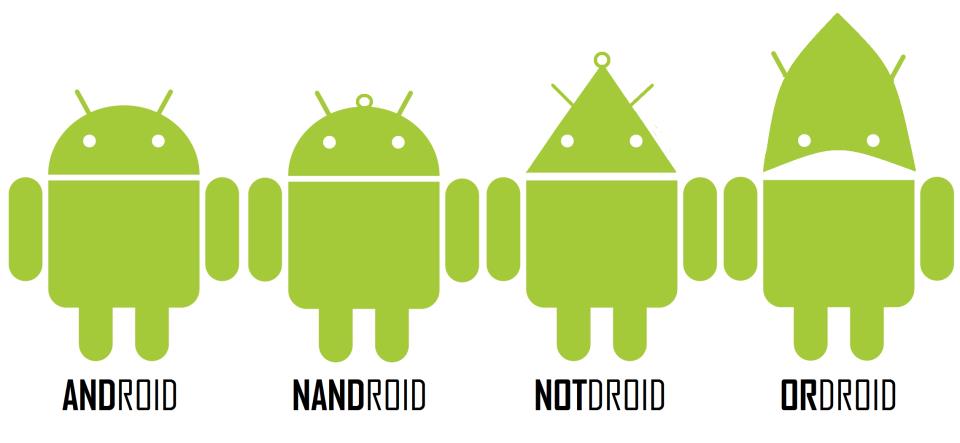
The logicdroid family

Posted by jpluimers on 2021/01/04

Almost complete droid family:

Source: CodeProject – Google+: The whole Droid family

A complete family would include ANDroid, NANDroid, NOTdroid, ORdroid, NORdroid, XORdroid, XNORdroid, so it’s missing the 74266.

Based on the 2011 ANDroid NANDroid NOTdroid ORdroid idea that got a picture in 2012:

–jeroen

Read the rest of this entry »

Posted in Android Devices, Fun, Power User | Leave a Comment »

Android: measuring sound levels

Posted by jpluimers on 2020/11/30

Two Android apps I tried that work quite OK for measuring dBA or Sound Pressure Level:

Measuring sound levels is not easy, especially the calibration is important. That’s why professional devices are relatively expensive.

These are no full replacements for those professional devices, but the first comes close enough for me.

–jeroen

Posted in Android Devices, LifeHacker, Power User | Leave a Comment »

Do you like/use the Slate font by OnePlus? Do you prefer it over Roboto? – Quora

Posted by jpluimers on 2020/11/02

No, I do not like the OnePlus Slate font, despite the lower x-height.

Background:

The fonts (images from Wikipedia):

Roboto – Wikipedia

Slate (typeface) – Wikipedia

–jeroen

Read the rest of this entry »

Posted in Android Devices, Font, LifeHacker, OnePlus Five, OnePlus Six, Power User | Leave a Comment »

Best android apps for zabbix – AndroidMeta

Posted by jpluimers on 2020/05/28

If I land a project using Zabbix again, one of the things I need to look into is [WayBackBest android apps for zabbix – AndroidMeta.

–jeroen

Posted in *nix, Android, Android Devices, Development, Linux, Mobile Development, Monitoring, Power User, Zabbix | Leave a Comment »

If I need to analyse power usage on my Android

Posted by jpluimers on 2020/03/20

A while ago, I had a power issue that somehow resolved itself before I could dig deeper into it, so for next time:

Via Roderick Gadellaa.

–jeroen

Posted in Android Devices, OnePlus Five, Power User | Leave a Comment »

How to factory reset the OnePlus 2 – AndroidPIT

Posted by jpluimers on 2020/03/02

The software based reset worked perfectly for me: [WayBack]How to factory reset the OnePlus 2 – AndroidPIT

–jeroen

Posted in Android Devices, OnePlus Two, Power User | Leave a Comment »

Commander One review: A superior alternative to Android File Transfer on Mac

Posted by jpluimers on 2020/01/10

On my list of software to try: [WayBackCommander One review: A superior alternative to Android File Transfer on Mac

Via: [WayBack] Looks like a must-have for anyone using a Mac (with MacOS) and an Android phone. – Roderick Gadellaa – Google+

–jeroen

Posted in Android, Android Devices, Apple, Development, iMac, Mac, Mac OS X / OS X / MacOS, MacBook, MacBook Retina, MacBook-Air, MacBook-Pro, MacMini, macOS 10.12 Sierra, macOS 10.13 High Sierra, Mobile Development, Software Development | Leave a Comment »

How to text from your computer with Android Messages – The Verge

Posted by jpluimers on 2019/12/30

Boy, I totally missed this was possible: [WayBack] How to text from your computer with Android Messages – The Verge

Texting from the web gives you a lot more flexibility in how and where you can continue conversations. Here’s how to set it up and get started.

  1. Make sure you’ve got the latest version of Android Messages installed on your phone.
  2. Go to messages.android.com on the computer or other device you want to text from. You’ll see a big QR code on the right side of this page.
  3. Open up Android Messages on your smartphone. Tap the icon with three vertical dots at the top and to the far right. You should see a “Messages for web” option inside this menu. If you don’t, just give it some time. Google is rolling out the feature gradually to everyone over the next week.
  4. Tap “Scan QR code” and point your phone’s camera at the QR code on your other device. In less than a second, your phone will vibrate and the two will be linked up. You should notice your conversations show up in the left column of the browser window. Google says that “conversation threads, contacts, and other settings will be encrypted and cached on your browser.”
    Note: this doesn’t mean your actual text conversations are encrypted. They’re not.


–jeroen

Posted in Android Devices, Chrome, Google, LifeHacker, Power User | Leave a Comment »

Hiding your number when calling from an Android phone

Posted by jpluimers on 2019/12/13

Via [WayBack] This was well hidden outside the regular Anrdoid settings I was trying at first. You need to start with the stock Android phone app, then go to settings… – Jeroen Wiert Pluimers – Google+.

The steps are in the images below, starting from the stock Android phone dialing app.

It helped solving this problem:

[WayBack] Twitter thread

@jpluimers: A friend of mine cannot receive anonymous calls: his #OnePlusOne on @KPNwebcare with latest Android available for it does not ring, not even in safe mode. But calls do appear in recent calls list. This used to work in the past months ago. Any tips?

@KPNwebcare: I suggest he try his SIM-card in a different phone to determine if the problem persists. This helps us figure out if the problem is related to the or our network. If the problem remains then I recommend that your friend contacts us directly!

@jpluimers: OK. I will assist him doing this. Thanks!

@jpluimers: Thanks for the offer. Enjoy your weekend. Somehow it’s the device. To be continued…

@jpluimers: After trying to reset many individual settings, the only thing that worked was a complete phone reset then restore apps from backup. Of course not all apps backup just as well, but that got us 90% with only 10% of manual configuration left. Phew (: And thanks for helping us out.

–jeroen

Read the rest of this entry »

Posted in Android Devices, Power User | Leave a Comment »