Archive for the ‘OS X 10.8 Mountain Lion’ Category
Posted by jpluimers on 2013/10/18
Martin Millstam posted this on Google Groups:
I figured out that it was the number of active downloads.
Not very intuitive as I first thought it was pending updates to Chrome, then to Extensions.
It turned out to be the number of active downloads.
It wasn’t intuitive for me either (:
–jeroen
via: On Mac, Chrome dock Icon shows a number on it: what does this mean? – Google Groups.
Posted in Apple, Chrome, Google, Mac, Mac OS X / OS X / MacOS, Mac OS X 10.4 Tiger, Mac OS X 10.5 Leopard, Mac OS X 10.6 Snow Leopard, Mac OS X 10.7 Lion, OS X 10.8 Mountain Lion, Power User | Leave a Comment »
Posted by jpluimers on 2013/10/04
One of the things that bugged me when using Mac OS X after years of Windows usage was that the Tab key doesn’t focus buttons in dialogs.
Luckily, there is a setting for that, which by default is off.
Steps (press on a screenshot to enlarge):
Read the rest of this entry »
Posted in Apple, Keyboards and Keyboard Shortcuts, Mac, Mac OS X / OS X / MacOS, Mac OS X 10.4 Tiger, Mac OS X 10.5 Leopard, Mac OS X 10.6 Snow Leopard, Mac OS X 10.7 Lion, MacBook, MacBook-Air, MacBook-Pro, OS X 10.8 Mountain Lion, Power User | Leave a Comment »
Posted by jpluimers on 2013/09/13
I wish I had kept an eye on it after it was announced (which was 3.5 years ago, but not very stable): The Youtube HTML5 viewer trial.
It has come a long way since then. Full screen it is still not as good as the official one, but the main attraction introduced since is: configurable playback speed!
Yes, you can choose playback at 25%, 50%, 100%, 150% or 200% of the original speed. Ideal for lectures or watching replays of conference sessions.
Quote from the life hacker post LifeHacker on this:
Read the rest of this entry »
Posted in Apple, Chrome, Firefox, Internet Explorer, Mac, Mac OS X / OS X / MacOS, Mac OS X 10.7 Lion, Opera, OS X 10.8 Mountain Lion, Power User, Web Browsers, Windows, Windows 7, Windows 8 | Leave a Comment »
Posted by jpluimers on 2013/07/31
Interesting:
Dialogue is a simple Mac application that uses bluetooth to connect your Mac with your phone. It allows you to answer and make normal phone calls over your Mac.
–jeroen
via: Mac App Store – Dialogue.
Posted in Apple, Mac, Mac OS X / OS X / MacOS, MacBook, MacBook Retina, MacBook-Air, MacBook-Pro, OS X 10.8 Mountain Lion, Power User | Leave a Comment »
Posted by jpluimers on 2013/07/12
Though Apple prominently advertises with the OS X name, they give Mac users a hard time finding it:
None of the built in options like “About this Mac” or “Software Update…” tell you the OS X name. They only tell you the OS X version number.
So I grabbed this list from the OS X – Wikipedia, the free encyclopedia. article:
- Public Beta: “Kodiak”
- Version 10.0: “Cheetah”
- Version 10.1: “Puma”
- Version 10.2: “Jaguar”
- Version 10.3: “Panther”
- Version 10.4: “Tiger”
- Version 10.5: “Leopard”
- Version 10.6: “Snow Leopard”
- Version 10.7: “Lion”
- Version 10.8: “Mountain Lion”
This list was correct at the time of writing, but Wikipedia probably keeps a better track at updating than I do, so after publication my list might lag behind.
–jeroen
via OS X – Wikipedia, the free encyclopedia.
Posted in Apple, Mac, Mac OS X / OS X / MacOS, Mac OS X 10.4 Tiger, Mac OS X 10.5 Leopard, Mac OS X 10.6 Snow Leopard, Mac OS X 10.7 Lion, OS X 10.8 Mountain Lion, Power User | Leave a Comment »
Posted by jpluimers on 2013/07/08
When doing a lot of remote desktop and VM work from a Mac to Windows machines, the Mission Control shortcuts (like Ctrl Up/Down) often get in the way.
Since I hardly use Mission Control anyway (I run VMs and remote machines to really cut dependencies: far stronger than multiple desktops), I just disabled all the Mission Control keyboard shortcuts you see here:
Read the rest of this entry »
Posted in Apple, Keyboards and Keyboard Shortcuts, Mac, Mac OS X / OS X / MacOS, MacBook, MacBook Retina, MacBook-Air, MacBook-Pro, OS X 10.8 Mountain Lion, Power User, Windows, Windows 7, Windows 8, Windows Server 2000, Windows Server 2003, Windows Server 2003 R2, Windows Server 2008, Windows Server 2008 R2, Windows Vista, Windows XP | Leave a Comment »
Posted by jpluimers on 2013/07/05
Posted in Apple, IPSec, Mac, Mac OS X / OS X / MacOS, Mac OS X 10.7 Lion, MacBook, MacBook Retina, MacBook-Air, MacBook-Pro, Network-and-equipment, OS X 10.8 Mountain Lion, Power User, PPTP, VPN | Leave a Comment »
Posted by jpluimers on 2013/05/13
Edit:
After writing this, DSA got deprecated then later removed. See [WayBack] Secure Secure Shell.
When working with SSH private/public keys (often because of ssh-keygen), and using DSA for auhtentication, these are the relevant files:
- $HOME/.ssh/id_dsa:
(on the local system)
The $HOME/.ssh/id_dsa file contains the protocol version 2 DSA authentication identity of the user.
- $HOME/.ssh/id_dsa.pub:
(on the local system)
The $HOME/.ssh/id_dsa.pub file contains the DSA public key for authentication when you are using the SSH protocol version 2. A user should copy its contents in the $HOME/.ssh/authorized_keys file of the remote system where a user wants to log in using DSA authentication.
- $HOME/.ssh/authorized_keys:
(on the remote system)
The $HOME/.ssh/authorized_keys file contains authorized DSA public keys (each line is the contents of a $HOME/.ssh/id_dsa.pub file) of users on systems that are auhorized to login on the remote system.
Important:
Be sure to transfer the contents of the local $HOME/.ssh/id_dsa.pub file to the remote system in a secure way.
–jeroen
via ssh-keygen – Wikipedia, the free encyclopedia.
Posted in *nix, Apple, Cygwin, Endian, Linux, Mac, Mac OS X / OS X / MacOS, Mac OS X 10.4 Tiger, Mac OS X 10.5 Leopard, Mac OS X 10.6 Snow Leopard, Mac OS X 10.7 Lion, OS X 10.8 Mountain Lion, Power User | Leave a Comment »
Posted by jpluimers on 2013/05/10
Finder on your Mac by default does not show hidden files, and the console has vi, which lots of people find awkward to use.
There is an easy trick to open a hidden file like ~/.bash_profile (for instance to add an alias) with a visual text editor.
Just execute this in your terminal:
- Always with TextEdit
open -e ~/.bash_profile
- For the default text editor (usually TextEdit)
open -t ~/.bash_profile
- For a specific text editor (in this cast TextWrangler)
open -b com.barebones.textwrangler ~/.bash_profile
The man open(1) page has more information on the parameters you can pass to open.
–jeroen
PS: You can teach Finder to Quickly show and hide hidden files | Finder, Terminal | Mac OS X Tips.
Posted in Apple, bash, Development, Mac, Mac OS X / OS X / MacOS, Mac OS X 10.4 Tiger, Mac OS X 10.5 Leopard, Mac OS X 10.6 Snow Leopard, Mac OS X 10.7 Lion, MacBook, MacBook-Air, MacBook-Pro, OS X 10.8 Mountain Lion, Power User, Scripting, Software Development | 6 Comments »
Posted by jpluimers on 2013/03/27
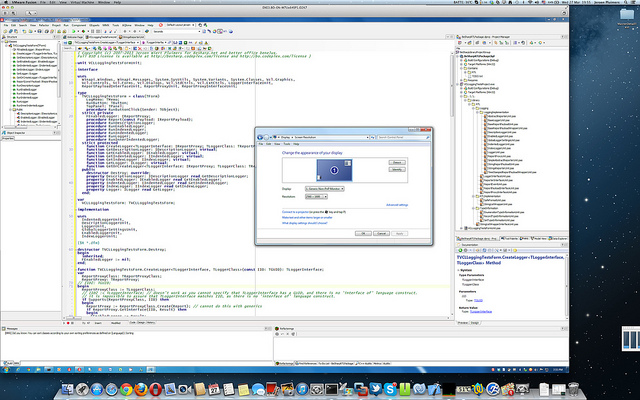
I was amazed that this is still usable:
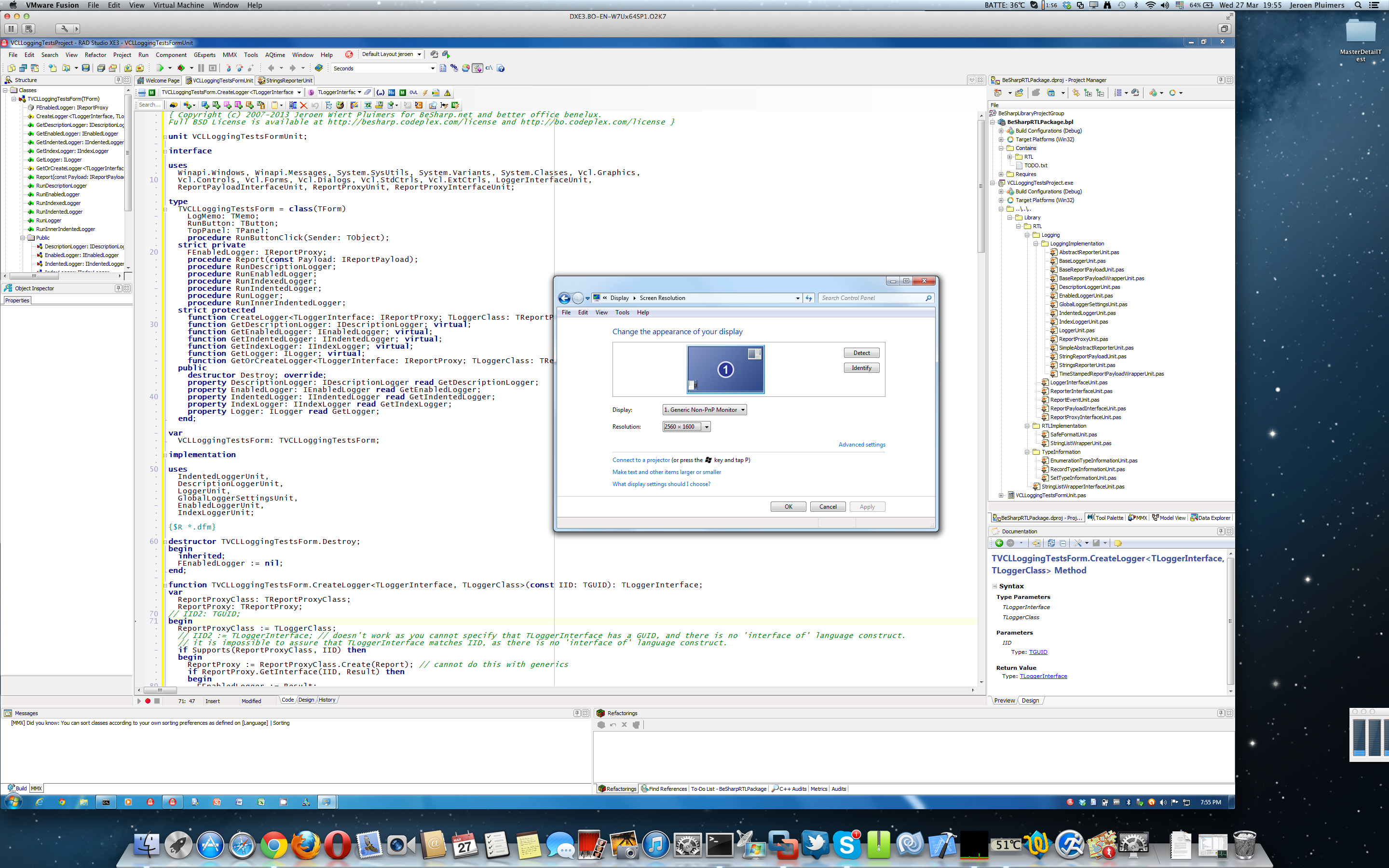
You can even run VMware Fusion 4 full screen at 2880×1800, but I prefer to have the Mac Desktop and Dock to be visible. I didn’t have any of the VMware Fusion 4 issues mentioned here.
So the only thing you need VMware Fusion 5 for is Windows 8 support.
You need SwitchResX to get the Retina MacBook to use 2880×1800 at all (otherwise you get 1920×1200 at 1.5 scale factor, which is also a 16:10 display ratio).
It really runs 5+ hours on one battery charge, which is much longer than my ThinkPad W701.
All in all, I’m very happy with this setup.
--jeroen
PS:
via: Screen Shot 2013-03-27 at 19.55.39 | Flickr – Photo Sharing!.
Click on the image or here for full size image.
Posted in Apple, Delphi, Delphi XE3, Development, Mac, Mac OS X / OS X / MacOS, MacBook, MacBook Retina, OS X 10.8 Mountain Lion, Power User, Software Development | 7 Comments »



 The Wiert Corner - irregular stream of stuff