Archive for the ‘MacBook Retina’ Category
Posted by jpluimers on 2013/12/24
I’ve been wanting this a very long time, so I’m going to install it Right Now ™ (:
Right before X-Mas, Scooter Software did the ANN: Beyond Compare 4.0 beta available on Windows, Linux, and OS X:
Posted: Dec 23, 2013 4:17 PM
Beyond Compare 4.0 beta is now available for testing on Windows, Linux, and OS X.
http://www.scootersoftware.com/beta
This version adds a number of new features: Read the rest of this entry »
Posted in *nix, Apple, Beyond Compare, Delphi, Development, Linux, Mac, Mac OS X / OS X / MacOS, Mac OS X 10.7 Lion, MacBook, MacBook Retina, MacBook-Air, MacBook-Pro, OS X 10.8 Mountain Lion, Power User, Software Development, Source Code Management, SuSE Linux, Windows | Leave a Comment »
Posted by jpluimers on 2013/11/29
Only a few more posts left in my “Missed Schedule” backlog. This one was from September 28, and I just needed it again today as Spotlight had some visual leftovers on one of my VMware Fusion desktops.
Thanks to Stefan Ernst:
The Finder crashed:
killall -KILL Finder
The Dock, DashBoard Widgets, or Spaces (on 10.5/10.6 – Leopard/Snow Leopard) crashed:
killall -KILL Dock
The Menubar crashed/refuses to be clickable, Spotlight misbehaves or some Menu Extra popup does not disappear:
killall -KILL SystemUIServer
One that I found myself: Read the rest of this entry »
Posted in Apple, Mac, Mac OS X / OS X / MacOS, Mac OS X 10.4 Tiger, Mac OS X 10.5 Leopard, Mac OS X 10.6 Snow Leopard, Mac OS X 10.7 Lion, MacBook, MacBook Retina, MacBook-Air, MacBook-Pro, OS X 10.8 Mountain Lion, Power User, SpotLight | Leave a Comment »
Posted by jpluimers on 2013/07/31
Interesting:
Dialogue is a simple Mac application that uses bluetooth to connect your Mac with your phone. It allows you to answer and make normal phone calls over your Mac.
–jeroen
via: Mac App Store – Dialogue.
Posted in Apple, Mac, Mac OS X / OS X / MacOS, MacBook, MacBook Retina, MacBook-Air, MacBook-Pro, OS X 10.8 Mountain Lion, Power User | Leave a Comment »
Posted by jpluimers on 2013/07/08
When doing a lot of remote desktop and VM work from a Mac to Windows machines, the Mission Control shortcuts (like Ctrl Up/Down) often get in the way.
Since I hardly use Mission Control anyway (I run VMs and remote machines to really cut dependencies: far stronger than multiple desktops), I just disabled all the Mission Control keyboard shortcuts you see here:
Read the rest of this entry »
Posted in Apple, Keyboards and Keyboard Shortcuts, Mac, Mac OS X / OS X / MacOS, MacBook, MacBook Retina, MacBook-Air, MacBook-Pro, OS X 10.8 Mountain Lion, Power User, Windows, Windows 7, Windows 8, Windows Server 2000, Windows Server 2003, Windows Server 2003 R2, Windows Server 2008, Windows Server 2008 R2, Windows Vista, Windows XP | Leave a Comment »
Posted by jpluimers on 2013/07/05
Posted in Apple, IPSec, Mac, Mac OS X / OS X / MacOS, Mac OS X 10.7 Lion, MacBook, MacBook Retina, MacBook-Air, MacBook-Pro, Network-and-equipment, OS X 10.8 Mountain Lion, Power User, PPTP, VPN | Leave a Comment »
Posted by jpluimers on 2013/07/03
On my MacBook Retina, SugarSync prompts me to install 2.0.27, and directs me to the SugarSync 2.0 Release Notes that only lists me 2.0.23. Time to skip a version…
–jeroen
via: SugarSync 2.0 Release Notes – desktop and web apps – current release.
Posted in Apple, Mac, MacBook, MacBook Retina, Power User, Windows | Tagged: Apple, technology | Leave a Comment »
Posted by jpluimers on 2013/06/14
One of the big differences between my old 13-inch MacBook Air and (fairly new) 15-inch Retina MacBook Pro was the predictability of battery usage.
The MacBook Air lasts between 4-5 hours. The Retina MacBook anywhere between 3-5 hours.
I finally found out the cause: Chrome, Remote Desktop and VMware Fusion will often (VMware fusion immediately) switch to the discrete NVIDIA GeForce GT 650M graphics. Which uses a lot more battery (but less memory) than the integrated Intel HD 4000. Though both can drive the retina display at 2800×1600 (see Retina MacBook Pro Pushes the Limits of its Graphics Capabilities – Mac Rumors) the latter is better suited for the road warrior.
But still having the need for Chrome, Remote Desktop and VMware Fusion, I wanted a way to block switching to discrete graphics.
Luckily, quite a few sites describe how to do that:
The all come down to installing gfxCardStatus by cody krieger.
Steps to force integrated graphics: Read the rest of this entry »
Posted in Apple, Mac, MacBook, MacBook Retina, MacBook-Air, MacBook-Pro, Power User | 3 Comments »
Posted by jpluimers on 2013/03/27
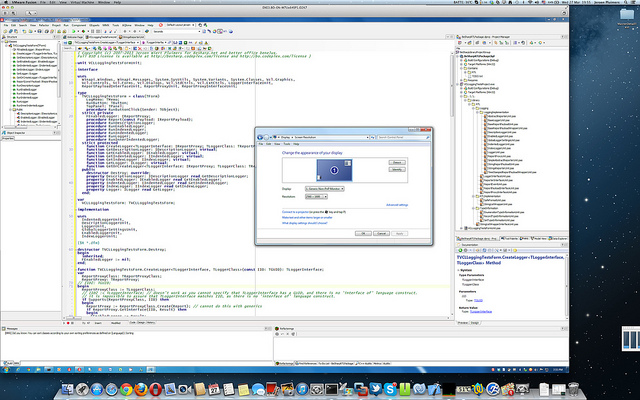
I was amazed that this is still usable:
You can even run VMware Fusion 4 full screen at 2880×1800, but I prefer to have the Mac Desktop and Dock to be visible. I didn’t have any of the VMware Fusion 4 issues mentioned here.
So the only thing you need VMware Fusion 5 for is Windows 8 support.
You need SwitchResX to get the Retina MacBook to use 2880×1800 at all (otherwise you get 1920×1200 at 1.5 scale factor, which is also a 16:10 display ratio).
It really runs 5+ hours on one battery charge, which is much longer than my ThinkPad W701.
All in all, I’m very happy with this setup.
--jeroen
PS:
via: Screen Shot 2013-03-27 at 19.55.39 | Flickr – Photo Sharing!.
Click on the image or here for full size image.
Posted in Apple, Delphi, Delphi XE3, Development, Mac, Mac OS X / OS X / MacOS, MacBook, MacBook Retina, OS X 10.8 Mountain Lion, Power User, Software Development | 7 Comments »
Posted by jpluimers on 2013/03/14
Today, Apple released SMC version 1.1 for MacBook Pro machines that especially Retina owners will like: it fixes their fan issue that has been present for months, but caused some stir lately.
Apple rushed this update. In fact, it is so new, not even EFI and SMC firmware updates for Intel-based Macs lists it.
It affects both mid 2012 and early 2013 models.
This is how to update:
I had the same problem with the basic installation. Just do the OSX updates from the App Store and the problem will disappear.
Lots of users are reporting the below SMC update fixes the fan issue.
It worked for my MacBook Retina too.
–jeroen
via:Apple Releases Retina MacBook Pro SMC Update to Address Gaming Frame Rates and Fan Issues – Mac Rumors.
Posted in Apple, Mac, MacBook, MacBook Retina, Power User | Tagged: Apple, firmware updates, mac rumors, technology | Leave a Comment »



 The Wiert Corner - irregular stream of stuff