Archive for the ‘MacMini’ Category
Posted by jpluimers on 2018/01/12
It looks like when syncing folders between Mac OS X (MacOS X?) and Windows, many directories get empty Icon? files have a size of 0 bytes.
None of these directories had custom icons, so I’m inclined to remove them all from the Google Drive folder:
find . -name 'Icon*' -size 0 -print0 | xargs -0 rm
as [WayBack] Didier Trosset answered at [WayBack] How to delete many 0 byte files in linux? – Stack Overflow
Before I do that, I need to read these in more detail:
–jeroen
Posted in Apple, Google, GoogleDrive, iMac, Mac, Mac OS X / OS X / MacOS, MacBook, MacBook Retina, MacBook-Air, MacBook-Pro, MacMini, OS X 10.10 Yosemite, OS X 10.11 El Capitan, OS X 10.9 Mavericks, Power User | Leave a Comment »
Posted by jpluimers on 2017/12/01
Free and – unlike the also free [WayBack] dupeGuru – finds duplicate files – hasn’t crashed on my system yet or fails to add folders:
Read reviews, compare customer ratings, see screenshots, and learn more about Duplicate File Finder for files & folders. Download Duplicate File Finder for files & folders for Mac OS X 10.9 or later and enjoy it on your Mac.
[WayBack] Duplicate File Finder for files & folders on the Mac App Store
–jeroen
Posted in Apple, iMac, Mac, Mac OS X / OS X / MacOS, MacBook, MacBook Retina, MacBook-Air, MacBook-Pro, MacMini, OS X 10.10 Yosemite, OS X 10.11 El Capitan, OS X 10.9 Mavericks, Power User | Leave a Comment »
Posted by jpluimers on 2017/12/01
cd /Volumes/Backup/Backups.backupdb/Joshua\ Priddle’s\ MacBook\ Pro/Latest/Macintosh\ HD/Users/priddle
tmutil restore -v secret_docs.txt ~/
Learned from [WayBack] Restoring files from OS X Time Machine with Terminal.app:
- do not use
cp as it will give you wrong permissions
- do use
tmutil
More elaborate steps (including finding the backup in the first place) is at [WayBack] Commandline restoration of a file in Time Machine on OS X | Hacks for Macs
–jeroen
Posted in Apple, iMac, Mac, Mac OS X / OS X / MacOS, Mac OS X 10.4 Tiger, Mac OS X 10.5 Leopard, Mac OS X 10.6 Snow Leopard, Mac OS X 10.7 Lion, MacBook, MacBook Retina, MacBook-Air, MacBook-Pro, MacMini, macOS 10.12 Sierra, OS X 10.10 Yosemite, OS X 10.11 El Capitan, OS X 10.8 Mountain Lion, OS X 10.9 Mavericks, Power User | Leave a Comment »
Posted by jpluimers on 2017/11/17
The first trick works for WinBox 3.7 on Mac [download], the second doesn’t.
First trick:
Read the rest of this entry »
Posted in Apple, Hardware, iMac, Mac, Mac OS X / OS X / MacOS, MacBook, MacBook Retina, MacBook-Air, MacBook-Pro, MacMini, MikroTik, Network-and-equipment, OS X 10.11 El Capitan, Power User, routers, WinBox | Leave a Comment »
Posted by jpluimers on 2017/11/17
I have the Atom editor and was wondering how you can open a file or folder from the terminal in Atom. I am using a Mac. I am looking for a way to do this: atom . (opens folder) atom file.js (
The answer to it isn’t any good any more (since then, Atom has evolved), but this comment works splendid:
I solved the issue by choosing “Install Shell Commands” under the “Atom” menu.
It will add a script in /usr/local/bin/atom that starts Atom with the parameters you entered.
Thanks [WayBack] rxgx!
[WayBack] github – Open Atom editor from command line – Stack Overflow
–jeroen
PS: Reminder to self to add a screenshot.
Posted in Apple, atom editor, Mac, Mac OS X / OS X / MacOS, MacBook, MacBook Retina, MacBook-Air, MacBook-Pro, MacMini, macOS 10.12 Sierra, OS X 10.11 El Capitan, Power User, Text Editors | Leave a Comment »
Posted by jpluimers on 2017/10/27
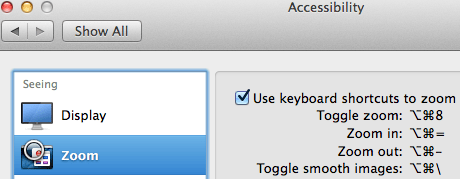
Accessibiity -> Zoom -> enable checkbox” class=”size-medium” /> Preferences -> Accessibiity -> Zoom -> enable checkbox
I didn’t know this was built-in since Mountain Lion and up, but it is, is startable from the keyboard and it’s tremendously convenient when presenting: [WayBack]: OS X Mountain Lion: Zoom content on the screen.
TL;DR:
- System Prefrecences
- Accesibility
- Zoom
- Checkbox
–jeroen
Posted in Apple, iMac, Keyboards and Keyboard Shortcuts, Mac, Mac OS X / OS X / MacOS, MacBook, MacBook Retina, MacBook-Air, MacBook-Pro, MacMini, macOS 10.12 Sierra, OS X 10.10 Yosemite, OS X 10.11 El Capitan, OS X 10.8 Mountain Lion, OS X 10.9 Mavericks, Power User | Leave a Comment »
Posted by jpluimers on 2017/08/28

CompuLab 4K Display Emulator (fit-Headless 4K)
The MacMini is a bit dumb as it won’t enable the GPU when there is no display attached. Which means headless operation is cumbersome as display rendering is very slow.
There are a few tricks of which the off-the-shelve HDMI solutions work best.
You can buy them at Amazon:

CompuLab Display Emulator (fit-Headless)
Sources:
Basically the trick to simulate a monitor with a dummy load works for other display connectors as well (most of them work fine with 75 ohm resistors, usually a bit lower or higher works just as well):
Read the rest of this entry »
Posted in Apple, Mac, Mac OS X / OS X / MacOS, MacMini, OS X 10.10 Yosemite, OS X 10.11 El Capitan, OS X 10.9 Mavericks, Power User | Leave a Comment »
Posted by jpluimers on 2017/08/11
Posted in Apple, iMac, Mac, Mac OS X / OS X / MacOS, Mac OS X 10.5 Leopard, Mac OS X 10.6 Snow Leopard, Mac OS X 10.7 Lion, MacBook, MacBook Retina, MacBook-Air, MacBook-Pro, MacMini, OS X 10.10 Yosemite, OS X 10.11 El Capitan, OS X 10.8 Mountain Lion, OS X 10.9 Mavericks | Leave a Comment »
Posted by jpluimers on 2017/06/12
You can use this package to install OS X on an empty partition, but perhaps more interestingly, you can also use it to upgrade existing OS X installations to a newer version of the OS X. There are many tools and workflows that support the installation of Apple packages; you can use these together with an OS X installation package to upgrade machines to the latest version of OS X.This is especially interesting when used with tools like Munki — you can automate the upgrade of a group of machines while still preserving user data, or offer an upgrade as a “Self-Service”-type option where a user can initiate an OS X upgrade themselves without needing to have administrative rights.
I will probably need this one day.
Source: munki/createOSXinstallPkg: Tools for packaging OS X installers
–jeroen
Posted in Apple, iMac, Mac, Mac OS X / OS X / MacOS, MacBook, MacBook Retina, MacBook-Air, MacBook-Pro, MacMini, OS X 10.10 Yosemite, OS X 10.11 El Capitan, OS X 10.9 Mavericks, Power User | Leave a Comment »
Posted by jpluimers on 2017/03/31
In addition to my post about Mac OS X: restarting Google Drive when it shows a spinning wheel, restarting a hanging Tunnelblick is even easier:
killall Tunnelblick

open -a Tunnelblick
–jeroen
Posted in Apple, bash, Development, iMac, Mac, Mac OS X / OS X / MacOS, MacBook, MacBook Retina, MacBook-Air, MacBook-Pro, MacMini, OS X 10.10 Yosemite, OS X 10.11 El Capitan, OS X 10.9 Mavericks, Power User, Scripting, Software Development | Leave a Comment »


 The Wiert Corner - irregular stream of stuff