Archive for the ‘Beyond Compare’ Category
Posted by jpluimers on 2025/12/10
A while ago I got an error 103 using both Beyond Compare. That did not whos the connection log or error reason, but WinSCP did: it mentioned unexpected output during the logon.
I got reminded that I had already solved this error before via [Wayback/Archive] SSH login works but SFTP login doesn’t – Server Fault (thanks [Wayback/Archive] qreon and [Wayback/Archive] Paulus):
Read the rest of this entry »
Posted in *nix, *nix-tools, bash, bash, Beyond Compare, Communications Development, Development, Internet protocol suite, Power User, Scripting, SFTP, Software Development, SSH, TCP, Windows, WinSCP | Leave a Comment »
Posted by jpluimers on 2021/06/23
There is a short thread mentioning [WayBack] Disable Filtered Gap – Scooter Forums (Issues concerning Text Compare sessions.)
It is the feature that when you select “Diffs” or “Same” on the toolbar on menu in a “Text Compare” (or similar, like XML compare), you see only the differences (or equalities when you selected “Same”).
There also will be small plus signs (+) in the gutter with the hover text “Expand Filtered Gap” on it to expand that gap and show the equalities (or differences when you selected “Same”).
There are two problems that basically make this feature very hard to use, which both stem from the need to view context around a difference in order to understand the proper meaning of that difference:
- you cannot expand or collaps the “Filtered Gap” by keyboard
- the “Number of context lines” in the “Text editing” part of the “Options” is not adhered to

Too bad as this could have been such a useful feature.
–jeroen
Posted in Beyond Compare, Development, Power User, Software Development | Leave a Comment »
Posted by jpluimers on 2021/02/03
Sometimes I forget the choco install mnemonics for various tools, so here is a small list below.
Of course you have to start with an administrative command prompt, and have a basic Chocolatey Installation in place.
If you want to clean cruft:
choco install --yes choco-cleaner
Basic install:
choco install --yes 7zip
choco install --yes everything
choco install --yes notepadplusplus
choco install --yes beyondcompare
choco install --yes git.install --params "/GitAndUnixToolsOnPath /NoGitLfs /SChannel /NoAutoCrlf /WindowsTerminal"
choco install --yes hg
choco install --yes sourcetree
choco install --yes sysinternals
For VMs (pic one):
choco install --yes vmware-tools
choco install --yes virtio-drivers
For browsing (not sure yet about Chrome as that one has a non-admin installer as well):
choco install --yes firefox
For file transfer (though be aware that some versions of Filezilla contained adware):
choco install --yes filezilla
choco install --yes winscp
For coding:
choco install --yes vscode
choco install --yes atom
For SQL server:
choco install --yes sql-server-management-studio
For web development / power user:
choco install --yes fiddler
For SOAP and REST:
choco install --yes soapui
If you don’t like manually downloading SequoiaView at gist.github.com/jpluimers/b0df9c2dba49010454ca6df406bc5f3d (e8efd031d667de8a1808d6ea73548d77949e7864.zip):
choco install --yes windirstat
For drawing, image manipulation (paint.net last, as it needs a UI action):
choco install --yes gimp
choco install --yes imagemagick
choco install --yes paint.net
For ISO image mounting in pre Windows 10:
choco install --yes wincdemu
For hard disk management:
choco install --yes hdtune
choco install --yes seatools
choco install --yes speedfan
For Fujitsu ScanSnap scanners (not sure yet this includes PDF support):
choco install --yes scansnapmanager
–jeroen
Posted in 7zip, atom editor, Beyond Compare, Chocolatey, Compression, Database Development, Development, DVCS - Distributed Version Control, Everything by VoidTools, Fiddler, Firefox, Fujitsu ScanSnap, git, Hardware, Mercurial/Hg, Power User, Scanners, SOAP/WebServices, Software Development, Source Code Management, SQL Server, SSMS SQL Server Management Studio, SysInternals, Text Editors, Versioning, Virtualization, VMware, VMware ESXi, vscode Visual Studio Code, Web Browsers, Web Development, Windows | Leave a Comment »
Posted by jpluimers on 2019/12/20
I wrote about [WayBack] XML Pretty Print in Online XML Pretty Print many years ago.
That’s all fine for small XML file and on-line usage.
A while ago however, I had two cases where off-line XML pretty printing turned out to be much easier than online XML pretty printing:
- pretty-print many XML files in one go
- compare large (100 megabyte plus) XML files
So I went searching, especially for a solution that would be available for both nx based platforms (Linux/Mac OS X/etc) and Windows which got me a few options in [WayBack] unix – How to pretty print XML from the command line? – Stack Overflow.
I found [WayBack] tidy to be more practical than [WayBack] xmllint as tidy would split more lines which made it easier for Beyond Compare (that is very much cross platform!) to spot and show the differences.
Not just easier in the sense that the (already excellent) diff engine from Beyond Compare (which really sets it apart from other differencing tools) but very much easier on the eyes as now differences where on lines below each other in stead of 1000s of character positions in one line you had to scroll through.
There is two important things to remember with tidy that both stem from its ancestry (it originates from an HTML):
- you have to specify
-xml
- you have to specify the characterset (even though XML can specify it and without a definition, XML by default is
UTF8, tidy does not know about that)
These were the command-lines I used on Windows to do the pretty printing:
tidy -xml -utf8 QCScaper.test@borland.com.cds.xml > QCScaper.test@borland.com.tidy.cds.xml

xmllint --format QCScaper.test@borland.com.cds.xml > QCScaper.test@borland.com.pretty-printed.cds.xml
Another trick is to write a small Delphi program centered around the FormatXMLData call which has been present since Delphi 2007 (see [WayBack] devnet.pdf), but documented since Delphi 2009 in [WayBack] XMLDoc.FormatXMLData Function.
Example code: [WayBack] delphi – How to reformat XML programmatically? – Stack Overflow.
An alternative is to use OmniXML: [WayBack] delphi – Nice bit of code to format an xml string – Stack Overflow
–jeroen
Related posts:
Read the rest of this entry »
Posted in Beyond Compare, Development, Power User, XML, XML/XSD | Leave a Comment »
Posted by jpluimers on 2019/08/20
I’ve added a few WayBack/Archive.is links to the interesting comments by Zoë Peterson from Scooter Software (of Beyond Compare fame) at [WayBack] … compare two JSON structures and pin-point … the differences – – Nicholas Ring – Google+:
Beyond Compare 4 has an optional “JSON sorted” file format that uses jq to pretty print and sort JSON data before comparing it. It’s not included out of the box yet, but you can get a copy here:
If you’re interested in an actual algorithm and not just an app, I don’t have a suggestion handy, but could dig one up. Tree alignment is more complicated than sequence alignment and we did do research into it, but it was quite a few years ago and didn’t get incorporated into BC. XML alignment algorithms were being actively researched back in the aughts and they should trivially transfer to JSON.
…
It looks like our research mostly ended around 2002, and I wasn’t personally involved in it, so I don’t know how helpful this will be, but here’s what I have:
The general idea in the thread is that JSON – though not as formalised as XML – does have structure, so if you can normalise it, then XML ways of differencing should work.
Normalisation also means that you need to normalise any floating point, date time, escaping, quoting, etc. Maybe not for the faint of heart.
–jeroen
Posted in *nix, *nix-tools, Beyond Compare, Development, diff, JavaScript/ECMAScript, jq, JSON, Power User, Scripting, Software Development, XML, XML/XSD | Leave a Comment »
Posted by jpluimers on 2019/08/02
If you don’t have Beyond Compare available for your platform (or cannot connect via Beyond Compare to it): sebastien/sink: Swiss army knife for directory comparison and synchronization.
The Python script in it does 3-way directory compares on the console.
It is very similar to the Beyond Compare “folder merge” functionality.
–jeroen
Posted in *nix, *nix-tools, Beyond Compare, Power User | Leave a Comment »
Posted by jpluimers on 2018/10/23
For my archive bc.bat it finds Beyond Compare, then starts it with the given command line parameters. It prefers version 4 over version 3 and user settings over system settings:
:begin
@echo off
  setlocal
  IF /I %PROCESSOR_ARCHITECTURE% == amd64 goto :x64
  IF /I %PROCESSOR_ARCHITEW6432% == amd64 goto :x64
  goto :x86
:x64
  :: OS is 64bit
  set hkcuBaseKey=HKEY_CURRENT_USER\Software\Scooter Software\Beyond Compare
  set hklmBaseKey=HKEY_LOCAL_MACHINE\SOFTWARE\Wow6432Node\Scooter Software\Beyond Compare

  goto :findBC
:x86
  :: OS is 32bit
  set hkcuBaseKey=HKEY_CURRENT_USER\Software\Scooter Software\Beyond Compare
  set hklmBaseKey=HKEY_LOCAL_MACHINE\SOFTWARE\Scooter Software\Beyond Compare
  goto :findBC
:findBC
  :: https://gist.github.com/rojepp/634908
  :: http://stackoverflow.com/questions/5369528/windows-batch-reg-query-key-value-to-a-variable-but-do-not-display-error-if-key
  set SupportedBeyondCompareVersions=3, 4
  for %%v in (%SupportedBeyondCompareVersions%) do (
    for /f "usebackq tokens=2* delims= " %%c in (`reg query "%hkcuBaseKey% %%v" /v ExePath 2^>NUL`) do (
      call :do set bcExe="%%d"
    )
  )
  if not [%bcExe%]==[] goto :foundBC
    for /f "usebackq tokens=2* delims= " %%c in (`reg query "%hkcuBaseKey%" /v ExePath 2^>NUL`) do (
      call :do set bcExe="%%d"
    )
  if not [%bcExe%]==[] goto :foundBC
  for %%v in (%SupportedBeyondCompareVersions%) do (
    for /f "usebackq tokens=2* delims= " %%c in (`reg query "%hklmBaseKey% %%v" /v ExePath 2^>NUL`) do (
      call :do set bcExe="%%d"
    )
  )
  if not [%bcExe%]==[] goto :foundBC
    for /f "usebackq tokens=2* delims= " %%c in (`reg query "%hklmBaseKey%" /v ExePath 2^>NUL`) do (
      call :do set bcExe="%%d"
    )
:foundBC
  if [%bcExe%]==[] ( echo no bc.exe found in registry) else (
    echo bcExe=%bcExe%
    if exist %bcExe% start "Beyond Compare" %bcExe% %*
    if not exist %bcExe% echo not found: [%bcExe%]
  )
:exit
  endlocal
:end
  goto :eof
:do
  ::echo %*
  call %*
  goto :eof
–jeroen
Posted in Batch-Files, Beyond Compare, Development, Power User, Scripting, Software Development | Leave a Comment »
Posted by jpluimers on 2018/09/03
Just in case I have Plastic SCM without Beyond Compare:
Merge
"C:\Program Files\PlasticSCM5\client\mergetool" -b="%TEMP%\baseFile-guid.pas" -bn="baseSymbolicName" -bh="baseHash" -s="%TEMP%\sourceFile-guid.pas" -sn="srcSymbolicName" -sh="srcHash" -d="...\destinationPath\destinationFile.pas" -dh="destinationHash" -a -r="%TEMP%\resultFile.pas" -t="text" -i="NotIgnore" -e="NONE" -m="forced" -re="NONE" --progress="progressDescription" --extrainfofile="%TEMP%\extraInfoFile.tmp"
Diff
To be done
aa
Merge help (takes about 10 seconds to start):
"C:\Program Files\PlasticSCM5\client\mergetool.exe" --help
---------------------------
Mergetool usage
---------------------------
Usage: mergetool [ | ]

    diffOptions:  []

    mergeOptions:   [] [[] [] ] [] []

        baseFile:            {-b | --base}=
        baseSymbolicName:    {-bn | --basesymbolicname}=
        automatic:           -a | --automatic
        silent:              --silent
        resultFile:          {-r | --result}=
        mergeType:           {-m | --mergeresolutiontype}={onlyone | onlysrc | onlydst | try | forced}

    generalFiles:  []  []

        sourceFile:          {-s | --source}=
        srcSymbolicName:     {-sn | --srcsymbolicname}=
        destinationFile:     {-d | --destination}=
        dstSymbolicName:     {-dn | --dstsymbolicname}=

    generalOptions: [] [] [] []

        defaultEncoding:     {-e | --encoding}={none |ascii | unicode | bigendian | utf7 | utf8}
        comparisonMethod:    {-i | --ignore}={none | eol | whitespaces | eol&whitespaces}
        fileType:            {-t | --filestype}={text/csharp | text/XML | text}
        resultEncoding:      {-re | --resultencoding}={none |ascii | unicode | bigendian | utf7 | utf8}
        progress:            {--progress}=progress string indicating the current progress, for example: Merging file 1/8
        extraInfoFile:       {--extrainfofile}=path to a file that contains extra info about the merge

    Remarks:

        -a | --automatic:    Tries to resolve the merge automatically.
                             If the merge can't be resolved automatically (requires user interaction), the merge tool is shown.
        --silent:            This option must be used combined with the --automatic option.
                             When a merge can't be resolved automatically, this option causes the tool to return immediately
                             with a non-zero exit code (no merge tool is shown).
                             If the tool was able to resolve the merge automatically, the program returns exit code 0.

    Examples:

        mergetool
        mergetool -s=file1.txt -d=file2.txt
        mergetool -s=file1.txt -b=file0.txt --destination=file2.txt
        mergetool --base=file0.txt -d=file2.txt --source=file1.txt --automatic --result=result.txt
        mergetool -b=file0.txt -s=file1.txt -d=file2.txt -a -r=result.txt -e=utf7 -i=eol -t=text/csharp -m=onlyone
---------------------------
OK
---------------------------
The merge extraInfoFile.tmp has a syntax like this:
Source (cs:-#)
    relative-sourceFile from cs:-# created by userName on timeStamp
    Comments: Source changeset description

Base (cs:#)
    relative-baseFile from cs:#@/baseBranch by userName on timeStamp
    Comments: BO's + CRUDS

Destination (cs:#)
    relative-destinationFile from cs@/destinationBranch created by userName on timeStamp
    Comments: Destination changeset description
Where each cs is a change set number.
–jeroen
Posted in Beyond Compare, Development, Encoding, PlasticSCM, Power User, Software Development, Source Code Management | Leave a Comment »
Posted by jpluimers on 2018/08/20
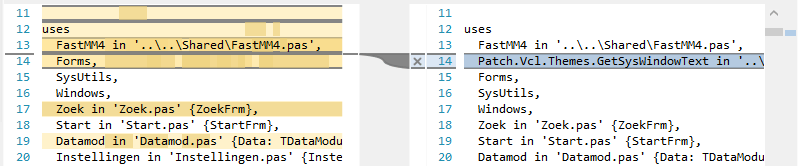
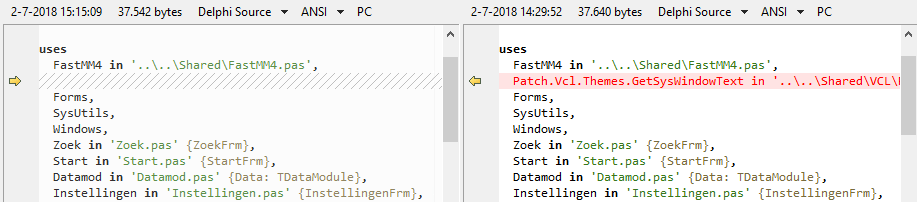
Same difference; two tools.
Plastic SCM compare: lots of clutter
Beyond Compare: just the things that are different.
–jeroen
Posted in Beyond Compare, Development, PlasticSCM, Power User, Source Code Management | 3 Comments »


 The Wiert Corner - irregular stream of stuff