Archive for the ‘Chrome’ Category
Posted by jpluimers on 2021/01/18
 Just learned a new Google Chrome URL chrome://devices/ which lists your Google Cloud devices like printers.
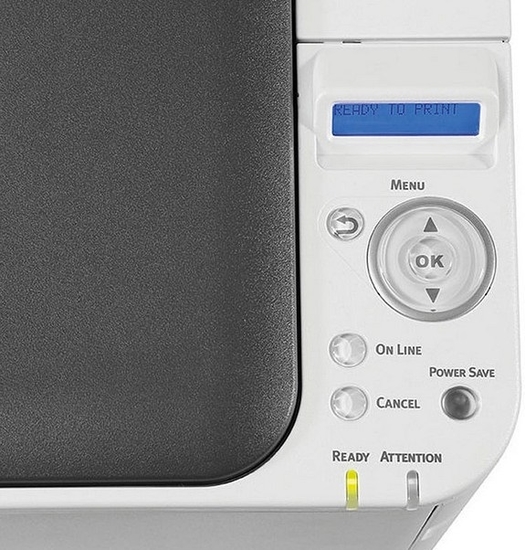
Though in the case of OKI printers, you have to enter your printers at the printer which the Menu button is a painful exercise. [WayBack] oki-c332dn-control-panel_maxwidth.jpg (525×550).
You can also view the device list in https://www.google.com/cloudprint#printers
For some OKI printers (including the MC342 series) you need to update the firmware. For a Mac, you need the below firmware update tool that automagically:
- detects the printers
- finds the firmware on the internet
- updates the printer
Tool: [WayBack] FWUP_020000_10.7.dmg via [WayBack] Firmware Update | OKI Global
–jeroen
Posted in Chrome, Google, Hardware, OKI C332, OKI Printers, Power User | Leave a Comment »
Posted by jpluimers on 2020/11/13
From [Archive.is] Chrome not asking to save or saving passwords? – Google Product Forums
Hemanth M said:
After a lot of playing around, I’ve arrived at an elegant solution. Here are the steps:Steps to make Google Chrome offer to save (prompt) password for a particular site (for e.g abcd.com) and Auto-login the site with the credentials thus saved.
- Go to the given URL ‘abcd.com‘
- Right-click Page Info and disable ‘JavaScript’
- Reload the page.
- Enter the credentials (uid,pwd)
- A prompt appears to save password.
- Click on Save password.
- Auto-Login Extension bubble appears on this page.
At this point it is important because the extension ‘Auto-Login’ (like many other extensions) require JavaScript to be enabled.
- Re-enable the JavaScript for this page and reload the page.
- Now Click on the ‘Auto-Login’ bubble for remembering automatically logging into the site hereafter!
In my case, this was for ESXi credentials. Do not go the cheap way or revealing them inside javascript like these guys:
–jeroen
Posted in Chrome, Chrome, Google, Power User, Web Browsers | Leave a Comment »
Posted by jpluimers on 2020/10/13
[WayBack/Archive.is] Dimensions – Chrome Web Store: A tool for designers to measure screen dimensions
This extension measures the dimensions from your mouse pointer up/down and left/right until it hits a border. So if you want to measure distances between elements on a website this is perfect. It doesn’t really work with images because there the colors change a lot pixel to pixel.
# Images & HTML Elements
Measure between the following elements: images, input-fields, buttons, videos, gifs, text, icons. You can measure everything you see in the browser.
# Mockups
Your designer handed you mockups as PNGs or JPEGs? Just drop them into Chrome, activate Dimensions and start measuring.
# Keyboard Shortcut
You can start and stop dimensions with the ALT + D shortcut.
# Area Boundaries
Wanna get the radius of a circle? Is text standing in your way? Press Alt to measure the dimensions of a connected area.
–jeroen
Via:
Posted in Chrome, Chrome, Development, Google, HTML, Power User, Software Development, Web Browsers, Web Development | Leave a Comment »
Posted by jpluimers on 2020/09/14
Interesting, not just from a GDPR perspective:
EditThisCookie is a cookie manager. You can add, delete, edit, search, protect and block cookies!
[WayBack] EditThisCookie – Chrome Web Store
Via [WayBack] Error 400 on Google sites (YouTube, Maps, Search etc) · Issue #537 · deanoemcke/thegreatsuspender · GitHub
–jeroen
Posted in Chrome, Chrome, Google, LifeHacker, Power User, Web Browsers | Leave a Comment »
Posted by jpluimers on 2020/07/27
 Somehow Firefox is available on ARM by default, but the crash recovery isn’t that awesome.
On my list of things to try is Chrome or Chromium. These links should help me find out if this is possible at all:
On Firefox crash recovery:
–jeroen
Posted in *nix, Chrome, Google, Linux, openSuSE, Power User, SuSE Linux, Tumbleweed | Leave a Comment »
Posted by jpluimers on 2020/07/20
So I wondered why on some tabs, the bookmark bar would never disappear:
Chrome’s default new tab page (NTP) always shows a bookmark bar, even if you turn it off for other pages. You can however install browser extensions which replace the NTP, and the replacements do not automatically get the bookmarks bar (but can with some extra programming).
So for instance Google’s Earth View extension does not show bookmarks, whereas Pinterest’s now does.
Thanks deltab for answering this at [WayBack] google chrome – How to hide the bookmark bar? – Super User
–jeroen
Posted in Chrome, Google, Power User | Leave a Comment »
Posted by jpluimers on 2020/06/25
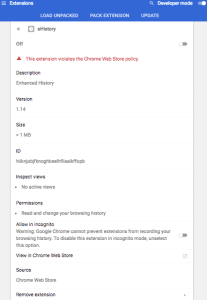 [WayBack] browser – Clearing old browsing data in Chrome instead of newer data – Super User had a few possibilities, but eHistory disappeared from the Chrome store (apparently due to some unknown violation), so the way that works best now is to hack the History database which is a SQLite file as mentioned in
[WayBack] How can I delete all web history that matches a specific query in Google Chrome – Super User: For literal values of “query”…You can even query your Chrome history using SQL. (Firefox too: see below. Of course, the appropriate file path will have to be changed).
If you really want you can hack the history frame chrome://history-frame/: [WayBack] How can I delete all web history that matches a specific query in Google Chrome – Super User
–jeroen
Posted in Chrome, Database Development, Development, Google, Power User, Software Development, SQL | Leave a Comment »
Posted by jpluimers on 2020/06/01
Cool: [WayBack] GitHub – kzahel/web-server-chrome: An HTTP Web Server for Chrome (chrome.sockets API)
This allows you to develop HTTP applications that live in Chrome:
[Archive.is1/Archive.is2] Web Server for Chrome – Chrome Web Store: A Web Server for Chrome, serves web pages from a local folder over the network, using HTTP. Runs offline.
Of course you could to python -m SimpleHTTPServer 8888 or python -m http.server 8888, but this runs within chrome and can be used from inside JavaScript projects.
Features
- serve local files
- configure listening port
- configure listening interface (e.g. localhost or all interfaces)
- custom http handlers possible
- websocket support available
- works nice with chrome.runtime.onSuspend
- options for autostart, start in background, etc etc.
- handles range requests, HEAD, etc
- options for CORS
- optional PUT, DELETE request (for upload files)
- sets MIME types
- can render directory listing
- See relevant options: https://github.com/kzahel/web-server-chrome/blob/master/polymer-ui/options.js
Via [WayBack] This is super useful: A# web #server that runs in #Chrome! Makes it super easy to do local web dev without the hassle of setting up a complex back end s… – Jason Mayes – Google+
–jeroen
Posted in Chrome, Development, Google, JavaScript/ECMAScript, Power User, Scripting, Software Development, Web Development | Leave a Comment »


 Just learned a new Google Chrome URL chrome://devices/ which lists your Google Cloud devices like printers.


 The Wiert Corner - irregular stream of stuff