Archive for the ‘Chrome’ Category
Posted by jpluimers on 2020/06/25
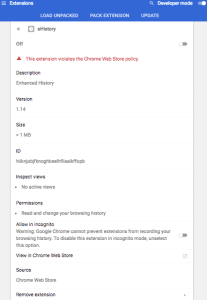 [WayBack] browser – Clearing old browsing data in Chrome instead of newer data – Super User had a few possibilities, but eHistory disappeared from the Chrome store (apparently due to some unknown violation), so the way that works best now is to hack the History database which is a SQLite file as mentioned in
[WayBack] How can I delete all web history that matches a specific query in Google Chrome – Super User: For literal values of “query”…You can even query your Chrome history using SQL. (Firefox too: see below. Of course, the appropriate file path will have to be changed).
If you really want you can hack the history frame chrome://history-frame/: [WayBack] How can I delete all web history that matches a specific query in Google Chrome – Super User
–jeroen
Posted in Chrome, Database Development, Development, Google, Power User, Software Development, SQL | Leave a Comment »
Posted by jpluimers on 2020/06/01
Cool: [WayBack] GitHub – kzahel/web-server-chrome: An HTTP Web Server for Chrome (chrome.sockets API)
This allows you to develop HTTP applications that live in Chrome:
[Archive.is1/Archive.is2] Web Server for Chrome – Chrome Web Store: A Web Server for Chrome, serves web pages from a local folder over the network, using HTTP. Runs offline.
Of course you could to python -m SimpleHTTPServer 8888 or python -m http.server 8888, but this runs within chrome and can be used from inside JavaScript projects.
Features
- serve local files
- configure listening port
- configure listening interface (e.g. localhost or all interfaces)
- custom http handlers possible
- websocket support available
- works nice with chrome.runtime.onSuspend
- options for autostart, start in background, etc etc.
- handles range requests, HEAD, etc
- options for CORS
- optional PUT, DELETE request (for upload files)
- sets MIME types
- can render directory listing
- See relevant options: https://github.com/kzahel/web-server-chrome/blob/master/polymer-ui/options.js
Via [WayBack] This is super useful: A# web #server that runs in #Chrome! Makes it super easy to do local web dev without the hassle of setting up a complex back end s… – Jason Mayes – Google+
–jeroen
Posted in Chrome, Development, Google, JavaScript/ECMAScript, Power User, Scripting, Software Development, Web Development | Leave a Comment »
Posted by jpluimers on 2020/05/25
Interesting: Secure Shell – Chrome Web Store. But does not work behind an SSH blocking firewall, seem more on that below.
Terminal emulator and SSH client.
Secure Shell is an xterm-compatible terminal emulator and stand-alone ssh client for Chrome. It uses Native-Client to connect directly to ssh servers without the need for external proxies.
Secure Shell is a Beta release and has known bugs.
Please read the FAQ, available here: http://goo.gl/3i5AJ.
You can also exchange feedback in the chromium-hterm mailing list, available here: http://goo.gl/RYHiK.
Edit 20240818: the above Googl links will die; the redirects back at the time of writing in 2014 where to:
- [Wayback/Archive] [chromiumos/platform/assets.git] / chromeapps / nassh / doc / faq.txt which first moved to [Wayback/Archive] hterm and Secure Shell – nassh/doc/FAQ.md and later moved to [Wayback/Archive] hterm and Secure Shell – nassh/docs/FAQ.md.
- [Wayback/Archive] chromium-hterm – Google Groups which now has moved to [Wayback/Archive] chromium-hterm – Google Groups.
It is based on [WayBack] GitHub – chromium/hterm: MOVED: Please use the new libapps repo on chromium.googlesource.com insteadf.
With relays, you can tunnel over SSH. Two relays are on github:
Resources:
--jeroen
via: Secure Shell – Chrome Web Store.
Posted in Chrome, Google, Power User | Leave a Comment »
Posted by jpluimers on 2020/05/20
 Cool feature I discovered from [WayBack] How to read network requests in Chrome for new tab or popup window:
chrome://net-internals/#events
It will immediately show all events from all tabs including networking events.
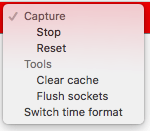
The red bar at the top has a drop down on the right where you can stop them and perform a few other actions.
During or after capture, you can select relevant requests from the list (through checkboxes) so the right of the pane gets their info (which is a lot: not just the request/response content including all headers and cookies, but also any delegates from extensions and their results).
Read the rest of this entry »
Posted in Bookmarklet, Chrome, Google, Power User, Web Browsers | Leave a Comment »
Posted by jpluimers on 2020/04/17
Reminder to self:
Some 5 years after the .zip top-level domain got live, I wonder if there are any domains in it.
Currently, it screws up non-quoted searches in browsers like Chrome, so I wonder if this still holds: .ZIP URLs (or, Why You Should Block Domains on a TLD That Doesn’t Have Any) | Blue Coat
When writing this, there was one domain (nic.zip) and two registrars.
–jeroen
Posted in Chrome, Google, Power User | Leave a Comment »
Posted by jpluimers on 2019/12/30
Boy, I totally missed this was possible: [WayBack] How to text from your computer with Android Messages – The Verge
Texting from the web gives you a lot more flexibility in how and where you can continue conversations. Here’s how to set it up and get started.
…
- Make sure you’ve got the latest version of Android Messages installed on your phone.
- Go to messages.android.com on the computer or other device you want to text from. You’ll see a big QR code on the right side of this page.
- Open up Android Messages on your smartphone. Tap the icon with three vertical dots at the top and to the far right. You should see a “Messages for web” option inside this menu. If you don’t, just give it some time. Google is rolling out the feature gradually to everyone over the next week.
- Tap “Scan QR code” and point your phone’s camera at the QR code on your other device. In less than a second, your phone will vibrate and the two will be linked up. You should notice your conversations show up in the left column of the browser window. Google says that “conversation threads, contacts, and other settings will be encrypted and cached on your browser.”
Note: this doesn’t mean your actual text conversations are encrypted. They’re not.
–jeroen
Posted in Android Devices, Chrome, Google, LifeHacker, Power User | Leave a Comment »
Posted by jpluimers on 2019/08/16
When archiving pages in the WayBack machine, despite Privacy Badger having set to “save no cookies”, it still managed to set truckloads of cookies.
So I used the Chrome settings in chrome://settings/content/cookies to disable cookies and now everything is fine.
–jeroen
Read the rest of this entry »
Posted in Chrome, Google, Internet, InternetArchive, Power User, Privacy, WayBack machine | Leave a Comment »
Posted by jpluimers on 2019/05/27
When you get the response “web.archive.org unexpectedly closed the connection” without even returning an HTTP code, but:
- it works in anonymous mode
- it works with all extensions turned off
then likely there are too many cookies for archive.org or/and web.archive.org: in my case, I had 90 cookies.
Cleaning these cookies out resolved the problem (I used [WayBack] Awesome Cookie Manager for this).
Edit 20231230: Awesome Cookie Manager source repository at [Wayback/Archive] Phatsuo/awesome-cookie-manager: Awesome Cookie Manager.

--jeroen
Posted in Chrome, Google, Internet, InternetArchive, Power User, WayBack machine | Leave a Comment »
Posted by jpluimers on 2019/05/13
[WayBack] Where is the Chrome settings file? – Super User, on various platforms as a folder named Default under:
In Windows: %LocalAppData%\Google\Chrome\User Data\
In OS X: ~/Library/Application Support/Google/Chrome/
In Linux: ~/.config/google-chrome/
The easiest way to find out the actual location is by browsing to chrome://version/ as per [WayBack] google chrome – Disabling “Sign In ” tab on startup – Super User. There the entry Profile Path will show the actual profile location.
Inside that path is a JSON file called preferences which you can edit if Chrome is closed (since Chrome will overwrite it regularly when active).
A few entries I saw are interesting:
- Restoring the session on startup:
    "session": {
      "restore_on_startup": 1
    },
- While running
    "exit_type": "Crashed",
    "exited_cleanly": true,
- After closing
    "exit_type": "Normal",
    "exited_cleanly": true,
A trick to restore the session after you quite Chrome is to replace "exited_cleanly":true with "exited_cleanly":false in the Preferences file.
–jeroen
Posted in Chrome, Google, Power User | Leave a Comment »
Posted by jpluimers on 2019/04/18
I still have to do this every few weeks on all my desktop machines: [WayBack] When +Google Nederland maps only fills none or part of the map tiles… – Jeroen Wiert Pluimers – Google+
When +Google Nederland maps only fills none or part of the map tiles at https://maps.google.nl, but https://maps.google.com works fine, then remove any gsScrollPos cookies from www.google.nl.
I need to do this every couple of days to keep maps.google.nl working.
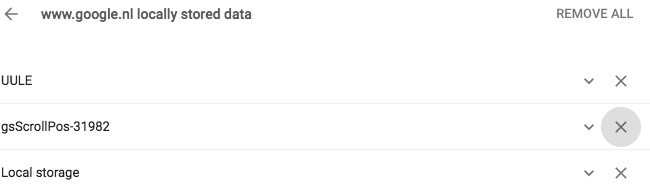
Later I also found it can happen for YouTube, then did more digging for gsScrollPos and found a better workaround: [WayBack] Awesome Cookie Manager where you can just delete the gsScrollPos cookies from all sites in one go.
Even later I found out that this can be one of the causes for the WayBack machine giving an error 400 when archiving. A more common reason however is that many archived web-pages try to create cookies in the web.archive.com subdomain resulting in the same problem.
The cause seems to be the Great Suspender plugin which should be fixed by now, but might not automatically update to the latest version. See:
Pending a new Great Suspender release, below is a quick way to manually remove them if you are into SQL scripting for sqlite. It basically comes down to executing the below statement when Chrome is closed:
delete from cookies where name like 'gsScrollPos-%'
Edit 20231230: Awesome Cookie Manager source repository at [Wayback/Archive] Phatsuo/awesome-cookie-manager: Awesome Cookie Manager.
--jeroen
Posted in Chrome, Google, GoogleMaps, Internet, InternetArchive, Power User, WayBack machine | Leave a Comment »


 [WayBack] browser – Clearing old browsing data in Chrome instead of newer data – Super User had a few possibilities, but eHistory disappeared from the Chrome store (apparently due to some unknown violation), so the way that works best now is to hack the History database which is a SQLite file as mentioned in


 The Wiert Corner - irregular stream of stuff