The Wiert Corner – irregular stream of stuff

Jeroen W. Pluimers on .NET, C#, Delphi, databases, and personal interests

  • My badges

  • Twitter Updates

  • My Flickr Stream

  • Pages

  • All categories

  • Enter your email address to subscribe to this blog and receive notifications of new posts by email.

    Join 1,862 other subscribers

Archive for the ‘Google’ Category

google chrome – How can I selectively disable paste blockers – Super User

Posted by jpluimers on 2021/04/16

For my link archive: [WayBack] google chrome – How can I selectively disable paste blockers – Super User.

Preliminary testing shows that Chrome Extension [Archive.is] “Don’t Fuck with Paste” works with eendagskentekenbewijsaanvragen.rdw.nl

–jeroen

Posted in Chrome, Chrome, Firefox, Google, Power User, Web Browsers | Leave a Comment »

Google Drive is not telling it secretly moves files to the trash

Posted by jpluimers on 2021/04/12

A while ago, Google Drive told me it was out of storage.

I tried re-syncing, and then it suddenly told me a “Drive storage is full” message indicating “You have 3GB in your trash at drive.google.com. Empty your trash or upgrade your storage”.

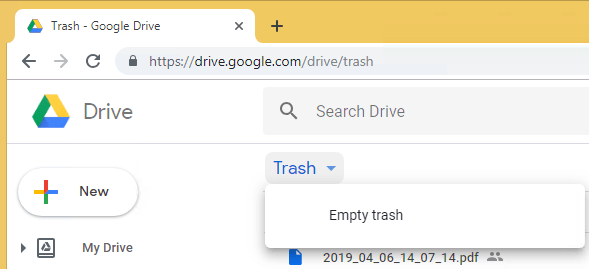
You can view your trash at drive.google.com/drive/trash

Emptying is more tricky than you’d think:

  1. Click on the “Trash word” (not the trash icon!)
  2. Click om “Empty trash”
  3. Conform the action


  4. wait a few seconds, as often the trash will fill itself up again
  5. if it refilled: repeat from step 2.
  6. refresh your browser screen, as often then the trash will refill
  7. if it refilled: repeat from step 2.

The trash contained thousands of temporary PDF files: 3.2 GB, even more than Google Drive indicated.

These are not something I want to keep in the trash. Too bad Google Drive never warned me they were kept there.

On a different account that had way more file changes this saved more than 27 GB.

Maybe time to setup [WayBack] Google Drive Sensor | PRTG Network Monitor User Manual

Might be really interesting, as since 2015, [WayBack] PRTG 100 is Now Available For Free.

–jeroen

Posted in Google, GoogleDrive, Power User | Leave a Comment »

Next time traveling in countries I do not speak the language of: use live (real time!) Google Translate of signage and voice.

Posted by jpluimers on 2021/03/29

Google translate is so useful.

The thread below is [WayBack] Thread by @shanselman: “Anytime I’m traveling I use Google Translate to check translations in real time on signage. You have to see it to belis real and LIVE while you move your camera. @ Paris Sorry, your browser doesn’t support embedded videos Folk […]”

But first one via [WayBack] Hadi Hariri on Twitter: “This is pretty damn cool.… “

[WayBack] Leon Fayer on Twitter: “Another point for Google docs… “

https://twitter.com/papa_fire/status/1111994073609633792

Live translate (Via Danny Thorpe and Mark Miller):

Read the rest of this entry »

Posted in Google, GoogleTranslate, Power User | Leave a Comment »

Is there a way to increase the rate at which Gmail fetches mail from another account? – Web Applications Stack Exchange

Posted by jpluimers on 2021/02/05

[WayBack] Is there a way to increase the rate at which Gmail fetches mail from another account? – Web Applications Stack Exchange got a nice follow-up on Twitter:

This is way better than suggestions from the past: increase the frequency in which email arrives at the POP3 account.

Related: [WayBack] mobile – Can I control how often Gmail polls POP3 accounts for incoming mail? – Web Applications Stack Exchange

–jeroen

Posted in GMail, LifeHacker, Power User | Leave a Comment »

Limiting Google Research to multiple web-sites using the OR and site: operators

Posted by jpluimers on 2021/01/22

I knew Google Search had a site: operator and I thought you could or them together using something like this:

reboot site:superuser.com or site:android.stackexchange.com

To my surprise that returned zero results as in empty result list.

Indeed: the OR needs to be in uppercase to work:

you can use the OR operator to add another site to your query:

reboot site:superuser.com OR site:android.stackexchange.com

–jeroen

Source: How to limit Google search result to a set of websites? – Web Applications Stack Exchange [WayBack]

Posted in Google, GoogleSearch, Power User | Leave a Comment »

Google Chrome URL chrome://devices/ -> your registered Google Cloud devices like printers

Posted by jpluimers on 2021/01/18

Just learned a new Google Chrome URL chrome://devices/ which lists your Google Cloud devices like printers.

Though in the case of OKI printers, you have to enter your printers at the printer which the Menu button is a painful exercise. [WayBackoki-c332dn-control-panel_maxwidth.jpg (525×550).

You can also view the device list in https://www.google.com/cloudprint#printers

For some OKI printers (including the MC342 series) you need to update the firmware. For a Mac, you need the below firmware update tool that automagically:

  1. detects the printers
  2. finds the firmware on the internet
  3. updates the printer

Tool: [WayBackFWUP_020000_10.7.dmg via [WayBackFirmware Update | OKI Global

–jeroen

Posted in Chrome, Google, Hardware, OKI C332, OKI Printers, Power User | Leave a Comment »

Mike Cardwell’s Tech Blog: Twitter to RSS with Google Cloud Function – Grepular

Posted by jpluimers on 2020/12/03

Cool, on my list of things to tinker with: [WayBack] Twitter to RSS with Google Cloud Function – Grepular at Mike Cardwell’s Tech Blog

Source at [WayBack] Mike Cardwell / funcTwitter · GitLab, of which these are the most important bits:

Via [WayBack] Mike Cardwell on Twitter: “Twitter to RSS with Google Cloud Function”

–jeroen

Posted in Cloud Apps, Cloud Development, Development, Google, Google Cloud Function, Internet, Power User, RSS, SocialMedia, Software Development, Twitter | Leave a Comment »

Aaron Tay on Twitter: “trying experimental Wayback Machine Chrome ext from @internetarchive . There’s usual find latest/earliest archived versions and “context”, which just checks whois, annotations from https://t.co/qlqDUJNkIa, tweets etc but “find cited books and papers” is only on wikipedia pages… https://t.co/QqFSQ2HJ3e”

Posted by jpluimers on 2020/11/27

On my list of things to try:

Source: Aaron Tay on Twitter: “trying experimental Wayback Machine Chrome ext from @internetarchive . There’s usual find latest/earliest archived versions and “context”, which just checks whois, annotations from Hypothes.is, tweets etc but “find cited books and papers” is only on wikipedia pages”

–jeroen

Read the rest of this entry »

Posted in Chrome, Chrome, Development, Google, Power User, Software Development, Web Browsers | Leave a Comment »

Using both Google Fi and Google Voice means you need to use two Google accounts on the same phone

Posted by jpluimers on 2020/11/13

A while ago at [WayBack] The only bad thing about getting Google Fi is giving up Google Voice — Mike Elgan wrote

You can use Google Voice or you can use Google Fi, but you can’t use both. I just bought a Google Pixel 3 in order to move off AT&T and onto Google Fi fulltime. (We used to use Google Fi using my wife’s account, but only as a WiFi hotspot while traveling abroad.) It’s kind of a bummer, b

But the first comment has a solution that works, if you use two Google accounts that is:

I have Fi and use Google Voice on the same phone. I have to sign in to Voice with a separate Google account so there are some compromises but it works for how I use it.

–jeroen

Posted in Google, GoogleVoice, LifeHacker, Power User | Leave a Comment »

Chrome not asking to save or saving passwords? – Google Product Forums

Posted by jpluimers on 2020/11/13

From [Archive.is] Chrome not asking to save or saving passwords? – Google Product Forums

Hemanth M said:

After a lot of playing around, I’ve arrived at an elegant solution. Here are the steps:Steps to make Google Chrome offer to save (prompt) password for a particular site (for e.g abcd.com) and Auto-login the site with the credentials thus saved.

  1. Go to the given URL ‘abcd.com
  2. Right-click Page Info and disable ‘JavaScript’
  3. Reload the page.
  4. Enter the credentials (uid,pwd)
  5. A prompt appears to save password.
  6. Click on Save password.
  7. Auto-Login Extension bubble appears on this page.

At this point it is important because the extension ‘Auto-Login’ (like many other extensions) require JavaScript to be enabled.

  1. Re-enable the JavaScript for this page and reload the page.
  2. Now Click on the ‘Auto-Login’ bubble for remembering automatically logging into the site hereafter!

In my case, this was for ESXi credentials. Do not go the cheap way or revealing them inside javascript like these guys:

–jeroen

Posted in Chrome, Chrome, Google, Power User, Web Browsers | Leave a Comment »