The Wiert Corner – irregular stream of stuff

Jeroen W. Pluimers on .NET, C#, Delphi, databases, and personal interests

  • My badges

  • Twitter Updates

  • Pages

  • All categories

  • Enter your email address to subscribe to this blog and receive notifications of new posts by email.

    Join 1,854 other subscribers

Archive for the ‘Google’ Category

Where is the Chrome settings file? – Super User

Posted by jpluimers on 2019/05/13

[WayBack] Where is the Chrome settings file? – Super User, on various platforms as a folder named Default under:

In Windows%LocalAppData%\Google\Chrome\User Data\
In OS X~/Library/Application Support/Google/Chrome/
In Linux~/.config/google-chrome/

The easiest way to find out the actual location is by browsing to chrome://version/ as per [WayBack] google chrome – Disabling “Sign In ” tab on startup – Super User. There the entry Profile Path will show the actual profile location.

Inside that path is a JSON file called preferences which you can edit if Chrome is closed (since Chrome will overwrite it regularly when active).

A few entries I saw are interesting:

  • Restoring the session on startup:
        "session": {
          "restore_on_startup": 1
        },
  • While running
        "exit_type": "Crashed",
        "exited_cleanly": true,
  • After closing
        "exit_type": "Normal",
        "exited_cleanly": true,
    

A trick to restore the session after you quite Chrome is to replace "exited_cleanly":true with "exited_cleanly":false in the Preferences file.

–jeroen

Posted in Chrome, Google, Power User | Leave a Comment »

When +Google Nederland maps only fills one or part of the map tiles…

Posted by jpluimers on 2019/04/18

I still have to do this every few weeks on all my desktop machines: [WayBack] When +Google Nederland maps only fills none or part of the map tiles… – Jeroen Wiert Pluimers – Google+

When +Google Nederland maps only fills none or part of the map tiles at https://maps.google.nl, but https://maps.google.com works fine, then remove any gsScrollPos cookies from www.google.nl.

I need to do this every couple of days to keep maps.google.nl working.
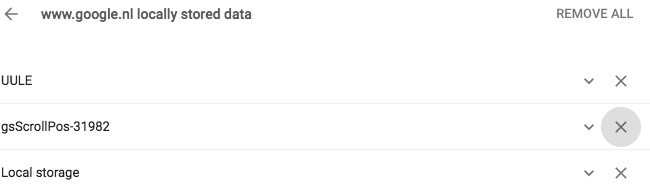
Later I also found it can happen for YouTube, then did more digging for gsScrollPos and found a better workaround: [WayBackAwesome Cookie Manager where you can just delete the gsScrollPos cookies from all sites in one go.

Even later I found out that this can be one of the causes for the WayBack machine giving an error 400 when archiving. A more common reason however is that many archived web-pages try to create cookies in the web.archive.com subdomain resulting in the same problem.

The cause seems to be the Great Suspender plugin which should be fixed by now, but might not automatically update to the latest version. See:

Pending a new Great Suspender release, below is a quick way to manually remove them if you are into SQL scripting for sqlite. It basically comes down to executing the below statement when Chrome is closed:

delete from cookies where name like 'gsScrollPos-%'

Edit 20231230: Awesome Cookie Manager source repository at [Wayback/Archive] Phatsuo/awesome-cookie-manager: Awesome Cookie Manager.

--jeroen

Posted in Chrome, Google, GoogleMaps, Internet, InternetArchive, Power User, WayBack machine | Leave a Comment »

Ich brauch gerade mal Nachhilfe in uBlock Syntax. Wo kann man Beispiele lese…

Posted by jpluimers on 2019/04/08

For my link archive:

On uBlock, uMatrix, Personal Blocklist, Google Chrome Site Settings and others.

–jeroen

Posted in Chrome, Google, Power User | Leave a Comment »

Google Local Guides Nederland after G+

Posted by jpluimers on 2019/04/02

For my information archive as G+ died:

From the (unarchived, but disappeared) Is er al iemand een slack kanaal gestart waar we als localguides heen kunnen?

Read the rest of this entry »

Posted in Google, GoogleMaps, Local Guides, Power User | Leave a Comment »

My message was blocked – Google Product Forums

Posted by jpluimers on 2019/03/18

Cool: https://support.google.com/mail/?p=RfcMessageNonCompliant

So Google does RFC checkking: [Archive.isMy message was blocked – Google Product Forums and shows bot the above link and this in the SMTP protocol:

“Our system has detected that this message is not RFC 5322 compliant,”

After that is the actual reason (for instance no From).

–jeroen

Posted in GMail, Google, Power User | Leave a Comment »

GitHub – ArchiveTeam/googleplus-grab: Archiving Google+.

Posted by jpluimers on 2019/03/18

Soon this is a thing of the past, but for just a few more days, you can help: Archiving Google+.

Either run this project: [WayBack] GitHub – ArchiveTeam/googleplus-grab: Archiving Google+.

Or even better: run the appliance, and help the WayBack machine with any archiving projects setup by the virtual appliance: the [WayBack] ArchiveTeam Warrior – Archiveteam.

See some of their other pages for more background information:

You can donate both to the archive team, and the internet archive:

How is G+ archiving doing?

The tracker is well under way: [WayBack] Googleplus tracker Dashboard. History: archive.is 1; archive.is 2

Read the rest of this entry »

Posted in ArchiveTeamWarrior, Development, G+: GooglePlus, Google, Internet, InternetArchive, Power User, Python, Scripting, SocialMedia, Software Development, WayBack machine | Leave a Comment »

There’s recently been a question about moving G+ Photos to Google Photos. [Th…

Posted by jpluimers on 2019/03/01

[WayBack] There’s recently been a question about moving G+ Photos to Google Photos. [That is, Photos posted to Google+] Just been playing with this. Here’s one… – Julian Bond – Google+

Before I forget:

Here’s one route.

  1. Go to Google Photos settings and set Google Drive –
    Sync photos & videos from Google Drive.
  2. Google Takeout. G+Streams.Photos.
  3. Unzip locally.
  4. Copy the contents of ‘Takeout\Google+ Stream\Photos\Photos from posts‘ to a directory in Google Drive\My Pictures
  5. Fire up “Backup and Sync from Google” to upload
  6. Check the photos are now present in Photos.

And https://get.google.com/albumarchive/

Via: [WayBack] There’s recently been a question about moving G+ Photos to Google Photos. Just been playing with this. Here’s one route. 1. Go to Google Photos setti… – Alan Cox – Google+

–jeroen

Posted in G+: GooglePlus, Google, Google Photos, GoogleDrive, Power User | Leave a Comment »

Bye, Bye, Google · Bogdan Popa

Posted by jpluimers on 2019/02/28

Interesting approach: saying good bye isn’t that hard if you do not share a lot things with other people through it.

[WayBackBye, Bye, Google · Bogdan Popa:

I spent this past weekend de-Google-ifying my life and, despite my expectations, it wasn’t too hard to do. I started by moving all of my websites off of Google App Engine and onto a dedicated box that I had already owned. That was straightforward enough. Next, I removed any Google Analytics snippets from each of them and replaced those with my own analytics server that I had built a while back (it doesn’t store any PII, only aggregate information (and very little of that, too)).

Via:

This might be a viable mail alternative: [WayBack] Reliable Email Provider, Inbox Email & Resource Center | inbox.com

Simplify your online communication with one login to secure email communication, organize conversations, and fine-tune archive searches.

Via: [WayBack] Thank you for following us! It’s been our pleasure to build a community with all of you. In the coming weeks, we’ll be closing this page. Please find us… – Google – Google+

Thank you for following us! It’s been our pleasure to build a community with all of you. In the coming weeks, we’ll be closing this page. Please find us here to stay connected:

www.youtube.com/google
www.twitter.com/google
www.instagram.com/google
www.facebook.com/google

–jeroen

Posted in G+: GooglePlus, Google, LifeHacker, Power User, SocialMedia | Leave a Comment »

Navigation bar notifications for Google web products will go away on March 7, 2019. Via Manage your notifications – Google Account Help

Posted by jpluimers on 2019/02/08

After March 7, 2019, notifications for Google web products will no longer be accessible from the navigation bar.

[WayBackManage your notifications – Google Account Help has more details, but it does not look good.

More Google stuff is dying, almost every month now. For a list of dying products see: [WayBackdidgoogleshutdown.com

Given more is dying, and the increased lack of confidence many people have in Google, more people are abandoning Google. More on that in a future post.

For now: [WayBack] “Manage your Notifications”: After March 7, 2019, notifications for Google web products will no longer be accessible from the navigation bar. If you’d l… – Edward Morbius – Google+

“Manage your Notifications”: After March 7, 2019, notifications for Google web products will no longer be accessible from the navigation bar. If you’d like to receive similar notifications in the future, you can update the notification settings for your individual Google products.

As usual, it’s not clear whether or not this will affect the notifications widget on G+ itself. Google’s standards for clarity in exposition remain uncorrupted. Which is to say: entirely inadequate.

Otherwise, the article addresses Google Photos, Hangouts Chat, and Google+ (G Suite users).

Update: Further close reading suggests that Consumer Google+ will lose Notifications on March 7:

Note: Google+ notifications are available for G Suite users only.

https://support.google.com/accounts/answer/9231049

Via: [WayBack] “Manage your Notifications”: After March 7, 2019, … – Lars Fosdal – Google+

–jeroen

Posted in G+: GooglePlus, Google, Google Photos, GoogleHangouts, Power User, SocialMedia | Leave a Comment »

Local Guides Connect – Help Desk – Local Guides Connect

Posted by jpluimers on 2019/02/01

Reminder to self: Local Guides Nederland moved their [WayBack] G+ community over to [WayBackLocal Guides Connect – Help Desk – Local Guides Connect which is part of [WayBack] Local Guides Connect and powered by [WayBack] Powered by Lithium | Lithium.

Since that is not part of any other social media platform I subscribe to, I will likely only see new stuff when I actively go to that place: hopefully that is more than once a year.

–jeroen

Posted in G+: GooglePlus, Google, GoogleMaps, LifeHacker, Local Guides, Power User | Leave a Comment »