Archive for the ‘Google’ Category
Posted by jpluimers on 2013/03/22
WordPress just posted a nice article on SEO for people that still don’t get that SEO is basically following common sense.
The most important bullets from the article:
SEO DOs and DON’Ts
Do:
- Regularly publish original content.
- Use a few precise categories and tags.
- Write for human ears.
- Build your traffic in smart, organic ways.
- Choose simple, meaningful post slugs.
- Create a descriptive tagline.
- Include keywords selectively.
Don’t:
- Start duplicate sites.
- “Stuff” your site with irrelevant, broad categories, tags, or buzzwords.
- Write with search engines in mind.
- Purchase or exchange meaningless “backlinks.”
- Buy into SEO fads.
- Worry too much about SEO at the expense of writing good content!
Two things I didn’t know about: WordPress generates two sitemaps for each site: both a regular XML sitemap, as well as an XML based news-sitemap.
–jeroen
via: All About SEO on WordPress.com — Blog — WordPress.com.
Posted in Google, GoogleSearch, Power User, SocialMedia, WordPress | Leave a Comment »
Posted by jpluimers on 2013/03/14
Google Reader will not be available after July 1, 2013
Learn more.
Reminder to self:
Edit; this Dutch post covered it nicely: Wat zijn alternatieven voor Google Reader?.
Google stopt per 1 juli met Google Reader – IT Pro – Nieuws – Tweakers.
–jeroen
via:
Posted in About, Google, Personal, Power User | 1 Comment »
Posted by jpluimers on 2013/03/06
Dang! I’ll be in NYC for almost 2 weeks and cannot order a Nexus 4, even when:
– using a VPN to get through a USA IP address
– having configured a USA physical address where we are staying
Why not?
Sorry! Devices on Google Play is not available in your country yet.
We’re working to bring devices to more countries as quickly as possible.
Please check back again soon.
–jeroen
via: Unavailable in your country.
Posted in Google, LifeHacker, Power User | 2 Comments »
Posted by jpluimers on 2013/01/19
I love Google:
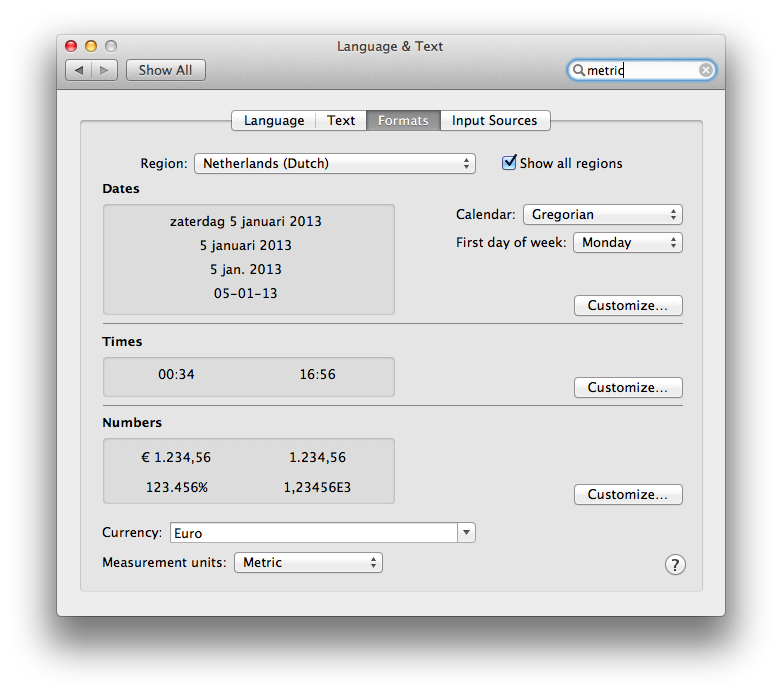
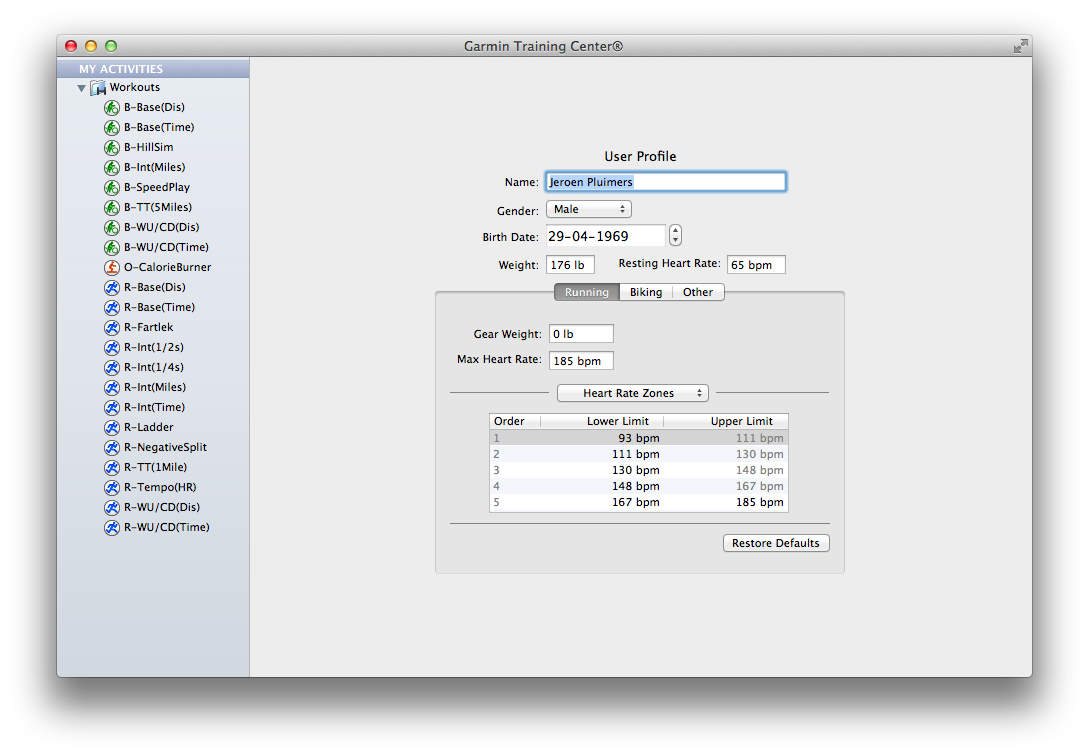
Especially since there is still software like Garmin Training Center for Mac on Mac OS X with – in the System Preferences – the Measurement Units set as Metric, insists on entering weight as lb, and workout distance in miles.
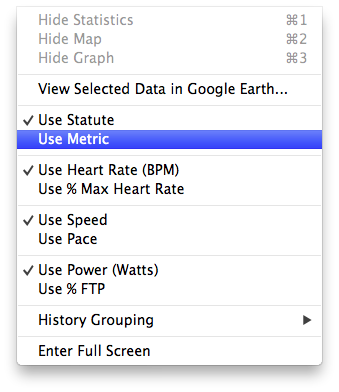
The reason is that Garmin Training Center on Mac OS X has its own “Measurement Units” settings. Where Mac OS lets the system wide setting be either “Metric” or ” US”, Garmin choose between “Metric” and “Statute” (the latter is default, not the OS X setting).
The problem is twofold:
Garmin has head offices and most of their customers outside the USA, so why insist on US units being default, and why not link the setting to the Mac OS X Preference?
UX #fail.
Oh BTW: if you connect your Garmin device, and GTC still indicates “no fitness device was found”, then use a different USB Cable and don’t connect it through a hub: the device is very picky on talking over USB (charging over USB works with virtually any USB cable).

Garmin Training Center on Mac OS X insists in imperial units, even though the system is configured as metric.

Garmin Training Center on Mac OS X has its own “Measurement Units” settings. Where Mac OS lets the system wide setting be either “Metric” or ” US”, Garmin choose between “Metric” and “Statute” (the latter is default, not the OS X setting).

Even after setting the Garmin Training Center to “Metric”, it still lists “Miles” in your workouts.
–jeroen
Posted in Google, GoogleSearch, Opinions, Power User, User Experience (ux) | Tagged: gadgets, garmin, google, imperial units, kg, mac os x, measurement units, metric, os x, software, system preferences, technology, workout | Leave a Comment »
Posted by jpluimers on 2013/01/11
Often while researching, I have a zillion pages open in Chrome. Mentally I have the right search texts in my head, but finding back the really relevant tabs can be a pain. That’s where the Chrome extension Search Plus comes in handy which used to be called FullSearch.
To quote a via FullSearch: Search Any Text String Across All Open Tabs In Chrome review :
The extension allows you to search for text in all open tabs at once, and shows a list of search results right in the pop-up. Moreover, clicking any of the results takes you to the particular tab with the highlighted text.
From the Search Plus extension page:
The Search Plus is a Chrome Extension App.
It helps to find the tabs you’re looking for from all opened tabs regardless of window, and you can manage the found tabs easily and quickly.
It works like a charm.
Highly recommended!
–jeroen
via:
Posted in Chrome, Google, Power User | 2 Comments »
Posted by jpluimers on 2012/12/24
Just saw that Google Flights was introduce: for searching and booking flights online.
It needs some more work (see below), but it is a great start for a couple of reasons as compared to any of the competition I have seen:
- A much more intuitive and clutter-free user interface
- A blazingly fast response (SFO – AMS: response in about a second, all others took at least 10 seconds)
Try the user experience for yourself. A few things I liked:
- In addition to selecting preferred airlines, you can select preferred Airline Alliances
(they share miles anyway).
- Shows flight duration and allows you to sort on it
(ideal for business passengers)
- Shows if you can have WiFi
(for geeks like me)
- Uses hint-panes when you hoover the mouse over certain areas to fill in more detailed information
(like the airline that operates the flight, or the stops you make).
- Shows a graph with fare-rate over time
(so you can pick days with lowest fare more easily; the sweet spot for SFO-AMS seems to be 2-5 day trips that include a saturday/sunday night).
Some things they need to work on:
- You can search from USA to destinations outside USA, but not vice versa
(for instance, it finds SFO – AMS, but you are not allowed to enter AMS – SFO).
- You can enter IATA airport codes, but not ICAO ones (like EHAM)
- It is not included in the Google – Products list
(right now you can go from Flights to Web search, but not the other way around).
- It always starts with a departure in SFO
(it would make sense if you can select your faviourite departure airport; I live about 10 minutes from AMS / EHAM).
- It always starts with a departure date 16 days from now
(The last link is pun intended: it tests the Google search cache for refreshing pages that calculate information).
–jeroen
via: Flights from San Francisco – Google Search.
Posted in Google, GoogleFlights, Power User | Tagged: airline alliances, aviation, booking flights, business passengers, day trips, departure airport, departure date, eham, flight duration, google, google search, iata airport codes, lowest fare, preferred airline, preferred airlines, sweet spot, transportation, user interface | Leave a Comment »
Posted by jpluimers on 2012/11/02
Just found out about Sound Search Engine | SoundJax.com. It is nice for sounding sound effects.
Anyone who knows other sound search engines or search phrases that are good in finding sound effects?
–jeroen
Posted in Google, Power User | Leave a Comment »
Posted by jpluimers on 2012/10/22
It was a lot of pain, and somehow my Android 4 device now doesn’t sync contacts any more.
–jeroen
Posted in Android Devices, Chrome, GMail, Google, Google Apps, GoogleCalendar, GoogleMaps, GoogleSearch, HTC, HTC Sensation, Power User | 1 Comment »
Posted by jpluimers on 2012/10/18
It seems quite a few people cannot access their GMail, but are able to access Plus, Contacts, Calendar, etc.
Only when accessing GMail, they get this:
| We’re sorry, but your Gmail account is temporarily unavailable. We apologize for the inconvenience and suggest trying again in a few minutes.If the issue persists, please visit the Gmail Help Center »Try Again Sign Out |
It happened to me about 90 minutes ago.
After doing the obvious (making sure I have a fresh browser without plugins, logged off the Google account, cleared cookies, restarted the browser, have Google send me a new 2 factor login code to my phone), I followed the GMail Help Center link, then filed a ticket at the please let us know link.
Hopefully this gets resolved soon…
–jeroen
Posted in GMail, Google, Power User | Tagged: error 500, gmail account, google, inconvenience, software, technology | Leave a Comment »
Posted by jpluimers on 2012/08/27
Posted in *nix, Apple, Chrome, Google, Linux, Mac, Mac OS X / OS X / MacOS, Mac OS X 10.4 Tiger, Mac OS X 10.5 Leopard, Mac OS X 10.6 Snow Leopard, Mac OS X 10.7 Lion, MacBook, MacBook-Air, MacBook-Pro, Power User | 3 Comments »