The Wiert Corner – irregular stream of stuff

Jeroen W. Pluimers on .NET, C#, Delphi, databases, and personal interests

  • My badges

  • Twitter Updates

  • My Flickr Stream

  • Pages

  • All categories

  • Enter your email address to subscribe to this blog and receive notifications of new posts by email.

    Join 1,862 other subscribers

Archive for the ‘Keyboards and Keyboard Shortcuts’ Category

Quick Access Extension (Visual Studio equivalent of RAD Studio IDE Insight)

Posted by jpluimers on 2010/08/10

It is good to see the cross breeding effect works:

Last week, the Visual Studio 2010 Productivity Power Tools added Quick Access Extension, which is the Visual Studio equivalent of the Delphi RAD Studio IDE Insight.

It is a keyboard shortcut (Delphi: F6 or Ctrl-.; Visual Studio: Ctrl+3) to search and execute things defined by the environment:

  • menu options
  • configuration options
  • templates

Delphi has a few options that Visual Studio hasn’t and vice versa, but it comes really close.

–jeroen

Posted in .NET, Delphi, Development, Keyboards and Keyboard Shortcuts, Power User, Software Development, Visual Studio and tools | 2 Comments »

Nick Hodges | The End of the Chow Line

Posted by jpluimers on 2010/07/30

From the comments on Nick’s excellent post (that instantly made me feel hungry <g>):

If you find your developers bringing in their own equipment to work then you know there is a problem.

That reminds me of this story: Read the rest of this entry »

Posted in About, Keyboards and Keyboard Shortcuts, Opinions, Personal, Power User, RSI, ThinkPad, UltraNav keyboards | Leave a Comment »

Solution: Can’t paste on a web-site with Ctrl-V

Posted by jpluimers on 2010/07/16

Quite a few web sites have fields where you cannot paste with Ctrl-V.
I don’t know why: pasting text input is a great way to speed up your work.

A solution for most of them: Read the rest of this entry »

Posted in Chrome, Firefox, Internet Explorer, Keyboards and Keyboard Shortcuts, Power User, Web Browsers, Windows | 1 Comment »

7 screens; 3 computers; 1 keyboard/mouse to direct them all: Input Director

Posted by jpluimers on 2010/07/12

At home, I have 7 screens on 3 computers on the same desk.

That sounds like a clutter, but all these keyboards and mice hooked up to them add even more clutter.

Until I found out about [Wayback] Input Director a while ago: a (virtual)  Software KVM to Control Multiple Computers.
It took only a few minutes to setup, and works like a breeze.

I have played around with it for about 2 months now, and it is great: I did not have to change any settings since the initial – and easy – setup.

Now I just use the keyboard/mouse that are most convenient to my situation: all keyboard/mice can control all computers and monitors.

A breeze indeed!

–jeroen

Posted in Keyboards and Keyboard Shortcuts, Power User | Leave a Comment »

Windows 7 shortcuts in Vista or XP

Posted by jpluimers on 2010/07/09

A while ago, I posted about Windows 7: new shortcut keys (windows hotkeys and more).

When you are in Vista or XP, you can feel a bit ‘lost’ missing those new keyboard shortcuts.

I just learned there is a tool that supplies the new Windows 7 keyboard shortcuts in Vista and XP :-)

–jeroen

Posted in Keyboards and Keyboard Shortcuts, Power User | Leave a Comment »

ThinkPads beep during certain key combinations – found the cause

Posted by jpluimers on 2010/05/18

I’ve had an annoying beep on my thinkpad whenever I tried to write CD quickly.

It particularly shows when you press these three keys at the same time:

Shift+CD

Recently, I googled for the symptom to find out the cause.
Below are a few links I found, but this is the actual cause (thanks Kriston!): Read the rest of this entry »

Posted in Keyboards and Keyboard Shortcuts, Power User | Leave a Comment »

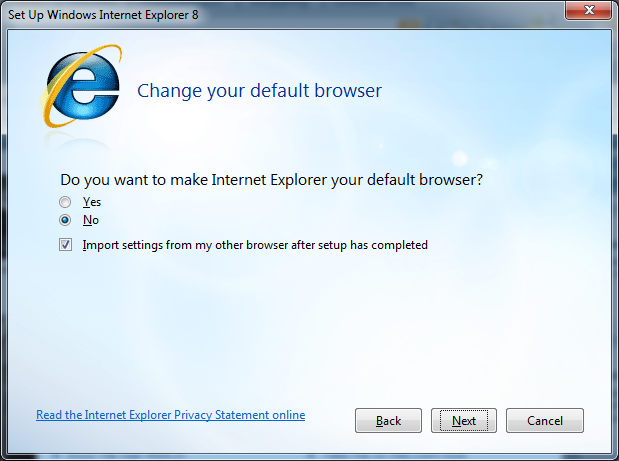
Duplicate Shortcuts IE8 configuration dialog – Alt-N binds to “No” and “Next”. Are UI designers ever going to learn to be nice to keyboard users?

Posted by jpluimers on 2010/05/17

Duplicate Alt-N shortcut: No / NextFor every (re)install, IE8 is usually part of the installation.
So, for the upteenth time, I came across the dialog on the right.
This time Alt-N is bound to both the “No” choice as well as the “Next” button.

–jeroen; wishing UI designers would learn to pay more attention to keyboard users…

Via: 20100516-UI-Duplicate-Shortcuts-IE8 on Flickr – Photo Sharing!.

Posted in Development, Keyboards and Keyboard Shortcuts, Power User, Software Development, UI Design | Leave a Comment »

Windows 7: new shortcut keys (windows hotkeys and more)

Posted by jpluimers on 2010/05/06

In the past there were already a lot of shortcuts, including a few including the windows key.

SEO Consultants has a good overview of both lists.

Microsoft has the classic list.

Windows 7 introduced quite a few more, which I’ll list below.
Read the rest of this entry »

Posted in Conference Topics, Conferences, Event, Keyboards and Keyboard Shortcuts, Power User | 5 Comments »

Windows 7 x64 on ThinkPad T61p

Posted by jpluimers on 2010/03/06

Somehow, the latest Windows Vista automatic update screwed my laptop.

It didn’t manage to make a System Restore Point, but in stead managed to remove all previous restore points.

In addition, my laptop now performed like a dog because of excessive disk activity on the primary HDD (login took 30 minutes).
Safe Mode and Safe Mode with Network were fine, so I tried to figure out what was wrong, but gave up after a day of investigating with Process Monitor and Process Explorer, and stopping/pausing allmost all services and killing/pausing almost all processes.

So: I bit the bullet and Installed Windows 7 x64 on my fully loaded T61p.

The machine has dual 7200 rpm 500 Gb drives (I have not used physical DVD’s or CD’s in years), with 4 Gb of memory (the official maximum, but I recently heard it can actually handle 8 gigabyte fine).
It functions as a host (my work is almost exclusively in a virtual machines so I can separate things), so it needs to be a balance of functional but lean installation.

Most of the installation process was straight forward (in fact much more straightforward than getting Vista on it).

Here is the run-down that includes the things I bumped into:

  1. Installed the Windows 7 USB/DVD Download Tool to copy the installation DVD to a bootable USB stick (I know there many guides on doing this by hand, but I like to be pragmatic).
  2. Booted from the USB stick and did basic install
  3. Be surprised about how much hardware was supported out of the box
  4. Installed these Lenovo drivers (most from the T61p drivers and software matrix):
    UltraNav driver (for thehttp://en.wikipedia.org/wiki/TrackPoint– which I love – and the TouchPad – which I disabled)
    FingerPrint driver (I really like the biometric fingerprint login over typing my password)
    Hotkey driver (more formally called “features integration”)
    4-in-1 Ricoh  multi card reader driver (which is not on the driver matrix, and supports SD/SDIO/MMC/MMCplus, MS/MS-Pro, xD Picture Card, and IEEE 1394/FireWire)
  5. DAEMON Tools Lite (a virtual CD/DVD player – ideal on a 2 HDD setup)
  6. GhostScript and FreePDF (so I can print to PDF files and view PostScript files)
  7. Adobe Reader (there are faster and smaller PDF viewers, but nothing beats the original)
  8. Google Chrome (my favorite browser, I use other browsers for testing web-stuff, but those are in virtual machines)
  9. Fiddler2 (for monitoring HTTP/HTTPS traffic when things go wrong, or I need a direct download URL of something
  10. Skype (the new 4.x, even though it is almost unworkable compared to the old 3.8.0.188, the old version keeps crashing under Windows 7. I moved my Skype Chat History)
  11. VMware Workstation (note that officially you need version 7 to run Windows as host or guest, 6.5.3 does seem to work for some people)
  12. 7zip (my favourite compression tool)
  13. My standard BIN directory with my favourite light weight command-line tools (did I mention I’m from they keyboard age? Hence the love for the TrackPoint)

Windows 7 feels a lot faster than Windows Vista, and requires a lot less memory for itself (slightly more than 1 gigabyte, where Vista needs almost half a gigabyte more).

–jeroen

Ref: Re: Device Manager unknown devices T61p – lenovo community.

Posted in Keyboards and Keyboard Shortcuts, Power User, RSI, ThinkPad, UltraNav keyboards | 6 Comments »

Welcome to Classic Shell: Classic Start Menu and Classic Explorer functions for Windows 7

Posted by jpluimers on 2009/12/31

One of the things in usability is to enable old skoop people that have been using.

Windows 7 went even further than Windows Vista into changing start menu functionality and explorer functionality that had been there since Windows 95.
So things that have been working for over a decade, suddenly stopped to work, or worse: work differently.

Would you imagine what happened when someone reordered the pedals in a car (from left to right are clutch, brake and throttle) or reassign their functionality?

So some people gathered and wrote Classic Shell.

Now someone please restrore the “backspace” keyboard behaviour back to “go one level up in the folder tree” as it had been for more than a decade…

–jeroen

Posted in Keyboards and Keyboard Shortcuts, Power User, Usability, User Experience (ux) | 4 Comments »