The Wiert Corner – irregular stream of stuff

Jeroen W. Pluimers on .NET, C#, Delphi, databases, and personal interests

  • My badges

  • Twitter Updates

  • My Flickr Stream

  • Pages

  • All categories

  • Enter your email address to subscribe to this blog and receive notifications of new posts by email.

    Join 1,860 other subscribers

Archive for the ‘KVM keyboard/video/mouse’ Category

First/Last-Tab: Ctrl-1/9 (or Command-1/9): Switch Between Tabs in Any Browser Using Shortcut Keys

Posted by jpluimers on 2021/12/10

Only recently, I learned this works on just about any web-browser:

  • Ctrl-9 (macOS: Command-9) goes to LAST tab
  • Ctrl-1 (macOS: Command-1) goes go FIRST tab

Via: [WayBack] Switch Between Tabs in Any Browser Using Shortcut Keys

For those keyboard ninjas who hate using the mouse, switching between tabs in your browser window is essential since most people probably have a bunch of tabs open at once. […]

If you want to go to a specific tab, you can press CTRL + N, where N is a number between 1 and 8. Unfortunately, you can’t go past 8, so if you have more than eight tabs, you’ll have to use a different keyboard shortcut or just click on it. CTRL + 9 will take you to the last tab, even if there are more than 8!

–jeroen

Posted in Chrome, Firefox, Internet Explorer, Keyboards and Keyboard Shortcuts, Opera, Power User, Safari, Web Browsers | Leave a Comment »

PiKVM v3 HAT by Maxim Devaev » Shipping in progress — Kickstarter

Posted by jpluimers on 2021/11/22

Oh cool: should arrive during the holiday season:

~500pc have been shipped to the backers in the USA and CanadaWe are planning to ship ALL pledges that don’t contain the case by Nov, 19.We are planning to ship ALL pledges that include the case by Dec, 3.Depending on your location it might take from a couple of days to a couple of weeks to actually receive the shipments.Important: we send a notification with a tracking number for every shipment. Please check your Spam folder from time to time.

Source: [Wayback/Archive] PiKVM v3 HAT by Maxim Devaev » Shipping in progress — Kickstarter

Documentation is at [Wayback/Archive] PiKVM v3 HAT guide – PiKVM Handbook via [Wayback/Archive] Thank you for buying PiKVM v3 HAT! showing that the ATX case bracket needs to be 3D-printed separately:

Read the rest of this entry »

Posted in Hardware, KVM keyboard/video/mouse, PiKVM / Pi-KVM, Power User | Leave a Comment »

Low cost remote IP KVM and control, is it possible?

Posted by jpluimers on 2021/09/20

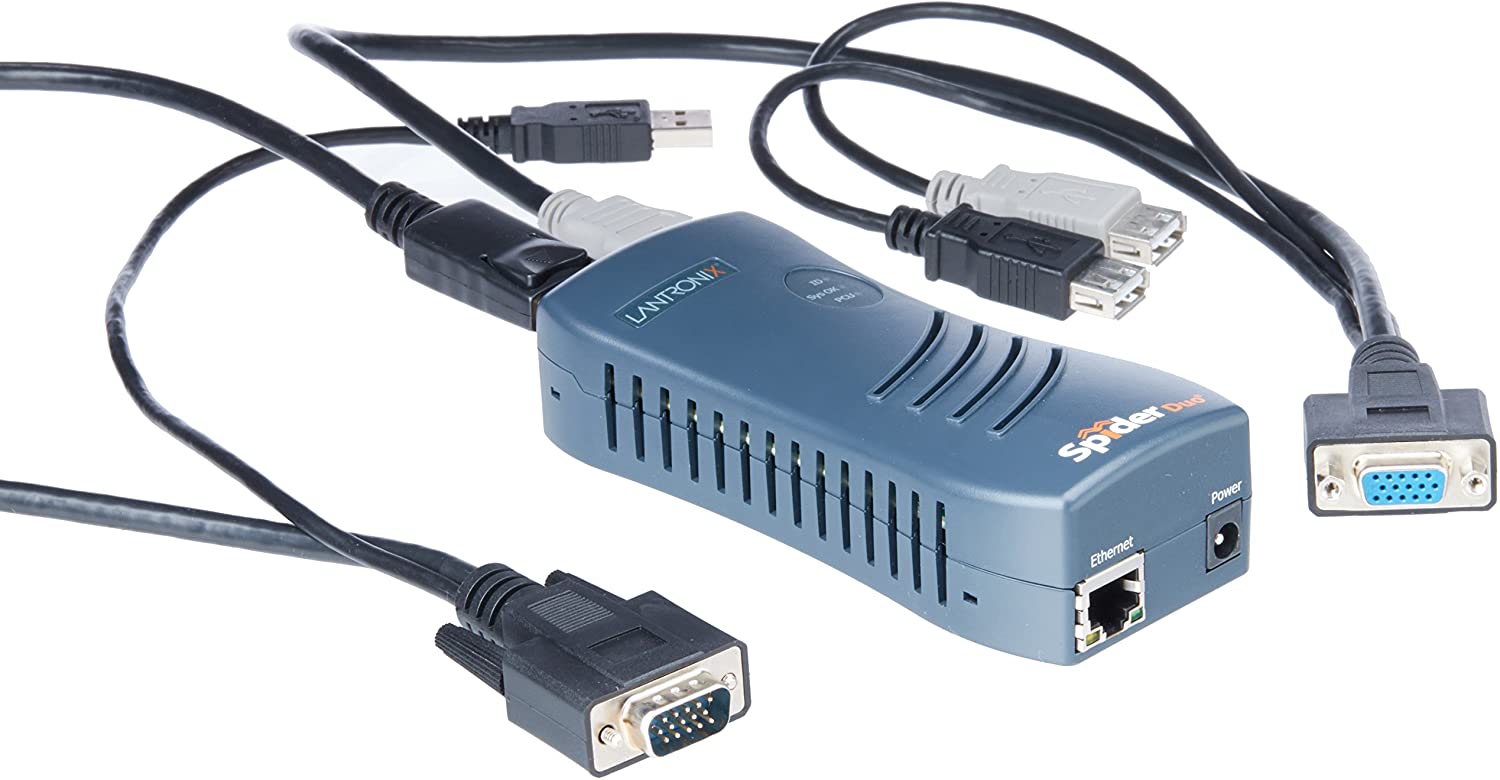
A long time ago, I bought one [Wayback/Archive.is] SpiderDuo Local and Remote KVM Over IP | Lantronix, which – without power control unit – was already some USD 400 (while writing this in fall 2021, the price has increased to almost USD 600 [Archive.is]).

1PORT Local + Remote USB Securelinx Spiderduo KVM Over IP : Electronics - Amazon.com

It was about the only “affordable” remote KVM over IPv4 available and by now has a big drawback: it’s based on Java in the browser, which is a pain in the ass to keep working.

So I went looking for alternatives and found only two reasonable ones:

I will likely go for the Pi-KVM ; it’s on kickstarter right now

Not only that, but I found a few comparisons favouring PiKVM:

I found the Pi-KVM via [Archive.is] Solar Designer on Twitter: “PiKVM v3 HAT, “Raspberry Pi based open-source KVM over IP” by @mdevaev, is now funded on Kickstarter “

At USD 145 or less on kickstarter (excluding a Raspberry Pi 4 or power brick, so add some USD 50 for those), it is way cheaper than the SpiderDuo above which I bought some 5 years ago.

The kickstarter closes in about a week from now, so if you consider one: don’t be late! [Wayback/Archive.is] PiKVM v3 HAT by Maxim Devaev — Kickstarter shows what you get:

  • The PiKVM v3 HAT board for Raspberry Pi 4
  • USB-C bridge board – to connect the HAT with Pi over USB-C
  • ATX controller adapter board and wiring – to connect the HAT to the motherboard (if you want to manage power supply through hardware)
  • 2 flat CSI cables
  • Screws and brass standoffs

You will also need:

  • Raspberry Pi 4 with 2Gb RAM or more
  • MicroSD card
  • USB-C to USB-A cable
  • HDMI cable
  • Straight Ethernet cable (for the ATX expansion board connection)
  • Power supply unit (5.1V 3A USB-C, recommended by the Raspberry Pi)

You can use our free 3D printing case design to build a beautiful complete unit or wait a bit for the official PiKVM metal case we are working on!

–jeroen

Read the rest of this entry »

Posted in Hardware, KVM keyboard/video/mouse, Power User | Leave a Comment »

Yet again, GitHub violates the Web Content Accessibility Guidelines by stealing a key: not it is the dot (.)

Posted by jpluimers on 2021/08/17

More sites seem to have a tendency of stealing keyboard shortcuts and violating the WCGA (Web Content Accessibility Guidelines), especially the (lowest!) conformance level A in [Wayback] WCAG version 2.1, section Success Criterion 2.1.4 Character Key Shortcuts

If a keyboard shortcut is implemented in content using only letter (including upper- and lower-case letters), punctuation, number, or symbol characters, then at least one of the following is true:

1. Turn off
mechanism is available to turn the shortcut off;
2. Remap
A mechanism is available to remap the shortcut to use one or more non-printable keyboard characters (e.g. Ctrl, Alt, etc);
3. Active only on focus
The keyboard shortcut for a user interface component is only active when that component has focus.

Mind you, I’m a keyboard person, there is even a: Keyboards and Keyboard Shortcuts category, but they always need to be configurable, anything else is a sin.

And GitHub did it again: [Archive.is] GitHub on Twitter: “🤫 New shortcut: Press . on any GitHub repo.… “.

So I’m totally with these:

Now they have started to steal the dot (.) keyboard to (in-place, with a fully new URL and no indication how to easily go back) start Visual Studio Code in the current repository.

Going back, though not documented, actually takes between one and three “back” movements in your web-browser history: utterly ridiculous for a key one can accidentally hit.

This behaviour violates all three above sub-criterions:

  1. it cannot be turned off
  2. there is no way to remap it
  3. it is almost always activated (unless there a text input – like “search” or “goto file” – has focus)

This is a very bad way to cope with accessibility, especially as conformance level A is yet again violated.

[Wayback] WCAG 2.1: section 5.2.1 Conformance Level:

One of the following levels of conformance is met in full.

  • For Level A conformance (the minimum level of conformance), the Web page satisfies all the Level A Success Criteria, or a conforming alternate version is provided.
  • For Level AA conformance, the Web page satisfies all the Level A and Level AA Success Criteria, or a Level AA conforming alternate version is provided.
  • For Level AAA conformance, the Web page satisfies all the Level A, Level AA and Level AAA Success Criteria, or a Level AAA conforming alternate version is provided.

To me another cardinal sin is that they stole Ctrl-F / Command-F (depending if you use non-MacOS or MacOS) from the web browser. So now it does not find it in the full page, but only in the currently selected file. (You guessed it, I’m with [Archive.is] KewlCat on Twitter: “I hate it when they intercept “/” and even [Ctrl]-F… “ too)

More of those conformance violation sins are at [Wayback] Keyboard shortcuts – GitHub Docs.

It isn’t hard to prevent this kind of thinking: it’s a mind set as described by [Archive.is] Patrick Joannisse on Twitter: “I don’t know if you are expecting a real answer but here goes: it starts with the mindset. In my training they had us wear goggles to block our vision and made us use a screen reader for a while. We met people with disabilities and they would show us how they work.… “

If you still like it and want to know how it works

–jeroen

Read the rest of this entry »

Posted in accessibility (a11y), Development, GitHub, Keyboards and Keyboard Shortcuts, Power User, Software Development, Source Code Management | Leave a Comment »

Keyboard Shortcuts, Markdown, and Autocomplete – Atlassian Documentation

Posted by jpluimers on 2021/06/14

Details at [WayBack] Keyboard Shortcuts, Markdown, and Autocomplete – Atlassian Documentation; summary:

To view all Confluence keyboard shortcuts, do any of the following:

  • Choose the help icon  from the universal sidebar, then choose Keyboard Shortcuts.
  • When viewing a page, press shift+?
  • While editing a page, choose the question mark icon from the editor toolbar.

a list of some of the most common shortcuts:

Markdown

Use markdown shortcuts to format text from the comfort of your keyboard.

  1. Either:
    • Type [ and then the first few characters of the page title, user’s name, image name or file name.
    • Type the first few characters of the page title, user’s name, image name, or file name (or select relevant text) and then press ctrl+shift+k.
  2. Click the relevant link from the list of suggestions.

If the item you need is not in the list, either choose Search for ‘xxx’ to continue looking for the page within Confluence, or Insert Web Link to link to an external page.

When a Windows shortcut has Ctrl in it, the MacOS shortcut uses Command.

–jeroen

Posted in Development, Keyboards and Keyboard Shortcuts, Lightweight markup language, MarkDown, Power User, Software Development | Leave a Comment »

Operant Conditioning by Software Bugs – Embedded in Academia

Posted by jpluimers on 2020/07/21

Good to remember both these:

[WayBack] Operant Conditioning by Software Bugs – Embedded in Academia which means when using a system, you subconsciously start behaving around it’s issues. This also happens when you the software you wrote the software for such a system: you hardly test the things that you broke.

The magic SysReq key on Linux systems running on PC-hardware allows you to sync/mount read-only/shutdown a system by keyboard (and many more options – see the Wikipedia list below). Do not forget to enable this as it is disabled by default. And remember that many laptops forego the SysReq key (as do Mac systems).

The order while holding Alt-SysReq down is S,U,B…

Both via [WayBack] Kristian Köhntopp – Google+

–jeroen

Read the rest of this entry »

Posted in *nix, *nix-tools, Development, Keyboards and Keyboard Shortcuts, Power User, Software Development, ThinkPad | Leave a Comment »

Remapping a mac keyboard for windows user In my quest to make this macbook air into a usable machine: Karabiner-Elements

Posted by jpluimers on 2020/07/10

I am still a bit ambivalent on remapping keys on a keyboard, mainly because of two reasons:

  • Without remapping, tools used for virtualisation, remote access and shells already get it wrong every now and then. Finding causes is already tough, so adding more degrees of freedom complicates this more.
  • Switching systems or assisting people without the tools can be cumbersome. I vividly remember the really hard times when I had switched from Windows Explorer to Windows Commander (now Total Commander) and could not use it on a sequence of contracting jobs.

Just in case I am going to use it:

–jeroen

Via:


Posted in Keyboards and Keyboard Shortcuts, Power User | Leave a Comment »

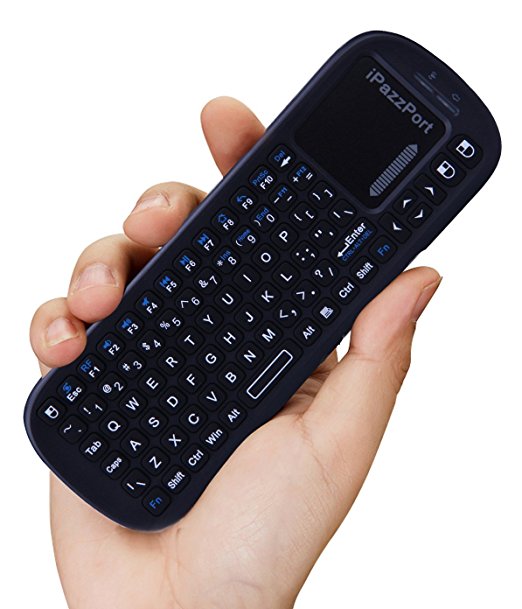
Brilliant device: iPazzPort Wireless Mini Handheld Keyboard with Touchpad Mouse Combo for Android TV Box and Raspberry Pi 3 and HTPC and XBMC KP-810-19S – Black: Computers & Accessories

Posted by jpluimers on 2020/01/03

Brilliant device: [WayBack] KP-810-19BTT Mini Bluetooth Keyboard with touchpad – Unisen Group iPazzPort

I got it via Amazon USA ([WayBack] iPazzPort Wireless Mini Handheld Keyboard with Touchpad Mouse Combo for Android TV Box and Raspberry Pi 3 and HTPC and XBMC KP-810-19S – Black: Computers & Accessories), but Amazon in Europe has it as well (this is the German link:[Archive.isiPazzPort Mini Wireless Handheld Tastatur mit Touchpad: AmazonSmile: Computer & Zubehör; replace .de with .fr, .co.uk, to find your local link).

There are this one is 2.4 Ghz, includes a USB dongle in the battery compartment and requires 2 AAA batteries.

There are Bluetooth and back-lit versions too which cost slightly more.

Via: [WayBack] Raspberry Pi Cluster – Software Team Lead

–jeroen

Posted in Development, Hardware Interfacing, Keyboards and Keyboard Shortcuts, Power User, USB | Leave a Comment »

Magic SysRq key – Wikipedia

Posted by jpluimers on 2019/12/20

Cool: Magic SysRq key – Wikipedia

The magic SysRq key is a key combination understood by the Linux kernel, which allows the user to perform various low-level commands regardless of the system’s state. It is often used to recover from freezes, or to reboot a computer without corrupting the filesystem.[1] Its effect is similar to the computer’s hardware reset button (or power switch) but with many more options and much more control.

Sometimes reading fluffy fluff posts teaches you new things, so be sure to read this one:

[WayBack] I just got trolled by my cat, hard. Last night i left my linux laptop open and running while watching TV in the other room. I came back to find Marley … – Stephen Shirley – Google+

I started looking through the kernel logs from last night, to see if there was any indication of the issue starting. And then i saw it. One innocent line that said:

Dec 18 21:26:52 x240 kernel: [373001.156356] sysrq: SysRq : Emergency Remount R/O

The fluffy dumbass had somehow hit the Sysrq [0] key combo to mount all filesystems read-only. This is an old, low-level when-all-else-fails facility for dealing with an linux unresponsive system, and fluff-for-brains Marley had somehow hit alt+fn+s+u.

Sigh.

[0] https://en.wikipedia.org/wiki/Magic_SysRq_key

Via: [Archive.is] I just got trolled by my cat, hard. Last night i left my linux laptop open and running while watching TV in the other room. I came back to find Marley … – Kristian Köhntopp – Google+

–jeroen

Posted in *nix, *nix-tools, Keyboards and Keyboard Shortcuts, Linux, Power User | Leave a Comment »

PS/2 port colours – Wikipedia

Posted by jpluimers on 2019/03/11

I always forget which colours the [WayBackPS/2 port for keyboard and mouse have.

Some of my old (some call it classic or vintage) mice and keyboards don’t even have a coloured plug.

Luckily, Wikipedia has the answer File:Ps-2-ports.jpg – Wikipedia :

Color Description
Purple Keyboard
Green Mouse

–jeroen


Posted in History, Keyboards and Keyboard Shortcuts, Power User | Leave a Comment »