The Wiert Corner – irregular stream of stuff

Jeroen W. Pluimers on .NET, C#, Delphi, databases, and personal interests

  • My badges

  • Twitter Updates

  • My Flickr Stream

  • Pages

  • All categories

  • Enter your email address to subscribe to this blog and receive notifications of new posts by email.

    Join 1,839 other subscribers

Archive for the ‘MikroTik’ Category

MikroTik PoE: automatically power cycle and reboot device when it becomes unresponsive.

Posted by jpluimers on 2021/09/24

In the past I had these manual scripts to power-cycle a hung RaaspberryPi device:

/interface ethernet poe set ether5 poe-out=off
/interface ethernet poe set ether5 poe-out=forced-on

or on one line:

/interface ethernet poe set ether5 poe-out=off; /interface ethernet poe set ether5 poe-out=forced-on

I am going to try this script for the port having a Raspberry Pi on it (note: this requires a 48V power brick for the Mikrotik!) on RouterOS version 6.48.3 (stable):

/interface ethernet
set [ find default-name=ether5 ] comment="RaspberryPi" poe-out=\
    forced-on power-cycle-ping-address=192.168.124.38 power-cycle-ping-enabled=\
    yes power-cycle-ping-timeout=2m

The above has not worked for a long time as per [Wayback] No POE Power Cycle @ hEX POE – MikroTik:

But it might be fixed as of [Wayback] RouterOS version v6.47.3[stable] as per [Wayback] MikroTik Routers and Wireless – Software: 6.47.3 (2020-Sep-01 05:24):

*) poe – fixed “power-cycle” functionality on RB960GSP;

Similar issues exist on RB760iGS/Hex S, and there the fix requires new hardware in addition to firmware as per [Wayback] POE OUT issue on ether5 rb760igs (no power) – MikroTik

Note that I did disassemble both of these routers for inspection and there are obvious changes to the hardware to correct the PoE problems – most notably a completely different relay, capacitor and some minor circuit design changes.

If it still fails, I might try

[Wayback] No POE Power Cycle @ hEX POE – MikroTik: workaround script

:local ipPing ("x.x.x.x")
:local pingip
#
# pingip below RUNS and sets the variable
# to number of successful pings ie 3 means 3 of 45 success
# can also use ($pingip > 1) or ($pingip >= 1) both TESTED
# ($pingip >= 1) means if only 1 or 0 pings do the IF, not the ELSE
#
:log info ("ping CHECK script IS RUNNING NOW")
# first delay 90 b4 ping test incase this is running at POWER UP
:delay 90
:set pingip [/ping $ipPing count=45]
:if ($pingip <= 3) do={ :log warning (">95% lost ping LOSS to isp GW IP x.x.x.x via ether5 so DO POE powerCYCLE")
  /interface ethernet poe set ether5 poe-out=off
  :delay 12
  /interface ethernet poe set ether5 poe-out=auto-on
  :delay 10
  :log warning ("ether5 POE HAS BEEN TURNED BACK ON")
  :delay 90
  /system script run emailPOEresult
} else={
  :log warning ("PoeCyclePINGcheck ELSE ran so no ping loss detected by script")
}

Based on:

Read the rest of this entry »

Posted in Development, Hardware Development, Internet, MikroTik, Power User, Raspberry Pi, routers | Leave a Comment »

Mikrotik RouterOS “/ip ssh” setting not available from WinBox and defaulting to insecure?

Posted by jpluimers on 2021/09/20

Still need to research this further:

Somewhere around 6.44, when upgrading an existing RouterOS device, this snippet became part of the configuration:

/ip ssh
set allow-none-crypto=yes forwarding-enabled=remote

A few remarks:

Read the rest of this entry »

Posted in Hardware, Internet, MikroTik, Network-and-equipment, Power User, routers, WinBox | Leave a Comment »

MikroTik RB960PGS hEX PoE powering PoE devices: ensure you get a 48V power supply

Posted by jpluimers on 2021/08/24

By default, the [WayBack] MikroTik RB960PGS hEX PoE comes with a 24V power supply.

Most PoE capable devices cannot be powered by 24V but need 48V. I wrote about this before in the midst of the long post Linus Torvalds – Google+: Working gadgets: Ubiquiti UniFi collection (and a whole bunch of Unifi/Ubiquiti/Ubtn links)

So now I re-mention it in a much smaller post so it easier to find back, and a few links to Power over Ethernet – Wikipedia, where especially these bits are relevant:

  • The PoE Standard implementation for 802.3af (802.3at Type 1) “PoE” requires DC 44.0–57.0 V.
  • Of the PoE Non-standard_implementations, some common Passive specifications include:
    • 24VDC 0.5A 100 Mbit/s or 1 Gbit/s
    • 24VDC 1.0A 100 Mbit/s or 1 Gbit/s
    • 48VDC 1.0A 100 Mbit/s or 1 Gbit/s
    • 56VDC 1.0A and 2.0A 1 Gbit/s (used for 45W+ load point to point microwave and millimeter band radios

The 24V is what MikroTik sticks to with their default power supply.

Read the rest of this entry »

Posted in Internet, MikroTik, Network-and-equipment, Power User, routers, Unifi-Ubiquiti | Leave a Comment »

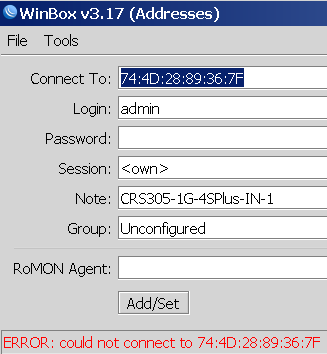
Winbox 3.19 can connect via MAC whereas Winbox 3.17 cannot

Posted by jpluimers on 2021/08/17

Not sure why, but Winbox 3.17 could not connect to out of the box blank MikroTik equipment at all.

Winbox 3.19 complains every now and than, but usually connects fine.

This was while configuring a bunch of [WayBack] MikroTik Routers and Wireless – Products: CRS305-1G-4S+IN.

Read the rest of this entry »

Posted in Development, Hardware, Internet, MikroTik, Network-and-equipment, Power User, RouterOS, routers, Scripting, Software Development, WinBox | Leave a Comment »

Mikrotik CCR devices based on NAND memory will eventually die

Posted by jpluimers on 2021/08/16

If you own a Mikrotik CCR device based on NAND memory, then be prepared that it will die.

I had this on a (now discontinued [WayBack] MikroTik Routers and Wireless – Products: CCR1009-8G-1S-1S+PC, superseded by the less functional [WayBack] MikroTik Routers and Wireless – Products: CCR1009-7G-1C-1S+PC, which is also NAND based).

Many more people had this or very similar problems:

It also happens due to bad capacitors on the (also discontinued) [WayBack] MikroTik Routers and Wireless – Products: RB1200:

There have been quite a few NAND related changes to the firmware over the years that have to do with handling corruption:

If you are really lucky (I was not), then it is a bad power supply: [WayBack] bootloop on CCR1036-12g-4s (almost 5 years old) [SOLVED] – MikroTik.

Sometimes you can partially recover using the Console port or NetInstall, but eventually you will trip another part of the faulty NAND storage and it will die again, until it has spent all its lives.

Unlike a cat, those are usually far less than 9 lives.

If you do need to recover, the links might help you:

–jeroen

Posted in Internet, MikroTik, Power User, routers | Leave a Comment »

Factory reset a MikroTik hEX PoE RB960PGS using the reset button

Posted by jpluimers on 2021/08/02

Edit 20260504: added link to the gist of the switch configuration and a link to a forum post I recently found.

[WayBack] Manual:Reset – MikroTik Wiki:

 unplug the device from power

2) press and hold the button right after applying power

Note: hold the button for 5 seconds (USER LED will start flashing)

3) release the button to clear configuration.

Icon-note.png Note: If you wait until LED stops flashing, and only then release the button – this will instead launch Netinstall mode, to reinstall RouterOS.

Initial configuration

(see also [WayBack] Manual:First time startup – MikroTik Wiki)

Read the rest of this entry »

Posted in Hardware, Internet, MikroTik, Network-and-equipment, Power User, routers, WinBox | Leave a Comment »

Did not realise that a 2018 Mikrotik vulnerability made it to the top of the CBL (SMTP composite black list) warning page for quite some months as the first ever device

Posted by jpluimers on 2021/07/02

Having it accidentally made it to the CBL (Composite Blocking List – Wikipedia) a long time ago, I discovered the page started with (WayBack link mine):

IMPORTANT: Many CBL/XBL listings are caused by a vulnerability in Mikrotik routers. If you have a Mikrotik router, please check out the [WayBack] Mikrotik blog on this subject and follow the instructions before attempting to remove your CBL listing.

It wasn’t one of my Mikrotik devices, as first of all they had all being patched out of the box from a really empty internal network before being externally exposed to the internet or more busy internal networks, and second because the CBL entry was a one off on one specific day where someone used our guest network.

Some CBL entries in the range where it was displayed, quite a while after CVE-2018-14847 became public:

Read the rest of this entry »

Posted in Firewall, Hardware, Infrastructure, Internet, MikroTik, Network-and-equipment, Power User, routers, SPAM, WinBox | Leave a Comment »

Forced routing of selective emails to ISP SMTP via Mikrotik Routing | Syed Jahanzaib Personal Blog to Share Knowledge !

Posted by jpluimers on 2021/01/14

For my link archive: [WayBack] Forced routing of selective emails to ISP SMTP via Mikrotik Routing | Syed Jahanzaib Personal Blog to Share Knowledge !

–jeroen

Posted in Development, MikroTik, Power User, RouterOS, routers, Scripting, Software Development | Leave a Comment »

Mikrotik Remote Access via Multiple WAN Links | Syed Jahanzaib Personal Blog to Share Knowledge !

Posted by jpluimers on 2020/11/04

Multi-WAN routing always involves marking incoming connections to the replies go out on the same connection: [WayBack] Mikrotik Remote Access via Multiple WAN Links | Syed Jahanzaib Personal Blog to Share Knowledge !

# Mirkotik IP Firewall Mangle Section
/ ip firewall mangle
# Mark traffic coming via WAN-1 link
add chain=input in-interface=WAN1 action=mark-connection new-connection-mark=WAN1_incoming_conn
# Mark traffic coming via WAN-2 link
add chain=input in-interface=WAN2 action=mark-connection new-connection-mark=WAN2_incoming_conn
# Mark traffic routing mark for above marked connection for WAN-1 , so that mikrotik will return traffic via same interface it came in
add chain=output connection-mark=WAN1_incoming_conn action=mark-routing new-routing-mark=to_WAN1
# Mark traffic routing mark for above marked connection for WAN-2, so that mikrotik will return traffic via same interface it came in
add chain=output connection-mark=WAN2_incoming_conn action=mark-routing new-routing-mark=to_WAN2
# Finally Add appropriate routes in ROUTE section
/ ip route
add dst-address=0.0.0.0/0 gateway=1.1.1.2 routing-mark=to_WAN1 check-gateway=ping
add dst-address=0.0.0.0/0 gateway=2.2.2.2 routing-mark=to_WAN2 check-gateway=ping

Related:

–jeroen

Posted in Development, Internet, MikroTik, Power User, RouterOS, routers, Scripting, Software Development | Leave a Comment »

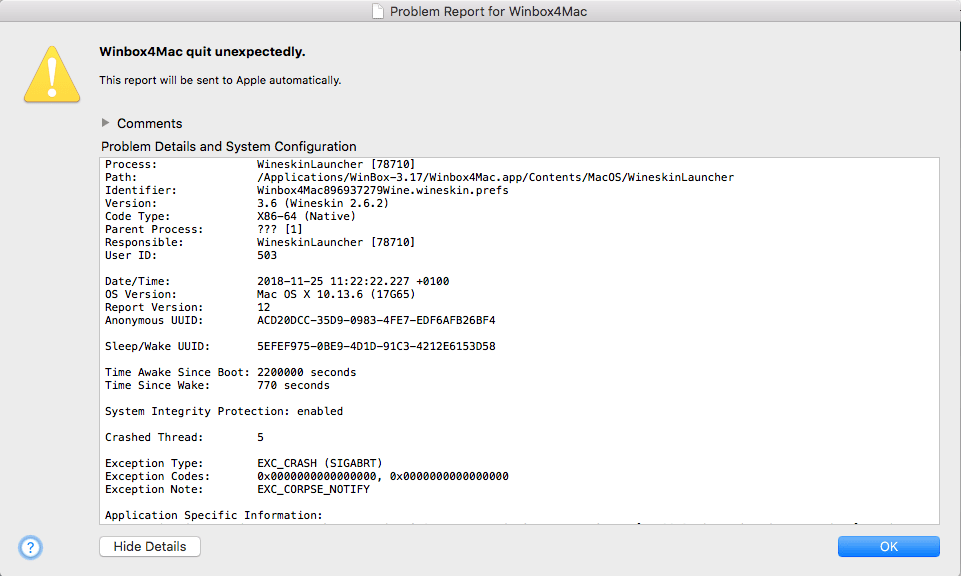
WinBox on MacOS crashing

Posted by jpluimers on 2020/08/04

On my investigation list as WinBox 3.17 only crashes some of the times.

It might have to do with changes in High Sierra:

The real problem: if this happens, WinBox will not start until I have rebooted.

--jeroen

Read the rest of this entry »

Posted in Development, Ethernet, Hardware, MikroTik, Network-and-equipment, Power User, routers, Software Development, WinBox | Leave a Comment »