It looks like many Dell machines suffer from this: devmgmt.msc indicating an unknown device with identification ACPI\DELLABC6.
The odd thing is that the tool known for 10+ years as Dell Detect, but got renamed into SupportAssist does not detect that Windows needs drivers for it.
The first 6 hex digits are the source MAC address, the next are the destination MAC address:
May 10 08:59:24 linux kernel: IPv4: martian source 255.255.255.255 from 192.168.17.44, on dev eth1

May 10 08:59:24 linux kernel: ll header: 00000000: ff ff ff ff ff ff 00 0c 29 f7 0f fe 08 00 ........).....
In the above example:
Destination = MAC ff ff ff ff ff ff (broadcast, which corresponds with IPv4 target 255.255.255.255)
Source = MAC 00 0c 29 f7 0f fe (specific, which I could verify after checking out the machine having IPv4 192.168.17.44)
I wasn’t aware that IPMI more recent than 3.3 also supports virtual media, but in retrospect it’s very logical it does. When managing remote machines, you don’t walk up to it to switch physical media (:
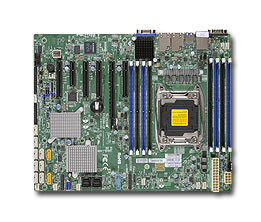
Worked splendid on my X10SRH-CF based server, and even supports SMB based network shares.
The how-to is very simple, steps are for instance at these links:
Note: the for IPMI mounted ISO images, I found out that they will not work in UEFI mode and that you have to switch your BIOS back to LEGACY boot mode:
I had my ScanSnap ix500 – on which I wrote before – connected to a WiFi network that supported 2.4GHz and 5GHz.
Since there is too much trouble on the 2.4GHz band (too many access points around me running at too much power, and having even more trouble around meal times, so likely one or more badly shielded Microwave devices in the neighbourhood) I turned it off in my WiFi access points.
Now I have a separate access point indicating it is 2.4Ghz, so I had to use the Wireless Configuration Tool (which requires a USB connection to the ix500) to reconfigure it.
When one of the machine isn’t active for a while it seems to disappear. Even when it’s active some of the machines have intermittent errors pinging it as like every 10-30 seconds one of these ping results appear:
92 bytes from tl-er5120 (192.168.71.1): Redirect Host(New addr: 192.168.71.193)
Vr HL TOS  Len   ID Flg  off TTL Pro  cks      Src      Dst
 4  5  00 0054 05de   0 0000  40  01 644d 192.168.71.108  192.168.71.193
At the recent Embedded Linux Conference and OpenIoT Summit, Mozilla Technical Evangelist Dietrich Ayala proposed a simple and affordable solution to home automation: A discarded smartphone can handle some of the most useful home automation tasks without requiring expensive hubs and sensors — or risking data security in the cloud.
It’s in my main virtualisation workhorse, uses little power, has loads of disk (SAS/SATA) ports, IPMI, two network connections and enough slots for memory and I/O to be extensible.
I use it for most of my software development even when on the road: VPN home over one of the fiber connections and it screams.
Some links, as SuperMicro tends to hide them behind POST requests:



 The Wiert Corner - irregular stream of stuff
