The Wiert Corner – irregular stream of stuff

Jeroen W. Pluimers on .NET, C#, Delphi, databases, and personal interests

  • My badges

  • Twitter Updates

  • My Flickr Stream

  • Pages

  • All categories

  • Enter your email address to subscribe to this blog and receive notifications of new posts by email.

    Join 1,860 other subscribers

Archive for the ‘Hardware’ Category

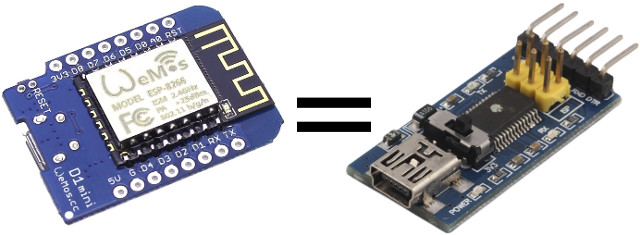
Transform Your ESP8266 Board into a USB to Serial Board Easily with Arduino Serial Bypass Sketch

Posted by jpluimers on 2018/07/11

An interesting re-use: [WayBackTransform Your ESP8266 Board into a USB to Serial Board Easily with Arduino Serial Bypass Sketch

Via: [WayBack] If you don’t have a USB to TTL board around, you can use an +ESP8266 board instead (or any other Arduino compatible boards with USB). – Jean-Luc Aufranc – Google+

–jeroen

Posted in Development, ESP8266, Hardware Development, IoT Internet of Things, Network-and-equipment, Power User | Leave a Comment »

IoT & Smart Location of Things – Google Maps, Google Cloud

Posted by jpluimers on 2018/07/10

#IoT + Google Maps Geocoding API

Convert between addresses & geographic coordinates to determine the location of devices relative to known addresses https://goo.gl/BfwYTF

Edit 202400819: the Googl link above will die, and the link it pointed to (enterprise.google.com/maps/iot) back then pointed to [Wayback/Archive] IoT & Smart Location of Things – Google Maps, Google Cloud.

Source: [WayBackIoT & Smart Location of Things – Google Maps, Google Cloud

Via: [WayBack] Google Maps API – Google+

--jeroen

Posted in Development, IoT Internet of Things, LoRa - Long Range wireless communications network, Network-and-equipment, Power User, Software Development | Leave a Comment »

Skype consumer IP ranges

Posted by jpluimers on 2018/07/09

Since I will likely have to enable Skype in a relatively restricted environment, here are some links that likely will help me getting IP lists to open up:

–jeroen

Posted in Internet, Power User, routers, Skype | Leave a Comment »

Just in case I move away from Mikrotik

Posted by jpluimers on 2018/07/02

Mikrotik has great hardware, great firmware (if you have the right builds), but notoriously bad documentation and a not so great software release and testing process.

So I might consider switching away, so here are some threats that might lead to alternatives:

–jeroen

Vincent Parret commented at https://plus.google.com/+JeroenPluimers/posts/UWZiufmkdK1


I use ubnt edgerouters, great bang for buck. My ER Pro-8 has been up for 8 months (no reboots) and hasn’t missed a beat, rock solid ipsec vpn. I looked at microtik, but found the edgerouters slightly easier to configure.

Posted in Internet, MikroTik, Power User, routers | Leave a Comment »

Amazon Alexa on a Raspberry Pi (add a USB microphone and a speaker with a 3.5mm plug)

Posted by jpluimers on 2018/06/19

I never realised that Amazon Alexa has an open source account on GitHub: https://github.com/alexa

There are full instructions on getting a Java based Alexa Voice Service (AVS) – also used by Amazon Echo – to run on a Raspberri Pi (3 or better recommended, works on 2 as well) with this extra hardware:

  • USB microphone
  • Speaker with a 3.5mm audio plug
  • USB WiFi (essential for Raspberry Pi 2, optional if you want to boost your WiFi signal on a Raspberry Pi 3)

Full instructions are at Raspberry Pi · alexa/alexa-avs-sample-app Wiki and a video is below: https://www.youtube.com/watch?v=baec1CbV6A0

I should find some time to try this out (:

–jeroen

Read the rest of this entry »

Posted in Development, Hardware, Hardware Development, Hardware Interfacing, Software Development | Leave a Comment »

MC342dn | Drivers & software | OKI UK | Printers & Managed Print Services

Posted by jpluimers on 2018/06/08

For my link archive, to get firmware updates installed on my OKI MC342 printer (Mac update fails, Windows update fails, both with “Firmware update failed.”):

download support printer drivers and software utilities for your OKI printers

Source: MC342dn | Drivers & software | OKI UK | Printers & Managed Print Services

[Oki Data] The Firmware Update Utility is used to upload new firmware files to your printer.

Source: Firmware Update | OKI Global

I needed a firmware update because enabling Google Cloud Printing failed.

Source: Cloud Printing | OKI Europe Ltd – Printers, Printing Solutions and Managed Print Services

The reason was error 10a00013 which according to the Cloud Print Manual is “Connection error to the HTTP server (server authentication error). Access the website stored in the Oki Data device (http://(Oki Data device IP address)), and check the imported CA license. Alternatively, update the firmware.”

As the web page didn’t tell me about how to imported CA licenses, I have to update the firmware.

–jeroen

Posted in Hardware, OKI C332, OKI Printers, Power User, Printers | Leave a Comment »

When Windows suddenly starts mixing up keys for various applications.

Posted by jpluimers on 2018/05/14

Since:

  • many people use the left-alt key as it as it is more accessible
  • development tools uses a lot of Alt-Shift based keyboard shortcuts
  • Windows by default has the Left Alt+Shift shortcut enabled to switch language+keyboard layout combinations
  • In most countries, Windows by default has more than one language+keyboard combination installed
  • Windows remembers per application instance which language+keyboard combination is used

every now and then you will get strange characters in only your development tools.

You can change this Windows setting, but be aware that every now and then, various Windows versions will re-enable the Left Alt+Shift even if you have previously disabled it. As of Windows 7 this occurs far less often, but still seems to occur.

Source: Question: Does anyone else have instances in the IDE (Berlin but has happened…

Comments at https://plus.google.com/+JeroenPluimers/posts/ektRa2qW92L


Posted in internatiolanization (i18n) and localization (l10), Keyboards and Keyboard Shortcuts, Power User, Windows | Leave a Comment »

Intel SSD 600p Series NVMe SSD Temperatures: ensure you cool it properly even for moderate use

Posted by jpluimers on 2018/04/30

A short while ago, I installed a pair of 1TB Intel 600p NVMe SSD devices.

Performing a straight rsync backup of some 100 gigabyte of data managed to shutdown both of them: the throttling was so much that VMware ESXi lost the volumes on it and showed “Permanently inaccessible device”.

I was quite surprised as the initial reviews did not mention any temperature problems, but apparently there are.

Since then I’ve put a 120mm fan near to it which made the problems go away, but it still every now and then jumped to over 60 degrees Celsius.

Later I “fixed” it in a better way for cooling getting the idle temperature around 30 degrees Celsius and heavy duty temperatures around 40 degrees Celsius:

I did not have to mount any M.2 heatsinks on them yet; they probably won’t fit under the fan anyway

Related links and products:

Related:

–jeroen

Posted in Hardware, NVMe, Power User, SSD | 1 Comment »

Backup & Sync: The ridiculous steps you need to move the Google Drive from the C: drive to the D: drive

Posted by jpluimers on 2018/04/27

Unlike for instance DropBox, Google Backup & Sync does not allow you do move the Google Drive location in a one-step way. You have to go through below ridiculous steps to move it around yourself.

A comment on G+ indicated I should try Insync. Not free, but way more stable and more features.

[WayBack] Insync: A Mini Desktop File Manager For Your Google Drive

Insync adds Google Drive functionality to your Windows, Linux and mac OS desktop. Sync, backup, edit and share files easily with one or multiple accounts. Team Drives syncing for G Suite accounts now available! Try Insync free, no credit card needed.

[WayBack] Unlike for instance DropBox, Google Backup & Sync does not allow you do move … – Jeroen Wiert Pluimers – G+

I got them via [Archive.is] Change default location of Backup and Sync Folder on disk. – Google Product Forums, rephrased and added screenshots:

Read the rest of this entry »

Posted in Fujitsu ScanSnap, Google, GoogleBackupAndSync, GoogleDrive, Hardware, ix500, Power User, Scanners | Leave a Comment »

If you never updated your Intel 320 SSD firmware, you should

Posted by jpluimers on 2018/04/23

Somehow I missed this:

So I made a file and an image backup, then updated the firmware.

–jeroen

Posted in Hardware, Power User, SSD | Leave a Comment »