The Wiert Corner – irregular stream of stuff

Jeroen W. Pluimers on .NET, C#, Delphi, databases, and personal interests

  • My badges

  • Twitter Updates

  • My Flickr Stream

  • Pages

  • All categories

  • Enter your email address to subscribe to this blog and receive notifications of new posts by email.

    Join 1,860 other subscribers

Archive for the ‘Hardware’ Category

Creating vSphere 5 ESXi embedded USB Stick (failed at first in HP XW6600, but with MBR partition table it works)

Posted by jpluimers on 2012/07/30

Installing and booting ESXi 5 from USB allows you to keep your storage exclusively for VMs and separately make backup of your boot configuration and data configuration (note you cannot put the DataStore on your USB stick).

A small stick (minimum 1 gigabyte) will suffice, and works on many systems, but at first not on my HP XW6600, despite the latest BIOS version 1.36a. You get a nice “Non-System disk or disk error” message.

Both methods I tried failed at first. I thought they failed because the BIOS on the HP has limited USB boot support. It did boot from single partition USB sticks, but seemed not to boot from multi-partition ones, no matter if they are removable or HDD (with the removable bit flipped).

The ESXi5 installer is a single partition one. The final ESXi5 installed image is a multi-partition one. That’s what got me thinking into the multi-partiton direction.

Since the problem is similar to the impossibility of booting VMware workstation VMs from USB stick, (this fails even from the BIOS), I tried Plop since Plop works for VMware Workstation. The Plop USB boot manager failed too. My final thought was to install Plop on a FAT formatted USB stick(which does boot) and continue from there to the ESXi5 one: that failed too.

Boy I was wrong: the failure was not caused by the multi-partition setup, but because of my “Google blindness”: I searched in the wrong direction with the wrong keywords, therefore not getting the right links as search results.

A VMware Communities forum threads on “No bootable device” after successful ESXI5 installation on Intel DG35EC desktop motherboard” and No boot after clean install  finally got me in the right direction:

As of ESXi5, the default partition table type is GPT (GUID Partition Table), not MBR (Master Boot Record) any more (thats why an ESXi4 install will work fine).

Booting from GPT is in the EFI standards (now in its second generation UEFI or United Extensible Firmware), allowing – among others – to boot from disks bigger than 2 terrabyte. You need a BIOS that is compatible with GPT to do so, and the HP XW6600 BIOS clearly isn’t compatible with GPT.

Not all is lost, as while installing ESXi5, you have an option – though well hidden – to force it to use MBR boot. That worked, and I will blog on the steps later.

The good news: it now works on my HP XW6600 workstations (that support both VT-x and VT-d, which means I can do PCI pass through).

How to create an ESXi5 install on a USB stick

First things first though: creating the USB stick in the first place. Read the rest of this entry »

Posted in BIOS, Boot, ESXi4, ESXi5, Hardware, HP XW6600, Power User, UEFI, Virtualization, VMware, VMware ESXi | 4 Comments »

Asus RT N66U: steps to get “Tomato Backup Settings & Log to USB Drive Script – TomatoUSB” working on an Asus RT N66U @AustinStAubin

Posted by jpluimers on 2012/07/27

Below are some steps to get the  Tomato Backup Settings & Log to USB Drive Script – TomatoUSB by Austin Saint Aubin working on an Asus RT N66U router.

I presume you are using a Windows system (hence the FAT/FAT32 formatting of the USB stick) for doing the edits and copying of files to an USB stick. Read the rest of this entry »

Posted in *nix, ASUS RT-N66U, Internet, Network-and-equipment, Power User, TomatoUSB | Leave a Comment »

#WordPress changed from Alt-Shift to Alt #keyboard #shortcuts and now breaks your regular browser Alt shortcuts. @wordpressdotcom

Posted by jpluimers on 2012/07/23

A couple of months ago, I created a nice post listing all #WordPress Editor #keyboard #shortcuts for both Windows and Mac OS X.

As of a few days ago, WordPress.com changed their Alt-Shift shortcuts into Alt shortcuts.

For instance, Alt-Shift-d (strike through) is now Alt-d, thereby blocking the original Alt-d (which for most browsers on Windows brings you to the address bar).

They violate one of the basic GUI principles: keep existing keyboard shortcuts as they are.

On Windows based browsers that means: keep Alt and Ctrl based shortcuts. Alt-Shift, Ctrl-Shift and Ctrl-Alt-Shift shortcuts are OK.

I haven’t tested WordPress on my MacBook air yet (as I don’t think the end-users should be the WordPress.com beta testers, though they probably think the world at large is a big beta-test garden).

I have asked WordPress.com to change the shortcuts back to what they were.

–jeroen

via: #WordPress Editor #keyboard #shortcuts « The Wiert Corner – irregular stream of Wiert stuff.

Posted in Keyboards and Keyboard Shortcuts, Power User, SocialMedia, WordPress | Leave a Comment »

Addendum to Guide to “Install Tomato firmware on Asus RT-N66U / RT-N16 / RT-N12 B1 / RT-N12 C1 / RT-N10U router 韌體教學 | Moonlight Knight”

Posted by jpluimers on 2012/07/23

I had a bit different experience getting the Tomato Shibby firmware loaded on one of my Asus RT-N66U routers than the description from Guide to Install Tomato firmware on Asus RT-N66U nor this Video of the Asus Routers Rescue Mode Tutorial.

Somehow, the Asus Firmware Restoration Utility kept indicating “The wireless router is not in rescue mode”, no matter what I did.

This might be due to that I run VMware Workstation with some virtual LAN adapters on most of my machines.

Or not: the web-interface on the Asus RT N66U would not get into the firmware restoration mode either.

This worked though:

  1. pull the power plug on the RT N66U
  2. press and hold the reset button
  3. insert the power plug on the RT N66U
  4. wait for the power led to slowly blink
  5. release the reset button
  6. wait a few minutes for the modem to become stable
  7. in the mean time set your PC to these IPv4 settings: – host = 192.168.1.100 – mask = 255.255.255.0
  8. start your web-browser
  9. point your web-browser to http://192.168.1.1 (it will time out, don’t worry)
  10. press the power button to turn off the router
  11. wait a few seconds
  12. press the power button to turn on the router now your router gets into rescue mode
  13. refresh your browser so it goes to http://192.168.1.1 again
  14. upload your Tomato firmware

–jeroen

via: Guide to Install Tomato firmware on Asus RT-N66U / RT-N16 / RT-N12 B1 / RT-N12 C1 / RT-N10U router 韌體教學 | Moonlight Knight.

Posted in *nix, ASUS RT-N66U, Internet, Network-and-equipment, Power User, TomatoUSB | 2 Comments »

Hollerith and why we have digraphs in Pascal and trigraphs in C/C++ (nostalgia, Apple ][ plus)

Posted by jpluimers on 2012/07/04

Apple ][ plus keyboardSome nostalgia (:

In the mid 80s, when programming in UCSD Pascal and Turbo Pascal, I learned that Pascal has (. and .) digraphs that translate into [ and ], similar to the (* and *) digraphs that translate to { and }.

In fact I thought the English word was bigraph (as bi- is a prefix for twice, just like tri- is a prefix for thirce).
The digraphs are lexical alternatives (Pascal ISO  standard 7185:1990 paragraph 6.1.9 or Extended Pascal ISO standard 10260:1990 paragraph 6.1.11). There is even one more: the @ at-sign is a lexical alternative for the ^ caret.

Back then (I was in my teens, there was no internet yet and school library had nothing on programming) I thought these were because keyboards like those of the Apple ][ plus couldn’t emit [ and ], but I was wrong: it was in fact the Hollerith Card Code that could not represent these characters.

That limitation was because of the first Pascal implementation was done on a CDC 6000 series that used punched card readers/writers.  You could not punch arbitrary numbers of holes on each row (lace cards lacked structural strength) limiting the character codes you can represent.

They still work in the Delphi compiler for arrays and for comments (I just learned that various Pascal implementations use different rules of mixing digraph and normal comments (some even allow nesting)).

While I taught myself C and C++ just as I taught myself Pascal, somehow I never learned that they use lexical alternatives too. It was only recently that they do, both as trigraphs and as of C99 also as digraphs and that there is even a trigraph tool as part of the C++ personality of RAD Studio 2007.

–jeroen

Posted in Apple, Apple ][, C++, Delphi, Development, History, Keyboards and Keyboard Shortcuts, Power User, Software Development | 1 Comment »

Visual Studio Smart Tag keyboard shortcuts: Ctrl-. and Shift+Alt-F10

Posted by jpluimers on 2012/07/04

I’m a keyboard fan, so recently I have put up a new Keyboards and Keyboard Shortcuts category and tried to add all old relevant posts to it (staying organized is time consuming, but in the end it pays back by being able to find back stuff faster).

At conferences, presentations, and clients people often wonder “how do you get to such-and-such IDE feature so quickly” and the answer usually is: be sure you know your keyboard shortcuts. Which isn’t easy, as documentation for them is often spread out, and to find the information: you have to know how the underlying actions are called.

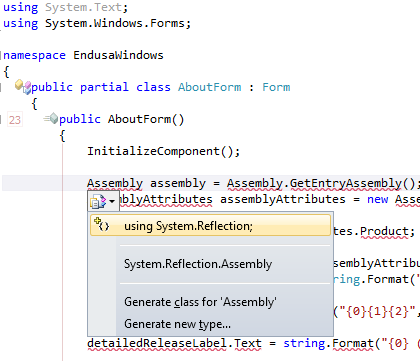
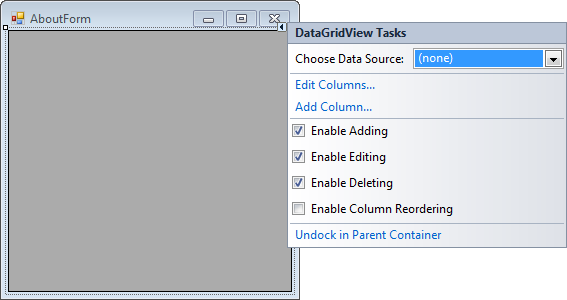
A long time ago (I think it was in version 2005) Visual Studio introduced Smart Tags. Most posts talk only about one kind of Smart Tags, but the Visual Studio IDE has two kinds:

  • A tiny triangle in the designer
  • A combobox drop-down button like control in the code editor

Both listen to these keyboard shortcuts (most cheat sheets miss at least one of these, but you can find them at Pre-defined keyboard shortcuts and at the VS2008 C# keyboard cheatsheet):

  • Shift-Alt-F10
    The shortcut is called View.ShowSmartTag, View.ObjectBrowserGoToSearchCombo
  • Ctrl-.                    (yes, the . is a period)
    The shortcut seems to be called Edit.Generate

The pictures below show the Smart Tag in action.


Oh BTW: the red squiggly lines and some of the other adornments in the screenshot are from CodeRush, one of the most keyboard-centric additions to Visual Studio I know.

–jeroen

Posted in Keyboards and Keyboard Shortcuts, Visual Studio 11, Visual Studio 2005, Visual Studio 2008, Visual Studio 2010, Visual Studio and tools | Leave a Comment »

[Links] Asus RT-N66U (N900) dual-band router

Posted by jpluimers on 2012/06/08

Just came accross an interesting ethernet router: The Asus RT-N66U (N900) dual-band WiFi router.

It has quite a bit of horsepower, is passively cooled, might handle dual-WAN from the stock firmware, and it it doesn’t: it is supposed to run custom firmwares like Tomato, DD-WRT, OpenWRT, etc.

Interesting…

–jeroen

Dual / Triple WAN How To – InfoDepot Wiki.

Posted in ASUS RT-N66U, Internet, Network-and-equipment, Power User, TomatoUSB | 2 Comments »

Excel 2010/2007: Convert text to a table or vice versa (via: Word – Office.com)

Posted by jpluimers on 2012/05/21

The introduction of the Ribbon in Office 2007 and 2010 often makes me ask “why are things so complicated now, that were so easy until Office 2003”.

One of the things that were very close together in Word 2003, was converting text to and from tables: they were in adjecent menu items.

Not any more, as you can see in the Convert text to a table or vice versa  topic on the Microsoft site. There is even a Dummies article on this topic.

Summarized:

Convert text to a table

  1. Tab Insert,
  2. Group Tables,
  3. click Table,
  4. then click Convert Text to Table.

Of course the keyboard shortcuts are “easy” to remember: Alt, N, T, V

Convert a table to text

  1. When you have a (portion of a) table selected, you get a new contextual tab set called Table Tools.
  2. Tab Layout,
  3. Group  Data,
  4. click Convert to Text.

Of course the keyboard shortcuts are “easy” to remember: Alt, J,L, V

Word 2007/2010: Convert Table to Text

–jeroen

via: Convert text to a table or vice versa – Word – Office.com.
Naming of ribbon UI elements

Posted in Keyboards and Keyboard Shortcuts, Office, Power User, Word | Leave a Comment »

The end of the classic ThinkPad Keyboard layout (#Lenovo #Fail)

Posted by jpluimers on 2012/05/18

(Thanks to a “Missed Post” problem on WordPress.com, this one didn’t get posted on the scheduled date. Sorry for any inconvenience)

First Lenovo did away with 1920×1200 screens. Now they done away with the ThinkPad keyboard layout.

Both were my compelling reasons for buying Lenovo.

In fact, they are now marked as forum.thinkpads.com • non-ThinkPad Lenovo Hardware.

New Lenovo X1 keyboard. No more ScrLk, Pause and local-menu keys, PrtScr key moved to impossible place. 6-key navigation split.

New Lenovo X1 keyboard. No more ScrLk, Pause and local-menu keys, PrtScr key moved to impossible place. 6-key navigation split.

–jeroen

PS: Anyone in The Netherlands who has a new ThinkPad W701 with 1920×1200 screen for sale?

Posted in Keyboards and Keyboard Shortcuts, Missed Schedule, Power User, SocialMedia, WordPress | 2 Comments »

Mac keyboard shortcut to move things to the Trash – Mac Guides: command-backspace #mac #keyboard #shortcut

Posted by jpluimers on 2012/05/18

Some shortcuts on the Mac are difficult for me to remember. For instance the one to move something from the Finder to the Trash.

The guides on Trash at MacRumours.com to the rescue:

Deleting items

You delete files and folders by moving them to the Trash. You can:

Drag and drop a file on the trash icon in the dock

Control-click on a file and select “Move to Trash” from the menu

Select a file or files and use the keyboard shortcut: command-backspace

Select a file or files and choose “File > Move to Trash” from the menu bar

Notes:

Read the rest of this entry »

Posted in Apple, Keyboards and Keyboard Shortcuts, Mac OS X / OS X / MacOS, Mac OS X 10.5 Leopard, Mac OS X 10.6 Snow Leopard, Mac OS X 10.7 Lion, Power User | Leave a Comment »