Archive for the ‘Hardware’ Category
Posted by jpluimers on 2025/01/02
For my link archive: [Wayback/Archive.is] Converting Phono Inputs to Line-Level
It shows for some receiver models how to have the Phono input signals bypass the preamplifier (preamp) so they effectively become Line level inputs and there is no need for an extra devices that undoes RIAA equalisation.
If that fails, then you need something like the [Wayback/Archive.is] Line level to phono input converter diagram:

Or get you a [Wayback/Archive.is] iRIAA2 – Inverse RIAA Filter – Hagerman Audio Labs
Read the rest of this entry »
Posted in Development, Hardware, Hardware Development, Power User | Leave a Comment »
Posted by jpluimers on 2024/12/27
A while ago there was an interesting point of using tiered md to both obtain low read latency and write safety on the Google Cloud Platform in [Wayback/Archive] How Discord Supercharges Network Disks for Extreme Low Latency
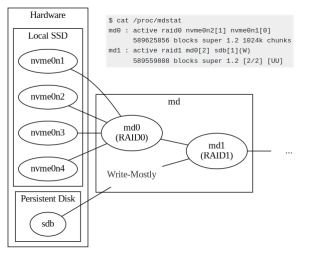
It is an interesting approach to universally tune performance within the sketched boundaries, but raised some questions as their aim was improving ScyllaDB performance and Unix-like platforms on Google Cloud Platform can supports ZFS.
In this case Discord wanted to improve their ScyllaDB that was already read/written from GCP Persistent Storage and used tiered md to improve that.
Read the rest of this entry »
Posted in *nix, *nix-tools, Cloud, GCP Google Cloud Platform, Google, Hardware, Infrastructure, NVMe, Power User, RAID, SSD | Leave a Comment »
Posted by jpluimers on 2024/12/11
I wish I had bumped into this page a way sooner as it contains most if not all the keyboard symbols I ever looked for: [Wayback/Archive] Unicode: Keyboard Symbols ⌘ ↵ ⌫
The page contains a lot more than just this diagram (which already is a great start):
⎋
 ` 1 2 3 4 5   6 7 8 9 0  - = ⌫    ⎀ ⤒ ⇞
 ⇥ Q W E R T   Y U I O P  [ ] \    ⌦ ⤓ ⇟
 🄰  A S D F G   H J K L ;  ' ↵
 ⇧   Z X C V B   N M , . /  ⇧        ↑
 ⎈ ❖ ⎇    ␣    ⎇ ❖ ▤ ⎈           ← ↓ →

🌐 ⌃ ⌥ ⌘
Some more symbols are at these pages:
Read the rest of this entry »
Posted in Development, Encoding, Hardware, Keyboards and Keyboard Shortcuts, KVM keyboard/video/mouse, Power User, Software Development, Unicode | Leave a Comment »
Posted by jpluimers on 2024/12/09
TL;DR: it was a Dutch keyboard, which almost nobody in The Netherlands uses (US or US-International are the most used physical keyboard layouts over there)
I tried searching for keyboard layouts using Google with these special keys that were present on the keyboard (listing all keys that either have special symbols on them, or use the Alg-Gr modifier):
Read the rest of this entry »
Posted in Hardware, Keyboards and Keyboard Shortcuts, KVM keyboard/video/mouse, LifeHacker, Power User | Leave a Comment »
Posted by jpluimers on 2024/11/28
Ordered because all of a sudden, my scanner would only charge over USB, but not connect to any computer any more over USB (likekly because the Micro-USB connector on the mainboard was broken which is odd after just a few 100 inserts which is odd as it should last 10k+ cycles according to USB hardware – Wikipedia) [WaybackSave/Archive] SCANSNAP iX100 SCANNER REPAIR MANUAL – PFU Ricoh Store.
It costs only USB 0.00, so I hope they will send it outside of the USA.
When ordering, you have to agree with these:
When I don’t receive the manual, hopefully the translated version of this video will be of help: [WaybackSave/Archive] Reparación Scanner Fujitsu ScanSnap – Puerto De Carga Micro USB – YouTube -> Fujitsu ScanSnap Scanner Repair – Micro USB Charging Port – YouTube.
Como me pasa muchas veces esto grabe este video. Me piden que repare algo que ya intentaron reparar de la manera incorrecta.
->
As this happens to me many times, I recorded this video. I am asked to repair something that they already tried to repair incorrectly.
Queries:
--jeroen
Posted in Development, Fujitsu ScanSnap, Hardware, Hardware Development, ix100, Power User, Scanners | Leave a Comment »
Posted by jpluimers on 2024/11/27
Posted in Development, Hardware, Internet, IPv4, Network-and-equipment, Power User, Scripting, Software Development | Tagged: cyberwarrior, infosec, networkbasics, networks, networks4hackers, subnetting | Leave a Comment »
Posted by jpluimers on 2024/11/12
Posted in 2FA/MFA, Authentication, Development, Hardware, Hardware Interfacing, Power User, Security, Software Development, U2F FIDO Security Keys, USB, USB | Leave a Comment »
Posted by jpluimers on 2024/10/25
Now that Dell 3060 and 3070 Micro MFF have become available quite a bit cheaper than before, please note that both only support M.2 PCIe x2 (though the 3060 documentation indicates x4, the 3070 documentation correctly states x2).
This is a board electronics issue, as the chip-set does support x4.
The M.2 connector however is more versatile than I expected and does support a variety of M.2 keying of which not all “big connector” PCI-e or USB M.2 adapters support:
Read the rest of this entry »
Posted in Hardware, M.2/NGFF, PCIe/PCI-e/PCI Express, Power User, SAS/SATA | Leave a Comment »


 The Wiert Corner - irregular stream of stuff