


Nice [Wayback/Archive] Thread by @jhewitt_net on Thread Reader App that started with [Wayback/Archive] Joseph Hewitt on Twitter: “I bought some cheap aliexpress directional 2.4GHz antennas. As expected, they aren’t very good. (A small thread)”:
Archive for the ‘Hardware’ Category
If you thought you found cheap directional WiFi antennas (2.4GHz or 5Ghz), then think twice
Posted by jpluimers on 2025/02/07

Posted in Hardware, Power User, WiFi | Leave a Comment »
Chrome on Windows: Keyboard – Move focus to the shortcuts bar – Google Chrome Community
Posted by jpluimers on 2025/01/31
[Wayback/Archive] Keyboard – Move focus to the shortcuts bar – Google Chrome Community was a great question that I had myself for a long time.
TL;DR: On Windows, you can either cycle focus using F6, Alt + Shift + b to use the keyboard for getting focus to the bookmarks bar.
This is not officially documented for Windows/Linux at [Wayback/Archive] Chrome keyboard shortcuts – Computer – Google Chrome Help:
Share this:
Posted in Chrome, Google, Hardware, IBM SAA CUA, Keyboards and Keyboard Shortcuts, KVM keyboard/video/mouse, Power User | Leave a Comment »
Classic iPod Dock Connector to Line-in / Line-out
Posted by jpluimers on 2025/01/15
For my link archive on the Apple 30-pin Dock Connector:
- [Wayback/Archive.is] Dock Connector – wikiPodLinux
- [Wayback] Archive.is:iPod Dock Connector – nuxx.net (with pictures)
- [Wayback/Archive.is] Rockbox Stuff for iPod Nano: Making an iPod dock for recording and line-out
- [Wayback/Archive.is] The Apple 30-pin Dock Connector « irq5.io which also describes quite a bit of history in addition to the pin lay-out.
- [Wayback/Archive.is] Apple iPod, iPhone (2g, 3g), iPad Dock connector pinout diagram @ pinouts.ru
–jeroen
Share this:
Posted in Cable TV/Radio, Development, Hardware, Hardware Development, Hardware Interfacing, Home Audio/Video, LifeHacker, Power User | Leave a Comment »
Latest Products/Feature Request Board topics – Ring Community
Posted by jpluimers on 2025/01/03
Yup, I have been in the Ring ecosystem since way before Amazon took them over, and it is kind of hard to part from the useful cameras, so here is for my link archive: [Wayback/Archive] Latest Products/Feature Request Board topics – Ring Community
Via two suggestions I did:
Share this:
Posted in Amazon.com/.de/.fr/.uk/..., Cloud, Hardware, Infrastructure, IoT Internet of Things, LifeHacker, Network-and-equipment, Power User, Ring Doorbell/Chime (Amazon) | Leave a Comment »
Modifying your receiver/amplifier: Converting Phono Inputs to Line-Level
Posted by jpluimers on 2025/01/02
For my link archive: [Wayback/Archive.is] Converting Phono Inputs to Line-Level
It shows for some receiver models how to have the Phono input signals bypass the preamplifier (preamp) so they effectively become Line level inputs and there is no need for an extra devices that undoes RIAA equalisation.
If that fails, then you need something like the [Wayback/Archive.is] Line level to phono input converter diagram:

Or get you a [Wayback/Archive.is] iRIAA2 – Inverse RIAA Filter – Hagerman Audio Labs
Share this:

Posted in Development, Hardware, Hardware Development, Power User | Leave a Comment »
How Discord Supercharges Network Disks for Extreme Low Latency
Posted by jpluimers on 2024/12/27
A while ago there was an interesting point of using tiered md to both obtain low read latency and write safety on the Google Cloud Platform in [Wayback/Archive] How Discord Supercharges Network Disks for Extreme Low Latency
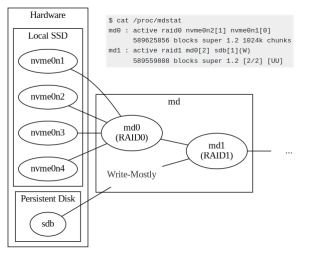
It is an interesting approach to universally tune performance within the sketched boundaries, but raised some questions as their aim was improving ScyllaDB performance and Unix-like platforms on Google Cloud Platform can supports ZFS.
In this case Discord wanted to improve their ScyllaDB that was already read/written from GCP Persistent Storage and used tiered md to improve that.
Share this:

Posted in *nix, *nix-tools, Cloud, GCP Google Cloud Platform, Google, Hardware, Infrastructure, NVMe, Power User, RAID, SSD | Leave a Comment »
How to lock the Philips TV after a specific time? | Philips
Posted by jpluimers on 2024/12/20
Yup, old model, but this is supposed to work: [Wayback/Archive] How to lock the Philips TV after a specific time? | Philips
Share this:
Posted in Cable TV/Radio, Hardware, Power User | Leave a Comment »
Unicode: Keyboard Symbols ⌘ ↵ ⌫
Posted by jpluimers on 2024/12/11
I wish I had bumped into this page a way sooner as it contains most if not all the keyboard symbols I ever looked for: [Wayback/Archive] Unicode: Keyboard Symbols ⌘ ↵ ⌫
The page contains a lot more than just this diagram (which already is a great start):
⎋
 ` 1 2 3 4 5   6 7 8 9 0  - = ⌫    ⎀ ⤒ ⇞
 ⇥ Q W E R T   Y U I O P  [ ] \    ⌦ ⤓ ⇟
 🄰  A S D F G   H J K L ;  ' ↵
 ⇧   Z X C V B   N M , . /  ⇧        ↑
 ⎈ ❖ ⎇    ␣    ⎇ ❖ ▤ ⎈           ← ↓ →

🌐 ⌃ ⌥ ⌘
Some more symbols are at these pages:
Share this:
Posted in Development, Encoding, Hardware, Keyboards and Keyboard Shortcuts, KVM keyboard/video/mouse, Power User, Software Development, Unicode | Leave a Comment »
A Dutch friend got a 2nd hand Lenovo with a keyboard layout I didn’t know: searching for the special keys did not return results
Posted by jpluimers on 2024/12/09
TL;DR: it was a Dutch keyboard, which almost nobody in The Netherlands uses (US or US-International are the most used physical keyboard layouts over there)
I tried searching for keyboard layouts using Google with these special keys that were present on the keyboard (listing all keys that either have special symbols on them, or use the Alg-Gr modifier):
Share this:

Posted in Hardware, Keyboards and Keyboard Shortcuts, KVM keyboard/video/mouse, LifeHacker, Power User | Leave a Comment »
SCANSNAP iX100 SCANNER REPAIR MANUAL – PFU Ricoh Store
Posted by jpluimers on 2024/11/28
Ordered because all of a sudden, my scanner would only charge over USB, but not connect to any computer any more over USB (likekly because the Micro-USB connector on the mainboard was broken which is odd after just a few 100 inserts which is odd as it should last 10k+ cycles according to USB hardware – Wikipedia) [WaybackSave/Archive] SCANSNAP iX100 SCANNER REPAIR MANUAL – PFU Ricoh Store.
It costs only USB 0.00, so I hope they will send it outside of the USA.
When ordering, you have to agree with these:
- [WaybackSave/Archive] Terms of Sale
- [WaybackSave/Archive] PFU America Privacy Policy – Ricoh Scanners
When I don’t receive the manual, hopefully the translated version of this video will be of help: [WaybackSave/Archive] Reparación Scanner Fujitsu ScanSnap – Puerto De Carga Micro USB – YouTube -> Fujitsu ScanSnap Scanner Repair – Micro USB Charging Port – YouTube.
Como me pasa muchas veces esto grabe este video. Me piden que repare algo que ya intentaron reparar de la manera incorrecta.
->
As this happens to me many times, I recorded this video. I am asked to repair something that they already tried to repair incorrectly.
Queries:
- [WaybackSave/Archive] “repair” “iX100” – Sök på Google
- [WaybackSave/Archive] scansnap ix100 repair usb – Google Video Suche
--jeroen
Share this:
Posted in Development, Fujitsu ScanSnap, Hardware, Hardware Development, ix100, Power User, Scanners | Leave a Comment »
 The Wiert Corner - irregular stream of stuff