The Wiert Corner – irregular stream of stuff

Jeroen W. Pluimers on .NET, C#, Delphi, databases, and personal interests

  • My badges

  • Twitter Updates

  • Pages

  • All categories

  • Enter your email address to subscribe to this blog and receive notifications of new posts by email.

    Join 1,854 other subscribers

Archive for the ‘IBM SAA CUA’ Category

Chrome on Windows: Keyboard – Move focus to the shortcuts bar – Google Chrome Community

Posted by jpluimers on 2025/01/31

[Wayback/Archive] Keyboard – Move focus to the shortcuts bar – Google Chrome Community was a great question that I had myself for a long time.

TL;DR: On Windows, you can either cycle focus using F6Alt + Shift + b to use the keyboard for getting focus to the bookmarks bar.

This is not officially documented for Windows/Linux at [Wayback/Archive] Chrome keyboard shortcuts – Computer – Google Chrome Help:

Read the rest of this entry »

Posted in Chrome, Google, Hardware, IBM SAA CUA, Keyboards and Keyboard Shortcuts, KVM keyboard/video/mouse, Power User | Leave a Comment »

With the newest PowerToys version, the Microsoft teams shows they forgot about their CUA heritage

Posted by jpluimers on 2024/08/30

The most recent Microsoft Power Toys version binds to Alt + Spacebar which indicates the Windows team has forgotten about the CUA (Common User Access) heritage.

[Wayback/Archive] PowerToys bring fun tweaks to Windows 10 and 11 • The Register

And that tells us something else, too: that none of the Microsoft developers involved in building and releasing this tool are old-style keyboard warriors, because since Windows 1.0 in 1985, Alt+space has been the keystroke to invoke the window-management menu. From Windows 2 onwards, the leftmost button on every Windows title bar even looked like a space bar, to remind you. So to maximize a window, it’s Alt+space, x; to minimize, Alt+space, n; to resize with the keyboard, Alt+space, s, and so on.

Via [Wayback/Archive] Jeroen Wiert Pluimers @wiert@mastodon.social on X: “Stealing Alt+Space for a Power Toy, the Microsoft @Windows team has forgotten about its CUA heritage.”.

--jeroen

Posted in Hardware, IBM SAA CUA, Keyboards and Keyboard Shortcuts, KVM keyboard/video/mouse, Power User, Windows, Windows 10, Windows 11 | Leave a Comment »

Computing History – The UK Computer Museum – Cambridge

Posted by jpluimers on 2020/06/19

On my places to visit:

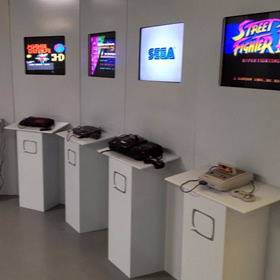
The Centre for Computing History is a computer museum based in Cambridge, UK. With a collection of vintage computers and game consoles, many of the exhibits are hands on and interactive.

[WayBackComputing History – The UK Computer Museum – Cambridge.

When I bumped into it, this was their collection size, ranging from the 1960s until recent history:

Archive Statistics :

  • Computers = 993
  • Peripherals = 1446
  • Mobile Devices = 31
  • Game Consoles = 213
  • Video Games = 10259
  • Software Packages = 2605
  • Books = 2045
  • Manuals = 4106
  • Magazines = 9057

Looking at their archived brands (having [WayBack] MITS – Altair and [WayBack] Raspberry Pi in the collection) is such a joy.

Archiving the older parts is a tough job, as they stem from way before the web era, so information has been lost, parts are hard to source, a lot of hardware got thrown away or is hard to find at all, people have died. More on that at [WayBack] About – Computing History.

Without a physical visit, you can find what they have at [WayBack] Search Our Archive – Computing History.

The video below on their archive is impressive.

–jeroen

Read the rest of this entry »

Posted in 6502, 68k, Apple I, BBC Micro B, BBS, C64, Commodore, CP/M, dial-up modems, FidoNet, History, IBM SAA CUA, PowerPC, Tesseract, VIC-20, Z80 | Leave a Comment »

Some links and references to IBM CUA: Common User Access which defines a lot of the UIs and UX we still use.

Posted by jpluimers on 2016/02/04

Back in the late 80s and early 90s of last century, engineers Richard E. Berry, Cliff J. Reeves set a standard that still influences the user interfaces and user experience of today: the IBM Common User Access.

I mentioned CUA a few times before, but since an old client of mine managed to throw away their paper originals in a “we don’t need that old stuff any more as we are now all digital” frenzy, I wanted to locate some PDFs. And I promised to write more about CUA.

If anyone has printed versions of the non-PDF documents below, please donate them to aek at bitsavers.org or scanning at archive.org as they are really hard to get.

A few search queries I used:

The PDFs I think are most interesting:

Read the rest of this entry »

Posted in BitSavers.org, Development, Hardware, History, IBM SAA CUA, Keyboards and Keyboard Shortcuts, KVM keyboard/video/mouse, Power User, Software Development, UI Design, Usability, User Experience (ux) | 3 Comments »

Keyboards, logo keys CUA and a some more history…

Posted by jpluimers on 2015/04/06

My response to the comments in Cut and Paste Files & Folders in Mac OS X got a bit took long. So here is it in an article:

Indeed. CUA. The days (:
I’ll write more about CUA in the future (there is some CUA site:wiert.me stuff from the past) as it defines a lot of modern UI and user experience.

In fact the history of Ctrl-C and Command-C goes back until before System 1 (the OS for the first Macintosh) which indeed had the Open Apple Key shortcuts, but didn’t introduce them.

The Command Key was introduced in the Apple III and became more popular in the Apple //e and //c (I own both) where AppleWorks was already using these shortcuts in 1986.

It is funny to notice that Apple keyboards lost their logo keys but Windows keyboards gained them.

Some Apple keyboard pr0n can be found on Wikipedia.

--jeroen

Posted in 6502, Hardware, History, IBM SAA CUA, Keyboards and Keyboard Shortcuts, KVM keyboard/video/mouse, Power User | 1 Comment »

When writing applications, include Keyboard Shortcuts for both the CUA and Windows/Apple shortcuts

Posted by jpluimers on 2011/12/06

When you write applications, it is important to include both the CUA and the Windows/Apple keyboard shortcuts, and get the tab order of keyboard accessible user elements right.

Many modern applications seem to put less and less emphasis on the most efficient user input device: the keyboard.

You should: it makes your application much more pleasant to use.

I wrote about CUA before, but the Windows and Mac shortcuts are just as important.

A small table (please post a comment if you know additions):

Read the rest of this entry »

Posted in .NET, Delphi, Development, Hardware, IBM SAA CUA, Keyboards and Keyboard Shortcuts, KVM keyboard/video/mouse, Power User, Software Development, xCode/Mac/iPad/iPhone/iOS/cocoa | Leave a Comment »

Solution: Can’t paste on a web-site with Ctrl-V

Posted by jpluimers on 2010/07/16

Quite a few web sites have fields where you cannot paste with Ctrl-V.
I don’t know why: pasting text input is a great way to speed up your work.

A solution for most of them: Read the rest of this entry »

Posted in Chrome, Firefox, Hardware, IBM SAA CUA, Internet Explorer, Keyboards and Keyboard Shortcuts, KVM keyboard/video/mouse, Power User, Web Browsers, Windows | 1 Comment »