The Wiert Corner – irregular stream of stuff

Jeroen W. Pluimers on .NET, C#, Delphi, databases, and personal interests

  • My badges

  • Twitter Updates

  • My Flickr Stream

  • Pages

  • All categories

  • Enter your email address to subscribe to this blog and receive notifications of new posts by email.

    Join 1,860 other subscribers

Archive for the ‘ix500’ Category

Some videos on defining ScanSnap scan destinations (Folder, Acrobat, …)

Posted by jpluimers on 2021/10/25

For my link archive some videos below.

Note that I dislike ScanSnap Cloud, as I do not want an intermediate party in between me and my cloud provider.

I much more prefer providers like Google Drive, OneDrive, etc to configure locally and have them upload to the cloud instead of ScanSnap Could also seeing my scanned content.

–jeroen

Posted in Fujitsu ScanSnap, Hardware, ix100, ix1500, ix500, Power User, Scanners | Leave a Comment »

ScanSnap Home 1.4.0 update and release notes

Posted by jpluimers on 2021/09/10

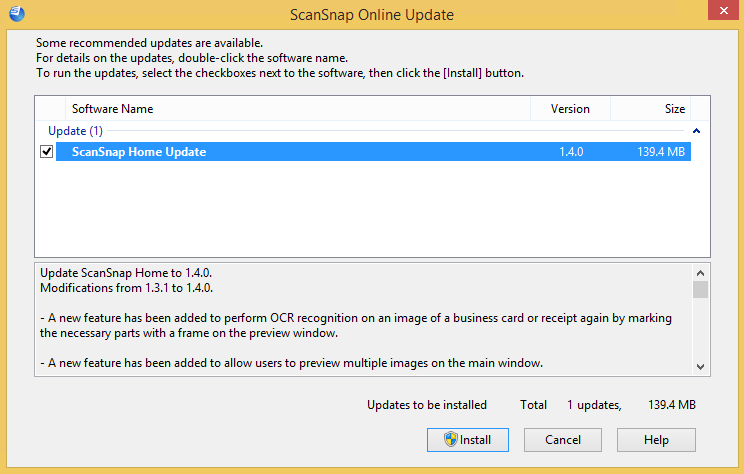
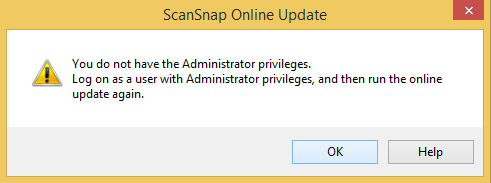
The first stupid thing is that when pressing the “Install” button: it will not ask for UAC elevation, despite the UAC elevation badge:

The second is the release notes from the installer indicate there is more information to be found when clicking, but after clicking it shows exactly the same information:

Update ScanSnap Home to 1.4.0.
Modifications from 1.3.1 to 1.4.0.

– A new feature has been added to perform OCR recognition on an image of a business card or receipt again by marking the necessary parts with a frame on the preview window.

– A new feature has been added to allow users to preview multiple images on the main window.

– A new feature has been added to apply [ScanSnap Manager – Profile] to ScanSnap Home.

– Help menus and contents have been improved, allowing users to find information that they want quickly on the Help.

– Operability for linking with cloud services has been improved.

– Operability for adding and editing profiles on the taskbar has been improved.

– A modification has been made so that you can delete a content data record that is managed in ScanSnap Home even after you delete a file for the content data record in Explorer.

– The waiting time it takes after a scan has been reduced.

– A modification has been made which enables users to use the scan window as soon as it is displayed.

– Operability for contacting your support representative has been improved.

– Fixed the problem that occurs on ScanSnap iX500, preventing the Wi-Fi settings from being configured successfully with an SSID that includes double-byte characters.

– Fixed the problem where the Scan buttons for other users may not be disabled on the touch panel when users are switched.

– Fixed the problem where the scanner turns off even if [Automatic power off] is set to [Never].

– Fixed the problem that occurs when the title of a content data record is changed during text recognition, causing the changed title to return back to the original title.

– Fixed the problem that occurs when scanned images are not managed in ScanSnap Home and when they are linked with a certain application, preventing the scanned images from being saved in a specified folder.

– Fixed the problem that occurs when a connection is established with ScanSnap SDK via Wi-Fi, preventing a serial number from being obtained with the GetScannerInfo command.

– Other miscellaneous bug fixes and improvements have been done.

For details, double-click [ScanSnap Home Update].

–jeroen

Posted in Fujitsu ScanSnap, Hardware, ix100, ix1500, ix500, Power User, Scanners | Leave a Comment »

Windows on VMware ESXi: fixing “Unknown USB Device” or “The USB device returned an invalid USB device descriptor”

Posted by jpluimers on 2021/08/27

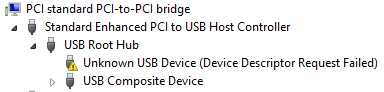
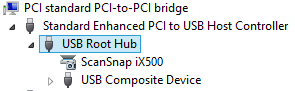
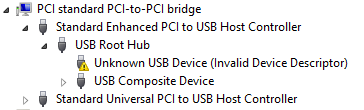
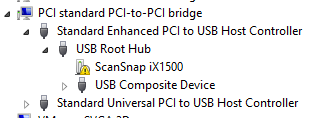
Sometimes, the Windows device manager shows any of the below errots for an USB 3.x device that is physically connected to the ESXi host and passes through a VM (via a virtual USB controller and virtual USB device).

This solution usually works: use a USB 2.0 cable instead of a USB 3.x cable.

If it doesn’t work, then the solutions are the same as when this happens in a pure physical solution:

In my case, I needed a USB connection, because it is the only way to reset a Fujitsu ScanSnap scanner to correct WiFi settings after it gets confused (which happens a few times per year).

Sreenshots

The difference for devices with a known driver:

  • USB 3 cable 
  • USB 2 cable 

The difference for devices with an unknown driver:

  •  USB 3 cable 
  • USB 2 cable 

Related information

This happened with me on both a ScanSnap iX500 and iX1500, and this did not help (as I was on a more recent Windows version): [WayBack] When setting up your scanner 502: My computer does not recognize ScanSnap iX500 with a USB 3.0 port. – Fujitsu Global.

More on USB passthrough:

More on USB virtualisation:

–jeroen

Posted in ESXi5.5, ESXi6, ESXi6.5, Fujitsu ScanSnap, Hardware, ix500, Power User, Scanners, Virtualization, VMware, VMware ESXi | Leave a Comment »

ScanSnap Advanced Operation Guide (Mac OS) Creating Searchable PDF Files

Posted by jpluimers on 2021/08/13

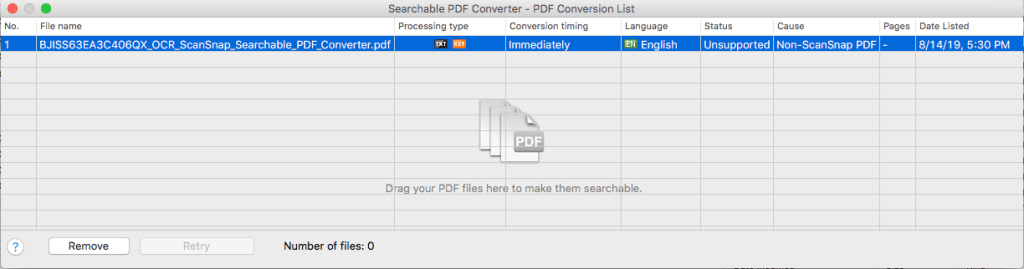
This works only for PDF files originally created by ScanSnap (otherwise “Unsuccessful” with “Non-ScanSnap PDF”: [WayBack] ScanSnap Advanced Operation Guide (Mac OS) Creating Searchable PDF Files

ATTENTION

  • Vertical text can be searched with Adobe Acrobat, but not with Spotlight or Preview.

HINT

The [Searchable PDF Converter] icon Searchable PDF Converter Icon appears in the status menu of the menu bar while Searchable PDF Converter is running. For details, refer to the ScanSnap Manager Help.

  1. Click the [Searchable PDF Converter] icon Searchable PDF Converter in the Quick Menu.
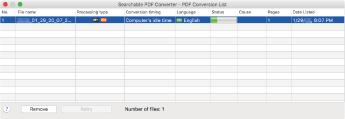
    • The [Searchable PDF Converter – PDF Conversion List] window appears, and conversion starts.
      Searchable PDF Converter

    HINT

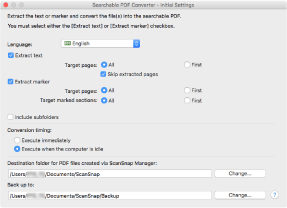
    On a window that appears when [Searchable PDF Converter] is started for the first time, click the [OK] button to open the [Searchable PDF Converter – Initial Settings] window. In the [Searchable PDF Converter – Initial Settings] window, specify the processes that are to be performed, the conversion timing, and the folder to which the converted files are saved while conversion into searchable PDF files is being performed.

    Searchable PDF Converter - Initial Settings

When using different kinds of PDFs, you get this error:

I have not figured out yet how it recognises ScanSnap generated PDF files.

–jeroen

Posted in Fujitsu ScanSnap, Hardware, ix500, Power User, Scanners | Leave a Comment »

Adding a Fujitsu PFU ScanSnap ix1500 scanner to a Windows machine that already had a ix500 scanner workflow was cumbersome

Posted by jpluimers on 2021/08/06

I was hoping for a quick install of the ScanSnap ix1500 on a machine that had a fully working ix500 workflow, just biting the bullet after contemplating about [WayBack] Thoughts on ix500; should I get an ix1500? for a while.

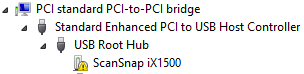
That didn’t work as expected: the Windows machine would not recognise the ix1500 when connected over USB or WiFi:

Missing driver

One problem here is that with the Ix500 installed, only the ix500 driver is known to Windows (on my machine it was in C:\Windows\Inf\oem12.inf which is identical to C:\Windows\SSDriver\SSMini\SSiX500-x64.inf) and the ScanSnap Installer software did not copy all drivers to C:\Windows\SSDriver\SSMini:

fi5110e-x64.cab
fi5110e-x64.cat
fi5110e-x64.inf
S1100-x64.cab
s1100-x64.cat
S1100-x64.inf
S1300-x64.cab
s1300-x64.cat
S1300-x64.inf
S1300i-x64.cab
s1300i-x64.cat
S1300i-x64.inf
S1500-x64.cab
S1500-x64.cat
S1500-x64.inf
S300-x64.cab
s300-x64.cat
S300-x64.inf
S500-x64.cab
s500-x64.cat
S500-x64.inf
SSiX100-x64.cab
ssix100-x64.cat
SSiX100-x64.inf
SSiX500-x64.cab
ssix500-x64.cat
SSiX500-x64.inf
SV600-x64.cab
sv600-x64.cat
SV600-x64.inf

Incompatible software

I later found out that the ix1500 is incompatible with the ScanSnap Manager: [WayBack] ScanSnap iX1500 Before you buy 03 – Fujitsu Global

Read the rest of this entry »

Posted in Fujitsu ScanSnap, Hardware, ix1500, ix500, Power User, Scanners | Leave a Comment »

Thoughts on ix500; should I get an ix1500?

Posted by jpluimers on 2021/04/30

Some of my thoughts on [WayBack] AW: Netzwerkfähiger Dokumentenscanner?:

I use a Fujitsu ScanSnap ix500 scanner for this plus a Windows VM that automatically logs on.

It is out of production now, but I think most of the below holds as the successor ix1500 is very similar (ix500 announcement https://www.fujitsu.com/sg/about/res…-20181002.html)

Before the ix500, I used a Fujitsu ScanSnap S510 which had similar capabilities as the ix500 but was a lot slower.

Cool things:

  • included software can do OCR and scan to a path the Windows user has access to
  • the scanner is fast, and does a stack of A4 full duplex automatically at a few seconds per page scanning on the scanner and 5-10 seconds per page OCR on a 1.2 Ghz dual core VM
  • no fiddling from within the scanner to get network stuff working, or to keep it up-to-date on protocol changes

Drawbacks:

  • the software pops up a dialog after each scan, so I wrote this: https://bitbucket.org/jeroenp/wiert….onsoleProject/
  • you need a Windows PC that is logged on (so the software does work), which means I configured a VM to auto-logon
  • WiFi 2.4 Ghz only (no ethernet interface, no 5 Ghz WiFi)
  • you need USB on the same VM connected to the scanner once to configure WiFI
  • like any hardware/software combination, sometimes the scanner or Windows VM need a reboot, for instance when it looses network or USB connection

The ix1500 has a touch screen instead of 2 buttons, so it might be that it has more standalone functionalities than the ix500.

Since I need a second scanner in a second place, I might get an ix1500 after the summer.

–jeroen

–jeroen

Posted in Fujitsu ScanSnap, Hardware, ix500, LifeHacker, Power User, Scanners | Leave a Comment »

Automatically closing ABBY Finereader 5.0 windows after scanning is completed

Posted by jpluimers on 2021/02/23

Both my Fujitsu ScanSnap ix500 and ix100 scanners can be used from Windows to automatically scan to PDF.

PDF conversion is done through the included ABBYY FineReader 5.0 software.

However, on each scan, it keeps a dialog open with the scan results, even if scanning went fine.

When scanning lots of documents, lots of dialogs are open, causing two problems:

  • a lot of memory and window handle resource usage
    • this can be ~100 megabytes per instance
  • a lot of disk usage:
    • it keeps both the non-OCR and OCR PDF files active (only when closing, the non-OCR PDF file is deleted)

I wanted to close that dialog automatically, but none of the configuration settings allow it.

So I wrote a quick and dirty solution, that could have been in any tool supporting the Windows API and call backs. The solution below should easily translate to tools other than Delphi.

These are the only Windows API functions used:

these types:

and these constants:

The basic structure is an EumWindows call passing a callback that gets called for all top level Windows, then in the callback, for matching captions: call EnumChildWindows with another callback. In that callback, for matching captions and child captions, perform a click or close.

Related posts:

Log of Windows related to both programs:

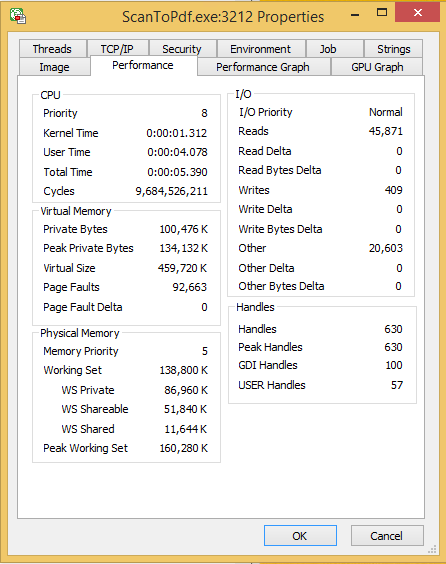
ParentHWnd=$00000000;HWnd=$00030602;IsVisible=-1;IsOwned=0;IsAppWindow=-1;WindowTextLength=33;WindowText="ABBYY FineReader for ScanSnap 5.0"
> Recursive child windows for ABBYY
  ParentHWnd=$00030602;HWnd=$000205E2;IsVisible=-1;IsOwned=0;IsAppWindow=0;WindowTextLength=0;WindowText=""
  ParentHWnd=$00030602;HWnd=$000205E0;IsVisible=-1;IsOwned=0;IsAppWindow=0;WindowTextLength=0;WindowText=""
  ParentHWnd=$00030602;HWnd=$000205EC;IsVisible=-1;IsOwned=0;IsAppWindow=0;WindowTextLength=0;WindowText=""
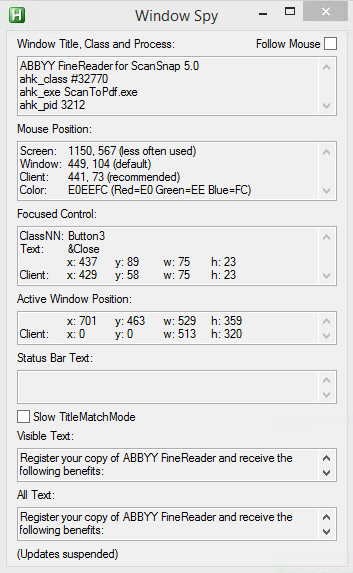
  ParentHWnd=$00030602;HWnd=$000205EA;IsVisible=-1;IsOwned=0;IsAppWindow=0;WindowTextLength=74;WindowText="Register your copy of ABBYY FineReader and receive the following benefits:"
  ParentHWnd=$00030602;HWnd=$000205E8;IsVisible=-1;IsOwned=0;IsAppWindow=0;WindowTextLength=25;WindowText="- Free technical support;"
  ParentHWnd=$00030602;HWnd=$000205E6;IsVisible=-1;IsOwned=0;IsAppWindow=0;WindowTextLength=51;WindowText="- Information about new versions of ABBYY products."
  ParentHWnd=$00030602;HWnd=$000205E4;IsVisible=-1;IsOwned=0;IsAppWindow=0;WindowTextLength=12;WindowText="Registration"
  ParentHWnd=$00030602;HWnd=$000205FC;IsVisible=-1;IsOwned=0;IsAppWindow=0;WindowTextLength=0;WindowText=""
  ParentHWnd=$00030602;HWnd=$000205FA;IsVisible=-1;IsOwned=0;IsAppWindow=0;WindowTextLength=6;WindowText="&Close"
  > Child is Close button: clicking.
  < ParentHWnd=$00000000;HWnd=$00030602;IsVisible=-1;IsOwned=0;IsAppWindow=-1;WindowTextLength=33;WindowText="ABBYY FineReader for ScanSnap 5.0"
  ParentHWnd=$00030602;HWnd=$000205F6;IsVisible=-1;IsOwned=0;IsAppWindow=0;WindowTextLength=34;WindowText="Processing finished (warnings: 1)."
  ParentHWnd=$00030602;HWnd=$000205F4;IsVisible=-1;IsOwned=0;IsAppWindow=0;WindowTextLength=31;WindowText="Converting to searchable PDF..."
  ParentHWnd=$00030602;HWnd=$000205F0;IsVisible=-1;IsOwned=0;IsAppWindow=0;WindowTextLength=0;WindowText=""
  ParentHWnd=$00030602;HWnd=$000205EE;IsVisible=-1;IsOwned=0;IsAppWindow=0;WindowTextLength=0;WindowText=""
  ParentHWnd=$00030602;HWnd=$000205D2;IsVisible=-1;IsOwned=0;IsAppWindow=0;WindowTextLength=63;WindowText="Page 1. Make sure the correct recognition language is selected."

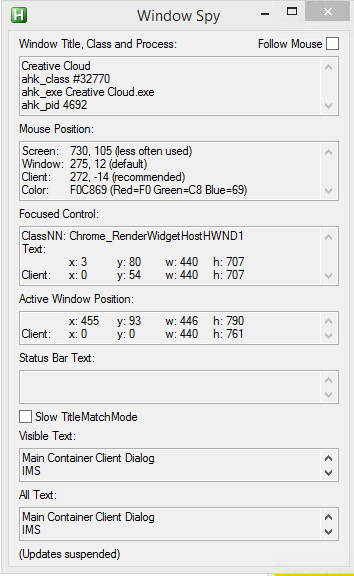
ParentHWnd=$00000000;HWnd=$00010248;IsVisible=-1;IsOwned=-1;IsAppWindow=0;WindowTextLength=14;WindowText="Creative Cloud"
> Recursive child windows for Creative Cloud
  ParentHWnd=$00010248;HWnd=$0001024A;IsVisible=-1;IsOwned=0;IsAppWindow=0;WindowTextLength=28;WindowText="Main Container Client Dialog"
  ParentHWnd=$00010248;HWnd=$0002034A;IsVisible=-1;IsOwned=0;IsAppWindow=0;WindowTextLength=3;WindowText="IMS"
  ParentHWnd=$00010248;HWnd=$0001035A;IsVisible=-1;IsOwned=0;IsAppWindow=0;WindowTextLength=0;WindowText=""
  ParentHWnd=$00010248;HWnd=$00020350;IsVisible=-1;IsOwned=0;IsAppWindow=0;WindowTextLength=18;WindowText="Sign in - Adobe ID"
  > Child is Signin button: closing parent.
  < ParentHWnd=$0003011A;HWnd=$00010248;IsVisible=-1;IsOwned=-1;IsAppWindow=0;WindowTextLength=14;WindowText="Creative Cloud"
    < ParentHWnd=$00000000;HWnd=$0003011A;IsVisible=0;IsOwned=0;IsAppWindow=0;WindowTextLength=4;WindowText="Core"

It appears that ABBYY has a different set of booleans than Creative Cloud.

This is kind of odd, as delphi – How to get captions of actual windows currently running? – Stack Overflow points to Window Features – Windows applications | Microsoft Docs: Owned Windows stating:

The Shell creates a button on the taskbar whenever an application creates a window that isn’t owned. To ensure that the window button is placed on the taskbar, create an unowned window with the WS_EX_APPWINDOW extended style. To prevent the window button from being placed on the taskbar, create the unowned window with the WS_EX_TOOLWINDOW extended style. As an alternative, you can create a hidden window and make this hidden window the owner of your visible window.

Apparently, ABBYY fully plays by the rules, but Creatheive Cloud cheats a bit: none of the Windows are WS_EX_APPWINDOW, but the hidden unowned “Core” owner of the “Creative Cloud” still makes it appear on the taskbar.

–jeroen

Read the rest of this entry »

Posted in Delphi, Development, Fujitsu ScanSnap, Hardware, ix100, ix500, Power User, Scanners, Software Development, Windows Development | Leave a Comment »

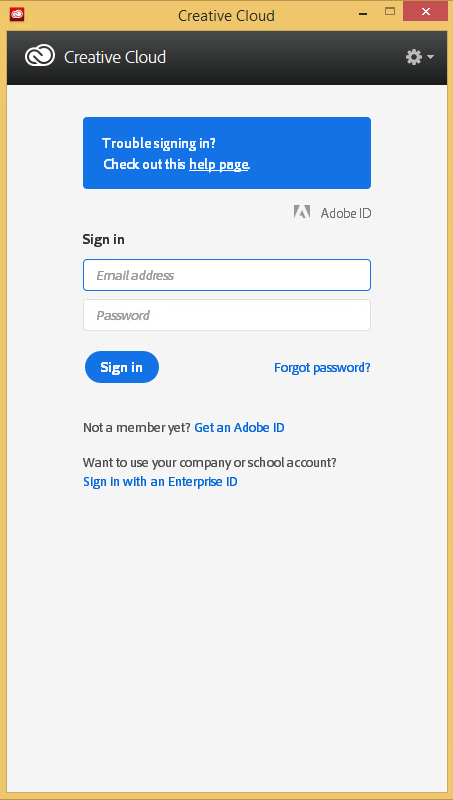
Automating the closing of the Creative Cloud signing and ABBY FindReader for ScanSnap 5.0 dialogs

Posted by jpluimers on 2021/01/06

Every time my scan VM logs on I get the dialog on the right.

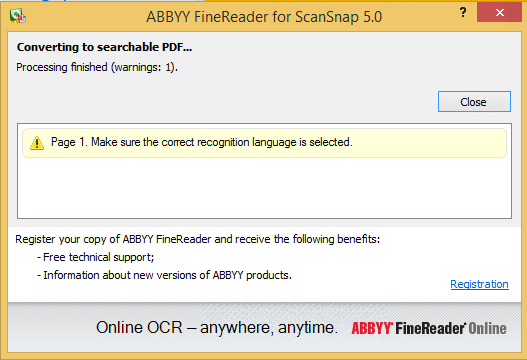
Every time I finish an OCR scan, I get the dialog below.

There are two reasons I want to close the ABBY dialog:

  1. While open, it will keep both the original PDF and OCR PDF files alive.When after a while, Windows updates auto-reboots the machine, before clicking the OK buttons I have to manually check if the conversion succeeded before removing the non-OCR PDF.This is time consuming.
  2. While open, it still consumes a lot of system resources: about 100 megabyte for a simple single monochrome A4 page. Much more for complex, multi-page or colour documents.When scanning a lot of document this causes the system to run out of memory, after becoming much much slower because the truckload of Window handles and underlying threads drags Windows down.

I do not want to fully get rid of these dialogs, as often being aware of the progress is important, and I always forget how to re-enable things. If you can do without the dialogs, then try these:

Finding the Windows and controls

I did use one nice feature of AutoHotKey: their Windows Spy utility, which is implemented as a AHK script: [WayBack] AutoHotKey-scripts/WindowSpy.ahk at master · elig0n/AutoHotKey-scripts · GitHub. In the past this was a separate executable, so do not start looking for that any more. You can get it either after a full install of the [WayBack] Releases · Lexikos/AutoHotkey_L · GitHub, or by extracting from the most current AutoHotKey.zip from [Archive.is] AutoHotkey Downloads.

Related:

This gets these for the Create Cloud and ABBY windows:

Automating the click

I contemplated about using AutoIt (freeware, but closed source) or AutoHotKey_L (the current active fork of AutoHotKey).

AutoIt is now closed source, forked in the past as AutoHotKey, which has a lot of half backed – usually poorly documented – scripts needing you to learn a new API wrapper around existing Windows API functionality.

So I reverted back to using the Windows API using Delphi: a simple repeat loop, to check for the existence of the underlying processes, windows and controls, plus some logic to terminate then the user stops the application (Ctrl-C, Ctrl-Break), logs off, or Windows shuts down.

Releated Windows API  keywords and posts:


I could have used AutoHotKey with these hints to get it working:

MacOS

Note that when you run on MacOS, you need an alternative like for instance the video below shows via [WayBack] Stop ScanSnap From Prompting You When You Scan.

–jeroen

Read the rest of this entry »

Posted in Development, Fujitsu ScanSnap, Hardware, ix100, ix500, Power User, Scanners, Scripting, Software Development, Windows, Windows 10, Windows 8.1 | Leave a Comment »

Making Fujitsu ix500 scanner’s CardMinder Viewer not globally steal the Alt-F3 shortcut

Posted by jpluimers on 2020/10/30

I hate applications that globally install Windows shortcut keys without the setup/install either warn about it or make it configurable.

In this case it is about CardMinder Viewer that ships with the Fujitsu ix500 scanner and installs a global shortcut, by default Alt-F3.

CardMinder Viewer is especially bad because the “settings” are not in the application: the settings are part of the Windows notification area (usually on the lower left of your screen; many people call it “the tray” as it was called tray in the Cairo research that led to Windows 95 and Windows NT 3.5).

So here is how to get rid of the AltF3 shortcut to be stolen:

Read the rest of this entry »

Posted in Fujitsu ScanSnap, Hardware, ix500, Power User, Scanners, Windows | Leave a Comment »

Mint 17/SANE will not recognize Fujitsu ScanSnap ix500 scanner : linuxmint

Posted by jpluimers on 2019/04/26

For my link archive:

Posted in Fujitsu ScanSnap, Hardware, ix100, ix500, Power User, Scanners | Leave a Comment »