The Wiert Corner – irregular stream of stuff

Jeroen W. Pluimers on .NET, C#, Delphi, databases, and personal interests

  • My badges

  • Twitter Updates

  • My Flickr Stream

  • Pages

  • All categories

  • Enter your email address to subscribe to this blog and receive notifications of new posts by email.

    Join 1,861 other subscribers

Archive for the ‘DNS’ Category

Duh moment: when 69.162.119.78 is querying your DNS infrastructure and it appears to be uptimerobot

Posted by jpluimers on 2020/07/28

From the hindsight department [WayBack] Nice when someone in Dallas using 69.162.119.78 is querying your DNS infrastructure for many permutations of domains… https://gist.github.com/jpluimer… – Jeroen Wiert Pluimers – Google+.

Wolfgang Rupprecht gave me some hints on the cause, as the IP address 69.162.119.78 Google Search used to be of a gaming server: [WayBack] TwotailsTikat’s Profile – Member List – Minecraft Forum

After a good night sleep,

# nslookup 69.162.119.78
78.119.162.69.in-addr.arpa name = mail.uptimerobot.com

In retrospect: perfectly normal behaviour for monitoring machine “snip”.

Log by https://github.com/gamelinux/passivedns

–jeroen

Read the rest of this entry »

Posted in *nix, DNS, Internet, Monitoring, Power User, Uptimerobot | Leave a Comment »

CAA Mandated by CA/Browser Forum | Qualys Blog

Posted by jpluimers on 2019/07/22

[WayBack] CAA Mandated by CA/Browser Forum | Qualys Blog

Certification Authority Authorization (CAA), specified in RFC 6844 in 2013, is a proposal to improve the strength of the PKI ecosystem with a new control to restrict which CAs can issue certificates…

Related:

–jeroen

Posted in Conference Topics, Conferences, DNS, Encryption, Event, HTTPS/TLS security, Internet, Power User, Security | Leave a Comment »

Windows Server 2008 and Server 2008 R2 – OpenDNS

Posted by jpluimers on 2018/12/10

I did this a long time ago, but forgot to blog about it back then: [Archive.isWindows Server 2008 and Server 2008 R2 – OpenDNS.

Summary:

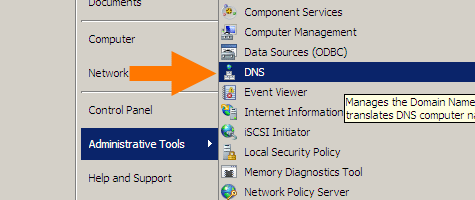
Start with the DNS manager:

%SystemRoot%\system32\dnsmgmt.msc /s

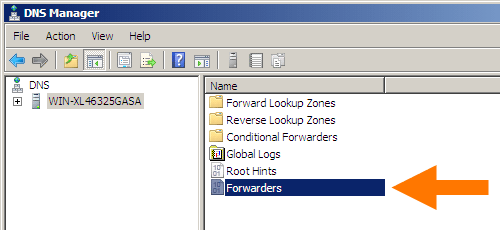
Then open your machine, and double-click Forwarders:

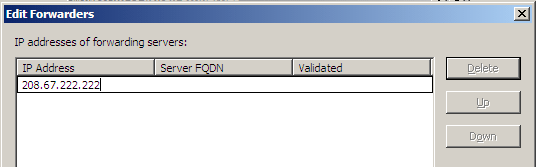
In the dialog, click the Edit button and add DNS servers (for instance Google DNS 8.8.8.8 and 8.8.4.4).

In my case it became this:

Google DNS servers added

Google DNS servers added

Click Done buttons until all dialogs are closed.


–jeroen

Read the rest of this entry »

Posted in DNS, Internet, Power User, Windows, Windows Server 2008, Windows Server 2008 R2 | Leave a Comment »

Uptime Robot on Twitter: “Sorry all that the API and status pages fluctuated since the last 18 hours. The issue is completely fixed and it is all back to normal now.”

Posted by jpluimers on 2018/12/04

[WayBackUptime Robot on Twitter: “Sorry all that the API and status pages fluctuated since the last 18 hours. The issue is completely fixed and it is all back to normal now.”

[WayBackJeroen Pluimerson Twitter: “Some are still broken, especially the ones with IDs 778601760 778601763 778601765 778601777 778601814 779973649 779677530 779677532 All of them reachable through various ISPs, but UpTimeRobot marks them down since about 11 hours”

See:

Failing:

Edit 20181205

Found out what happened: the IP got blocked on some spam lists. This is odd:

Even though the SMTP server behind it has relay blocked apart from the 2 domains it is primary MX for, somebody found a trick around it, I think by sending mail to the primary domains that

  1. are not caught yet by the installed backlist filters
  2. later bounce when forwarded to their forward address because their blacklist filters are by now more up-to-date,
  3. then the bounce email being flagged as SPAM.

MXTOOLBOX

The trick caused the IP to appear on 3 blacklists according to MXTOOLBOX:

Blacklist Reason TTL ResponseTime
 LISTED CBL 80.100.143.119 was listed  Detail 806 0 Ignore
 LISTED Hostkarma Black 80.100.143.119 was listed  Detail 805 0 Ignore
 LISTED Spamhaus ZEN 80.100.143.119 was listed  Detail 300 281 Ignore

Checking these revealed all to be around CBL:

CBL:

This IP address was detected and listed 6 times in the past 28 days, and 0 times in the past 24 hours. The most recent detection was at Tue Dec 4 02:25:00 2018 UTC +/- 5 minutes

Hostkarma Black:

Your reverse DNS is correct! – snip.xs4all.nl
The IP address for the reverse lookup name matches the original IP – RDNS Information

This is a list from our log files showing the activity from IP address 80.100.143.119. Our system stores information for 4 days.


/ip-log/karma.log.06:black 80.100.143.119 auth-bad ID=79648-15207 X=mxbackup H=snip.xs4all.nl [80.100.143.119]:40353 HELO=[[127.0.0.1]] SN=[M.ASMMSS.06446644586518723606@terrain.gov.harvard.edu] AUTH=[antonio] T=[irena.getheridge2018@outlook.fr] S=[Re: RcPT[(ALERT) | 0644664458]]

Spamhaus ZEN:

80.100.143.119 is not listed in the SBL

80.100.143.119 is not listed in the PBL

80.100.143.119 is listed in the XBL, because it appears in:

dnsbl.spfbl.net

Further research also found an entry in dnsbl.spfbl.net:

Check result of IP 80.100.143.119

This is the rDNS found:

This IP was flagged due to misconfiguration of the e-mail service or the suspicion that there is no MTA at it.


For the delist key can be sent, select the e-mail address responsible for this IP:

  • add a PayPal user’s email for 6.00 BRL.
  • add a PayPal user’s email for 1.50 USD.
  • <abuse@xs4all.nl> qualified.
  • <postmaster@snip.xs4all.nl> qualified.
  • <postmaster@xs4all.nl> qualified.

The rDNS must be registered under your own domain. We do not accept rDNS with third-party domains.

A chicken-and-egg situation here: since snip.xs4all.nl is blocked because of the blacklist entry, I cannot request a validation email for the blacklist entry.

But then there was MultiRBL showing that most DNS black lists are aggregators of others.

jeroen

Read the rest of this entry »

Posted in *nix, DNS, Internet, Monitoring, Power User, Uptimerobot | Leave a Comment »

dig: getting the list of root servers

Posted by jpluimers on 2018/11/15

For many dig queries, it helps to get the current list of root DNS servers.

Though the list is pretty static, occasionally it changes. While writing there were 13 of them and the most recent history report was in “RSSAC023: History of the Root Server System” at [WayBackwww.icann.org/en/system/files/files/rssac-023-04nov16-en.pdf.

So below are the steps to get an accurate list based on

First find out what the root servers are:

$  dig +noall +answer . ns | sort
.           106156  IN  NS  a.root-servers.net.
.           106156  IN  NS  b.root-servers.net.
.           106156  IN  NS  c.root-servers.net.
.           106156  IN  NS  d.root-servers.net.
.           106156  IN  NS  e.root-servers.net.
.           106156  IN  NS  f.root-servers.net.
.           106156  IN  NS  g.root-servers.net.
.           106156  IN  NS  h.root-servers.net.
.           106156  IN  NS  i.root-servers.net.
.           106156  IN  NS  j.root-servers.net.
.           106156  IN  NS  k.root-servers.net.
.           106156  IN  NS  l.root-servers.net.
.           106156  IN  NS  m.root-servers.net.

You should shorten this to $ dig +noall +answer . ns but that will not give you the TTL (how long the information will be cached before your DNS server refreshes it).

Now query at least 3 of these to get the actual list of root servers (I list only one statement, the rest is similar):

$ dig +noall +answer . ns @j.root-servers.net. | sort
.           518400  IN  NS  a.root-servers.net.
.           518400  IN  NS  b.root-servers.net.
.           518400  IN  NS  c.root-servers.net.
.           518400  IN  NS  d.root-servers.net.
.           518400  IN  NS  e.root-servers.net.
.           518400  IN  NS  f.root-servers.net.
.           518400  IN  NS  g.root-servers.net.
.           518400  IN  NS  h.root-servers.net.
.           518400  IN  NS  i.root-servers.net.
.           518400  IN  NS  j.root-servers.net.
.           518400  IN  NS  k.root-servers.net.
.           518400  IN  NS  l.root-servers.net.
.           518400  IN  NS  m.root-servers.net.

Compare the lists. If they are equal, then you’re done.

If not, then the internet is in trouble (:

When you want the A and AAAA records with IP addresses in addition to the NS records with names, then add +additional to your query:

dig +noall +answer +additional @j.root-servers.net. | sort
.           518400  IN  NS  a.root-servers.net.
.           518400  IN  NS  b.root-servers.net.
.           518400  IN  NS  c.root-servers.net.
.           518400  IN  NS  d.root-servers.net.
.           518400  IN  NS  e.root-servers.net.
.           518400  IN  NS  f.root-servers.net.
.           518400  IN  NS  g.root-servers.net.
.           518400  IN  NS  h.root-servers.net.
.           518400  IN  NS  i.root-servers.net.
.           518400  IN  NS  j.root-servers.net.
.           518400  IN  NS  k.root-servers.net.
.           518400  IN  NS  l.root-servers.net.
.           518400  IN  NS  m.root-servers.net.
a.root-servers.net. 518400  IN  A   198.41.0.4
a.root-servers.net. 518400  IN  AAAA    2001:503:ba3e::2:30
b.root-servers.net. 518400  IN  A   192.228.79.201
b.root-servers.net. 518400  IN  AAAA    2001:500:200::b
c.root-servers.net. 518400  IN  A   192.33.4.12
d.root-servers.net. 518400  IN  A   199.7.91.13
e.root-servers.net. 518400  IN  A   192.203.230.10
f.root-servers.net. 518400  IN  A   192.5.5.241
g.root-servers.net. 518400  IN  A   192.112.36.4
h.root-servers.net. 518400  IN  A   198.97.190.53
i.root-servers.net. 518400  IN  A   192.36.148.17
j.root-servers.net. 518400  IN  A   192.58.128.30
k.root-servers.net. 518400  IN  A   193.0.14.129
l.root-servers.net. 518400  IN  A   199.7.83.42
m.root-servers.net. 518400  IN  A   202.12.27.33

–jeroen

Posted in DNS, Internet, Power User | 1 Comment »

Find the TTL for a domain and subdomain by getting to the authoritative nameserver first

Posted by jpluimers on 2018/11/15

Lets find the authoritative name server and TTL (time to live) for the example.org domain and www.example.org subdomain.

Notes:

1a: get parents of name servers

First start with a root server (dig: getting the list of root servers) to get parents of the name servers for example.org (don’t you love indirection!):

$ dig +norecurse +noall +authority @f.root-servers.net. example.org.
org.            172800  IN  NS  a0.org.afilias-nst.info.
org.            172800  IN  NS  a2.org.afilias-nst.info.
org.            172800  IN  NS  b0.org.afilias-nst.org.
org.            172800  IN  NS  b2.org.afilias-nst.org.
org.            172800  IN  NS  c0.org.afilias-nst.info.
org.            172800  IN  NS  d0.org.afilias-nst.org.

You can repeat this query for 2 more root servers to ensure they are in sync.

1b: get authoritative name servers from the parents

Now repeat with at least 3 of these to ensure they give matching results for the name servers for example.org:

$ dig +norecurse +noall +authority @b0.org.afilias-nst.info. example.org.
example.org.        86400   IN  NS  b.iana-servers.net.
example.org.        86400   IN  NS  a.iana-servers.net.
$ dig +norecurse +noall +authority @c0.org.afilias-nst.info. example.org.
example.org.        86400   IN  NS  a.iana-servers.net.
example.org.        86400   IN  NS  b.iana-servers.net.
$ dig +norecurse +noall +authority @a0.org.afilias-nst.info. example.org.
example.org.        86400   IN  NS  a.iana-servers.net.
example.org.        86400   IN  NS  b.iana-servers.net.

2a: getting the domain name servers from a public name server

A query to a public DNS server will also return a name server list, but then you would need to know that name server first. In addition, you can not ask for +authority; you have to ask for +answer NS in stead:

$ dig +norecurse +noall +answer NS @8.8.8.8 example.org.
example.org.        55312   IN  NS  a.iana-servers.net.
example.org.        55312   IN  NS  b.iana-servers.net.

The name servers on the list are not guaranteed to be authoritative, as this query returns an empty result:

$ dig +norecurse +noall +authority @8.8.8.8 example.org.

2b. ensuring the name servers are authoritative name servers

From the name servers returned, you can now check if the servers themselves return the same name servers. If so, then you are sure they are authoritative:

$ dig +norecurse +noall +authority @a.iana-servers.net. example.org.
example.org.        86400   IN  NS  a.iana-servers.net.
example.org.        86400   IN  NS  b.iana-servers.net.
$ dig +norecurse +noall +authority @b.iana-servers.net. example.org.
example.org.        86400   IN  NS  b.iana-servers.net.
example.org.        86400   IN  NS  a.iana-servers.net.

3: get the actual TTL

With the authoritative name servers, you can get the actual TTL:

$ dig +norecurse +noall +answer SOA @a.iana-servers.net. example.org.
example.org.        3600    IN  SOA sns.dns.icann.org. noc.dns.icann.org. 2017042729 7200 3600 1209600 3600
$ dig +norecurse +noall +multiline +answer SOA @a.iana-servers.net. example.org.
example.org.        3600 IN SOA sns.dns.icann.org. noc.dns.icann.org. (
                2017042729 ; serial
                7200       ; refresh (2 hours)
                3600       ; retry (1 hour)
                1209600    ; expire (2 weeks)
                3600       ; minimum (1 hour)
                )

I got the +multiline trick from [WayBackHOWTO: Using dig(1) to Find DNS Time to Live (TTL) Values – A-Team Systems.

4: get the count down TTL from a local name server

You can repeat the above process with a non-authoritative name server a few times to see the TTL decrease:

$ dig +norecurse +noall +answer SOA example.org.
example.org.        322 IN  SOA sns.dns.icann.org. noc.dns.icann.org. 2017042729 7200 3600 1209600 3600
$ dig +norecurse +noall +answer SOA example.org.
example.org.        321 IN  SOA sns.dns.icann.org. noc.dns.icann.org. 2017042729 7200 3600 1209600 3600

This is for instance what is returned by [WayBackexample.org DNS information – who.is example.org DNS information. DNS records such SOA, TTL, MX, TXT and more.

Public DNS servers having multiple servers per IP can even run disperse TTL numbers, for instance Google DNS at 8.8.8.8 does this:

$ dig +norecurse +noall +answer SOA @8.8.8.8 example.org.
example.org.        13  IN  SOA sns.dns.icann.org. noc.dns.icann.org. 2017042729 7200 3600 1209600 3600
$ dig +norecurse +noall +answer SOA @8.8.8.8 example.org.
example.org.        1388    IN  SOA sns.dns.icann.org. noc.dns.icann.org. 2017042729 7200 3600 1209600 3600
$ dig +norecurse +noall +answer SOA @8.8.8.8 example.org.
example.org.        10  IN  SOA sns.dns.icann.org. noc.dns.icann.org. 2017042729 7200 3600 1209600 3600

Note that +nssearch does not work for me

Using +nssearch as per [WayBackHow to find what Authoritative Name Server provided the answer using dig? – Server Fault fails for me:

$ dig +nssearch example.org
SOA sns.dns.icann.org. noc.dns.icann.org. 2017042729 7200 3600 1209600 3600 from server 199.43.135.53 in 83 ms.
SOA sns.dns.icann.org. noc.dns.icann.org. 2017042729 7200 3600 1209600 3600 from server 199.43.133.53 in 144 ms.
;; connection timed out; no servers could be reached

This reveals this in the bold values:

  • The authoritative nameserver sns.dns.icann.org is not publicly accessible.
  • TTL 7200 (7200 seconds is 2 hours).

Future research

Authoritative answers might not be present in dig queries on some platforms. I need to dig deeper into [WayBackterminal – Dig not returning authority section? – Ask Different to see why.

Glue records are always tricky to get right: [WayBackHow to check domain NS glue records using dig « Admins eHow

–jeroen

Posted in *nix, *nix-tools, bash, Development, dig, DNS, Internet, Power User, Scripting, Software Development | Leave a Comment »

Some sites than can help you check if your (maybe dynamic) IP has been black-listed

Posted by jpluimers on 2018/09/07

A few links that helped me track down why a sudden new Ziggo IP-address was blacklisted:

–jeroen

Posted in DNS, Internet, Power User | Leave a Comment »

From the #AllesIstKaput department: DNS 1.1.1.1 is unusable for many; 9.9.9.9 has government affiliation

Posted by jpluimers on 2018/04/04

Abstract from this morning’s Twitter feed:

  • 1.1.1.1 [Wayback] DNS is broken in many areas (because of for instance AT&T, Vodafone, Cisco screwing up and 1.1.1.1 historically being marked for research purposes)
  • 9.9.9.9 [Wayback] DNS has government affiliation (owned by Quad9, but the partner list below does not look nice)

So what’s left?

There are a more interesting IPv4 addresses untaken for DNS, but I’m not sure they are likable enough:

Read the rest of this entry »

Posted in Cloud, Cloudflare, DNS, Infrastructure, Internet, LifeHacker, Power User | Tagged: , , , , | Leave a Comment »

DNS traffic monitoring tools: tshark, tcpdump or dnstop

Posted by jpluimers on 2018/04/02

I resolved my issue with tshark, but that’s not available on all systems neither is dnstop. Most systems do have tcpdump though.

Anyway, some links:

–jeroen

Posted in *nix, *nix-tools, DNS, Internet, Linux, openSuSE, Power User, SuSE Linux | Leave a Comment »

If I ever have to do bind named work again…

Posted by jpluimers on 2018/03/12

Boy, named can be cryptic.

So here are some links that might help me in the future

jeroen

Posted in *nix, bind-named, DNS, Internet, Linux, Power User | Leave a Comment »