The Wiert Corner – irregular stream of stuff

Jeroen W. Pluimers on .NET, C#, Delphi, databases, and personal interests

  • My badges

  • Twitter Updates

  • My Flickr Stream

  • Pages

  • All categories

  • Enter your email address to subscribe to this blog and receive notifications of new posts by email.

    Join 1,861 other subscribers

Archive for the ‘Internet’ Category

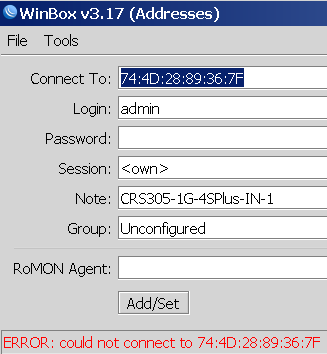
Winbox 3.19 can connect via MAC whereas Winbox 3.17 cannot

Posted by jpluimers on 2021/08/17

Not sure why, but Winbox 3.17 could not connect to out of the box blank MikroTik equipment at all.

Winbox 3.19 complains every now and than, but usually connects fine.

This was while configuring a bunch of [WayBack] MikroTik Routers and Wireless – Products: CRS305-1G-4S+IN.

Read the rest of this entry »

Posted in Development, Internet, MikroTik, Power User, RouterOS, routers, Scripting, Software Development | Leave a Comment »

Mikrotik CCR devices based on NAND memory will eventually die

Posted by jpluimers on 2021/08/16

If you own a Mikrotik CCR device based on NAND memory, then be prepared that it will die.

I had this on a (now discontinued [WayBack] MikroTik Routers and Wireless – Products: CCR1009-8G-1S-1S+PC, superseded by the less functional [WayBack] MikroTik Routers and Wireless – Products: CCR1009-7G-1C-1S+PC, which is also NAND based).

Many more people had this or very similar problems:

It also happens due to bad capacitors on the (also discontinued) [WayBack] MikroTik Routers and Wireless – Products: RB1200:

There have been quite a few NAND related changes to the firmware over the years that have to do with handling corruption:

If you are really lucky (I was not), then it is a bad power supply: [WayBack] bootloop on CCR1036-12g-4s (almost 5 years old) [SOLVED] – MikroTik.

Sometimes you can partially recover using the Console port or NetInstall, but eventually you will trip another part of the faulty NAND storage and it will die again, until it has spent all its lives.

Unlike a cat, those are usually far less than 9 lives.

If you do need to recover, the links might help you:

–jeroen

Posted in Internet, MikroTik, Power User, routers | Leave a Comment »

Firefox: disable DNS over HTTPS (which they call TTR)

Posted by jpluimers on 2021/08/03

There are many reasons to disable DNS over HTTPS (DoH), of which enough are discussed in the links below.

Disabling DoH always talks about setting TTR (the abbreviation Mozilla uses for it) to 5 (like [WayBack] Thread by @isotopp: “Firefox is about to break DNS by enabling DNS-over-HTTP by default […]”), but hardly ever explains the meaning of 5, or any other potential values.

After some searching, I found [WayBack] Firefox disable trr | Knowledge Base:

  • 0: Off by default
  • 1: Firefox chooses faster
  • 2: TRR default w/DNS fallback
  • 3: TRR only mode
  • 5: Disabled

I imagine the setting we’re all looking for is: user_pref(“network.trr.mode”, 5); (emphasis mine)

It pointed me to [WayBack] Trusted Recursive Resolver – MozillaWiki:

Read the rest of this entry »

Posted in Cloud, Cloudflare, Communications Development, Development, DNS, Firefox, Infrastructure, Internet protocol suite, Power User, TCP, Web Browsers | Leave a Comment »

Factory reset a MikroTik hEX PoE RB960PGS using the reset button

Posted by jpluimers on 2021/08/02

[WayBack] Manual:Reset – MikroTik Wiki:

 unplug the device from power

2) press and hold the button right after applying power

Note: hold the button for 5 seconds (USER LED will start flashing)

3) release the button to clear configuration.

Icon-note.png Note: If you wait until LED stops flashing, and only then release the button – this will instead launch Netinstall mode, to reinstall RouterOS.

Initial configuration

(see also [WayBack] Manual:First time startup – MikroTik Wiki)

  1. Connect your machine to port 1 on the Mikrotik hEX PoE RB960PGS (after the reset, this port will have IPv4 address 192.168.88.2 with netmask 255.255.255.0)
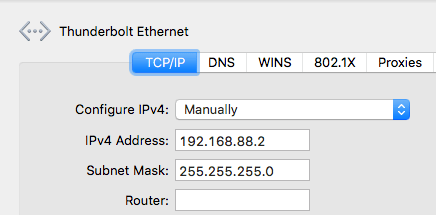
  2. Ensure your local machine to IPv4 address 192.168.88.2 with netmask 255.255.255.0 (otherwise WinBox might not see the router, not even in discovery mode):

  3. Have WinBox auto discover it:

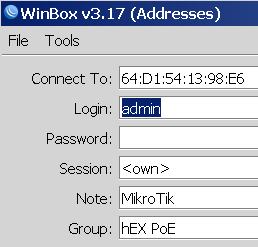
  4. Connect with user admin and no password:


  5. Configure your Mikrotik hEX PoE RB960PGS as router or switch

For switch, I prefer a setting like this (the bold portions are different from the default configuration):

/interface bridge
add admin-mac=64:D1:54:13:98:E6 auto-mac=no comment=defconf name=bridgeLocal
/interface wireless security-profiles
set [ find default=yes ] supplicant-identity=MikroTik
/ip hotspot profile
set [ find default=yes ] html-directory=flash/hotspot
/interface bridge port
add bridge=bridgeLocal comment=defconf interface=ether1
add bridge=bridgeLocal comment=defconf interface=ether2
add bridge=bridgeLocal comment=defconf interface=ether3
add bridge=bridgeLocal comment=defconf interface=ether4
add bridge=bridgeLocal comment=defconf interface=ether5
add bridge=bridgeLocal comment=defconf interface=sfp1
/ip dhcp-client
add comment=defconf dhcp-options=hostname,clientid disabled=no interface=bridgeLocal
/ip dns static
add address=192.168.88.1 name=router.lan
/system clock
set time-zone-name=Europe/Amsterdam
/system identity
set name="RB960PGS <<location-name>>"
/system ntp client
set enabled=yes server-dns-names=0.pool.ntp.org,1.pool.ntp.org,2.pool.ntp.org,3.pool.ntp.org

–jeroen

Posted in Internet, MikroTik, Power User, routers | Leave a Comment »

Listing information on all active interfaces on MacOS part 2: adding DHCP/BOOTP and routing details

Posted by jpluimers on 2021/07/27

This is a continuation of yesterdays

Listing information on all active interfaces on MacOS part 1: getting the active interface names.

It is based on ideas in these StackExchange posts:

I threw most of the implementation details in the ideas away, as they were way to much based on empirical trial and error, than proper research.

So I tried doing the research and came up with the things below.

Getting the IPv4 address and DHCP/BOOTP information of a NIC

By using the ipconfig command, you can get specific details for a NIC like an IPv4 (with the getifaddr) or DHCP (with the getpacket option to get the latest DHCP packet):

for i in $(ifconfig -l -u); do if ifconfig $i | grep -q "status: active" ; then echo $i; fi; done | xargs -n1 -I_nic_ sh -c 'echo "_nic_: $(ipconfig getifaddr _nic_)"'

or DHCP/BOOTP:

for i in $(ifconfig -l -u); do if ifconfig $i | grep -q "status: active" ; then echo $i; fi; done | xargs -n1 -I_nic_ sh -c 'echo "_nic_: $(ipconfig getpacket _nic_)"'

The latter returns a very long list, which I wanted to shorten into a more readable format.

ipconfig syntax

You can find more information in the [Archive.is] ipconfig(8) [osx man page] / [WayBack] ipconfig Man Page – macOS – SS64.com excerpt:

Read the rest of this entry »

Posted in *nix, *nix-tools, Apple, bash, Development, DNS, ifconfig, Mac OS X / OS X / MacOS, Power User, Scripting, Software Development | Leave a Comment »

Did not realise that a 2018 Mikrotik vulnerability made it to the top of the CBL (SMTP composite black list) warning page for quite some months as the first ever device

Posted by jpluimers on 2021/07/02

Having it accidentally made it to the CBL (Composite Blocking List – Wikipedia) a long time ago, I discovered the page started with (WayBack link mine):

IMPORTANT: Many CBL/XBL listings are caused by a vulnerability in Mikrotik routers. If you have a Mikrotik router, please check out the [WayBack] Mikrotik blog on this subject and follow the instructions before attempting to remove your CBL listing.

It wasn’t one of my Mikrotik devices, as first of all they had all being patched out of the box from a really empty internal network before being externally exposed to the internet or more busy internal networks, and second because the CBL entry was a one off on one specific day where someone used our guest network.

Some CBL entries in the range where it was displayed, quite a while after CVE-2018-14847 became public:

If you want to try for yourself or harden it: [WayBack] Exploiting Mikrotik for Good ? | Syed Jahanzaib Personal Blog to Share Knowledge !

So I did some more digging.

First of all, it seems that if you ever had an infected Mikrotik system, then you have to factory reset it, then upgrade and configure from scratch. Otherwise at least the SOCKS and Web proxy services can still send out spam: [Archive.is] spammer behind mikrotik or mikrotik is the spammer : sysadmin. There, the best advice was

aliterCogitare, Jr. Sysadmin: 

Your mikrotik has been compromised then, I would suggest either going on site and rebuilding the router from scratch, or looking at a few things:

  1. Check System -> Scheduler for any schedules running( that you haven’t configured yourself)

  2. Check Systems -> scripts for any installed scripts that are running and delete, also look for running jobs and terminate them.

  3. Finally check the file explorer for any suspicious files or scripts, and delete any you find. A default library should look like this: flash (the partition) -pub -skins anything else that you havent put there yourself, Delete.

Anything else that I have mentioned above should be empty. Also you need to re-evaluate the security of your network. If you happen to be on site, reset the router and remove the default configuration on the boot prompt. Create two rules:

  • Allow input chain source IP from your default local network, if i remember correctly its 192.168.88.0/24

  • create an explicit drop rule on input chain for all interfaces and addresses + ports

  • disable IP – services except winbox Finally work your way up on what your network needs step by step by creating rules to accept traffic. And be sure to put your explicit rule on the bottom of the list by drag-and-dropping. That is all I can say, I hope I could be of help.

This means the advice in these two links might not be enough:

Another helpful resource [WayBack] Router Sending Spam – MikroTik which discusses the firewall rules, socks and web proxy services.

Second, there are a truckload of these devices around: [WayBack] Thousands of Compromised MikroTik Routers Send Traffic to Attackers and [WayBack] Thousands of MikroTik routers are snooping on user traffic | ZDNet write that in September 2018, at least 7500 devices were known infected and about 370-thousand endpoints vulnerable.

Third, you should be able to use [WayBack] Manual:Tools/Netwatch – MikroTik Wiki to check if you are on the CBL: [WayBack] Probing CBL blacklist – MikroTik.

Read the rest of this entry »

Posted in Firewall, Internet, MikroTik, Power User, routers, SPAM | Leave a Comment »

GitHub – jjjake/internetarchive: A Python and Command-Line Interface to Archive.org

Posted by jpluimers on 2021/06/16

On my list of things to play with: [WayBack] GitHub – jjjake/internetarchive: A Python and Command-Line Interface to Archive.org.

Via:

Related:

  • [WayBack] The Internet Archive Python Library — Internet Archive item APIs 1.8.5 documentation
  • [WayBack] Command-Line Interface — Internet Archive item APIs 1.8.5 documentation
  • [WayBack] Quickstart — Internet Archive item APIs 1.8.5 documentation, including:

    Configuring

    Certain functionality of the internetarchive Python library requires your archive.org credentials. Your IA-S3 keys are required for uploading, searching, and modifying metadata, and your archive.org logged-in cookies are required for downloading access-restricted content and viewing your task history. To automatically create a config file with your archive.org credentials, you can use the ia command-line tool:

    $ ia configure
    Enter your archive.org credentials below to configure 'ia'.
    
    Email address: user@example.com
    Password:
    
    Config saved to: /home/user/.config/ia.ini
    

    Your config file will be saved to $HOME/.config/ia.ini, or $HOME/.ia if you do not have a .configdirectory in $HOME. Alternatively, you can specify your own path to save the config to via ia --config-file '~/.ia-custom-config' configure.

    If you have a netc file with your archive.org credentials in it, you can simply run ia configure --netrc. Note that Python’s netrc library does not currently support passphrases, or passwords with spaces in them, and therefore not currently suported here.

–jeroen

Read the rest of this entry »

Posted in Development, Internet, InternetArchive, Power User, Python, Scripting, Software Development, WayBack machine | Leave a Comment »

Check if this still happens: some Twitter content in the WayBack machine gets a slash in the URL removed during rendering on Chrome

Posted by jpluimers on 2021/06/11

From my research list; check if this still happens: [WayBack] Saving Twitter content in the WayBack archive: the fully loaded page has a wrong trailing URL (missing the second slash before the authority) · GitHub

  1. Visited https://twitter.com/MarkGraham
  2. Saved it using https://web.archive.org/save/https://twitter.com/MarkGraham
  3. Waited for the save to complete and the page to fully load and got https://web.archive.org/web/20190607081047/https:/twitter.com/MarkGraham
  4. Observed the trailing part is not a valid URL any more https:/twitter.com/MarkGraham: it is missing the second slash before the authority (see https://en.wikipedia.org/wiki/Uniform_Resource_Identifier#Generic_syntax)

This might be a Twitter.com thing:

Notes:

  • I have only tested this with my Chrome configurations on various machines (both regular and anonymous tabs) over at least a year; I need to figure out what happens when using different browsers.
  • It does not always happen.

Via: [WayBack] Jeroen Pluimers on Twitter: “I understand that the sites themselves pay a big role in this. That’s why I have the mangling of URLs that sometimes happens on my research list. I made this quick summary: …”

–jeroen

Read the rest of this entry »

Posted in Internet, InternetArchive, Power User, SocialMedia, Twitter, WayBack machine | Leave a Comment »

CloudKey ESXi Appliance – Google Search

Posted by jpluimers on 2021/06/07

Via [Archive.is] CloudKey ESXi Appliance – Google Search:

–jeroen

Posted in *nix, Cloud Key, ESXi6, ESXi6.5, ESXi6.7, Internet, Network-and-equipment, Power User, Unifi-Ubiquiti, Virtualization, VMware, VMware ESXi | Leave a Comment »

Contact for when WayBack internet archival fails to grab content

Posted by jpluimers on 2021/06/07

For my link archive, some tweets. [WayBack] Mark Graham is the person to contact in case archiving a link in the WayBack machine fails.

These are the steps for my link archival:

  1. check if it saves and renders with the WayBack machine, if so, copy the saved URL and the original URL
  2. check if it saves and renders with archive.is, if so, copy the saved URL and the original URL
  3. if neither saved, then use the original URL and link text, but note it was unsavable; otherwise prepend the original URL and link text with [WayBack] or [Archive.is] containing the saved URL

Reporting history gist: https://gist.github.com/jpluimers/6115b3cd6dab568ebd1c10ebddfaf140

–jeroen

Read the rest of this entry »
Posted in Internet, InternetArchive, Power User, WayBack machine | Leave a Comment »