The Wiert Corner – irregular stream of stuff

Jeroen W. Pluimers on .NET, C#, Delphi, databases, and personal interests

  • My badges

  • Twitter Updates

  • Pages

  • All categories

  • Enter your email address to subscribe to this blog and receive notifications of new posts by email.

    Join 1,839 other subscribers

Archive for the ‘Network-and-equipment’ Category

Not all Fritz!Box devices can be upgraded to the most recent firmware

Posted by jpluimers on 2018/11/30

I forgot to document this earlier.

Many Fritz!Box devices cannot be upgraded to recent firmwares. The behaviour differs on hardware revisions of the same model. I’ve seen it happen on Fritz!Box 7360 devices, but others are could be affected too.

You can get the firmware revision using the trick here: FRITZ!Box call http://fritz.box/cgi-bin/system_status.

If your hardware revision is affected, do not expose it to the outside world.

You could still turn it into a local switch though: [WayBackConvert FRITZ!Box 7360 to Managed Switch (or even Access Point) having it’s own IP address: Setting up the FRITZ!Box as an IP client.

I did this before even discovering about the hardware revision limits as I wanted to keep the full phone history when migrating from ADSL to fiber (which came with a brand new Fritz!Box 7490) and could use the extra LAN ports.

Fritz!Box 7360 hardware revision v1: limited to firmware 06.3x

Read the rest of this entry »

Posted in Fritz!, Fritz!Box, Internet, Power User | Leave a Comment »

Parsing simple html in Python

Posted by jpluimers on 2018/11/29

Was working to get fritzcap to emit a list of interfaces so I could specify which one to capture.

For that I needed to parse the output of http://fritz.box/capture.lua which consists of HTML fragments like below.

What I needed was for each consecutive entries of [WayBack] th and first [WayBackbutton tags:

  • content of the th tag
  • content of the value attribute of the button tag having a type="submit" attribute and name=start attribute

So before starting to work on it, I created [WayBackIn order to fix #5, print a list of available interfaces to potentially capture from · Issue #6 · jpluimers/fritzcap

The goal was to get a series of key/value pairs:

4-138 = AP2 (2.4 + 5 GHz, ath1) - Interface 1
4-137 = AP2 (2.4 + 5 GHz, ath1) - Interface 0
4-132 = AP (2.4 GHz, ath0) - Interface 1
4-131 = AP (2.4 GHz, ath0) - Interface 0
4-129 = HW (2.4 GHz, wifi0) - Interface 0
4-128 = WLAN Management Traffic - Interface 0a

So I built a class descending from [WayBackHTMLParser — Simple HTML and XHTML parser that ships with the [WayBackPython standard libraries.

If in the future I need more complex HTML parsing, then these links will help me choosing more feature rich parsers:

Back to the HTMLParser descendant in interfaces_dumper.py which can basically be condensed down to the code below.

  • handle_data is called for both start tags and end tags. The th value in data is only present in the start tag (at the time of end tag the data is empty), so you need to keep track of both last_start_tag and last_end_tag.
  • handle_endtag maintains last_end_tag to help handle_data.
  • handle_starttag maintains last_start_tag to help handle_data and also handles the button behaviour.
    • The buttonis only relevant if it has type="submit" and name="start" and a value attribute in that order.
    • Output is in data which is an array of key/value pairs.

Read the rest of this entry »

Posted in Development, Fritz!, Fritz!Box, fritzcap, Internet, Power User, Python, Scripting, Software Development | Leave a Comment »

Fritz!Box LUA links on my research list

Posted by jpluimers on 2018/11/27

I’m not sure around which firmware versions Fritz!Box started to implement LUA links, but they are now on my research list.

Below a reference and where I found them.

A few notes first:

  • There are many duplicates, which in due time I need to de-duplicate.
  • The .lua links seem to override the old cgi-bin links (that are partially reverse engineered at [WayBackCategory:Befehle in /usr/www/cgi-bin – Fritz!Box).
  • Usually, .lua links require a SID. In the web-ui, a Fritz!Box very much tries to hide that SID from URLs in the browser address bar (especially for firmware versions 06.50 and up) so the easiest to get them is this:
    1. Login to your Fritz!Box
    2. Manually copy any of the URLs in the left side
    3. Take the SID from there.
  • More recent firmware versions hide the .lua links too, but you can see them when monitoring your network traffic in the developer mode of your web browser

Logging in programmatically needs a challenge response mechanism. It used to be at [Wayback] http://www.avm.de/de/Extern/Technical_Note_Session_ID.pdf but now has moved to [Wayback/Archive.ishttps://avm.de/fileadmin/user_upload/Global/Service/Schnittstellen/AVM_Technical_Note_-_Session_ID.pdf

Here is the list:

Read the rest of this entry »

Posted in Development, Fritz!, Fritz!Box, Hardware Development, Hardware Interfacing, Internet, Power User | Leave a Comment »

SSH: Connection Reset by Peer – Server Fault

Posted by jpluimers on 2018/11/22

One occasion I had SSH throw a Connection Reset by Peer on my when was the SD-card of a Raspberry Pi started failing and the ext4 filesystem got mounted in read-only mode.

Then sshd was still listening on port 22, but since it could not write to disk any more, it threw a Connection Reset by Peer to the client.

It was on OpenSuSE Tumbleweed, but would failed just as well using Raspbian.

Lessons learned:

  • IoT hardware will fail.
  • ext4 breaks when the hardware breaks.

–jeroen

Reference:

Posted in *nix, *nix-tools, Debian, Development, Hardware Development, IoT Internet of Things, Linux, Network-and-equipment, openSuSE, Power User, Raspberry Pi, Raspbian, SuSE Linux, Tumbleweed | Leave a Comment »

FRITZ!Box call http://fritz.box/cgi-bin/system_status

Posted by jpluimers on 2018/11/22

While researching what the cgi-bin of Fritz!Box devices expose, I found this post on http://fritz.box/cgi-bin/system_status:

[WayBack] FRITZ!Box „Service Code“ auslesen und dekodieren – Antary

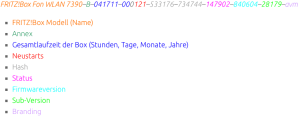
FRITZ!Box Fon WLAN 7390–B–041711–000121–533176–734744–147902–840604–28179–avm

  • FRITZ!Box Modell (Name)
  • Annex
  • Gesamtlaufzeit der Box (Stunden, Tage, Monate, Jahre)
  • Neustarts
  • Hash
  • Status
  • Firmwareversion
  • Sub-Version
  • Branding

The site has the entries colour coded, but WordPress doesn’t allow for that.

I found out that on a Fritz!Box 7490 you do not need to logon, but on a Fritz!Box 7360 you have to.

The site has a few other interesting Fritz!Box posts as well:

–jeroen

Read the rest of this entry »

Posted in Fritz!, Fritz!Box, Internet, Power User | Leave a Comment »

IPv4 to IPv6 conversion on a load balancer causing rare packet loss

Posted by jpluimers on 2018/11/02

Nice find on not so nice packet conversion: [WayBack] Fun with IPv6 We were investigating packet loss. The loss rate was very low (smaller than 1 of 1000) but as UDP was used, it caused rare but noticeab… – Martin Seeger – Google+

Basically the load balancer could not cope well converting empty IPv4 UDP checksums to IPv6 and back.

Or like Kris mentioned it: [WayBack] Null. In Zahlen: -1., causing a nice set of comments to be posted on short term solutions versus long time forgotten problems.

–jeroen

Posted in Internet, IPv4, IPv6, Network-and-equipment, Power User, routers | Leave a Comment »

Notes on recording audio calls from a Fritz!Box and playing back those captures calls

Posted by jpluimers on 2018/09/28

A while ago, I documented some links for In case I ever need to record calls on my Fritz!Box devices.

By now, I’ve done a bit more investigation: I’ve enabled the call monitor, did some port scans, installed domoticz and got deeper into fritzcap.

Oh and I got packet capturing to work too: Fritz!Box – capture network packets in Wireshark format or ISDN in dtrace format.

A small recap so I don’t forget what I did and what the effects were.

Enabling CallMonitor

[WayBackFritzbox – Domoticz showed how to enable the CallMonitor option in your Fritz!Box

  • Dial #96*5* to enable (response “CallMonitor On”)
  • Dial #96*4* to disable (response “CallMonitor Off”)
  • It seems not possible to ask for the current state (enabled/disabled)
  • After it is enabled, the TCP port 1012 on your Fritz!Box is available for tools like [WayBackDomoticz and fritzcap.

Read the rest of this entry »

Posted in *nix, Fritz!, Fritz!Box, Internet, Linux, openSuSE, Power User, SuSE Linux | Leave a Comment »

Fritz!Box – capture network packets in Wireshark (tshark/tcpdump) format or ISDN in dtrace format

Posted by jpluimers on 2018/09/24

You can capture network packets on a Fritz!Box for any interface by:

  1. appending `/html/capture.html` to the IP address of your Fritz!Box
  2. providing your credentials
  3. for ISDN traces optionally entering any dtrace parameters in the edit box
  4. pressing the Start button for the port you want to capture
  5. pressing the Stop button when you are finished capturing

Example URL: 192.168.178.1/html/capture.html

Note it’s ISDN [WayBackDtrace – Fritz!Box, not nx kernel [WayBackDTrace – Wikipedia

I’ve seen this on these devices:

  • Fritz!Box 7360 running FRITZ!OS 06.30
  • Fritz!Box 7490 running FRITZ!OS: 06.83

Note there are tons of tools allowing to capture from various scripting languages:

–jeroen

Read the rest of this entry »

Posted in Fritz!, Fritz!Box, Internet, Power User | Leave a Comment »

playing with IOT

Posted by jpluimers on 2018/09/06

Interesting stuff:

Open-source home automation platform running on Python 3. Track and control all devices at home and automate control. Installation in less than a minute.

Source: Home Assistant

Via:

CounterDesk
@Dysan18 mei 2017 09:47

Ik doe dus een hoop met home-assistant (https://home-assistant.io/) en wat custom Python scripts/apis wat allemaal op een oude laptop met ubuntu draait (10w verbruik).

De Horizon Box specifiek gaat via Harmony Hub, kan via de standaard integratie of via eigen brouwsels. Lifx en Nest heeft standaard integratie met Google Home. Al heb ik voor Lifx zelf het een-en-ander geschreven in Python om bijvoorbeeld scenes op te slaan en op te roepen met voice commando’s, dat kan weer niet standaard. NS API gaat ook via die Python API en wat er terug gezegd wordt (in het Nederlands) gaat via home-assistant.

Het voordeel van zelf zoiets bouwen is dat ik alles makkelijkers aan elkaar kan knopen dan bijvoorbeeld via IFTTT en Stringify o.i.d.. Zo kan ik bijvoorbeeld “Hey Google, sexy time” roepen en dan veranderd mijn verlichting langzaam naar iets romantischers (denk rood/oranje/roze), speelt er een zwoel lounge muziekje op mijn Sonos van een samba share, gaat de tempratuur wat omhoog en gaat mijn tv aan naar het chromecast kanaal en speelt er van die zelfde samba share een mp4 met een haardvuurtje.

Vet cheesy, I know, ik moet er de eerste vrouw nog mee verrassen :P maar het was ook vooral als demo van wat ik allemaal kan aansturen, bedoeld als grapje voor vrienden etc.

Google voegt een notificatiefunctie toe aan zijn Home-speaker. Als gebruikers een belangrijk bericht krijgen, zullen de ledjes op de speaker de aandacht gaan trekken van de gebruiker. De speaker gaat vooralsnog niet uit zichzelf spreken.

Source: Home-speaker van Google krijgt notificatiefunctie – Beeld en geluid – Nieuws – Tweakers

–jeroen

Posted in Development, IoT Internet of Things, Network-and-equipment, Power User, Software Development | Leave a Comment »

cool solution for precise point positioning (PPP) GPS/GLONASS navigation on Raspberry Pi…

Posted by jpluimers on 2018/08/31

cool solution for precise point positioning (PPP) GPS navigation.The RasPiGNSS “Aldebaran” expansion board fits onto the Pi’s expansion connector (named P1).

Source: Hi all, I found this cool solution for precise point positioning (PPP) GPS na…

Device: Dr. Franz Fasching » Products » GNSS » RasPiGNSS [WayBack]

–jeroen

Posted in Development, Hardware Development, IoT Internet of Things, Network-and-equipment, Power User, Raspberry Pi | Leave a Comment »