The Wiert Corner – irregular stream of stuff

Jeroen W. Pluimers on .NET, C#, Delphi, databases, and personal interests

  • My badges

  • Twitter Updates

  • My Flickr Stream

  • Pages

  • All categories

  • Enter your email address to subscribe to this blog and receive notifications of new posts by email.

    Join 1,854 other subscribers

Archive for the ‘*nix-tools’ Category

Eject USB drives / eject command – Unix & Linux Stack Exchange

Posted by jpluimers on 2020/07/20

I always thought than an umount /dev/sdX# for all partitions on /dev/sdX was enough for USB devices to be ejected, but there are three commands that (on most systems) actually power down USB drives (or USB to SD card adapters):

  • udisks --detach /dev/sdX (requires the udisks package which is obsolete)
  • eject /dev/sdX seems not to be enough on some systems; it is part of the util-linux package
  • udisksctl power-off -b /dev/sdX is equivalent to the udisks command; it is part of the udisks2 package.

These will ensure that the disk is not part of the fdisk --list output any more.

The opposite of these is sg_start, which is from the sg3_utils package.

Source: [WayBack] Eject USB drives / eject command – Unix & Linux Stack Exchange

On MacOS, you can use  diskutil eject /Volumes/<LABEL> (source: answer by efesaid on [WayBack] Eject USB drives / eject command – Unix & Linux Stack Exchange)

–jeroen

Posted in *nix, *nix-tools, Linux, openSuSE, Power User, SuSE Linux, Tumbleweed | Leave a Comment »

linux – ssh_exchange_identification: Connection closed by remote host (not using hosts.deny) – Unix & Linux Stack Exchange

Posted by jpluimers on 2020/07/17

I had this one day connecting to a guest:

debug3: send packet: type 20
debug1: SSH2_MSG_KEXINIT sent
Connection closed by 192.168.71.81 port 22

The cause was indeed a heavily overloaded box that would not respond in time to any actual data sent over network requests, but would accept the initial TCP connection.

Logging on the console also failed, but the memory and CPU usage on the wrapping host was out of the roof.

The only solution was to soft power-cycle the guest.

Very similar to:

You can also have a host who’s memory is so badly fragmented that it can’t allocate a page a contiguous memory to fork the process for hosting an SSH session.

In such a case, you can get either of the messages:

ssh_exchange_identification: read: Connection reset by peer

or:

Connection closed by aaa.bbb.ccc.ddd

depending on how far the host gets before it bails out.

If memory fragmenting is the apparent cause, the solution is to access the server via other means and to restart some of the pertinent services. I have found Apache and MySQL to be the culprit on VM’s since VM’s don’t have a swap partition. Failing that, reboot the host.

Via: [WayBacklinux – ssh_exchange_identification: Connection closed by remote host (not using hosts.deny) – Unix & Linux Stack Exchange

–jeroen

Posted in *nix, *nix-tools, Power User, ssh/sshd | Leave a Comment »

GitHub – gamelinux/passivedns: A network sniffer that logs all DNS server replies for use in a passive DNS setup

Posted by jpluimers on 2020/07/15

Cool tool: [WayBackGitHub – gamelinux/passivedns: A network sniffer that logs all DNS server replies for use in a passive DNS setup via [WayBack] How to log all my DNS queries? – Unix & Linux Stack Exchange (thanks mxmlnkn!).

It listens on port 53 for DNS requests then logs them to a file on regular intervals aggregating similar requests.

Usage is simple:

Read the rest of this entry »

Posted in *nix, *nix-tools, Development, DevOps, Infrastructure, Linux, openSuSE, Power User, SuSE Linux, Tumbleweed | Leave a Comment »

Marrying U-Boot, uEFI and grub2 – Alexander Graf – openSUSE…

Posted by jpluimers on 2020/07/13

A very insightful talk: “Marrying U-Boot, uEFI and grub2 – Alexander Graf – openSUSE…”

Booting is hard. Booting in the ARM world is even harder. State of the art are a dozen different boot loaders that may or may not deserve that name. Each gets configured differently and each has its own pros and cons.

As a distribution this is a nightmare. Configuring each and every one of them complicates code that really should be very simple.

To solve the problem, we can just add another layer of abstraction (grub2) on top of another layer of abstraction (uEFI) on top of another layer of abstraction (u-boot). Follow me on a journey on how all those layers can make life easier for the distribution and how much fun uEFI really is.

After this talk, you will know how ARM systems boot, what uEFI really means, how uEFI binaries interact with firmware and how we are going to move to uEFI based boot on openSUSE for ARM.

Usually known as agraf on-line, [WayBack] Alexander Graf – Open IoT & ELC 2017 is an impressive guy:

Alexander Graf

SUSE
KVM Wizard
Nürnberg Area, Germany
Alexander started working for SUSE about 9 years ago. Since then he worked on fancy things like SUSE Studio, QEMU, KVM and openSUSE on ARM. Whenever something really useful comes to his mind, he tends to implement it. Among others he did Mac OS X virtualization using KVM, nested SVM, KVM on PowerPC and a lot of work in QEMU for openSUSE on ARM. He is the upstream maintainer of KVM for PowerPC, QEMU for PowerPC and QEMU for S390x.

Slides: [WayBack] Marrying U-Boot, UEFI and grub.pdf

There are 2 videos on YouTube (view them below):

A few things I learned

Boot sequence:

  1. Raspberry Pi has a tiny boot ROM
  2. It loads the firmware in the GPU (for Raspberry this is a Raspberry Foundation provided binary)
  3. The firmware loads U-Boot
  4. U-Boot loads grub2
  5. grub2 can have many modules (like file system drivers) and loads the kernel

Alexander pushed the U-Boot stuff up stream, but the FreeBSD team was the first to actually boot a full OS from it.

Relations:

  • uEFI/EFI is a set of specs that define the API
  • U-Boot is the firmware implementing uEFI, so your machine behaves as a PC making booting a lot more standardised, starting at handing off to a regular grub2 boot process
  • U-Boot loads grub2

U-boot:

–jeroen

References:

Images

Read the rest of this entry »

Posted in *nix, *nix-tools, openSuSE, Power User, SuSE Linux, Tumbleweed | Leave a Comment »

openSUSE:Standards Rpm Metadata – openSUSE: Repository layout

Posted by jpluimers on 2020/07/09

For my link archive: [WayBack] openSUSE:Standards Rpm Metadata – openSUSE: Repository layout.

It is not fully up to date any more on primary.xml.gz, so here are my notes for the aarch64 version of Tumbleweed:

  1. Inspect http://download.opensuse.org/ports/aarch64/tumbleweed/repo/oss/repodata/repomd.xml [WayBack] for the name of *-primary.xml.gz (in this case http://download.opensuse.org/ports/aarch64/tumbleweed/repo/oss/repodata/d701c298b21d0b995c9560f9cfcc84685cb916deacc4f4c4a613a9b9d8f5aa57-primary.xml.gz [WayBack]
  2. Download that .gz file and uncompress it
  3. Inspect the *-primary.xml from it, look inside the metatadata root element for a package having a name element with value openSUSE-release: that package element now has a version element having a ver attribute containing the version text.

–jeroen

Posted in *nix, *nix-tools, Linux, openSuSE, Power User, SuSE Linux, Tumbleweed | Leave a Comment »

linux – How do I use sudo to redirect output to a location I don’t have permission to write to? – Stack Overflow

Posted by jpluimers on 2020/07/09

Various ways are explained at [WayBack] linux – How do I use sudo to redirect output to a location I don’t have permission to write to? – Stack Overflow.

Some are for simple commands and can be a one liner (for instance using tee, or executing a secondary shell).

Others are more suited for longer command sequences.

–jeroen

Posted in *nix, *nix-tools, bash, bash, Development, Power User, Scripting, Software Development | Leave a Comment »

shell – List open SSH tunnels – via: Super User

Posted by jpluimers on 2020/06/29

I put an lsof example and output in Reverse ssh tunnel between two linux boxes to allow RDP traffic over port 3389, but forgot to explain it.

Note that if you are bumping into remote tunneling issues selecting the wrong network interface, then checkout the GatewayPorts setting in the above post first!

Inactive local tunnels on the client: find the first word ssh on lsof output.

$ lsof -i -n | grep -w '^\<ssh\>'
ssh       93548 jeroenp    3u  IPv4 0x298985ab430c8aa9      0t0  TCP 192.168.71.77:50257->80.101.239.92:30022 (ESTABLISHED)
ssh       93548 jeroenp    5u  IPv6 0x298985ab22e02df9      0t0  TCP [::1]:59124 (LISTEN)
ssh       93548 jeroenp    6u  IPv4 0x298985ab272543a1      0t0  TCP 127.0.0.1:59124 (LISTEN)
ssh       93548 jeroenp    7u  IPv6 0x298985ab22e03339      0t0  TCP [::1]:ms-wbt-server (LISTEN)
ssh       93548 jeroenp    8u  IPv4 0x298985ab4306eaa9      0t0  TCP 127.0.0.1:ms-wbt-server (LISTEN)
ssh       93548 jeroenp    9u  IPv6 0x298985ab28049339      0t0  TCP [::1]:5925 (LISTEN)
ssh       93548 jeroenp   10u  IPv4 0x298985ab25cefe89      0t0  TCP 127.0.0.1:5925 (LISTEN)

The above listens two tunnels listening to ports 59124, 3389 (ms-wbt-server) and 5925.

Remote tunnels on the server: find the first word sshd on lsof output. Needs sudo if sshd runs as daemon or to listen active connections:

$ sudo lsof -i -n | grep -w '^\<sshd\>'
sshd       1664     root    3u  IPv4   21299      0t0  TCP *:ssh (LISTEN)
sshd       1664     root    4u  IPv6   21301      0t0  TCP *:ssh (LISTEN)
sshd       5026     root    3u  IPv4  350758      0t0  TCP 192.168.124.32:ssh->192.168.171.24:52417 (ESTABLISHED)
sshd       5029  jeroenp    3u  IPv4  350758      0t0  TCP 192.168.124.32:ssh->192.168.171.24:52417 (ESTABLISHED)
sshd       5120     root    3u  IPv4 6693665      0t0  TCP 192.168.124.32:ssh->80.100.143.119:11585 (ESTABLISHED)
sshd       5123  jeroenp    3u  IPv4 6693665      0t0  TCP 192.168.124.32:ssh->80.100.143.119:11585 (ESTABLISHED)
sshd      13320     root    3u  IPv4 6319692      0t0  TCP 192.168.124.32:ssh->192.168.171.24:56801 (ESTABLISHED)
sshd      13323  jeroenp    3u  IPv4 6319692      0t0  TCP 192.168.124.32:ssh->192.168.171.24:56801 (ESTABLISHED)
sshd      16505     root    3u  IPv4 6374150      0t0  TCP 192.168.124.32:ssh->192.168.171.24:21505 (ESTABLISHED)
sshd      16508  jeroenp    3u  IPv4 6374150      0t0  TCP 192.168.124.32:ssh->192.168.171.24:21505 (ESTABLISHED)

The above does not list any tunnels, just regular connections as there were no local tunnels from the client active, which lists the server side of tunnel -L 59124:192.168.124.32:5900 (which is service rfb):

$ sudo lsof -i -n | grep -w '^\<sshd\>'

sshd       1664     root    3u  IPv4   21299      0t0  TCP *:ssh (LISTEN)
sshd       1664     root    4u  IPv6   21301      0t0  TCP *:ssh (LISTEN)
sshd       5026     root    3u  IPv4  350758      0t0  TCP 192.168.124.32:ssh->192.168.171.24:52417 (ESTABLISHED)
sshd       5029  jeroenp    3u  IPv4  350758      0t0  TCP 192.168.124.32:ssh->192.168.171.24:52417 (ESTABLISHED)
sshd       5120     root    3u  IPv4 6693665      0t0  TCP 192.168.124.32:ssh->80.100.143.119:11585 (ESTABLISHED)
sshd       5123  jeroenp    3u  IPv4 6693665      0t0  TCP 192.168.124.32:ssh->80.100.143.119:11585 (ESTABLISHED)
sshd       5123  jeroenp   13u  IPv4 6698066      0t0  TCP 192.168.124.32:51494->192.168.124.32:rfb (ESTABLISHED)
sshd      13320     root    3u  IPv4 6319692      0t0  TCP 192.168.124.32:ssh->192.168.171.24:56801 (ESTABLISHED)
sshd      13323  jeroenp    3u  IPv4 6319692      0t0  TCP 192.168.124.32:ssh->192.168.171.24:56801 (ESTABLISHED)
sshd      16505     root    3u  IPv4 6374150      0t0  TCP 192.168.124.32:ssh->192.168.171.24:21505 (ESTABLISHED)
sshd      16508  jeroenp    3u  IPv4 6374150      0t0  TCP 192.168.124.32:ssh->192.168.171.24:21505 (ESTABLISHED)

For the client side of active connections you need sudo too:

$ sudo lsof -i -n | grep -w '^\<ssh\>'
Password:
ssh 93548 jeroenp 3u IPv4 0x298985ab430c8aa9 0t0 TCP 192.168.71.77:50257->80.101.239.92:30022 (ESTABLISHED)
ssh 93548 jeroenp 5u IPv6 0x298985ab22e02df9 0t0 TCP [::1]:59124 (LISTEN)
ssh 93548 jeroenp 6u IPv4 0x298985ab272543a1 0t0 TCP 127.0.0.1:59124 (LISTEN)
ssh 93548 jeroenp 7u IPv6 0x298985ab22e03339 0t0 TCP [::1]:ms-wbt-server (LISTEN)
ssh 93548 jeroenp 8u IPv4 0x298985ab4306eaa9 0t0 TCP 127.0.0.1:ms-wbt-server (LISTEN)
ssh 93548 jeroenp 9u IPv6 0x298985ab28049339 0t0 TCP [::1]:5925 (LISTEN)
ssh 93548 jeroenp 10u IPv4 0x298985ab25cefe89 0t0 TCP 127.0.0.1:5925 (LISTEN)
ssh 93548 jeroenp 15u IPv4 0x298985ab2998de89 0t0 TCP 127.0.0.1:59124->127.0.0.1:52580 (ESTABLISHED)

Based on [WayBackshell – List open SSH tunnels – Super User.

–jeroen

Posted in *nix, *nix-tools, Power User, ssh/sshd | Leave a Comment »

Audacity error when starting “The application “Audacity.app” can’t be opened.”

Posted by jpluimers on 2020/06/29

For quite a while, I had the error “The application “Audacity.app” can’t be opened.” and Audacity still opening. Clicking the OK button often enough made me hunt for the solution:

This is what I did:

$ cd ~/Library/Application\ Support/audacity
$ grep Temp audacity.cfg
TempDir=/Users/jeroenp/Library/Application Support/audacity/SessionData

Then I checked if the directory existed:

Read the rest of this entry »

Posted in *nix, *nix-tools, Apple, Audacity, Audio, Mac, Mac OS X / OS X / MacOS, MacBook, MacBook Retina, MacBook-Air, MacBook-Pro, Media, Power User, sed | Leave a Comment »

Navigating throug the Windows of the Joe’s Own Editor – Wikipedia

Posted by jpluimers on 2020/06/26

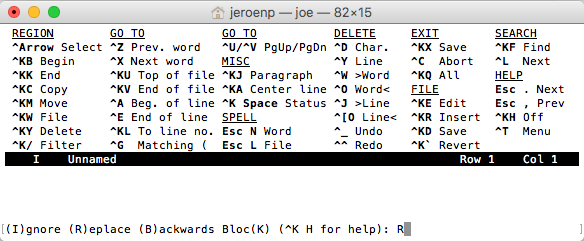
The built-in help of the Joe’s Own Editor – Wikipedia shows only a limited set of keyboard shortcuts:

What it misses is how to navigate through Windows. You use the ^KN (for Next) and ^KP (for Previous) navigation shortcuts for that.

You can even use that to navigate out of the Find or Replace line: The Find and Replace lines are single line prompts without a status line (but with a caption).

Read the rest of this entry »

Posted in *nix, *nix-tools, joe, Power User | Leave a Comment »

Creating a properly aligned partition with parted – twm’s blog

Posted by jpluimers on 2020/06/19

I like the deceptively simple, if you remind that percent signs are the way to go for GNU parted (not to be confused with gparted which is Gnome parted).

At [WayBack] Creating a properly aligned partition with parted – twm’s blog:

mkpart /dev/somedevice ext4 0% 100%

It gets rid of the dreaded “The resulting partition is not properly aligned for best performance”.

References:

Via: [WayBack] Parted is a flexible tool for working with partition tables under Linux. Unfortunately it sometimes seems rather stupid… – Thomas Mueller (dummzeuch) – Google+

–jeroen

Posted in *nix, *nix-tools, parted, Power User | Leave a Comment »