The Wiert Corner – irregular stream of stuff

Jeroen W. Pluimers on .NET, C#, Delphi, databases, and personal interests

  • My badges

  • Twitter Updates

  • My Flickr Stream

  • Pages

  • All categories

  • Enter your email address to subscribe to this blog and receive notifications of new posts by email.

    Join 1,839 other subscribers

Archive for the ‘*nix-tools’ Category

Bash Notes for Professionals book

Posted by jpluimers on 2020/05/12

For my reading list: Bash Notes for Professionals book

Download: [WayBack]  BashNotesForProfessionals.pdf

Via: [WayBack] Bash Notes for Professionals – a book compiled from Stack Overflow Documentation released under Creative Commons BY-SA  – ThisIsWhyICode – Google+

–jeroen

Posted in *nix, *nix-tools, bash, bash, Development, Power User, Scripting, Software Development | Leave a Comment »

x11vnc encryption: ssl works better with the realVNC client than ssh tunneling

Posted by jpluimers on 2020/05/08

“Unencrypted connection” “This connection is unencrypted. Would you like to continue?”

When you run realVNC to an x11vnc server, even over an ssh tunneled connection, it will produce errors like the screenshots on the right (from an Android device) and below (from a Mac).

Before I had the realVNC client on the Mac, the Android message totally put me on the wrong foot. I tried searching x11vnc encryption, of which almost all results – especially the Google Search abstracts – will talk about ssh tunneling. So tried to setup the client to use the SSH endpoint, but it refused because it doesn’t talk SSH.

So then I installed a desktop realVNC client (in this case on my Mac) and got this message:

“Unencrypted connection” “The connection to this VNC Server will not be encrypted”

Then it occurred to me that maybe the VNC server itself could do encryption as well and would not need an SSH tunnel after all. And it does even in the first hit:

Read the rest of this entry »

Posted in *nix, *nix-tools, Power User, Screen sharing, VNC/Virtual_Network_Computing, X11 | Leave a Comment »

MultiBootUSB

Posted by jpluimers on 2020/05/07

Cool tool:

MultiBootUSB is a cross platform software written in python which allows you to install multiple live linux on a USB disk non destructively and option to uninstall distros. Try out the world’s first true cross platform multi boot live usb creator for free. Download Now!

Information and downloads on [WayBackMultiBootUSB.

There are actually a few repositories within [WayBack] mbusb (multibootusb) · GitHub of which one has a ruby implementation as well.

A more elaborate article is on [WayBack] How to Install Multiple Linux Distributions on One USB, but the site should get you going just fine.

Via: [WayBack] Multiple Linux distributions on one UBS stick. I just tried it with: * CloneZilla * Lubuntu * LiteLinux The tool they describe – MultiBootUSB – comes w… – Thomas Mueller (dummzeuch) – Google+

–jeroen

Posted in *nix, *nix-tools, Development, Hardware, Linux, Power User, Python, Software Development, USB | Leave a Comment »

OpenSSH keygen guidelines

Posted by jpluimers on 2020/05/01

Verify [WayBack] OpenSSH: Key generation before generating keys.

At the time of grabbing it was this (for the mozilla tag; use another tag if you prefer):

# RSA keys are favored over ECDSA keys when backward compatibility ''is required'',
# thus, newly generated keys are always either ED25519 or RSA (NOT ECDSA or DSA).
$ ssh-keygen -t rsa -b 4096 -f ~/.ssh/id_rsa_mozilla_$(date +%Y-%m-%d) -C "Mozilla key for xyz"

# ED25519 keys are favored over RSA keys when backward compatibility ''is not required''.
# This is only compatible with OpenSSH 6.5+ and fixed-size (256 bytes).
$ ssh-keygen -t ed25519 -f ~/.ssh/id_ed25519_mozilla_$(date +%Y-%m-%d) -C "Mozilla key for xyz"

This was not changed based on [WayBack] Key generation: pass-a and -o argument? · Issue #68 · mozilla/wikimo_content · GitHub: a discussion on the KDF rounds (-a parameter) and storage format (-o parameter).

This is slightly less strong than in [WayBack] Upgrade Your SSH Key to Ed25519 | Programming Journal, but seems to be OK when writing this in 2018.

For comparison, a similar discussion is at [WayBack] public key – How many KDF rounds for an SSH key? – Cryptography Stack Exchange.

In practice, I am not for one ssh ID per host, but I use different tags depending on where the ssh ID applies. More discussion on this is at [WayBack] privacy – Best Practice: ”separate ssh-key per host and user“ vs. ”one ssh-key for all hosts“ – Information Security Stack Exchange

Based on the above, I also learned about this password generator: [WayBack] GitHub – gdestuynder/pwgen

–jeroen

Posted in *nix, *nix-tools, Encryption, Hashing, Power User, Security, ssh/sshd | Leave a Comment »

KiTTY auto-reconnect ssh tunnel so you can RDP from remote machine into local one

Posted by jpluimers on 2020/04/27

I needed this equivalent in KiTTY while also keeping the connection alive:

ssh -o "ExitOnForwardFailure yes" -R :3389:127.0.0.1:3389 

Here, (via [WayBack] SSH options, Port Forwarding over SSH, Keepalives – zwilnik), -R Specifies that the given port on the remote (server) host is to be forwarded to the given host and port on the local side. This works by allocating a socket to listen to port on the remote side, and whenever a connection is made to this port, the connection is forwarded over the secure channel, and a connection is made to host port hostport from the local machine.

This is unlike most port forwarding examples which shows you how to forward a local port to a remote one (for instance [WayBack] Portforwarding with SSH (Putty)).


I wanted this on Windows, but auto connect, and not depend on OpenSSH. So I used the portable edition of [WayBack] Download KiTTY., which is a PuTTY derivative with more features.

With OpenSSH it is easier, but requires either Windows 10 (having it pre-installed) or an OpenSSH installation. How simple? This simple: [WayBack] openssh – How do I keep SSH connection alive on Windows 10? – Stack Overflow

The portable version of KiTTYensures all configuration is in configuration files (not the registry like the regular edition: [WayBack] KiTTY Session Configuration Location – Chase’s Notes)

I bumped into KiTTY because in another situation, I needed to execute a remote command and found [WayBack] ssh – How to run a remote command in PuTTY after login & keep the shell running? – Super User

Later I found other references as it can also auto-logon:

Kitty has a URL based update checker; for instance [WayBackwww.9bis.net/kitty/check_update.php?version=0.70.0.6 checks if a newer version than 0.70.0.6 is available. If you do not trust it, you can run that URL over TLS as well.

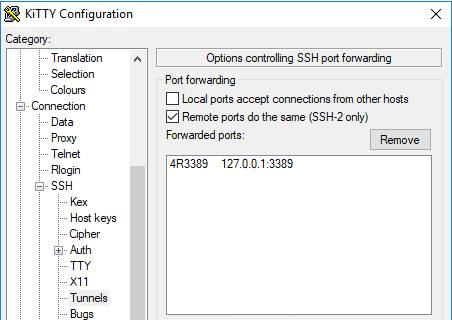
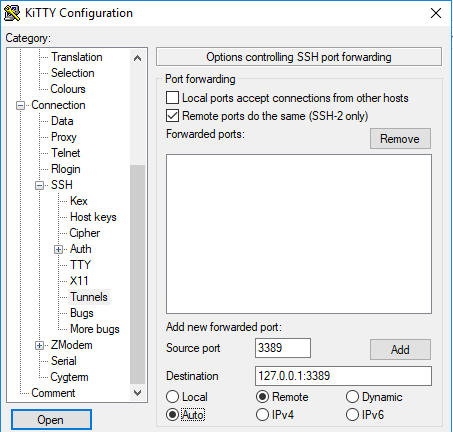
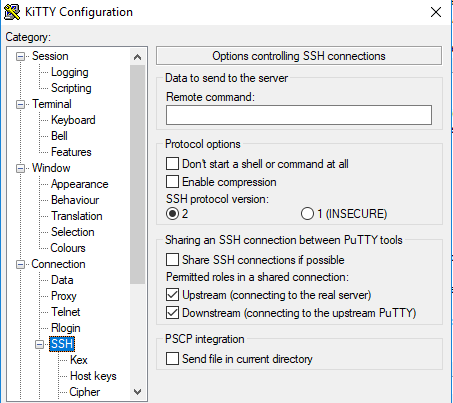
These screenshots seem to do just get the above configuration:

  1. Under “SSH”, in “Tunnels”
    • tick “Remote ports do the same (SSH-2 only)”
    • fill in a source port (that’s the remote port and will become the :3389: bit above)
    • fill in destination 127.0.0.1:3389 (that’s the local RDP port on your Windows machine)
    • tick “Remote”
    • tick “Auto”
    • click “Add” to get to the second screenshot
  2. Under connection:
    • Ensure “Seconds between keepalives” is larger than zero (I took 1)
    • Tick “Disable Nagle’s algorithm”
    • Tick “Enable TCP keepalives”
    • Tick “Attempt to reconnect on system wakup”
    • Tick “Attempt to reconnect on connection failure”
  3. On the “SSH” tab:
    • Do not enter a “Remote command” (seems unneeded on my system)
So for now, I can do without things like:

–jeroen

Posted in *nix, *nix-tools, Power User, ssh/sshd, Windows | Leave a Comment »

This means your SD card is dead for writing: “fsck.ext4: unable to set superblock flags on ROOT”

Posted by jpluimers on 2020/04/24

A while ago I had a "fsck.ext4: unable to set superblock flags on ROOT" on an SD card in a Raspberry Pi: it basically means the SD card is dead.

Back then Google found only one entry: [WayBack] Bad Superblock – Raspberry Pi Forums

–jeroen

Posted in *nix, *nix-tools, Development, Hardware Development, Power User, Raspberry Pi | Leave a Comment »

Create a large file filled with zeros on Linux – twm’s blog

Posted by jpluimers on 2020/04/13

Interesting read as there are at least 3 options of which I only knew the first (dd): [WayBackCreate a large file filled with zeros on Linux – twm’s blog.

  • dd (fully allocated storage; zeros, random or another data source)
  • truncate (sparse storage; always gets zeros)
  • fallocate (fully allocated storage; always gets zeros)

–jeroen

via: [WayBack] Sometimes you need a large file for testing purposes or just to take up space that should not be available on the file system. There are several options… – Thomas Mueller (dummzeuch) – Google+

Posted in *nix, *nix-tools, Power User | Leave a Comment »

xrdp

Posted by jpluimers on 2020/04/06

I totally missed this the last 5 years. Where have I been (:

[WayBack] xrdp: An open source remote desktop protocol(rdp) server.

It runs on top of either Xvnc (which I have used) or X11rdp and should be usable with any RDP client (like the excellent Microsoft RDP for Mac OS X).

Related

Via:

–jeroen

Posted in *nix, *nix-tools, Power User, Remote Desktop Protocol/MSTSC/Terminal Services, VNC/Virtual_Network_Computing, Windows | Leave a Comment »

Workaround for “Nmap 7.8 Assertion failed: htn.toclock_running == true” · Issue #1764 · nmap/nmap · GitHub

Posted by jpluimers on 2020/03/27

I got this on Windows 10, 8.1 and 7, MacOS and Linux:

C:\bin>nmap -sn 192.168.71.0/24
Starting Nmap 7.80 ( https://nmap.org ) at 2020-03-24 13:44 W. Europe Standard Time
Assertion failed: htn.toclock_running == true, file ..\Target.cc, line 503

Luckily [WayBack] Nmap 7.8 Assertion failed: htn.toclock_running == true · Issue #1764 · nmap/nmap · GitHub has a solution: add the --max-parallelism 100 parameter:

C:\bin>nmap -sn --max-parallelism 100 192.168.71.0/24
Starting Nmap 7.80 ( https://nmap.org ) at 2020-03-24 13:48 W. Europe Standard Time
Nmap scan report for 192.168.71.1
...
Host is up.
Nmap done: 256 IP addresses (50 hosts up) scanned in 54.07 seconds

The other workaround is to have at least one ARP request succeed.

Via [WayBack] “Assertion failed: htn.toclock_running == true, file ..\Target.cc, line 503” – Google Search

–jeroen

Posted in *nix, *nix-tools, nmap, Power User | Leave a Comment »

Postfix for relaying SMTP, some info about my own configuration

Posted by jpluimers on 2020/03/20

I’ve a bunch of secondary MX servers using postfix (which I like a lot over sendmail). Basically all their configurations are very similar:

  1. To the file /etc/postfix/relay, add a list of domains to relay for, each ending with a space followed by OK as per
    [WayBack] Configure Postfix to relay mail to multiple internal mail servers w/different domains
  2. Run postmap /etc/postfix/relay to update the relay database file.
  3. Ensure that /etc/postfix/main.cf has these settings (note that the FQDN – in the example smtp3.example.org – isn’t always returned by hostname --fqdn, see below):
    1. inet_interfaces = all
    2. myhostname = smtp3.example.org
    3. smtpd_helo_required = yes
    4. smtpd_helo_restrictions = permit_mynetworks, reject_invalid_helo_hostname, reject_non_fqdn_helo_hostname, reject_unknown_helo_hostname
  4. rcpostfix restart && rcpostfix status

Check the functionality with journalctl -u postfix.

FQDN – how to get myhostname

This usually gives a good indication of your external FQDN, but depending on your network circumstances it might not at all be the FQDN of your machine:

dig +noall +answer +short -x `curl -s ipv4.whatismyip.akamai.com` | sed 's/\.$//'

I got there through these StackExchange answers:

Testing with sendEmail

Then test with sendEmail from [WayBack] GitHub – mogaal/sendemail: lightweight, command line SMTP email client, with statements like these

The most recent version is now at [Wayback/Archive.is] GitHub – zehm/sendEmail: SendEmail is a lightweight, command line SMTP email client.

  • sendEmail -o fqdn=sending.example.org -f sender@example.org -t recipient@example.com -u message-subjetc -s smtp3.example.org -m message-text
  • sendEmail -o fqdn=sending.example.org -f sender@example.org -t recipient@example.com -u message-subjetc -s smtp3.example.org -m message-text -v -v -v -v

If you get an error containing 450 4.7.1Helo command rejected: Host not found, then reject_unknown_helo_hostname works, but your -o fqdn= parameter contains an invalid hostname.

More sending examples are in the sendEmail documentation.

If you want to know more about fighting SPAM, then continue at [WayBack] Fighting Spam – What can I do as an: Email Administrator, Domain Owner, or User? – Server Fault

–jeroen

Posted in *nix, *nix-tools, postfix, Power User, sendmail | Leave a Comment »