


[WayBack] 🔎Julia Evans🔍 on Twitter: “ngrep: grep your network!… “
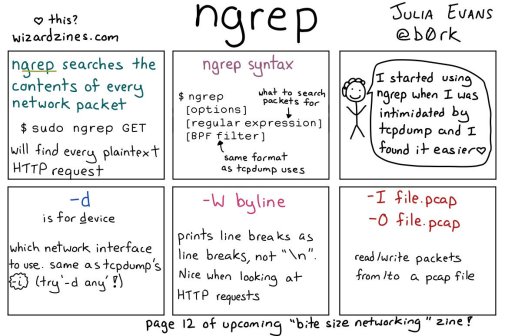
So this taught me a new tool and other new things:
Posted by jpluimers on 2021/02/16
[WayBack] 🔎Julia Evans🔍 on Twitter: “ngrep: grep your network!… “
So this taught me a new tool and other new things:

Posted in *nix, *nix-tools, Communications Development, Development, Internet protocol suite, Power User, Software Development, Wireshark | Leave a Comment »
Posted by jpluimers on 2021/02/08
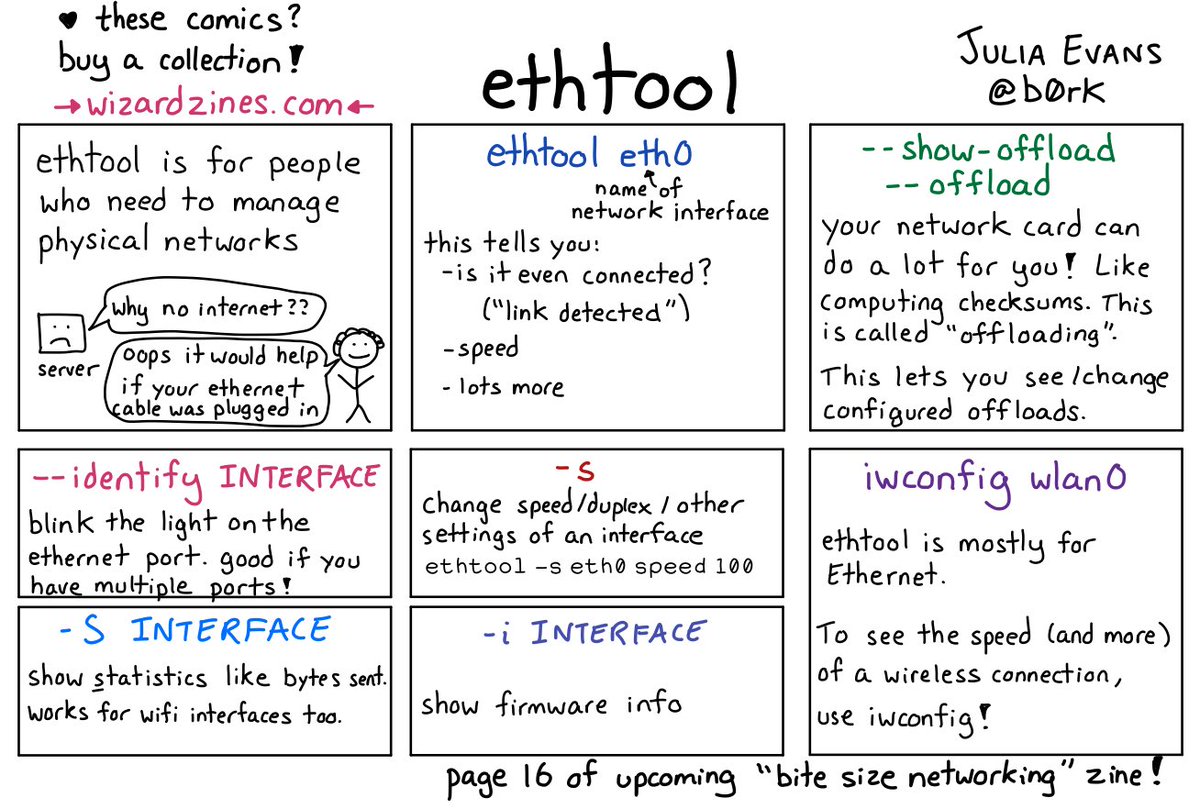
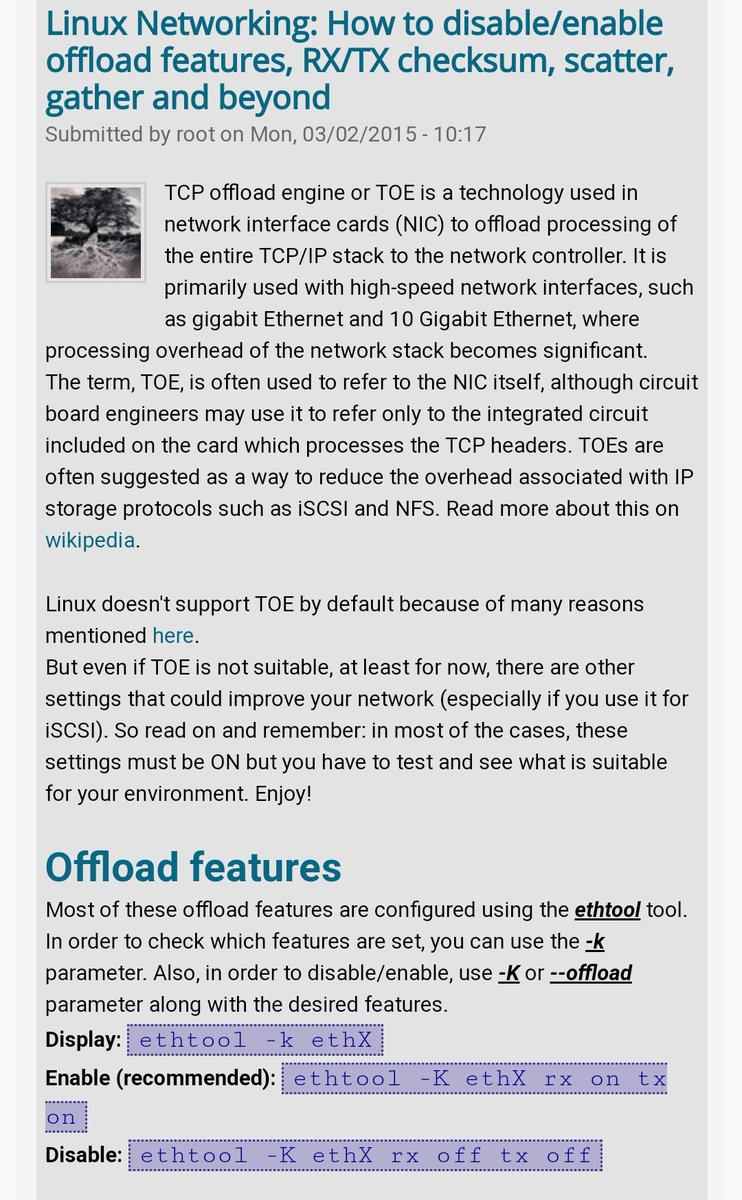
[WayBack] 🔎Julia Evans🔍 on Twitter: “ethtool… “
With a lot of responses, including:
–jeroen

Posted in *nix, *nix-tools, Network-and-equipment, Power User | Leave a Comment »
Posted by jpluimers on 2021/02/05
[WayBack] bash – How to get the primary IP address of the local machine on Linux and OS X? – Stack Overflow (thanks [WayBack] Collin Anderson!):
I tried on OS X 10.13.6 (macOS High Sierra) and these two work fine:
ip route get 1 | awk '{print $NF;exit}'
and
ip route get 8.8.8.8 | head -1 | cut -d' ' -f8
The first one needs the $ back-slash escaped as bash alias; the second does not need that.
Related:
–jeroen

Posted in *nix, *nix-tools, Apple, bash, Mac OS X / OS X / MacOS, macOS 10.13 High Sierra, Power User | Leave a Comment »
Posted by jpluimers on 2021/02/05
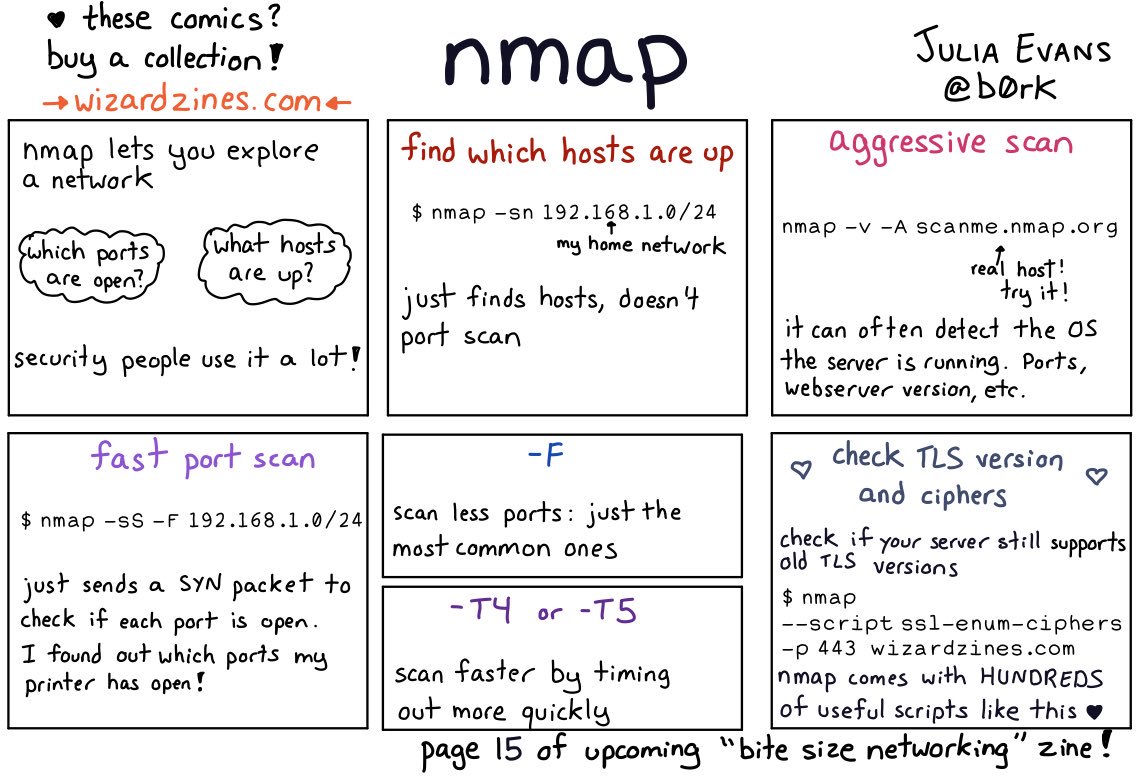
[WayBack] Thread by @b0rk: “nmap i haven’t used nmap much except to scan my home network for fun so if i missed something really important i’d love to know! […]”
i haven’t used nmap much except to scan my home network for fun so if i missed something really important i’d love to know!also i need to find space in there somewhere for “if you don’t run nmap as root it can’t send icmp (ping) packets, it’s better to run nmap as root”
also be careful when nmapping in a network you don’t administer! it’s a popular hacking tool so using nmap is often discouraged / banned. i made all of the examples in this comic “
nmap scanme.nmap.org” and “nmap your home network” for a reason :)
There are are quite a few interesting comments on the thread:
And it taught me about scanme.nmap.org: [WayBack] Go ahead and ScanMe!
Hello, and welcome to Scanme.Nmap.Org, a service provided by the Nmap Security Scanner Project and Insecure.Org.
We set up this machine to help folks learn about Nmap and also to test and make sure that their Nmap installation (or Internet connection) is working properly. You are authorized to scan this machine with Nmap or other port scanners. Try not to hammer on the server too hard. A few scans in a day is fine, but dont scan 100 times a day or use this site to test your ssh brute-force password cracking tool.
Thanks
–Fyodor
–jeroen

Posted in *nix, *nix-tools, nmap, Power User | Leave a Comment »
Posted by jpluimers on 2021/02/01
[WayBack] Thread by @b0rk: “this poster is like a SUPER EXTRA COMPRESSED version of the “Bite Size Networking” zine I’m working on: the goal of that zine is to teach yo […]”

Related:

Posted in *nix, *nix-tools, Power User | Leave a Comment »
Posted by jpluimers on 2021/01/25
Back in 2019, there were 56 commands and scripts covered. I wonder how many there are now.
An ongoing list of Linux Networking Commands and Scripts. These commands and scripts can be used to configure or troubleshoot your Linux network.
Source: [WayBack] 55 Linux Networking commands and scripts
List back then (which goes beyond just built-in commands: many commands from optional packages are here as well):
- arpwatch – Ethernet Activity Monitor.
- bmon – bandwidth monitor and rate estimator.
- bwm-ng – live network bandwidth monitor.
- curl – transferring data with URLs. (or try httpie)
- darkstat – captures network traffic, usage statistics.
- dhclient – Dynamic Host Configuration Protocol Client
- dig – query DNS servers for information.
- dstat – replacement for vmstat, iostat, mpstat, netstat and ifstat.
- ethtool – utility for controlling network drivers and hardware.
- gated – gateway routing daemon.
- host – DNS lookup utility.
- hping – TCP/IP packet assembler/analyzer.
- ibmonitor – shows bandwidth and total data transferred.
- ifstat – report network interfaces bandwidth.
- iftop – display bandwidth usage.
- ip (PDF file) – a command with more features that ifconfig (net-tools).
- iperf3 – network bandwidth measurement tool. (above screenshot Stacklinux VPS)
- iproute2 – collection of utilities for controlling TCP/IP.
- iptables – take control of network traffic.
- IPTraf – An IP Network Monitor.
- iputils – set of small useful utilities for Linux networking.
- jwhois (whois) – client for the whois service.
- “lsof -i” – reveal information about your network sockets.
- mtr – network diagnostic tool.
- net-tools – utilities include: arp, hostname, ifconfig, netstat, rarp, route, plipconfig, slattach, mii-tool, iptunnel and ipmaddr.
- ncat – improved re-implementation of the venerable netcat.
- netcat – networking utility for reading/writing network connections.
- nethogs – a small ‘net top’ tool.
- Netperf – Network bandwidth Testing.
- netsniff-ng – Swiss army knife for daily Linux network plumbing.
- netstat – Print network connections, routing tables, statistics, etc.
- netwatch – monitoring Network Connections.
- ngrep – grep applied to the network layer.
- nload – display network usage.
- nmap – network discovery and security auditing.
- nslookup – query Internet name servers interactively.
- ping – send icmp echo_request to network hosts.
- route – show / manipulate the IP routing table.
- slurm – network load monitor.
- snort – Network Intrusion Detection and Prevention System.
- smokeping – keeps track of your network latency.
- socat – establishes two bidirectional byte streams and transfers data between them.
- speedometer – Measure and display the rate of data across a network.
- speedtest-cli – test internet bandwidth using speedtest.net
- ss – utility to investigate sockets.
- ssh – secure system administration and file transfers over insecure networks.
- tcpdump – command-line packet analyzer.
- tcptrack – Displays information about tcp connections on a network interface.
- telnet – user interface to the TELNET protocol.
- tracepath – very similar function to traceroute.
- traceroute – print the route packets trace to network host.
- vnStat – network traffic monitor.
- wget – retrieving files using HTTP, HTTPS, FTP and FTPS.
- Wireless Tools for Linux – includes iwconfig, iwlist, iwspy, iwpriv and ifrename.
- Wireshark – network protocol analyzer.
Via:
–jeroen
Posted in *nix, *nix-tools, cURL, dig, Internet, nmap, Power User, SpeedTest, ssh/sshd, tcpdump, Wireshark | Leave a Comment »
Posted by jpluimers on 2021/01/15
I have seen this on one Raspberry Pi 3 system: named failing to start during a normal reboot.
The solution is to manually rcnamed start as root after boot.
From [Wayback] TUMBLEWEED Ordering cycle at boot with nss-lookup, the rcnamed status is the same as on my system, but no solution in that thread:
# systemctl status named ● named.service - Berkeley Internet Name Domain (DNS) Loaded: loaded (/usr/lib/systemd/system/named.service; enabled; vendor preset: disabled) Active: inactive (dead)Jul 02 08:13:40 hpprol2 systemd[1]: nss-lookup.target: Found ordering cycle on named.service/start Jul 02 08:13:40 hpprol2 systemd[1]: nss-lookup.target: Found dependency on time-sync.target/start Jul 02 08:13:40 hpprol2 systemd[1]: nss-lookup.target: Found dependency on ntpd.service/start Jul 02 08:13:40 hpprol2 systemd[1]: nss-lookup.target: Found dependency on nss-lookup.target/start Jul 02 08:13:40 hpprol2 systemd[1]: nss-lookup.target: Job named.service/start deleted to break ordering cycle starting with nss-lookup.target/start
Apparently, sometimes there is a service startup dependency loop, and named becomes the victim of it, effectively rendering DNS inoperable.
My system was running this version of Tumbleweed:
statler:~ # cat /etc/SUSE-brand /etc/os-release
openSUSE
VERSION = tumbleweed
NAME="openSUSE Tumbleweed"
# VERSION="20200825"
ID="opensuse-tumbleweed"
ID_LIKE="opensuse suse"
VERSION_ID="20200825"
PRETTY_NAME="openSUSE Tumbleweed"
ANSI_COLOR="0;32"
CPE_NAME="cpe:/o:opensuse:tumbleweed:20200825"
BUG_REPORT_URL="https://bugs.opensuse.org"
HOME_URL="https://www.opensuse.org/"
LOGO="distributor-logo"
On an identical system, the boot just worked fine, so it might be timing related.
waldorf:~ # cat /etc/SUSE-brand /etc/os-release
openSUSE
VERSION = tumbleweed
NAME="openSUSE Tumbleweed"
# VERSION="20200825"
ID="opensuse-tumbleweed"
ID_LIKE="opensuse suse"
VERSION_ID="20200825"
PRETTY_NAME="openSUSE Tumbleweed"
ANSI_COLOR="0;32"
CPE_NAME="cpe:/o:opensuse:tumbleweed:20200825"
BUG_REPORT_URL="https://bugs.opensuse.org"
HOME_URL="https://www.opensuse.org/"
LOGO="distributor-logo"
It has been fixed late January 2021 as per [Wayback] Bug 1177491 – systemd ordering cycle with nss-lookup.target:
Josef Möllers 2021-01-27 15:50:15 UTCFixed by removing "Before=nss-lookup.target" from systemd's service file.
It means editing /etc/systemd/system/multi-user.target.wants/named.service from
[Unit]
Description=Berkeley Internet Name Domain (DNS)
After=network.target
After=time-sync.target
Before=nss-lookup.target
Wants=nss-lookup.target
Wants=time-sync.target

[Service]
Type=forking
ExecStart=/usr/sbin/named.init start
ExecReload=/usr/sbin/named.init reload
ExecStop=/usr/sbin/named.init stop

[Install]
WantedBy=multi-user.target
into
[Unit]
Description=Berkeley Internet Name Domain (DNS)
After=network.target
After=time-sync.target
Wants=nss-lookup.target
Wants=time-sync.target

[Service]
Type=forking
ExecStart=/usr/sbin/named.init start
ExecReload=/usr/sbin/named.init reload
ExecStop=/usr/sbin/named.init stop

[Install]
WantedBy=multi-user.target
Note that it is an alias, so it won’t show up in a versioned /etc directory (for instance using etckeeper):
# ls -Alh /etc/systemd/system/multi-user.target.wants/named.service
lrwxrwxrwx 1 root root 37 Sep  5  2020 /etc/systemd/system/multi-user.target.wants/named.service -> /usr/lib/systemd/system/named.service
–jeroen
Posted in *nix, Linux, openSuSE, Power User, SuSE Linux | Leave a Comment »
Posted by jpluimers on 2021/01/12
I’ve this page for my brother: https://martijn.pluimers.com/agenda-month-weather.html.
It serves his agenda plus a few weather widgets.
The weerslag widget fails to load as it’s in an iframe pointing to http but the page is https. That’s not allowed as shown in this nice table at [WayBack] ssl – Insecure content in iframe on secure page – Stack Overflow by amol-ghotankar and richard:
page  - iframe - status
----- - -----  - -----------
http  - http   - allowed
http  - https  - allowed
https - http   - not allowed
https - https  - allowed
So I put it behind a simple Apache reverse proxy: https://www.pluimers.com/maps.weerslag.nl/GratisRadar/1201/864/verwacht?zoom=10:
| <Location /maps.weerslag.nl> | |
| ProxyPass http://maps.weerslag.nl | |
| ProxyPassReverse http://maps.weerslag.nl | |
| Require all granted | |
| </Location> |
If they still haven’t fixed their https access, I need to dig deeper into this.
When writing this [Arhive.is] https://maps.weerslag.nl/GratisRadar/1201/864/verwacht?zoom=10 gave a 404 and http://maps.weerslag.nl/GratisRadar/1201/864/verwacht?zoom=10 misbehaved behind the proxy:
–jeroen

Posted in *nix, Apache2, Development, Power User, Web Development | Leave a Comment »
Posted by jpluimers on 2021/01/11
Apparently, during my 15 month rectum cancer fight, I missed the one month window of migrating my opensuse account (because of the sale of opensuse from Microfocus to a German investment company named EQT Partners).
I got the email on may 1st (right before my first surgery) and since I only just am recovering from the last surgery, discovered [Wayback] Community Account Migration:
The Community Accounts (aka. Bugzilla Accounts) will migration to the SUSE datacenter in Nuremberg
SUSE is the largest independent open source company.
We are finalizing this independence also on the technical level.
The Community Accounts (a.k.a. Bugzilla Accounts) were moved back to SUSE to a new system in our Nuremberg data center.All accounts have been migrated. Except for the password.
To access your migrated account a migration tool was offered until June 18th
The migration is no longer possible.
To regain access to your account you have to request a password reset.
This requires that the account has your correct email address registered.
If this is not the case you will have to create a new account.
It looks like the account migration uses Okta (identity management) – Wikipedia as authentication service (quite odd for a German company to use a USA based company for authentication: hellp GDPR!), using mail servers having hostnames not ending in opensuse.org, but like o#.mailrelay.okta.com.
Hopefully identify emails do get through: they are now trying to get past my grey-list filters.
Edit:
The okta mail servers didn’t get through the grey-list, so I forced them to the secondary mail servers where they did get through.
It indicated migration is not possible any more and I should seek help:
At this time your password can only be reset by an administrator. To send them a request, go to your Sign-in Help page. Then click the Request help link.
So I did:
Hi,
Due to my 15 months fight with rectumcancer and the “SUSE Account Changes – Coming soon!” last May not indicating any deadline for the migration, I missed the one month account migration window (2020-05-18 to 2020-06-18) mentioned at https://idp-portal-info.suse.com/
Can you please re-activate the account jeroen.suffix@example.com and re-bind the forums.opensuse.org username accountname for me and send me a password reset email on that above email address?
Thanks,
–jeroen
Edit 20210112:
I got an account activation email, added password/question/mobile-phone-number, then got redirected to https://myaccount.suse.com/app/UserHome, then the “Forums” link allowed me to enter a forums alias the same as my old alias. So it looks it sort of works now: my old
jpluimersposts have not been linked to my new account.
Some reading for when I have more energy:
I just checked and the email about migration did not indicate any deadline apart from that password reset links were valid for 90 days, a lot longer than one month window.
–jeroen
Posted in *nix, Linux, openSuSE, Power User, SuSE Linux | Leave a Comment »
Posted by jpluimers on 2021/01/08
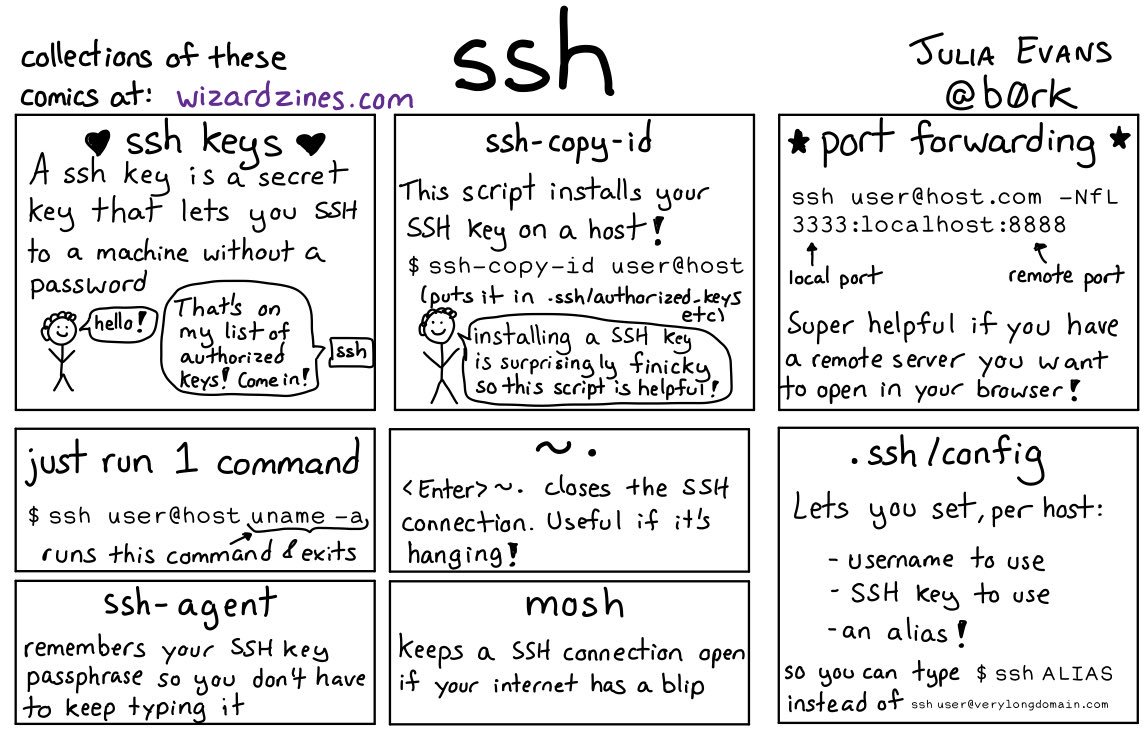
Great work by [WayBack] 🔎Julia Evans🔍 on Twitter: “ssh tips… “
Via:
Some more tips:

Posted in *nix, *nix-tools, Communications Development, Development, Internet protocol suite, Power User, SSH, ssh/sshd | Leave a Comment »

 The Wiert Corner - irregular stream of stuff