The Wiert Corner – irregular stream of stuff

Jeroen W. Pluimers on .NET, C#, Delphi, databases, and personal interests

  • My badges

  • Twitter Updates

  • My Flickr Stream

  • Pages

  • All categories

  • Enter your email address to subscribe to this blog and receive notifications of new posts by email.

    Join 1,860 other subscribers

Archive for the ‘wget’ Category

Some HTTP redirect checking sites compared

Posted by jpluimers on 2025/04/02


Every now and then I want to check how a URL redirect, for instance when checking out why a domain failed loading in browsers a while ago because of certificate problems:

The thing was that back then, the site officially did not have a security certificate, but somehow the provider had installed a self-signed one. Most web-browsers then auto-redirect from http to https. Luckily the archival sites can archive without redirecting:

When querying [Wayback/Archive] redirect check – Google Search, you get quite some results. These are the ones I use most in descending order of preference and why they are at that position:


Read the rest of this entry »

Posted in *nix, *nix-tools, archive.is / archive.today, Communications Development, Development, Encryption, HTTP, https, HTTPS/TLS security, Internet, Internet protocol suite, ISP, Power User, Security, Software Development, TCP, WayBack machine, Web Development, wget, xs4all | Leave a Comment »

Downloading files with wget on ESXi · random writes

Posted by jpluimers on 2021/05/31

Reminder to self to check if wget on ESXi now finally supports https downloading: [WayBack] Downloading files with wget on ESXi · random writes.

In the mean time, ESXi 6.7 Update 2 and up seems to support this; so the below workaround might only be needed for ESXi 6.7 update 1 and below.

[WayBack] VMware ESXi: help downloading large ISO – Server Fault

I will likely not do this, as by now all my ESXi boxes should have been recent enough.

I will keep the article because of the BusyBox commands section below.

If so, I might finally try and write a Python wrapper for this, as I know that Python 3 on ESXi supports https, but the ESXi BusyBox does not have a built-in cURL.

Some links and notes I might need by then:

BusyBox commands

Another cool thing in the above blog post is that it shows how to dump the BusyBox built in commands.

I ran it for ESXi 6.7 with a slight trick to get the full path (using back-ticks and escaped back-ticks) and content.

Since ESXi is BusyBox based, the commands that are in /bin are not actually binaries, but each command is a symlink to the BusyBox binary. BusyBox then knows the original name of the command, so it can deduct what part to execute. This makes for a very space efficient storage scheme.

The various bits of the tricks to get the location of the BusyBox binary, so the --list parameter can be passed to it:

  • The which wget gives the full path of wget.
  • The ls -l `which wget` shows the full path of wget and the symlink target (but there is no way for ls to only show the symlink target).
  • The readlink -f `which wget` shows the full path of where /bin/wget points to: the BusyBox binary.

The main trick consists of backtick evalution, and knowing that ls cannot get you just the symlink target, but readlink can:

Now the back-tick escapes, because you cannot nest back-ticks:

  • The `readlink -f \`which wget\`` executes the BusyBox binary without arguments.
  • The `readlink -f \`which wget\`` --list executes the BusyBox binary with the --list parameter.

Note I do not like the cat --help (see [WayBack] How do I check busybox version (from busybox)? – Unix & Linux Stack Exchange) way of getting the BusyBox version, as that gets echoed to stderr.

This is the output:

Read the rest of this entry »

Posted in *nix, *nix-tools, cURL, ESXi6, ESXi6.5, ESXi6.7, Power User, Virtualization, VMware ESXi, wget | Leave a Comment »

OpenCandy – Wikipedia

Posted by jpluimers on 2020/11/06

Hmm, one of my machines contained OpenCandy – Wikipedia as found by Malwarebytes (software) – Wikipedia:

Tracking back the installation, revealed it came with ImgBurn 2.5.8.0, which is now on my black-list.

In my case this was how to remove it:

rd /s /q %AppData%\OpenCandy

This is not universal; you might need to take additional measures like in [WayBack] How to Remove PUP.Optional.OpenCandy (Removal Guide).

I use this batch-file to get the most recent Malwarebytes and Chameleon:

get-malware-bytes.bat 

:: redirects to something like wget https://data-cdn.mbamupdates.com/web/mb3-setup-consumer/mb3-setup-consumer-3.6.1.2711-1.0.508-1.0.8211.exe
wget --content-disposition https://downloads.malwarebytes.com/file/mb3/
:: redirects to something like wget https://data-cdn.mbamupdates.com/web/mbam-chameleon-3.1.33.0.zip
wget --content-disposition https://downloads.malwarebytes.com/file/chameleon/

If you do not have wget on your system, then try this PowerShell alternative (which does not show progress) via [WayBack] Windows batch file file download from a URL – Stack Overflow

:: in case you do not have wget:
powershell -Command "(New-Object Net.WebClient).DownloadFile('https://downloads.malwarebytes.com/file/mb3/', 'mb3.exe')"
powershell -Command "(New-Object Net.WebClient).DownloadFile('https://downloads.malwarebytes.com/file/chameleon/', 'chameleon.exe')"
:: note these do not show progress!
:: https://stackoverflow.com/questions/4619088/windows-batch-file-file-download-from-a-url

Related: [WayBackJeroen Pluimers on Twitter: “What if the most recent @Malwarebytes on a Windows 8.1 x64 VM (all patches installed) on ESXi backed by NVME hangs for hours on one file with hardly any CPU usage? Screenshots of mbam.exe, mbamservice.exe and mbamtray.exe thread usage below.

–jeroen

Posted in *nix, *nix-tools, LifeHacker, Power User, Security, wget, Windows | Leave a Comment »

curl/wget: use content-disposition for the file names

Posted by jpluimers on 2020/04/27

For me, on Windows, curl works better than wget, but on Linux/Mac OS X, curl tends to work better. Some people find wget easier for downloading multiple URLs at the same time. So here the parameter switches for both so they download to the file specified by the Content-Disposition http header:

  • curl --remote-name --remote-header-name
  • wget --content-disposition

My experience is that wget is better at this, especially when redirects are involved (by adding a [WayBack] --location parameter to  thecurl command line).

So for instance the first fails, but the second succeeds determining the download to be VSCodeUserSetup-x64-1.27.2.exe (so curl keeps the name stable):

curl.exe --location --remote-name --remote-time --remote-header-name https://vscode-update.azurewebsites.net/latest/win32-x64-user/stable

wget.exe --content-disposition https://vscode-update.azurewebsites.net/latest/win32-x64-user/stable

This takes into account the name after all followed redirects.

Via:

–jeroen

Posted in *nix, cURL, Power User, wget | Leave a Comment »

Redirect Detective – A Free Tool To Trace Where Redirects End Up

Posted by jpluimers on 2020/02/27

Cool tool, but be aware it does aJavaScript:xmlhttpPost from , so your data can be logged [WayBackRedirect Detective – A Free Tool To Trace Where Redirects End Up.

For http://www.xs4all.nl/~jp, it shows these redirects (where in bold I’ve listed the changes):

Oh and it runs this call: JavaScript:xmlhttpPost("/linkdetect.px")?word=www.xs4all.nl%2F%7Ejp from [WayBackredirectdetective.com/ajax.js.

Note that this shows more redirects than the plain http ones, so wget from [WayBack] wget – How do I display all URLs in a redirect chain? – Unix & Linux Stack Exchange shows this:

$ wget http://www.xs4all.nl/~jp 2>&1 | grep Location:
Location: https://www.xs4all.nl/~jp [following]
Location: https://jp.home.xs4all.nl/ [following]

–jeroen

Posted in *nix, *nix-tools, Communications Development, Development, HTTP, Internet protocol suite, Power User, TCP, wget | Leave a Comment »

wget and curl: downloads that sometimes fail

Posted by jpluimers on 2018/10/19

For my archive somewhere between cURL 7.21.0 and 7.34.0 it does not like to be started from an RDP based tsclient share:

C:\Users\jeroen\Downloads>\\tsclient\bin\curl.7.21.0.exe --remote-name https://www.xs4all.nl/index.html
  % Total    % Received % Xferd  Average Speed   Time    Time     Time  Current
                                 Dload  Upload   Total   Spent    Left  Speed
100 86465    0 86465    0     0  60805      0 --:--:--  0:00:01 --:--:-- 70012

C:\Users\jeroen\Downloads>\\tsclient\bin\curl.7.34.0.exe --remote-name https://www.xs4all.nl/index.html
  % Total    % Received % Xferd  Average Speed   Time    Time     Time  Current
                                 Dload  Upload   Total   Spent    Left  Speed
  0     0    0     0    0     0      0      0 --:--:-- --:--:-- --:--:--     0curl: (6) Could not resolve host: web.archive.org

C:\Users\jeroen\Downloads>\\tsclient\bin\curl.7.61.0.exe --remote-name https://www.xs4all.nl/index.html
  % Total    % Received % Xferd  Average Speed   Time    Time     Time  Current
                                 Dload  Upload   Total   Spent    Left  Speed
  0     0    0     0    0     0      0      0 --:--:-- --:--:-- --:--:--     0curl: (6) Could not resolve host: www.xs4all.nl

C:\Users\jeroen\Downloads>copy \\tsclient\bin\curl.7.61.0.exe
        1 file(s) copied.

C:\Users\jeroen\Downloads>curl.7.61.0.exe --remote-name https://www.xs4all.nl/index.html
  % Total    % Received % Xferd  Average Speed   Time    Time     Time  Current
                                 Dload  Upload   Total   Spent    Left  Speed
100    13    0    13    0     0     10      0 --:--:--  0:00:01 --:--:--    10

It fails the same way after net use B: \\tsclient\bin, so that does not matter.

The best link I could find until I got to the real problem was [WayBack] curl: (6) Could not resolve host: application – Stack Overflow which shows a different problem: properly quoting.

In addition to remote-name, you can also grab the file name from the headers using --remote-header-name, and --remote-time use the remote file time. The --location follows 302-redirects. You can see that in the example below which I build based on

[WayBack] unix – Curl to grab remote filename after following location – Stack Overflow: The remote side sends the filename using the Content-Disposition header.curl 7.21.2 or newer does this automatically if you specify –remote-header-name / -J.curl -O -J -L $url

C:\Users\jeroen\Downloads>b:\curl.7.21.0.exe --location --remote-name --remote-time --remote-header-name "https://web.archive.org/web/20180712073755if_/https://www.danielwolf.eu/?wpdmdl=1965"
  % Total    % Received % Xferd  Average Speed   Time    Time     Time  Current
                                 Dload  Upload   Total   Spent    Left  Speed
100 86465    0 86465    0     0  45748      0 --:--:--  0:00:01 --:--:-- 50772
curl: Saved to filename 'pkgWuppdiWP_DX102T_1-1-2.zip'

wget failed big time:

C:\Users\jeroen\Downloads>B:\wget.exe --no-check-certificate -v -v -v --content-disposition --restrict-file-names=windows "https://web.archive.org/web/20180712073755if_/https://www.danielwolf.eu/?wpdmdl=1965"
wget: Cannot read b:/.wgetrc (No such file or directory).
--2018-07-12 09:55:23--  https://web.archive.org/web/20180712073755if_/https://www.danielwolf.eu/?wpdmdl=1965
Resolving web.archive.org... 207.241.225.186
Connecting to web.archive.org|207.241.225.186|:443... failed: Invalid argument.
Retrying.

...

--2018-07-12 09:55:23--  (try:20)  https://web.archive.org/web/20180712073755if_/https://www.danielwolf.eu/?wpdmdl=1965
Connecting to web.archive.org|207.241.225.186|:443... failed: Invalid argument.
Giving up.

This is not caused by the filename (Windows does not like the ? question mark in output file names, so  – like & ampersand in file URLs – you have to quote the full URL, but also provide the --restrict-file-names=windows parameter; see [WayBack] wget – I can’t download files with “?” – Super User).

–jeroen

Posted in *nix, *nix-tools, cURL, Power User, wget | Leave a Comment »

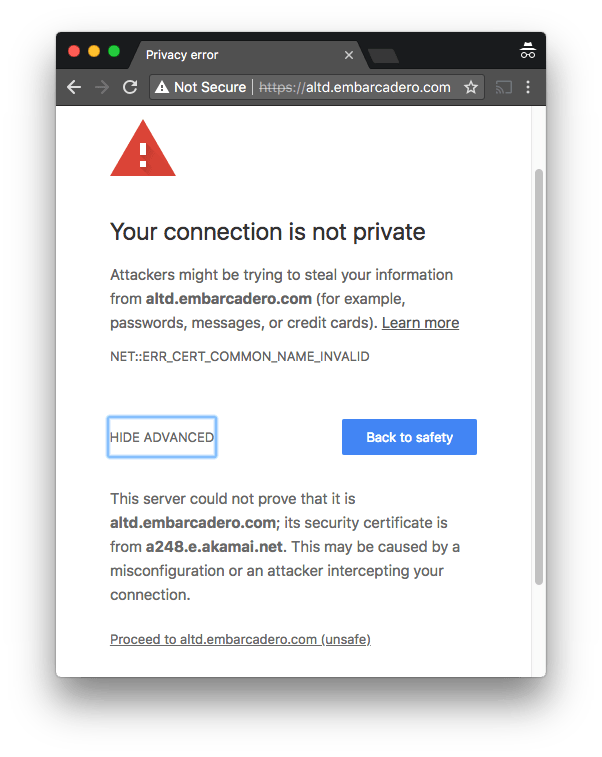
https://altd.embarcadero.com/ TLS certificate does not match domain name

Posted by jpluimers on 2018/09/07

One of the domains not yet monitored at embarcaderomonitoring.wiert.me, was the altd download server for ISOs and installers on http and https level. Ultimately you want https, as most of these are about installers, so you do not want any man-in-the-middle to fiddle with them.
TLS on altd fails

Upitmerobot is not yet smart enough to check validity of TLS certificates on https connections.

Chrome, Firefox, Safari, Internet Explorer, wget, curl and ssllabs however are.

altd hides as much from itself as possible

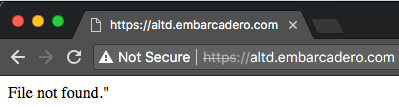
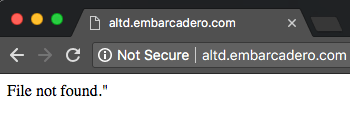
Uptimerobot did not like monitoring the plain http://altd.embarcadero.com/ and https://altd.embarcadero.com/ URLs, because the altd is not browsable, so it tries to hide most of its structure from access. This means they both return an odd response:

Those responses are actually 404 errors (note the - minus sign after curl --trace-ascii: it sends the trace to stdout):

$ wget http://altd.embarcadero.com/
--2018-09-05 10:44:23-- http://altd.embarcadero.com/
Resolving altd.embarcadero.com (altd.embarcadero.com)... 88.221.144.40, 88.221.144.10
Connecting to altd.embarcadero.com (altd.embarcadero.com)|88.221.144.40|:80... connected.
HTTP request sent, awaiting response... 404 Not Found
2018-09-05 10:44:23 ERROR 404: Not Found.

$ curl --verbose http://altd.embarcadero.com/
*   Trying 88.221.144.40...
* TCP_NODELAY set
* Connected to altd.embarcadero.com (88.221.144.40) port 80 (#0)
> GET / HTTP/1.1
> Host: altd.embarcadero.com
> User-Agent: curl/7.54.0
> Accept: */*
> 
< HTTP/1.1 404 Not Found
< Server: Apache
< Content-Type: text/html; charset=iso-8859-1
< Content-Length: 16
< Date: Wed, 05 Sep 2018 08:45:57 GMT
< Connection: keep-alive
< 
* Connection #0 to host altd.embarcadero.com left intact
File not found."

$ curl --trace-ascii - http://altd.embarcadero.com/
== Info:   Trying 88.221.144.40...
== Info: TCP_NODELAY set
== Info: Connected to altd.embarcadero.com (88.221.144.40) port 80 (#0)
=> Send header, 84 bytes (0x54)
0000: GET / HTTP/1.1
0010: Host: altd.embarcadero.com
002c: User-Agent: curl/7.54.0
0045: Accept: */*
0052: 
<= Recv header, 24 bytes (0x18)
0000: HTTP/1.1 404 Not Found
<= Recv header, 16 bytes (0x10)
0000: Server: Apache
<= Recv header, 45 bytes (0x2d)
0000: Content-Type: text/html; charset=iso-8859-1
<= Recv header, 20 bytes (0x14)
0000: Content-Length: 16
<= Recv header, 37 bytes (0x25)
0000: Date: Wed, 05 Sep 2018 08:47:19 GMT
<= Recv header, 24 bytes (0x18)
0000: Connection: keep-alive
<= Recv header, 2 bytes (0x2)
0000: 
<= Recv data, 16 bytes (0x10)
0000: File not found."
File not found."== Info: Connection #0 to host altd.embarcadero.com left intact

This is also the reason that WayBack does not want to archive that link, but it can be archived at [Archive.ishttps://altd.embarcadero.com/.

Luckily, a Google search for site:altd.embarcadero.com revealed there is a non-installer file short enough (~72 kibibytes) for Uptime robot to check, so it now verifies it can access these:

–jeroen

Read the rest of this entry »

Posted in *nix, *nix-tools, cURL, Encryption, HTTPS/TLS security, Monitoring, Power User, Security, Uptimerobot, wget | Leave a Comment »

Use TLS 1.2 or higher, as TLS 1.1 is phased out on many sites, after TLS 1.0/SLL has been disabled by most for a while now

Posted by jpluimers on 2018/07/23

If you get an error like this in one of your tools

OpenSSL: error:1407742E:SSL routines:SSL23_GET_SERVER_HELLO:tlsv1 alert protocol version

it means you are using a tool not yet properly supporting TLS 1.2 or higher.

Or in other words: update your tool set.

The reason is that – after turning off TLS 1.0 a while ago – more and more sites do the same for TLS 1.1.

A prime example of a site that warned on this in a clear way very early on is github:

Others have done this too, for instance:

TLS 1.0 is vulnerable to many attacks, and certain configurations of TLS 1.1 as well (see for instance [WayBack] What are the main vulnerabilities of TLS v1.1? – Information Security Stack Exchange), which means that properly configuring the non-vulnerable TLS 1.1 over times gets more and more complex. An important reason to say goodbye to that as well, as TLS 1.2 (from 2008) is readily available for a long time. The much more recent TLS 1.3 (from 2018) will take a while to proliferate.

I ran in the above error because on one of my systems, an old version of wget was luring around, so I dug up the easiest place to download recent Windows binaries for both win32 (x86) and win64 (x86_64):

[WayBack] eternallybored.org: GNU Wget for Windows having a table indicating the OpenSSL version for each wget build.

–jeroen

Reference: Transport Layer Security – Wikipedia: History and development

Posted in *nix, https, HTTPS/TLS security, OpenSSL, Power User, Security, wget | Leave a Comment »

HowTo: Wget Command Examples

Posted by jpluimers on 2017/04/28

HowTo: Wget Command Examples – Wget is a free software package for retrieving files using HTTP, HTTPS and FTP, the most widely-used Internet protocols

Source: HowTo: Wget Command Examples [WayBack]

I totally forgot about

  • the -c switch that continues an aborted download.
  • the -r -A combination to only download certain file types.

–jeroen

Posted in *nix, *nix-tools, Power User, wget | Leave a Comment »

Simple download script to get all FREE Microsoft eBooks again! Including: Windows 10, Office 365, Office 2016, Power BI, Azure, Windows 8.1, Office 2013, SharePoint 2016, SharePoint 2013, Dynamics CRM, PowerShell, Exchange Server, System Center, Cloud, SQL Server and more! | Microsoft Director of Sales Excellence – Eric Ligman

Posted by jpluimers on 2016/12/21

I saw a lot of people mention the Eric Ligman, Microsoft Director of Sales Excellence Blog a while ago: FREE! That’s Right, I’m Giving Away MILLIONS of FREE Microsoft eBooks again! Including: Windows 10, Office 365, Office 2016, Power BI, Azure, Windows 8.1, Office 2013, SharePoint 2016, SharePoint 2013, Dynamics CRM, PowerShell, Exchange Server, System Center, Cloud, SQL Server and more! | Microsoft Director of Sales Excellence – Eric Ligman

Even though I make most of my income from the Microsoft World, my main machine is a Mac and I dislike browsing

So I wanted to download them all in one easy go so SpotLight could index them.

Luckily there is a file that has all the download URLs in it: http://ligman.me/29zpthb (it expands to http://www.mssmallbiz.com/ericligman/Key_Shorts/MSFTFreeEbooks.txt and is archived at http://web.archive.org/web/*/http://www.mssmallbiz.com/ericligman/Key_Shorts/MSFTFreeEbooks.txt).

The file is mentioned at How to “Download All” of the FREE eBooks and Resources in My FREE eBooks Giveaway | Microsoft Director of Sales Excellence – Eric Ligman.

It’s very easy to download from there using wget (on Windows get it from https://eternallybored.org/misc/wget/ – the x64 versions work fine).

Be sure to use a “recent” version as 1.12 and lower have no support for the --trust-server-names parameter which makes wget use filenames from the http 301 followed links:

--trust-server-names
     If this is set to on, on a redirect the last component of the redirection URL will be used as the local file name.  By default it is used the last component in the original URL.

This is the script:

wget -m -np --trust-server-names http://ligman.me/29zpthb
wget -m -np --trust-server-names --input-file www.mssmallbiz.com/ericligman/Key_Shorts/MSFTFreeEbooks.txt

You might think why not do just wget -m -np --trust-server-names --input-file http://ligman.me/29zpthb  in one go?

Simple answer: like all software, wget occasionally crashes somewhere in the middle of downloading the URLs embedded.

If you restart, then it sees the followed http://ligman.me/29zpthb file has already been downloaded and won’t re-scan its contents.

Bug? I’m not sure. But the two-liner just works.

–jeroen

PS: if you want a script with all the URLs, try these:

https://news.ycombinator.com/item?id=12071552


wget –trust-server-names -m -np http://ligman.me/29ngkYn
wget –trust-server-names -m -np http://ligman.me/29jL5wW
wget –trust-server-names -m -np http://ligman.me/29afIRV
wget –trust-server-names -m -np http://ligman.me/29pyHgR
wget –trust-server-names -m -np http://ligman.me/29dmbfC
wget –trust-server-names -m -np http://ligman.me/29ollRF
wget –trust-server-names -m -np http://ligman.me/29gvv67
wget –trust-server-names -m -np http://ligman.me/29pzkHg
wget –trust-server-names -m -np http://ligman.me/29CWQ20
wget –trust-server-names -m -np http://ligman.me/1G0Cm7T
wget –trust-server-names -m -np http://ligman.me/29vDVrw
wget –trust-server-names -m -np http://ligman.me/29CW4SV
wget –trust-server-names -m -np http://ligman.me/29G1z1N
wget –trust-server-names -m -np http://ligman.me/29yWAAO
wget –trust-server-names -m -np http://ligman.me/29DHWHq
wget –trust-server-names -m -np http://ligman.me/1HGwMgm
wget –trust-server-names -m -np http://ligman.me/29yUVeH
wget –trust-server-names -m -np http://ligman.me/29ErxWs
wget –trust-server-names -m -np http://ligman.me/29EsHkr
wget –trust-server-names -m -np http://ligman.me/29v5zCF
wget –trust-server-names -m -np http://ligman.me/1H32nUT
wget –trust-server-names -m -np http://ligman.me/29yixk9
wget –trust-server-names -m -np http://ligman.me/29vq6d2
wget –trust-server-names -m -np http://ligman.me/29cvrjG
wget –trust-server-names -m -np http://ligman.me/29pzjTR
wget –trust-server-names -m -np http://ligman.me/29rPOf6
wget –trust-server-names -m -np http://ligman.me/29ctW9z
wget –trust-server-names -m -np http://ligman.me/29gvoHt
wget –trust-server-names -m -np http://ligman.me/29gvfEd
wget –trust-server-names -m -np http://ligman.me/29LvcBg
wget –trust-server-names -m -np http://ligman.me/29DS3gJ
wget –trust-server-names -m -np http://ligman.me/1q9L65I
wget –trust-server-names -m -np http://ligman.me/29pufLO
wget –trust-server-names -m -np http://ligman.me/29wODdA
wget –trust-server-names -m -np http://ligman.me/29vch9q
wget –trust-server-names -m -np http://ligman.me/29EmfZc
wget –trust-server-names -m -np http://ligman.me/29LXmMt
wget –trust-server-names -m -np http://ligman.me/29qwKfQ
wget –trust-server-names -m -np http://ligman.me/29sp3nZ
wget –trust-server-names -m -np http://ligman.me/29yWFFf
wget –trust-server-names -m -np http://ligman.me/29ZNaMN
wget –trust-server-names -m -np http://ligman.me/29gYy5h
wget –trust-server-names -m -np http://ligman.me/29NhudA
wget –trust-server-names -m -np http://ligman.me/29jDRJf
wget –trust-server-names -m -np http://ligman.me/29conIf
wget –trust-server-names -m -np http://ligman.me/29cnLlL
wget –trust-server-names -m -np http://ligman.me/29fNYRE
wget –trust-server-names -m -np http://ligman.me/29cq9cw
wget –trust-server-names -m -np http://ligman.me/29acqhj
wget –trust-server-names -m -np http://ligman.me/29fJJCS
wget –trust-server-names -m -np http://ligman.me/29nbxWK
wget –trust-server-names -m -np http://ligman.me/29fO9MV
wget –trust-server-names -m -np http://ligman.me/29pr2x1
wget –trust-server-names -m -np http://ligman.me/29oa0kH
wget –trust-server-names -m -np http://ligman.me/29i6ntm
wget –trust-server-names -m -np http://ligman.me/29n7JVF
wget –trust-server-names -m -np http://ligman.me/29fQsQ4
wget –trust-server-names -m -np http://ligman.me/29fQo2J
wget –trust-server-names -m -np http://ligman.me/29idz8T
wget –trust-server-names -m -np http://ligman.me/29dfwlu
wget –trust-server-names -m -np http://ligman.me/29fLliP
wget –trust-server-names -m -np http://ligman.me/29i83TI
wget –trust-server-names -m -np http://ligman.me/29diypX
wget –trust-server-names -m -np http://ligman.me/29fNpHO
wget –trust-server-names -m -np http://ligman.me/29oefNf
wget –trust-server-names -m -np http://ligman.me/29jGTgC
wget –trust-server-names -m -np http://ligman.me/29crPhL
wget –trust-server-names -m -np http://ligman.me/29FUJIk
wget –trust-server-names -m -np http://ligman.me/1G2oDNG
wget –trust-server-names -m -np http://ligman.me/29u5uMT
wget –trust-server-names -m -np http://ligman.me/29rlRt3
wget –trust-server-names -m -np http://ligman.me/29Yd9V0
wget –trust-server-names -m -np http://ligman.me/29s4EQ1
wget –trust-server-names -m -np http://ligman.me/29vkv6E
wget –trust-server-names -m -np http://ligman.me/29A3q8Z
wget –trust-server-names -m -np http://ligman.me/29H7ovO
wget –trust-server-names -m -np http://ligman.me/1dHMOui
wget –trust-server-names -m -np http://ligman.me/1G2pw8X
wget –trust-server-names -m -np http://ligman.me/29gnaPK
wget –trust-server-names -m -np http://ligman.me/29d7GZH
wget –trust-server-names -m -np http://ligman.me/29i2Mvf
wget –trust-server-names -m -np http://ligman.me/29rbpkY
wget –trust-server-names -m -np http://ligman.me/29e6cTO
wget –trust-server-names -m -np http://ligman.me/29hJU1c
wget –trust-server-names -m -np http://ligman.me/29bcJtd
wget –trust-server-names -m -np http://ligman.me/29bcRZO
wget –trust-server-names -m -np http://ligman.me/29d5mS2
wget –trust-server-names -m -np http://ligman.me/29cz6OD
wget –trust-server-names -m -np http://ligman.me/29fDult
wget –trust-server-names -m -np http://ligman.me/29pEdjN
wget –trust-server-names -m -np http://ligman.me/29rwoY0
wget –trust-server-names -m -np http://ligman.me/29fTQrx
wget –trust-server-names -m -np http://ligman.me/29gfrkN
wget –trust-server-names -m -np http://ligman.me/29rwoHw
wget –trust-server-names -m -np http://ligman.me/29d5AbX
wget –trust-server-names -m -np http://ligman.me/29fudHc
wget –trust-server-names -m -np http://ligman.me/29FzGG5
wget –trust-server-names -m -np http://ligman.me/29osNwd
wget –trust-server-names -m -np http://ligman.me/29a22WR
wget –trust-server-names -m -np http://ligman.me/29alDpK
wget –trust-server-names -m -np http://ligman.me/29fDylj
wget –trust-server-names -m -np http://ligman.me/29jPTCx
wget –trust-server-names -m -np http://ligman.me/29d5XTw
wget –trust-server-names -m -np http://ligman.me/29rUIci
wget –trust-server-names -m -np http://ligman.me/29hVdVa
wget –trust-server-names -m -np http://ligman.me/29ijDhm
wget –trust-server-names -m -np http://ligman.me/29pn5e2
wget –trust-server-names -m -np http://ligman.me/29ckVx7
wget –trust-server-names -m -np http://ligman.me/29cfePX
wget –trust-server-names -m -np http://ligman.me/29vGIvY
wget –trust-server-names -m -np http://ligman.me/29hfnPR
wget –trust-server-names -m -np http://ligman.me/29fCVFe
wget –trust-server-names -m -np http://ligman.me/29a6YLu
wget –trust-server-names -m -np http://ligman.me/29n4GwJ
wget –trust-server-names -m -np http://ligman.me/29jAS3v
wget –trust-server-names -m -np http://ligman.me/29ci56U
wget –trust-server-names -m -np http://ligman.me/29nW9L3
wget –trust-server-names -m -np http://ligman.me/29hV6ZM
wget –trust-server-names -m -np http://ligman.me/29d1qAV
wget –trust-server-names -m -np http://ligman.me/29pfpbI
wget –trust-server-names -m -np http://ligman.me/29v8nwX
wget –trust-server-names -m -np http://ligman.me/29uq452
wget –trust-server-names -m -np http://ligman.me/29d1wc3
wget –trust-server-names -m -np http://ligman.me/29Y1O7a
wget –trust-server-names -m -np http://ligman.me/29a7wRA
wget –trust-server-names -m -np http://ligman.me/29pnEEG
wget –trust-server-names -m -np http://ligman.me/1FYtDD8
wget –trust-server-names -m -np http://ligman.me/1HByNKS
wget –trust-server-names -m -np http://ligman.me/1NCfcKC
wget –trust-server-names -m -np http://ligman.me/1HCDxl9
wget –trust-server-names -m -np http://ligman.me/1HCCCRP
wget –trust-server-names -m -np http://ligman.me/1H4Q0e5
wget –trust-server-names -m -np http://ligman.me/1JI6V77
wget –trust-server-names -m -np http://ligman.me/1CSMobd
wget –trust-server-names -m -np http://ligman.me/1jWMJA2
wget –trust-server-names -m -np http://ligman.me/1m6xucg
wget –trust-server-names -m -np http://ligman.me/1onTg9n
wget –trust-server-names -m -np http://ligman.me/1n49kzj
wget –trust-server-names -m -np http://ligman.me/1sgBtn4
wget –trust-server-names -m -np http://ligman.me/1qZlnOJ
wget –trust-server-names -m -np http://ligman.me/TWa2Dg
wget –trust-server-names -m -np http://ligman.me/1vM9mwt
wget –trust-server-names -m -np http://ligman.me/1qzON6Q
wget –trust-server-names -m -np http://ligman.me/1rB8nl1
wget –trust-server-names -m -np http://ligman.me/TL3pn1
wget –trust-server-names -m -np http://ligman.me/1vM9H2d
wget –trust-server-names -m -np http://ligman.me/29odbJ6
wget –trust-server-names -m -np http://ligman.me/1LSKTC0
wget –trust-server-names -m -np http://ligman.me/1qC1pu4
wget –trust-server-names -m -np http://ligman.me/1dHSpRh
wget –trust-server-names -m -np http://ligman.me/1LO5k1Y
wget –trust-server-names -m -np http://ligman.me/1M7Xr5v
wget –trust-server-names -m -np http://ligman.me/29jLNtX
wget –trust-server-names -m -np http://ligman.me/29agpuw
wget –trust-server-names -m -np http://ligman.me/29cv8FE
wget –trust-server-names -m -np http://ligman.me/29ieXIo
wget –trust-server-names -m -np http://ligman.me/29dmCXi
wget –trust-server-names -m -np http://ligman.me/29jLjnM
wget –trust-server-names -m -np http://ligman.me/29agkqx
wget –trust-server-names -m -np http://ligman.me/29gvTBJ
wget –trust-server-names -m -np http://ligman.me/29pztuz
wget –trust-server-names -m -np http://ligman.me/29dmTJT
wget –trust-server-names -m -np http://ligman.me/29ieSEI
wget –trust-server-names -m -np http://ligman.me/29hB9CQ
wget –trust-server-names -m -np http://ligman.me/29fOWdV
wget –trust-server-names -m -np http://ligman.me/1JPNIAt
wget –trust-server-names -m -np http://ligman.me/29Xnqk8
wget –trust-server-names -m -np http://ligman.me/29oRWlp
wget –trust-server-names -m -np http://ligman.me/29csX4C
wget –trust-server-names -m -np http://ligman.me/29jH8bx
wget –trust-server-names -m -np http://ligman.me/29pcQFA
wget –trust-server-names -m -np http://ligman.me/29FkNr3
wget –trust-server-names -m -np http://ligman.me/12FIapt
wget –trust-server-names -m -np http://ligman.me/13WvGXa
wget –trust-server-names -m -np http://ligman.me/1bPPb6C
wget –trust-server-names -m -np http://ligman.me/12FIZ1I
wget –trust-server-names -m -np http://ligman.me/16CaDM1
wget –trust-server-names -m -np http://ligman.me/19LwMLI
wget –trust-server-names -m -np http://ligman.me/1JHmqiB
wget –trust-server-names -m -np http://ligman.me/1KHqGNK
wget –trust-server-names -m -np http://ligman.me/1M7Ycve
wget –trust-server-names -m -np http://ligman.me/1LSOsIu
wget –trust-server-names -m -np http://ligman.me/1UrQDFx
wget –trust-server-names -m -np http://ligman.me/TUmyTW
wget –trust-server-names -m -np http://ligman.me/1NLviCk
wget –trust-server-names -m -np http://ligman.me/17iaq4l
wget –trust-server-names -m -np http://ligman.me/1bPRqqz
wget –trust-server-names -m -np http://ligman.me/17iah0Q
wget –trust-server-names -m -np http://ligman.me/1287Jt4
wget –trust-server-names -m -np http://ligman.me/29djdrk
wget –trust-server-names -m -np http://ligman.me/29rLH2H
wget –trust-server-names -m -np http://ligman.me/29fNPxT
wget –trust-server-names -m -np http://ligman.me/29ddm60
wget –trust-server-names -m -np http://ligman.me/29gsnHt
wget –trust-server-names -m -np http://ligman.me/29nc2QS
wget –trust-server-names -m -np http://ligman.me/29fOrnd
wget –trust-server-names -m -np http://ligman.me/29dk0Ze
wget –trust-server-names -m -np http://ligman.me/29aewh2
wget –trust-server-names -m -np http://ligman.me/29gteI8
wget –trust-server-names -m -np http://ligman.me/29ibJVq
wget –trust-server-names -m -np http://ligman.me/29fKMD6
wget –trust-server-names -m -np http://ligman.me/29cthAz
wget –trust-server-names -m -np http://ligman.me/29ohqUT
wget –trust-server-names -m -np http://ligman.me/29crGiw
wget –trust-server-names -m -np http://ligman.me/29gsFOl
wget –trust-server-names -m -np http://ligman.me/29ncgrb
wget –trust-server-names -m -np http://ligman.me/29fKWdi
wget –trust-server-names -m -np http://ligman.me/29djvi9
wget –trust-server-names -m -np http://ligman.me/29FW41O
wget –trust-server-names -m -np http://ligman.me/29ddKBp
wget –trust-server-names -m -np http://ligman.me/29dkhf4
wget –trust-server-names -m -np http://ligman.me/29rML6Q
wget –trust-server-names -m -np http://ligman.me/29hxyEN
wget –trust-server-names -m -np http://ligman.me/29fPweO
wget –trust-server-names -m -np http://ligman.me/29fPMug
wget –trust-server-names -m -np http://ligman.me/29fPnIe
wget –trust-server-names -m -np http://ligman.me/29hxogT
wget –trust-server-names -m -np http://ligman.me/29deg2k
wget –trust-server-names -m -np http://ligman.me/29pwCBO
wget –trust-server-names -m -np http://ligman.me/29fPAec
wget –trust-server-names -m -np http://ligman.me/29deQgz
wget –trust-server-names -m -np http://ligman.me/29afaLE
wget –trust-server-names -m -np http://ligman.me/29pxarl
wget –trust-server-names -m -np http://ligman.me/29ne5V5
wget –trust-server-names -m -np http://ligman.me/29csBjh
wget –trust-server-names -m -np http://ligman.me/29dkZZK
wget –trust-server-names -m -np http://ligman.me/29ojrAy
wget –trust-server-names -m -np http://ligman.me/29jJLdx
wget –trust-server-names -m -np http://ligman.me/29df2fw
wget –trust-server-names -m -np http://ligman.me/29cu6sX
wget –trust-server-names -m -np http://ligman.me/29dlaE5
wget –trust-server-names -m -np http://ligman.me/29FZx0B
wget –trust-server-names -m -np http://ligman.me/29idnpO
wget –trust-server-names -m -np http://ligman.me/29dlH9d
wget –trust-server-names -m -np http://ligman.me/29cs157
wget –trust-server-names -m -np http://ligman.me/29dkq1V
wget –trust-server-names -m -np http://ligman.me/29aelm3
wget –trust-server-names -m -np http://ligman.me/29ycEnb
wget –trust-server-names -m -np http://ligman.me/29w5gr9
wget –trust-server-names -m -np http://ligman.me/29pfQ50
wget –trust-server-names -m -np http://ligman.me/1sgMWDe
wget –trust-server-names -m -np http://ligman.me/29w68w8
wget –trust-server-names -m -np http://ligman.me/29viFmi
wget –trust-server-names -m -np http://ligman.me/29zYWzl
wget –trust-server-names -m -np http://ligman.me/29H2bo1
wget –trust-server-names -m -np http://ligman.me/29AT60J
wget –trust-server-names -m -np http://ligman.me/29xtlNa
wget –trust-server-names -m -np http://ligman.me/29xtHDs
wget –trust-server-names -m -np http://ligman.me/29GpFsY
wget –trust-server-names -m -np http://ligman.me/29ddd2b
wget –trust-server-names -m -np http://ligman.me/29fJpEc
wget –trust-server-names -m -np http://ligman.me/29cs7Fg
wget –trust-server-names -m -np http://ligman.me/29fJA2g
wget –trust-server-names -m -np http://ligman.me/29cqzzq
wget –trust-server-names -m -np http://ligman.me/29ddbYb
wget –trust-server-names -m -np http://ligman.me/29rLlZV
wget –trust-server-names -m -np http://ligman.me/29ialCf
wget –trust-server-names -m -np http://ligman.me/29pvj5I
wget –trust-server-names -m -np http://ligman.me/29hwj8y
wget –trust-server-names -m -np http://ligman.me/29dj7zY
wget –trust-server-names -m -np http://ligman.me/1sl39Hs
wget –trust-server-names -m -np http://ligman.me/1anyEJj
wget –trust-server-names -m -np http://ligman.me/17icbPc
wget –trust-server-names -m -np http://ligman.me/ZZezok
wget –trust-server-names -m -np http://ligman.me/12S035G
wget –trust-server-names -m -np http://ligman.me/12RZWY1
wget –trust-server-names -m -np http://ligman.me/13PlvVY
wget –trust-server-names -m -np http://ligman.me/12FMEMP
wget –trust-server-names -m -np http://ligman.me/128a1ID
wget –trust-server-names -m -np http://ligman.me/19LCgpM
wget –trust-server-names -m -np http://ligman.me/13Pn1XY
wget –trust-server-names -m -np http://ligman.me/13WChkr
wget –trust-server-names -m -np http://ligman.me/12FN71F
wget –trust-server-names -m -np http://ligman.me/ZZh7Ts
wget –trust-server-names -m -np http://ligman.me/14HcD5O
wget –trust-server-names -m -np http://ligman.me/17UHSNJ
wget –trust-server-names -m -np http://ligman.me/19LEPIz
wget –trust-server-names -m -np http://ligman.me/11VIxdB
wget –trust-server-names -m -np http://ligman.me/12FObmf
wget –trust-server-names -m -np http://ligman.me/11HXnjD
wget –trust-server-names -m -np http://ligman.me/14fCxLS
wget –trust-server-names -m -np http://ligman.me/16CkUI4
wget –trust-server-names -m -np http://ligman.me/17VqB79
wget –trust-server-names -m -np http://ligman.me/13XRfqr
wget –trust-server-names -m -np http://ligman.me/19fCnqV
wget –trust-server-names -m -np http://ligman.me/11WvSqL
wget –trust-server-names -m -np http://ligman.me/1002Upx
wget –trust-server-names -m -np http://ligman.me/14HMJ1Q
wget –trust-server-names -m -np http://ligman.me/10ttQ3n
wget –trust-server-names -m -np http://ligman.me/15fRBI9
wget –trust-server-names -m -np http://ligman.me/19fDuqE
wget –trust-server-names -m -np http://ligman.me/11IMDlh
wget –trust-server-names -m -np http://ligman.me/10tu5eD
wget –trust-server-names -m -np http://ligman.me/128NAD6
wget –trust-server-names -m -np http://ligman.me/1bRgXzV
wget –trust-server-names -m -np http://ligman.me/14givRo
wget –trust-server-names -m -np http://ligman.me/18VNatF
wget –trust-server-names -m -np http://ligman.me/128Ogso
wget –trust-server-names -m -np http://ligman.me/13Qbl7k
wget –trust-server-names -m -np http://ligman.me/10tuWvL
wget –trust-server-names -m -np http://ligman.me/16dFAWc
wget –trust-server-names -m -np http://ligman.me/11lkViX
wget –trust-server-names -m -np http://ligman.me/1bRhVMn
wget –trust-server-names -m -np http://ligman.me/14HOjki
wget –trust-server-names -m -np http://ligman.me/1bRiXbc
wget –trust-server-names -m -np http://ligman.me/13QcfRi
wget –trust-server-names -m -np http://ligman.me/16E4lf4
wget –trust-server-names -m -np http://ligman.me/1005lbB
wget –trust-server-names -m -np http://ligman.me/14HOxb2
wget –trust-server-names -m -np http://ligman.me/16E6G9L
wget –trust-server-names -m -np http://ligman.me/14gkBRc
wget –trust-server-names -m -np http://ligman.me/1006fEV
wget –trust-server-names -m -np http://ligman.me/16dHXZ9
wget –trust-server-names -m -np http://ligman.me/13QdHDb
wget –trust-server-names -m -np http://ligman.me/11IQ8bd
wget –trust-server-names -m -np http://ligman.me/17jgPfG
wget –trust-server-names -m -np http://ligman.me/15fXTHQ
wget –trust-server-names -m -np http://ligman.me/11vx5Cy
wget –trust-server-names -m -np http://ligman.me/N1JiHO
wget –trust-server-names -m -np http://ligman.me/OudHlO
wget –trust-server-names -m -np http://ligman.me/OudJdr
wget –trust-server-names -m -np http://ligman.me/N1I2o4
wget –trust-server-names -m -np http://ligman.me/Oue0NG
wget –trust-server-names -m -np http://ligman.me/Oue2oE
wget –trust-server-names -m -np http://ligman.me/N1HQW0
wget –trust-server-names -m -np http://ligman.me/Ouebsh
wget –trust-server-names -m -np http://ligman.me/OuecfK
wget –trust-server-names -m -np http://ligman.me/N1Ienp
wget –trust-server-names -m -np http://ligman.me/OuelQu
wget –trust-server-names -m -np http://ligman.me/OueoMd
wget –trust-server-names -m -np http://ligman.me/N1J8A8
wget –trust-server-names -m -np http://ligman.me/OueFPb
wget –trust-server-names -m -np http://ligman.me/OueIKU
wget –trust-server-names -m -np http://ligman.me/N1I935
wget –trust-server-names -m -np http://ligman.me/OueUd4
wget –trust-server-names -m -np http://ligman.me/OueVxy
wget –trust-server-names -m -np http://ligman.me/N1HMW7
wget –trust-server-names -m -np http://ligman.me/Ouf6sO
wget –trust-server-names -m -np http://ligman.me/Ouf9og
wget –trust-server-names -m -np http://ligman.me/N1Jo27
wget –trust-server-names -m -np http://ligman.me/OufgQN
wget –trust-server-names -m -np http://ligman.me/OufkQs
wget –trust-server-names -m -np http://ligman.me/N1HEpM
wget –trust-server-names -m -np http://ligman.me/Oufwzg
wget –trust-server-names -m -np http://ligman.me/OufCXN
wget –trust-server-names -m -np http://ligman.me/N1JfvI
wget –trust-server-names -m -np http://ligman.me/OufRSs
wget –trust-server-names -m -np http://ligman.me/OufVlq
wget –trust-server-names -m -np http://ligman.me/N1HX3Q
wget –trust-server-names -m -np http://ligman.me/Oug5Jl
wget –trust-server-names -m -np http://ligman.me/Oug74a
wget –trust-server-names -m -np http://ligman.me/1H1Exty
wget –trust-server-names -m -np http://ligman.me/1S1f34H
wget –trust-server-names -m -np http://ligman.me/1HGqihD
wget –trust-server-names -m -np http://ligman.me/1G2ccS5
wget –trust-server-names -m -np http://ligman.me/1ffeiJo
wget –trust-server-names -m -np http://ligman.me/1NKjUqp
wget –trust-server-names -m -np http://ligman.me/1KEShAt
wget –trust-server-names -m -np http://ligman.me/1S1i4C0
wget –trust-server-names -m -np http://ligman.me/1ReR3Qq
wget –trust-server-names -m -np http://ligman.me/1dGxnSW
wget –trust-server-names -m -np http://ligman.me/1IZCarE
wget –trust-server-names -m -np http://ligman.me/1H2Bq3J
wget –trust-server-names -m -np http://ligman.me/1Rf7BaZ
wget –trust-server-names -m -np http://ligman.me/1LRIveQ
wget –trust-server-names -m -np http://ligman.me/1dGxEW7
wget –trust-server-names -m -np http://ligman.me/1omCrM6
wget –trust-server-names -m -np http://ligman.me/1j5aDhH
wget –trust-server-names -m -np http://ligman.me/1n3mkVY
wget –trust-server-names -m -np http://ligman.me/1n3mAUZ
wget –trust-server-names -m -np http://ligman.me/1vKOGot
wget –trust-server-names -m -np http://ligman.me/1H7bxTv
wget –trust-server-names -m -np http://ligman.me/1G0DEjb
wget –trust-server-names -m -np http://ligman.me/29pbiLY
wget –trust-server-names -m -np http://ligman.me/29dlTVV
wget –trust-server-names -m -np http://ligman.me/29rOYz9
wget –trust-server-names -m -np http://ligman.me/29ie2rq
wget –trust-server-names -m -np http://ligman.me/29fQN5c
wget –trust-server-names -m -np http://ligman.me/29idEct
wget –trust-server-names -m -np http://ligman.me/29nevuE
wget –trust-server-names -m -np http://ligman.me/29olaWI
wget –trust-server-names -m -np http://ligman.me/29pz4Im
wget –trust-server-names -m -np http://ligman.me/29fQRlQ
wget –trust-server-names -m -np http://ligman.me/29hzPzU
wget –trust-server-names -m -np http://ligman.me/29rON6X
wget –trust-server-names -m -np http://ligman.me/29cumbH
wget –trust-server-names -m -np http://ligman.me/29cv1JW
wget –trust-server-names -m -np http://ligman.me/29dmh6L
wget –trust-server-names -m -np http://ligman.me/29dfUkt
wget –trust-server-names -m -np http://ligman.me/1giniO7
wget –trust-server-names -m -np http://ligman.me/29H7K5O
wget –trust-server-names -m -np http://ligman.me/1qbEeVc
wget –trust-server-names -m -np http://ligman.me/1ewwcq6
wget –trust-server-names -m -np http://ligman.me/1H1MFKr
wget –trust-server-names -m -np http://ligman.me/1pxniH4
wget –trust-server-names -m -np http://ligman.me/1dG2ZZ9
wget –trust-server-names -m -np http://ligman.me/29v9igV
wget –trust-server-names -m -np http://ligman.me/29hofVk
wget –trust-server-names -m -np http://ligman.me/29idcee
wget –trust-server-names -m -np http://ligman.me/29rOvx0
wget –trust-server-names -m -np http://ligman.me/29ctkki
wget –trust-server-names -m -np http://ligman.me/29okalt
wget –trust-server-names -m -np http://ligman.me/29i2CEe
wget –trust-server-names -m -np http://ligman.me/29FT71n
wget –trust-server-names -m -np http://ligman.me/29NBSj1
wget –trust-server-names -m -np http://ligman.me/29H3O3o
wget –trust-server-names -m -np http://ligman.me/29OHLKa
wget –trust-server-names -m -np http://ligman.me/29uHKKV


Posted in *nix, .NET, Development, Office, Power User, Software Development, wget, Windows | 2 Comments »