The Wiert Corner – irregular stream of stuff

Jeroen W. Pluimers on .NET, C#, Delphi, databases, and personal interests

  • My badges

  • Twitter Updates

  • Pages

  • All categories

  • Enter your email address to subscribe to this blog and receive notifications of new posts by email.

    Join 1,854 other subscribers

Archive for the ‘Power User’ Category

regex – How to write a search pattern to include a space in findstr? – Stack Overflow

Posted by jpluimers on 2019/12/13

TL;DR:

  1. If you use regular expressions (/R) with FINDSTR, then pass them as /C:"regular-expression-string"
  2. If you forget the /C: the string will be used as a normal search string
  3. If you forget the : after the /C you will get an informal error, but the search will continue giving you wrong results

Details in [WayBackregex – How to write a search pattern to include a space in findstr? – Stack Overflow

–jeroen

Posted in Power User, Windows | Leave a Comment »

Hiding your number when calling from an Android phone

Posted by jpluimers on 2019/12/13

Via [WayBack] This was well hidden outside the regular Anrdoid settings I was trying at first. You need to start with the stock Android phone app, then go to settings… – Jeroen Wiert Pluimers – Google+.

The steps are in the images below, starting from the stock Android phone dialing app.

It helped solving this problem:

[WayBack] Twitter thread

@jpluimers: A friend of mine cannot receive anonymous calls: his #OnePlusOne on @KPNwebcare with latest Android available for it does not ring, not even in safe mode. But calls do appear in recent calls list. This used to work in the past months ago. Any tips?

@KPNwebcare: I suggest he try his SIM-card in a different phone to determine if the problem persists. This helps us figure out if the problem is related to the or our network. If the problem remains then I recommend that your friend contacts us directly!

@jpluimers: OK. I will assist him doing this. Thanks!

@jpluimers: Thanks for the offer. Enjoy your weekend. Somehow it’s the device. To be continued…

@jpluimers: After trying to reset many individual settings, the only thing that worked was a complete phone reset then restore apps from backup. Of course not all apps backup just as well, but that got us 90% with only 10% of manual configuration left. Phew (: And thanks for helping us out.

–jeroen

Read the rest of this entry »

Posted in Android Devices, Power User | Leave a Comment »

Node-RED

Posted by jpluimers on 2019/12/11

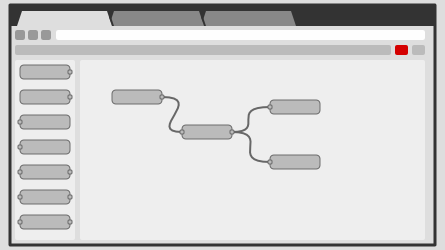
Node-RED is a programming tool for wiring together hardware devices, APIs and online services in new and interesting ways.It provides a browser-based editor that makes it easy to wire together flows using the wide range of nodes in the palette that can be deployed to its runtime in a single-click.

Seems one of the ways to automate our home: [WayBack] Node-RED, as it supports many input and output methods with all kinds of nodes between them:

input output
inject debug
catch
status
link link
mqtt mqtt
http http response
websocket websocket
tcp tcp
udp udp
serial serial

It is based on node.js, seems to need PM2 for running as a service, so I need to first figure out how well it runs on OpenSuSE (with more details than this gist).

After that I need to figure out how to version your configurations using git and document as it looks like the configurations sources are stored in JSON format [WayBack].

For resources:

  • StackOverflow node-red tag
  • Github node-red repositories
  • nodered documentation to:
    • get started (including Installation, Running, Adding non-stock Nodes, Upgrading, Creating your first and second flow, running on Docker / Windows)
      • running on a device (Raspberry Pi, BeagleBone Black, Android) which needs extra device specific modules to hardware inputs/outputs
      • communicating with a device (Arduino)
      • running in the cloud (IBM Bluemix, SenseTecnic FRED, Amazon Web Services, Microsoft Azure)
    • user guide (including Configuration, Security, Logging, Command-line Admin, Writing Functions, Embedding into an existing app)
    • cookbook (with many flows covering Basics, HTTP and MQTT)
    • creating nodes (with a wall of information: Creating your first node, JavaScript File, HTML File, Storing Context, Node properties, Node credentials, Node appearance, Node status, Configuration nodes, Help style guide, Packaging, Internationalisation)
    • flows (hundreds of them)

Code is published as JSON, but I wish more examples also showed the visual representation.

Via: [WayBack] Now I can go to bed :-) Added node-red [1] to my setup and thanks to node-red-contrib-ui [2] (replaced by node-red-dashboard [3]) I can now generate ni… – Jan Wildeboer – Google+ who also provided the large screenshot below.

–jeroen
Read the rest of this entry »

Posted in Development, Hardware Development, IoT Internet of Things, Network-and-equipment, Power User, Raspberry Pi | Leave a Comment »

Not sure why: ChromeCast on Harman Kardon BDS 580 series to Samsung MU6100 gives greenish tint

Posted by jpluimers on 2019/12/09

I had a problem similar to [Archive.is] MX613ST Color space conversion issue (detects YUV instead of RGB) – Google Product Forums.

In my case I had a Chromecast 1st generation connected to a [WayBackHarman Kardon BDS 580, which was hooked up to a [WayBackSamsung MU6100 TV.

Everything, especially the white and grey areas, had a greenish tint over it, and I think there was also a purple mismatch.

I think it has to do with YUV versus RGB, similar to [WayBack] Force RGB Color Space over HDMI? – Apple Community.

Though I did not notice that with an Apple TV 4th generation (which you can switch between YCbCr/RGB-High/RGB-Low) hooked up to the same BDS 580.

The solution: plug the Chromecast in the TV, then the ARC (Audio Return Channel) will automatically route the audio to the BDS 580.

–jeroen

Posted in 4K Monitor, BDS580, Displays, Hardware, Harman Kardon, Home Audio/Video, LifeHacker, Media, MU6100, Power User, Samsung TV, Video | Leave a Comment »

Digitally Free: Censor An Image In GIMP

Posted by jpluimers on 2019/12/09

I used the tips at [Archive.isDigitally Free: Censor An Image In GIMP to ensure some sensitive information was redacted from a picture I published on the internet.

dfree got much further than I needed, so I stayed at a Gaussian Blur with an 80 pixel radius which was more than enough to blur out a few rectangular areas but still show the user-experience of the underlying controls.

–jeroen

Source: Digitally Free: Censor An Image In GIMP

Read the rest of this entry »

Posted in Image Editing, Power User, The Gimp | Leave a Comment »

The Secret of Great Gradient – UX Planet

Posted by jpluimers on 2019/12/09

Gradients work best when “Inspired by Nature”, even if you live in the city.

–jeroen

Read the rest of this entry »

Posted in Development, Power User, Software Development, UI Design | Leave a Comment »

Making ISO images of MacOS installers

Posted by jpluimers on 2019/12/06

For my link archive:

If you want it on USB in stead, the steps are simpler (the link below also links to other OS X and MacOS versions):

If you do not have the full ~5 gigabyte install, then:

–jeroen

Posted in Apple, Mac, Mac OS X / OS X / MacOS, Power User | Leave a Comment »

Google Sites for your domain: map the domain root to a site

Posted by jpluimers on 2019/12/06

With Google Sites, you you can attach it to your domain like example.org.

In practice the example.org domain is not bound to Google Sites, but everywhere in this post, please substitute example.org with your own domain name.

In Google Sites, you can design web-sites and create “web address mapping” entries for it. However, you can only add a site mapping for a sub-domain.

But what if you want your www.example.org also to be visible as from example.org?

Then you get a nice error message “Required field must not be blank”:

Read the rest of this entry »

Posted in Google, Google Apps, Power User | Leave a Comment »

Need to research eternal “Establishing connection to your Google Cloud Shell”; gcp – Google Cloud Shell does not start – Stack Overflow

Posted by jpluimers on 2019/12/06

A while back I had a  after .

The problem is that after a successful “Provisioning your Google Cloud Shell machine”, the “Establishing connection to your Google Cloud Shell” did not go away, while the Cloud Shell Code Editor did work:

It was an awful situation, as the mobile reception was bad (so I could not start a hotspot), and the WiFi did not allow for SSH or VPN connections: exactly the situation where Google Cloud Shell is designed for.

A day later it was fine, so I am still not sure what went wrong, nor how I could get it to work if it ever fails again.

Anyone with an idea?

These are inconclusive:

It is a different problem than [WayBack] Google App Engine – cloud shell where both the shell and the code editor failed at the same time.

–jeroen

Read the rest of this entry »

Posted in Google, GoogleCloudShell, Power User | Leave a Comment »

bash: converting numbers to human readable SI or IEC units

Posted by jpluimers on 2019/12/03

Many unix tools that report sizes in bytes can convert them to either IEC or SI readable formats.

For github.com/jpluimers/btrfs-du/blob/master/btrfs-du I wrote about last week, I also wanted that kind of behaviour. So I did some research and came up with the code and test cases below.

Note that depending on the bitness of your system, bash integer numeric values are limited in size; see [WayBack] What is the maximum value of a numeric bash shell variable? – Super User.

So I wrote a small bash script for that too, which needed also gave me the opportunity to show how a  perpetual while loop as explained by [WayBack] bash – “while :” vs. “while true” – Stack Overflow.

Two things that always bite me with these short scripts are expressions (done through [WayBack]Arithmetic Expansion) and comparisons (through[WayBack] Other Comparison Operators).

The IEC suffixes contain one extra i to indicate binary and – next to the ISO notation that were already ISO defined – made it into the ISO 80000 standard since 2008. Here is a comparison list from [WayBackBinary prefix – Wikipedia:

Prefixes for multiples of
bits (bit) or bytes (B)
Decimal
Value SI
1000 k kilo
10002 M mega
10003 G giga
10004 T tera
10005 P peta
10006 E exa
10007 Z zetta
10008 Y yotta
Binary
Value IEC JEDEC
1024 Ki kibi K kilo
10242 Mi mebi M mega
10243 Gi gibi G giga
10244 Ti tebi
10245 Pi pebi
10246 Ei exbi
10247 Zi zebi
10248 Yi yobi

Most tools nowadays default to binary IEC suffixes for byte sizes, though disk manufacturers still use SI suffixes because, well then they appear bigger but aren’t. Just for comparison, look at the numbers from [WayBack] File size – Wikipedia and [WayBack] IEC and SI Size Notations – AN!Wiki where I got the test cases from:

Read the rest of this entry »

Posted in *nix, *nix-tools, bash, bash, Development, Power User, Scripting, Software Development | Leave a Comment »