


A while ago one of our machines threw an error 8E5E03FB while installing SP1 (KB976932) on Window 7 Home Premium.
This is what I used to recover from that (note that failed alone means it failed with the previous error code):
 Performed
 chkdsk %SystemDrive% /F, rebooted, waited for any issues to get fixed (none were)- Disabled Avast anti virus, then update -> failed
- Reboot, then update -> failed
- Reboot in safe mode, then update -> failed
- On an Administrative command prompt, run
sfc /scannow - Reboot, then update -> failed
- Downloaded [WayBack] Download Windows 7 and Windows Server 2008 R2 Service Pack 1 (KB976932) from Official Microsoft Download Center **
- Reboot, then install download -> failure
- Looked at
%SystemRoot%\Logs\CBS\CBS.logand found this entry:CBS Failed call to CryptCATAdminAddCatalog. [HRESULT = 0x8e5e03fb - JET_errPageNotInitialized
- Searched for that combination
- Via [WayBack] Error code 8E5E03FB for Windows 7 updates – Microsoft Community, went for https://aka.ms/diag_wu to [WayBack] https://download.microsoft.com/download/6/C/9/6C970550-32AB-4235-9CDD-7FC9DD848BBB/WindowsUpdate.diagcab
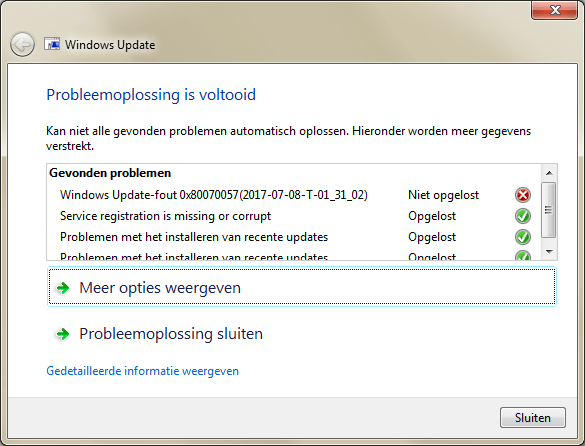
- Ran the diagnostics which fixed many problems, but left alone a
0x80070057. - Rebooted, then installed the SP1 download -> failed.
- Via[WayBack] SP1 installation failure, Code 0x8e5e03fb, performed the steps in [WayBack] How do I reset Windows Update components?.
- Rebooted, then installed the SP1 download -> failed, but for a new reason:
0x80070490. - Rebooted, then used on-line Windows update to install SP1 -> failed, but for again a new reason:
Code B7. This was in the CBS.Log:Store corruption detected in function CCSDirectTransaaction::ShouldKeepAliveFromInstallmapon resourceamd64_avast.vc140.crt_fcc99ee6193ebbca_14.0.24210.0_none_56aba0211ca246c2. - Uninstalled Avast.
- Installed CheckSUR (KB947821:[WayBack] Download System Update Readiness Tool for Windows 7 (KB947821) [October 2014] from Official Microsoft Download Center)
- Rebooted, then used on-line Windows update to install SP1 -> failed, but for a new reason:
0x80070490. This was in the CBS.Log:Failed to resolve package 'Package_2_for_KB2507938~31bf3856ad364e35~amd64~~6.1.1.4' [HRESULT = 0x80070490 - ERROR_NOT_FOUND]. - Searching for that error, I found [WayBack] [Win7HomePremium] Unable to install Service Pack 1 – Page 2 which got me to [WayBack] Download SFCFix – MajorGeeks, then run these in an administrative command prompt:
SFC /SCANNOW

SFCFix - The latter reported no errors, so I did some more searching and bumped into [WayBack] Installation Failures / CBS Store corruptions: Uncommon issues and troubleshooting – Microsoft GTSC Romania – Enterprise Platforms Support.
- It lead me to uninstall the package encompassing
'Package_2_for_KB2507938~31bf3856ad364e35~amd64~~6.1.1.4':dism /online /remove-package /packagename:Package_2_for_KB2507938~31bf3856ad364e35~amd64~~6.1.1.4 - Rebooted, then used on-line Windows update to install SP1 -> failed
- CBS.log first
0x80070490entry is stillFailed to resolve package 'Package_2_for_KB2507938~31bf3856ad364e35~amd64~~6.1.1.4' [HRESULT = 0x80070490 - ERROR_NOT_FOUND] - Performed
wusa /uninstall /KB:2507938-> failed indicatingDe update KB2507938 is niet op deze computer geïnstalleerd.(“The update KB2507938 is not installed on this computer.”) - That resulted into one Google Search hit: [WayBack] [SOLVED] [Win7] Error Code 80070490 to KB3126587, so downloaded [WayBack] Download Security Update for Windows 7 (KB2507938) from Official Microsoft Download Center
- Manually installed the downloaded KB2507938 -> failed with
De update geldt niet voor uw computer.(“The update is not applicable to your computer”) - Followed [WayBack] Windows Update Forum Posting Instructions and a few extra steps from [SOLVED] [Win7] Error Code 80070490 to KB3126587 so came up with this:
- To get into a relatively clean CBS log: Reboot, then install download -> failure
- Run CheckSUR KB947821
- On the administrative console, run
SFC /SCANNOWSFCFixFRST64
the latter with search argumentKB2507938
- Attached files from:
%SystemRoot%\Logs\CBS:- CBS.log
- CbsPersist_20170709180806.cab
- This is the log file during SP1 update
- CheckSUR.log
- CheckSUR.persist.log
%SystemRoot%\Logs\SFCFix:%SystemRoot%\Logs\FRST64:- Addition.txt
- FRST.txt
So I asked this question: [WayBack] [Win7HomePremium] SP1 fails with 0x80070490 as KB2507938 is not fully present.
Extra tools used
- [WayBack] Download SFCFix – MajorGeeks
- download 1: [WayBack] SFCFix.exe
- download 2: [WayBack] SFCFix.exe
- [WayBack] FRST Tutorial – How to use Farbar Recovery Scan Tool – Malware Removal Guides and Tutorials
- [WayBack] Farbar Recovery Scan Tool Download
- x64 version: [WayBack] FRST64.exe
- x86 version: [WayBack] FRST.exe
- [WayBack] FRST – Farbar Recovery Scan Tool Download – Geeks to Go Forum -> does not allow WayBack or Archive.is archival of download links
- [WayBack] Farbar Recovery Scan Tool Download
** SP1 download
TL;DR: for English Windows 7 x64 you need [WayBack] https://download.microsoft.com/download/0/A/F/0AFB5316-3062-494A-AB78-7FB0D4461357/windows6.1-KB976932-X64.exe
Note that the download file naming is very confusing as you will see only the above 6 files from the below list (which is English, but similar for other languages):


 The Wiert Corner - irregular stream of stuff