The Wiert Corner – irregular stream of stuff

Jeroen W. Pluimers on .NET, C#, Delphi, databases, and personal interests

  • My badges

  • Twitter Updates

  • My Flickr Stream

  • Pages

  • All categories

  • Enter your email address to subscribe to this blog and receive notifications of new posts by email.

    Join 1,839 other subscribers

Archive for the ‘Power User’ Category

Quickly finding and debugging jQuery event handlers with findHandlersJS – The Blinking Caret

Posted by jpluimers on 2018/10/16

tl;dr: Finding event handlers registered using jQuery can be tricky. findHandlersJS makes finding them easy, all you need is the event type and a jQuery selector for the elements where the events might originate.

I need to invest some time in using this: [WayBackQuickly finding and debugging jQuery event handlers with findHandlersJS – The Blinking Caret

Sourcecode: [WayBackraw.githubusercontent.com/ruidfigueiredo/findHandlersJS/master/findEventHandlers.js

References:

Via: [WayBackjavascript – Chrome Dev Tools : view all event listeners used in the page – Stack Overflow

–jeroen

Posted in Chrome, Development, Google, JavaScript/ECMAScript, jQuery, Power User, Scripting, Software Development, Web Browsers, Web Development | Leave a Comment »

macOS Sierra: Change the order of the network ports your computer uses to connect

Posted by jpluimers on 2018/10/15

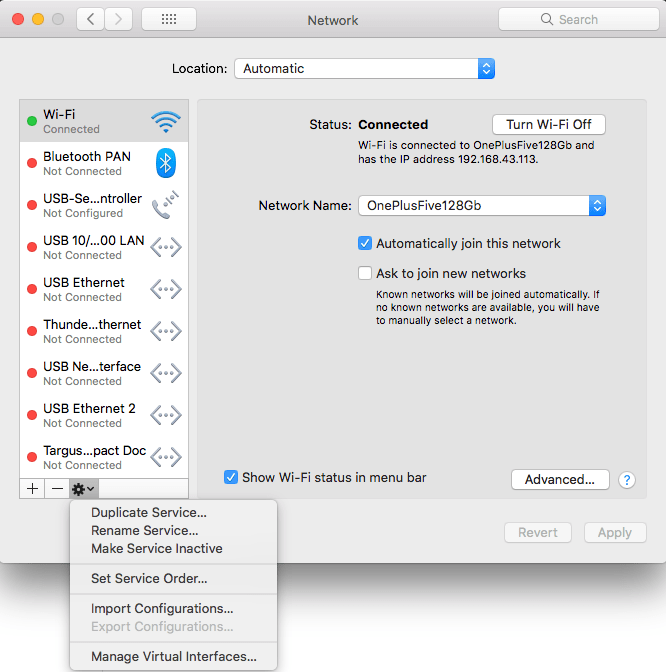
Very useful when you want to give your WiFi less priority than an USB or Thunderbolt network adapter: [WayBack] macOS Sierra: Change the order of the network ports your computer uses to connect.
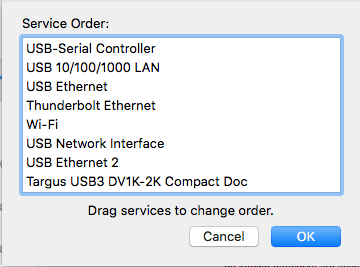
It is not just that the topmost adapter gets more priority: it also determines the DNS search!

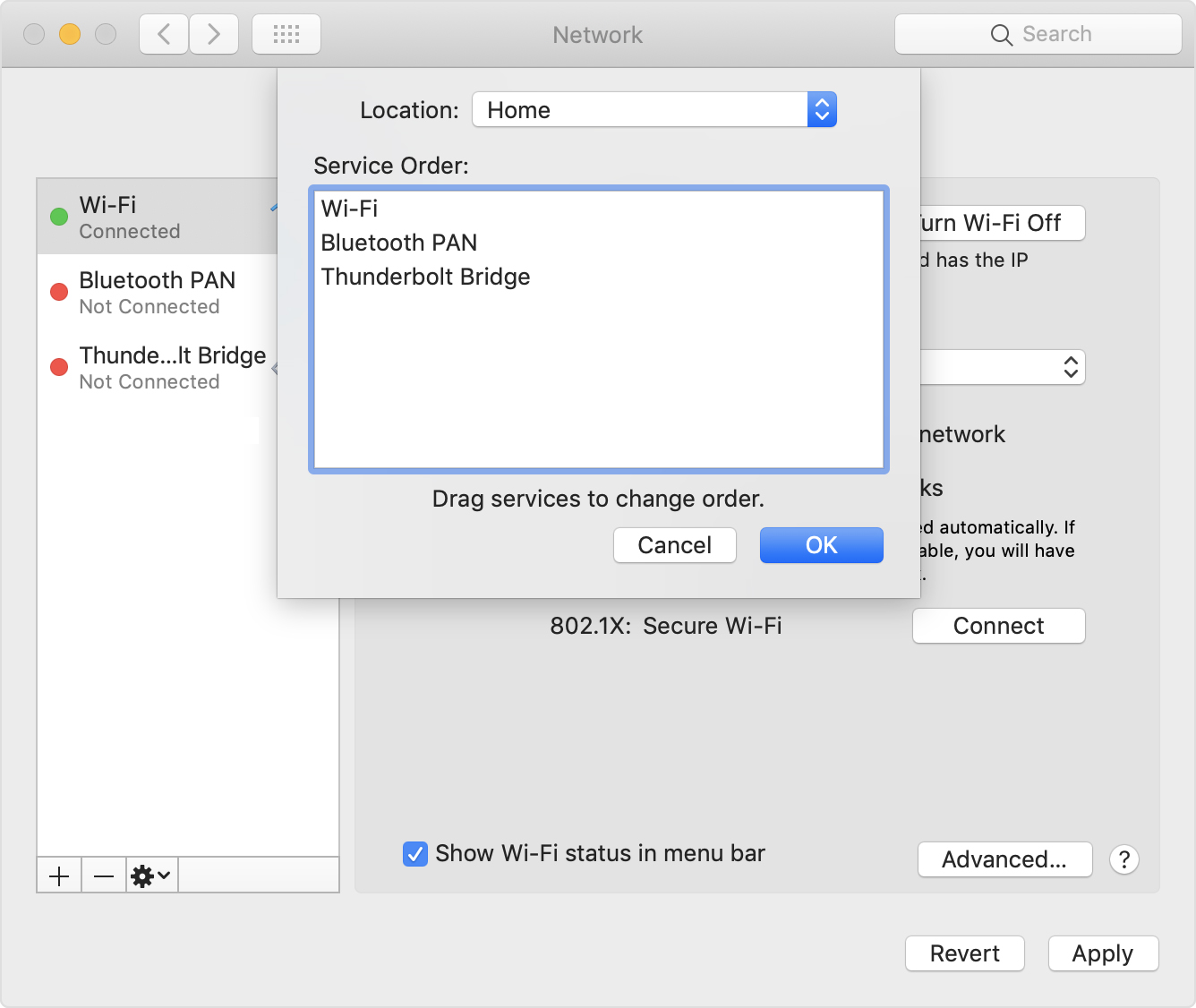
Anyway: after choosing “Set Service Order” on the right, choose the order as seen below.

–jeroen

PS: Since Apple is cleaning up their site, only the above WayBack works, but luckily the below link explains it in a very similar way when using Locations:

[WayBack] How to use network locations on your Mac – Apple Support


Posted in Apple, iMac, Mac, Mac OS X / OS X / MacOS, MacBook, Power User | Leave a Comment »

Why Are My Text Messages Stuck Pending | Pushbullet Help Central

Posted by jpluimers on 2018/10/15

Try this fix first:

For many, this issue goes away by simply reinstalling our Android app on your phone. We suggest giving this a try first.

That didn’t work, but this did:

Check that the correct device is selected in the top left of the SMS interface.

You may have an old device selected, which is preventing SMS from working correctly. Check that the correct device is selected in the drop down. You can remove old devices here.

It looks like all my old smartphones were still there despite not being a SIM card in them. Removing all but my active phone solved the problem.

Source: [WayBackWhy Are My Text Messages Stuck Pending | Pushbullet Help Central

–jeroen

Posted in Android Devices, Chrome, Google, Power User | Leave a Comment »

Aside from the Wayback Machine, what are other options for getting screenshots of websites from the past? – Quora

Posted by jpluimers on 2018/10/15

I’ve used these myself:

There are many more listed in for instance these links:

IIPC OpenWayBack:

–jeroen

Posted in Internet, InternetArchive, Power User, WayBack machine | Leave a Comment »

TweeterID – Twitter ID and username converter

Posted by jpluimers on 2018/10/12

Especially HTC devices used to store part of the context information like this:

<HTCData><Twitter>id:11111111/friendof:00000000</Twitter></HTCData>

[WayBack] TweeterID – Twitter ID and username converter:

Convert any Twitter account’s username or @handle into its respective Twitter ID, or convert ID to username

You can also do the Twitter ID to @handle conversion by URL (at the time of writing, neither existed, which is intentional: replace your own ID there) [WayBack] permalinks – URL link to Twitter user with ID, not name – Stack Overflow:

I could not find a twitter URL that does the conversion the other way around.

–jeroen


Posted in Power User, SocialMedia, Twitter | Leave a Comment »

Zamzar – video converter, audio converter, image converter, eBook converter – via @Matijn

Posted by jpluimers on 2018/10/12

Even for Geeks like me, this is a great on-line tool for converting media files: [WayBack/Archive] Zamzar – video converter, audio converter, image converter, eBook converter

Thanks Matijn for pointing me to this.

And for nerds there is ffmpeg:

for name in *.ogg; do ffmpeg -i "$name" -ab 128k -map_meta_data 0:0,s0 "${name/.ogg/.mp3}"; done;

–jeroen

Read the rest of this entry »

Posted in Audio, Emoticons, ffmpeg, Geeky, Media, Power User, Video | Leave a Comment »

Retr0bright – Wikipedia

Posted by jpluimers on 2018/10/12

For removing the yellowing of ABS plastics:

In addition to homemade gel mixtures, hydrogen peroxide-based hair bleaching creams available at beauty supply stores can also be used as a ready-made mix.

[WayBackRetr0bright – Wikipedia

More background information:

–jeroen

Read the rest of this entry »

Posted in History, LifeHacker, Power User | Leave a Comment »

MotionEyeOS on Odroid C1+ with Logitech USB web cameras

Posted by jpluimers on 2018/10/11

Hopefully I get this to work after fixing

The first part of the fix was to

  1. re-image the SD card.
  2. boot
  3. wait 5 minutes (there is no output on HDMI apart from some flickering and no output on TTY using 115200 bits/second despite trying [WayBacken:c1_hardware_uart [ODROID Wiki])

The second part is getting the USB web cameras to work.

I’ve got two types, but the label on them doesn’t list their common name, only their P/N sometimes with M/N:

  1. P/N 860-000049 M/N V-UBC40 (really old USB cameras)
  2. P/N 860-000334 (new USB camera)

The MotionEyeOS web interface didn’t list any working cameras so I had to do some digging.

Luckily [WayBackWebcam software and driver support for Windows has a table of part and model numbers combined with product names, so they got revealed them as these:

  1. P/N 860-000334 = M/N V-U0028  with name HD Pro Webcam C920
  2. P/N 861225 = M/N V-UBC40 with name Quick Cam Messenger
    (which is funny as the P/N on the label is different)

Both are supported by motion according to [WayBackLogitech < Motion < Foswiki though the Quick Cam Messenger needs [WayBackQuickcam Messenger & Communicate driver for Linux which I should try to cross-compile one day.

The latter works fine. Below are some settings I used.

Read the rest of this entry »

Posted in *nix, Development, Hardware Development, Linux, Odroid, Power User | Leave a Comment »

linux – dmesg time vs system time time isnt correct – Server Fault

Posted by jpluimers on 2018/10/10

[WayBacklinux – dmesg time vs system time time isnt correct – Server Fault helped me solve this problem with an Odroid C1+ running busybox:

[root@meye-062016b9 ~]# hwclock --show
Wed Apr  3 20:25:47 2013  0.000000 seconds
[root@meye-062016b9 ~]# date
Wed May 31 09:48:18 UTC 2018
[root@meye-062016b9 ~]# hwclock --systohc --utc
[root@meye-062016b9 ~]# hwclock --show
Wed May 31 09:48:29 2018  0.000000 seconds
[root@meye-062016b9 ~]# date
Wed May 31 09:48:35 UTC 2018
[root@meye-062016b9 ~]#

Note: If your logging clock in /var/log/dmesg.log is wrong by an exact couple of hours, then try [WayBacksyslog time wrong – but date returns the correct time? and edit [WayBack] /etc/sysconfig/clock.

The above involves looking if I can get MotionEyeOS working Giving up on the official Ubuntu for Odroid C1 image.

So far not much luck: the Ubuntu got hosed, but before it was stable as in that didn’t reboot suddenly.

Now the MotionEyeOS (which is busybox based) reboots itself without notice about every 3 minutes, despite no other hardware connected and trying 3 different power supplies.

The Odroid C1+ only draws 0.34 Ampère at 5.13 Volt which is well within specs.

I’m puzzled:

[Wed May 31 09:49:51 2018] Booting Linux on physical CPU 0x200
[Wed May 31 09:52:20 2018] Booting Linux on physical CPU 0x200
[Wed May 31 09:54:50 2018] Booting Linux on physical CPU 0x200
[Wed May 31 09:57:19 2018] Booting Linux on physical CPU 0x200
[Wed May 31 09:59:49 2018] Booting Linux on physical CPU 0x200
[Wed May 31 10:02:22 2018] Booting Linux on physical CPU 0x200
[Wed May 31 10:04:56 2018] Booting Linux on physical CPU 0x200
[Wed May 31 10:07:26 2018] Booting Linux on physical CPU 0x200
[Wed May 31 10:09:59 2018] Booting Linux on physical CPU 0x200
[Wed May 31 10:12:29 2018] Booting Linux on physical CPU 0x200
[Wed May 31 10:14:58 2018] Booting Linux on physical CPU 0x200

jeroen

Posted in *nix, *nix-tools, Power User | Leave a Comment »

tcp – How can I trigger a script when a certain port becomes available for requests? – Unix & Linux Stack Exchange

Posted by jpluimers on 2018/10/09

Netcat to the rescue waiting for a Windows 10 upgrade to finish (which can take hours):

while ! nc -z 172.22.0.67 3389; do echo "sleeping"; sleep 10; done; echo 'The server is up!'

Via: [WayBacktcp – How can I trigger a script when a certain port becomes available for requests? – Unix & Linux Stack Exchange, quoting from the answer:

  • nc is Netcat, “the Swiss-army knife for TCP/IP”,
  • -z means: do not send any data, just check if the port is open,
  • while ! nc -z …; do sleep 0.1; done: keep checking and sleeping for one tenth of a second until the port opens up, i.e. Netcat returns with a zero (success) status.

–jeroen

Posted in *nix, *nix-tools, Communications Development, Development, Internet protocol suite, Power User, TCP, Windows | Leave a Comment »