The Wiert Corner – irregular stream of stuff

Jeroen W. Pluimers on .NET, C#, Delphi, databases, and personal interests

  • My badges

  • Twitter Updates

  • My Flickr Stream

  • Pages

  • All categories

  • Enter your email address to subscribe to this blog and receive notifications of new posts by email.

    Join 1,839 other subscribers

Archive for the ‘Power User’ Category

MS Excel 2011 for Mac: How to Change Data Source for a Pivot Table

Posted by jpluimers on 2018/08/24

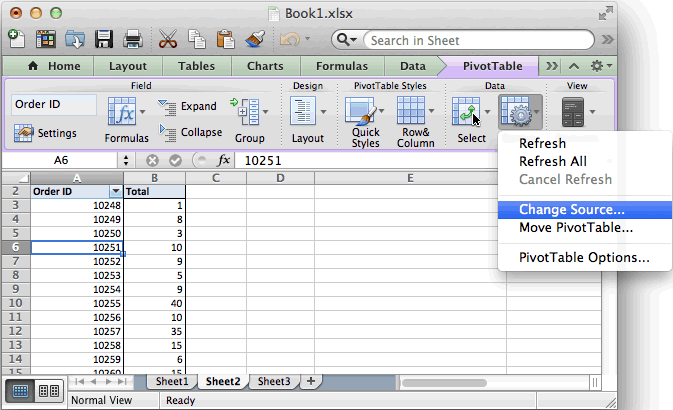
Based on [WayBackMS Excel 2011 for Mac: How to Change Data Source for a Pivot Table:

  • Refreshing the data is in the “PivotTable” toolbar under “Data”: either
    • “Refresh” for the current PivotTable or
    • “Refresh All” for all PivotTables in the spreadsheet
  • Setting the range of source data is “Change Source” in the “PivotTable” toolbar under “Data”
    • If your data is on a sheet by itself, it’s better to select the range using column only notation than using column:row notation, compare these:
      • ‘FRITZ!Box_CallList.csv’!$A:$S
      • ‘FRITZ!Box_CallList.csv’!$A$1:$S$401

The last trick makes it way easier to add newer data from an external CSV file into an existing workbook with various PivotTable analysis worksheets:

  1. Append the CSV data to the source
  2. Copy over any formulas needed to make pivot life easier
  3. “Refresh All”

On a 1920×1200 screen, the PivotTable toolbar looks like this:

Excel 2011 for Mac PivotTable toolbar

Excel 2011 for Mac PivotTable toolbar

–jeroen

Posted in Office, Office 2011 for Mac, Power User | Leave a Comment »

Plastic SCM compare versus Beyond Compare; guess which screenshot I like most

Posted by jpluimers on 2018/08/20

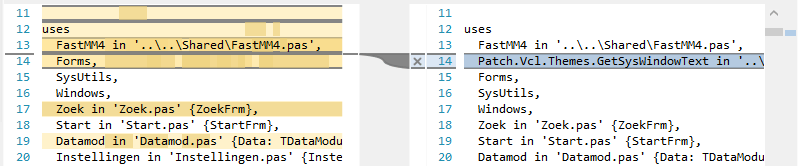
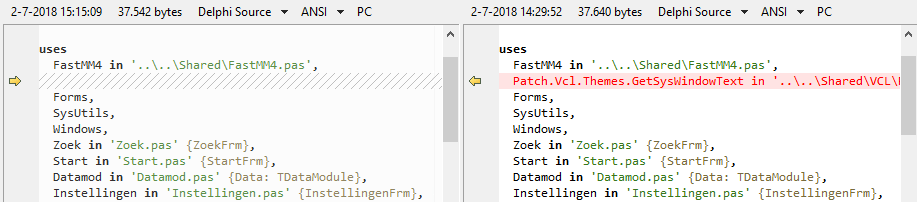
Same difference; two tools.

Plastic SCM compare: lots of clutter

Beyond Compare: just the things that are different.

–jeroen

Posted in Beyond Compare, Development, PlasticSCM, Power User, Source Code Management | 3 Comments »

Drone no-fly zones | ministerie van Infrastructuur en Milieu

Posted by jpluimers on 2018/08/20

If you ever want to fly a drone without a license in The Netherlands, be prepared that the flying zones are very limited, especially in : [Archive.isDrone no-fly zones | ministerie van Infrastructuur en Milieu

The text isn’t very clear, even to Dutch people, so there is some discussion and explanation in these links:

More temporary airspace restrictions are here:

–jeroen

Read the rest of this entry »

Posted in LifeHacker, Power User | Leave a Comment »

when bind named service hasn’t started after OpenSuSE Tumbleweed boots

Posted by jpluimers on 2018/08/20

A while ago, named would not start any more after I rebooted my Tumbleweed systems.

I had this behaviour on multiple systems, each installed quite a while ago and kept up-to-date with zypper dist-upgrade so it looked like a systematic issue.

Below are steps in researching the problem together with the helpful people on the IRC channel opensuse-factory.

Background reading for some of the commands: [WayBackHow To Use Systemctl to Manage Systemd Services and Units | DigitalOcean.

Both systemctl status named.service and systemctl status named would show the same output:

# systemctl status named
● named.service - LSB: Domain Name System (DNS) server, named
   Loaded: loaded (/etc/init.d/named; generated; vendor preset: disabled)
   Active: inactive (dead)
     Docs: man:systemd-sysv-generator(8)

Getting the log from events around a reboot would show a successful shutdown, but no start:

# journalctl --unit named --catalog --pager-end

Apr 28 13:19:27 laurel systemd[1]: Stopping LSB: Domain Name System (DNS) server, named...
-- Subject: Unit named.service has begun shutting down
-- Defined-By: systemd
-- Support: http://lists.freedesktop.org/mailman/listinfo/systemd-devel
-- 
-- Unit named.service has begun shutting down.
Apr 28 13:19:28 laurel named[20360]: no longer listening on 192.168.124.27#53
Apr 28 13:19:32 laurel named[20360]: received control channel command 'stop'
Apr 28 13:19:32 laurel named[20360]: shutting down: flushing changes
Apr 28 13:19:32 laurel named[20360]: stopping command channel on 127.0.0.1#953
Apr 28 13:19:32 laurel named[20360]: no longer listening on ::#53
Apr 28 13:19:32 laurel named[20360]: no longer listening on 127.0.0.1#53
Apr 28 13:19:32 laurel named[20360]: exiting
Apr 28 13:19:34 laurel named[30705]: Shutting down name server BIND  waiting for named to shut down ..done
Apr 28 13:19:34 laurel systemd[1]: Stopped LSB: Domain Name System (DNS) server, named.
-- Subject: Unit named.service has finished shutting down
-- Defined-By: systemd
-- Support: http://lists.freedesktop.org/mailman/listinfo/systemd-devel
-- 
-- Unit named.service has finished shutting down.

Similar results in these files:

  • /var/lib/named/log/general.log

28-Apr-2017 13:19:32.465 general: shutting down: flushing changes
28-Apr-2017 13:19:32.468 general: stopping command channel on 127.0.0.1#953
28-Apr-2017 13:19:32.622 general: exiting

  • /var/lib/named/log/named.log

28-Apr-2017 13:19:32.489 network: no longer listening on ::#53
28-Apr-2017 13:19:32.489 network: no longer listening on 127.0.0.1#53

With systemctl, I got this:

# systemctl is-enabled named
named.service is not a native service, redirecting to systemd-sysv-install.
Executing: /usr/lib/systemd/systemd-sysv-install is-enabled named
enabled
# systemctl is-active named
inactive
# systemctl is-failed named
inactive

After this, I was out of systemd and sysv knowledge, so I asked for help on the #openSUSE-factory IRC channel, where ismail was of great help.

Read the rest of this entry »

Posted in *nix, *nix-tools, bind-named, Linux, openSuSE, Power User, SuSE Linux, Tumbleweed | Leave a Comment »

How to check if a binary is 32 or 64 bit on Windows? – Super User

Posted by jpluimers on 2018/08/17

It seems there are a few, but only loading the binary is the sure method to know what the process will be using: [WayBackHow to check if a binary is 32 or 64 bit on Windows? – Super User and [WayBack] How do I determine if a .NET application is 32 or 64 bit? – Stack Overflow.

Details in the answers of these questions, here are a few highlights:

  • The first few characters in the binary header reveal what it was originally designed for.
  • A .NET executable might still have an x64 header for bootstrapping.
  • The Windows SDK has a tool dumpbin.exe with the /headers option.
  • You can use sigcheck.exe from SysInternals.
  • The file utility (e.g. from cygwin, which comes with msysgit) will distinguish between 32- and 64-bit executables.
  • Use the command line 7z.exe on the PE file (Exe or DLL) in question which gives you a CPU line.
  • Virustotal File detail is a way to find out if a binary is 32 bit or 64 bit.
  • Even an executable marked as 32-bit can run as 64-bit if, for example, it’s a .NET executable that can run as 32- or 64-bit. For more information see https://stackoverflow.com/questions/3782191/how-do-i-determine-if-a-net-application-is-32-or-64-bit, which has an answer that says that the CORFLAGS utility can be used to determine how a .NET application will run.

–jeroen

Search terms: win64, win32, x64, x86_64, x86

Posted in Assembly Language, Development, Power User, Windows, x64, x86 | Leave a Comment »

Ziggo – als je geen papieren factuur meer wilt

Posted by jpluimers on 2018/08/17

Als je bij Ziggo geen papieren factuur meer wilt, kun je dat op https://www.ziggo.nl/mijn-ziggo/gegevens/betalingsgegevens-wijzigen/ instellen.

–jeroen

via: [WayBack]

Posted in LifeHacker, Power User | Leave a Comment »

Steve Losh on Twitter: “HTTP status ranges in a nutshell: 1xx: hold on 2xx: here you go 3xx: go away 4xx: you fucked up 5xx: I fucked up”

Posted by jpluimers on 2018/08/17

[WayBackSteve Losh on Twitter:

“HTTP status ranges in a nutshell:

  • 1xx: hold on
  • 2xx: here you go
  • 3xx: go away
  • 4xx: you fucked up
  • 5xx: I fucked up”

–jeroen

via: [WayBack] HTTP status ranges in a nutshell… – This is why I Code – Google+

Read the rest of this entry »

Posted in Communications Development, Development, HTTP, Internet protocol suite, Power User, TCP | Leave a Comment »

Upgrade to ‎Microsoft Remote Desktop 10 on the Mac App Store

Posted by jpluimers on 2018/08/17

If you are still on version 8, then note this version will be deprecated at 20180901, so it is time to upgrade to [Archive.is‎Microsoft Remote Desktop 10 on the Mac App Store

[Archive.is] ‎Microsoft Remote Desktop 8 on the Mac App Store is now at version 8.0.44, which changed one thing:

This update adds a dismissible banner to the app UI to message the fact that the client will be deprecated soon. You can start using the new version of Remote Desktop today by downloading Microsoft Remote Desktop 10 from the App Store.

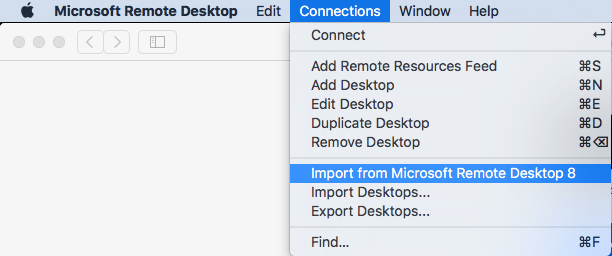
It is easy to import your RDP desktops from version 8 into version 18: in the menu, select Connections, then Import from Microsoft Remote Desktop 8, then enter your credentials so the saved logon passwords can be imported from the [WayBack] KeyChain.

A few things to note:

  • importing the Microsoft Remote Desktop 8 fails to import the Local Resource bindings
  • in Microsoft Remote Desktop 10, editing Local Resource binding right after adding them will crash

Background reading:

The full version histories of both:

Read the rest of this entry »

Posted in Apple, Power User, Remote Desktop Protocol/MSTSC/Terminal Services, Windows | Leave a Comment »

Hack The Box :: Penetration Testing Labs

Posted by jpluimers on 2018/08/13

Cool playground:

An online platform to test and advance your skills in penetration testing and cyber security.

Source: Hack The Box :: Penetration Testing Labs

Via [WayBack] hackthebox – Penetration testing labs This is an amazing platform – super addictive! Hack The Box is an online platform al… – Jürgen Christoffel – Google+

–jeroen

Posted in LifeHacker, Power User, Security | Leave a Comment »

Canon MF8200C default password…

Posted by jpluimers on 2018/08/13

I needed to figure out what was wrong with a Canon MF8200C UFRII LT XPS.

Luckily, this still worked for administrator access [WayBackDefault admin password for Canon Multifunction Printers:

Put in admin id 7654321 pw 7654321

–jeroen

Posted in Power User, Printer drivers, Windows | Leave a Comment »