


This sparked some great responses [Wayback/Archive] Iris Classon on Twitter: “What’s the least privacy invading way to track some metrics regarding traffic to my website? Basic stuff, not length of stay, color of underwear or body count.”, for instance:
Archive for the ‘Power User’ Category

VoIP: passing on a phone number from one Fritz!Box to another Fritz!Box
Posted by jpluimers on 2024/03/11
Most Fritz!Box VoIP configurations have a phone number configured to only work on telephony devices (i.e. handsets) on the same Fritz!Box.
But it is possible to define a telephony device that itself is another VoIP end-point.
This way you can hook a second (or more) Fritz!Box up to the phone number(s) of the first Fritz!Box.
I am using this for two reasons:
- the second Fritz!Box was the primary one, but is not supported by your VoIP provider any more (this happened after a forced migration from xs4all to KPN: VoIP would not work no matter I tried: Many links about free modem/router choice and their configurations for the Dutch KPN internet/VoIP provider)
- you have a LAN2LAN VPN between multiple locations and want to use the same phone numbers from different LAN locations (beware of LAN2LAN error messages; see Reminder that the Fritz!Box IKE error 0x1C is still barely documented: crucial places like the built-in help page point to non-existing URLs)
Below is how to get this going, assuming the first Fritz!Box is a 7490 running firmware 7.29 and the second is a a 7360 with firmware 6.33 (other versions and firmware versions vary slightly).
But first the related post: Many links about free modem/router choice and their configurations for the Dutch KPN internet/VoIP provider where I figured out that just using a 7360 won’t cut it any more.
Share this:

Posted in DECT, Fritz!, Fritz!Box, Hardware, ISDN, Network-and-equipment, Power User, PSTN, Telephony, VoIP | Leave a Comment »
etched: permanent, but slow way for storing/retrieving archived web-content
Posted by jpluimers on 2024/03/08
[Wayback/Archive.is] about etched:
etchedis an internet archive tool that permanently timestamps and stores web pages directly into the Bitcoin BSV blockchain.This is a major improvement from traditional web archivers as all etched pages are permanently stored and independently provable by anyone who has access to the bitcoin blockchain. This means even if etched shuts down anyone can search and view all previously saved data using bitcoin browsers like Bottle.
Via [Wayback] Archive.is blog — See if you suddenly died and that hardware failure…:
For redundancy, try something like etched.page, they store pages on Bitcoin blockchain.
Example: [Wayback] etched archive of nos.nl, 2021-09-10
Related:
- [Wayback/Archive.is] https://bottle.bitdb.network/
- [Wayback/Archive.is]
interplanaria/bottle:Bitcoin Browser - [Wayback]
B://: Bitcoin Simple Storage Protocol - [Wayback]
C://: Universal Content Addressable File System over Bitcoin
--jeroen
Share this:
Posted in archive.is / archive.today, Internet, InternetArchive, Power User, WayBack machine, Web Browsers | Leave a Comment »
Use Remembered Arguments for a Package During Upgrades · Issue #797 · chocolatey/choco
Posted by jpluimers on 2024/03/06
I totally missed this feature got implemented: [Wayback/Archive] Use Remembered Arguments for a Package During Upgrades · Issue #797 · chocolatey/choco. I also seem to be lucky I have not tried it out yet (:
I bumped into it via [Wayback/Archive] Chocolatey Software | Notepad++ 8.4.4, which had this interesting comment:
If you want Notepad++ 32 bit and you want it to stay on 32 bit with upgrades, ensure you are on Chocolatey 0.10.4 (or newer). Then add `
-x86` to your installation arguments. Then turn on the remembered arguments feature with ‘choco feature enable -n useRememberedArgumentsForUpgrades‘ – this will ensure that `-x86` gets passed on upgrade when running `choco upgrade all`. For more information on how this works, see https://github.com/chocolat…797
First of all, if you started using Chocolatey at or before 0.14, the useRememberedArgumentsForUpgrades feature is disabled by default and kept that way even after upgrading to the most recent version. You can see executing choco feature list on a system that started with Chocolatey:
Share this:
Posted in Chocolatey, Development, Power User, Scripting, Software Development, Windows | Leave a Comment »
A Fatigue Scale by Miss•Treated
Posted by jpluimers on 2024/03/04
Some two years ago, a friend of me having Long-COVID posted about fatigue and the trouble finding a scale for it.
Their Dutch Twitter thread contained the below list which is very useful as it is phrased using concrete terms.
[Wayback/Archive] Five Reasons Fatigue Isn’t Like Normal Tiredness (Proving Most People Don’t Get It) — Miss•Treated
Share this:

Posted in Awareness, Covid-19 / Coronavirus, Covid-19/SARS-CoV-2/Coronavirus, Health, LifeHacker, Power User | Leave a Comment »
Falende administratie: Pashouder gegevens opgeven – ABN AMRO
Posted by jpluimers on 2024/03/03
[Wayback/Archive] www.abnamro.nl/zakelijk-pashoudergegevens is een HTTP 301 redirect naar [Wayback/Archive] Pashouder gegevens opgeven – ABN AMRO.
Kennelijk bewaart De Bank niet de persoonsgegevens die ik 35 geleden bij ze opgaf en ze in de 25 jaar daarna – toen ze nog kantoren hadden – telkens aan de balie liet zien wanneer ik me bij bepaalde transacties nodig waren – moest legitimeren.
Maar “ken uw klant” geldt niet voor “de Bank”: ze hebben de gegevens opnieuw nodig met als smoes Wwft: [Wayback/Archive] Know your client centre – ABN AMRO
Wij willen dat u elke dag veilig uw bankzaken kunt doen. Eén van de manieren waarop we hiervoor zorgen, is door actuele en correcte informatie te hebben over onze klanten. Dit is ook vastgelegd in de Wet ter voorkoming van witwassen en financieren van terrorisme (Wwft).
Dat ze die gegevens zelf dus niet paraat hebben, betekent eigenlijk dat ze zelf de veiligheid uit het oog verloren hebben.
Helaas geen uitzondering: nog geen bank tegengekomen die deze zaken wel op orde had.
Iemand tips van banken die dat wel hebben?
Dit willen ze weten volgens de brief (dit staat niet op de pagina waar de site naar verwijst: [Wayback/Archive] Pashouder gegevens opgeven – ABN AMRO):
- Geboortedatum (ze snappen niet dat sommigen geen geboortedag of geboortemaand hebben en een of beide daarvan 00 kunnen zijn, zie Geboortedatum – Wikipedia)
- Geslacht waarbij onduidelijk is of die het gaat om genderidentiteit, genderexpressie of biologisch geslacht (fenotypisch, gonadaal, of genetisch). Bovendien kan daar slechts man (Heer) of vrouw (Mevrouw) worden ingevuld (hallo ISO 5218) en is daar sprake van discriminatie (als het bijvoorbeeld om het genetische geslacht, dan zijn er meer dan 2 keuzes: X, XX, XXX, XY, XXY en XYY komen voor)
- Volledige voornamen
- Officiële achternaam
- Aangekomen achternaam als die er is
Daadwerkelijk gevraagd op het elektronische formulier:
- IBAN
- Pasnummers
- Aanhef (geslacht) met slechts de keuzes Heer of Mevrouw
- Voorletter(s)
- Tussenvoegsel(s)
- Achternaam
- Volledige voornamen
- Tussenvoegsel(s) aangenomen achternaam
- Volledige dubbele achternaam
Naar UBO wordt dan weer niet gevraagd (wat in bovenstaande link wel wordt gesuggereerd): [Wayback/Archive] Uw UBO-gegevens – ABN AMRO.
Daar gaan ze vast nog een keer om vragen, want stel je voor dat de zaken bij ze nu al op orde zouden zijn…
Dingen die op het formulier niet werken:
- 00 en 00 in geboortedag en geboortemaand (of XX en XX) terwijl die op het identiteitsbewijs daadwerkelijk leeg kunnen zijn, zie Geboortedatum – Wikipedia
- een + in het emailadres voor sub-adressing, zie Email address: sub-addressing – Wikipedia
--jeroen
Share this:
Posted in LifeHacker, Power User | Leave a Comment »
firebug – Google Developer Tools “Network” Tab clears after redirect – Stack Overflow
Posted by jpluimers on 2024/02/29
With the ever changing Google Developer UI it is sometimes hard to track where things moved or what functionality is available.
I needed the “Network” tab to preserve the connections even after a redirect and this is indeed possible as per [Wayback/Archive] firebug – Google Developer Tools “Network” Tab clears after redirect – Stack Overflow (thanks [Wayback/Archive] Rodrigo Graça for asking and [Wayback/Archive] Snuffleupagus for answering):
Share this:

Posted in Chrome, Development, Google, Power User, Software Development, Web Development | Leave a Comment »
Long-term memory – Wikipedia
Posted by jpluimers on 2024/02/26
For my link archive:
- English: Long-term memory – Wikipedia
- Dutch: Langetermijngeheugen – Wikipedia
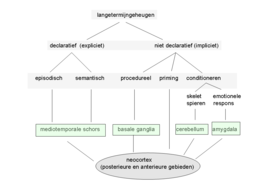
Words from the Dutch picture (thanks Google Lens!) of which there also is a large version:
Share this:

Posted in Health, LifeHacker, Power User | Leave a Comment »
Denkreflex on Twitter: “CN Pandemie / Trauma Wir sollten manchmal gnädiger mit uns sein. !B “
Posted by jpluimers on 2024/02/23
This was so much me from early 2022 to mid 2022: [Wayback/Archive] Denkreflex on Twitter: “CN Pandemie / Trauma Wir sollten manchmal gnädiger mit uns sein. !B”
- Heart carrying a large brick titled “past trauma”
- Heart also carrying smaller bricks “bad news”, “pandemic” and “stress”
- Heart trying to step over a “minor inconvenience”
- Heart breaking down and brains with glasses telling the heart “I think you’re overreacting”
Share this:

Posted in About, Awareness, Health, LifeHacker, Personal, Power User | Leave a Comment »
ShellCheck – shell script analysis tool
Posted by jpluimers on 2024/02/22
Cool: [Wayback] ShellCheck – shell script analysis tool
ShellCheck finds bugs in your shell scripts
It needs a shebang at the start of a script (like #!/usr/bin/env bash) to recognise the kind of shell, then does amazing analysis.
It is open source at [Wayback/Archive.is] koalaman/shellcheck: ShellCheck, a static analysis tool for shell scripts with excellent documentation including explaining screenshots like

It’s not just available on-line or on the command-line, but also integrates with many code editors (like [Wayback/Archive.is] ShellCheck – Visual Studio Marketplace: Integrates ShellCheck into VS Code, a linter for Shell scripts.) and CI/CD pipelines.
Via: [Wayback] bash – error conditional binary operator expected in compound branch – Unix & Linux Stack Exchange (thanks [Wayback] Cyrus!)
–jeroen
Share this:

Posted in *nix, *nix-tools, ash/dash, ash/dash development, bash, bash, Development, Power User, Scripting, Software Development | Leave a Comment »
 The Wiert Corner - irregular stream of stuff