


It’s a short term weather side-effect for which data centers are under dimensioned because data centers don’t have long term planning, right?
Narrator: it’s the climate changing way faster than anyone designing data centers anticipated.
Posted by jpluimers on 2026/06/23
It’s a short term weather side-effect for which data centers are under dimensioned because data centers don’t have long term planning, right?
Narrator: it’s the climate changing way faster than anyone designing data centers anticipated.

Posted in Cloud, Hosting, Infrastructure | Leave a Comment »
Posted by jpluimers on 2026/04/21
Reminder to self: [Wayback/Archive] Hacker Hosting
HackerHosting biedt Hackers, die samenkomen in hackerspaces, in hotels en op campings de mogelijkheid om te genieten van hoge kwaliteit hosting in Nederland, tegen een tarief waarvoor zelfs ‘kippenschuur-hosters’ en ‘brandgevaarlijke-datacenter-hosters’ het niet doen.
Via [Wayback/Archive] Angry Nerds 278 – Corrigendum – YouTube
--jeroern

Posted in Development, Hosting, Internet, ISP, Power User | Leave a Comment »
Posted by jpluimers on 2026/03/17
During a Cloudflare outage¹, I learned about [Wayback/Archive] Wisp.place Documentation | Wisp.place Docs
Decentralized static site hosting on the AT Protocol.
Wisp.place enables you to host static websites directly in your AT Protocol repository. Your Personal Data Server (PDS) holds the cryptographically signed manifest and files as the authoritative source of truth, while hosting services index and serve them with CDN-like performance.
This is the documentation of [Wayback/A] wisp.place by [Wayback/Archive] Ana (@nekomimi.pet) — Bluesky.
Related:

Posted in CDN (Content Delivery Network), Cloud, Cloudflare, Development, DVCS - Distributed Version Control, git, Hosting, Infrastructure, Power User, Software Development, Source Code Management | Leave a Comment »
Posted by jpluimers on 2025/12/04
I used [Wayback/Archive] How could i get a permanent link for raw file? · community · Discussion #22537 · GitHub to go
The reason I needed it is that for quite a while now, GitHub has started to display PDF files as preview, and modified the download behaviour to get a blob: link instead of the actual raw file download location.
On the to do list:
Thanks [Wayback/Archive] Lotaristo (Czeslaw Meyer) and [Wayback/Archive] byrneh (Hugh Byrne)
--jeroen
Posted in Bookmarklet, Conference Topics, Conferences, Development, DVCS - Distributed Version Control, Event, gist, git, GitHub, GitLab, Hosting, JavaScript/ECMAScript, Power User, Scripting, Software Development, Source Code Management | Tagged: 22537 | Leave a Comment »
Posted by jpluimers on 2025/10/01
In aanloop naar de verkiezingen: [WaybackSave/Archive] Jip van den Toorn | de Volkskrant over een vrijwilliger:
Posted in Awareness, Development, Hosting, Software Development, Web Development | Tagged: 425 | Leave a Comment »
Posted by jpluimers on 2025/07/21
Just in case I ever want to bind a BSKY handle to a domain name I own:
Via:
You can claim your own domain-name as username (like I did) by registering an
_atprotoTXTdns-record.
--jeroen
Posted in BlueSky, Development, DNS, Hosting, Internet, Power User, SocialMedia, Software Development, Web Development | Leave a Comment »
Posted by jpluimers on 2025/05/14
I wonder how long this can be hosted on GitHub. Will start using it, just to learn more about the GitHub computing infrastructure.
Links:
--jeroen
Posted in Cloud, Development, DVCS - Distributed Version Control, GitHub, Hosting, Infrastructure, Monitoring, Power User, Software Development, Web Development | Leave a Comment »
Posted by jpluimers on 2024/03/12
This sparked some great responses [Wayback/Archive] Iris Classon on Twitter: “What’s the least privacy invading way to track some metrics regarding traffic to my website? Basic stuff, not length of stay, color of underwear or body count.”, for instance:

Posted in Blogging, Development, Hosting, Power User, SocialMedia, Software Development, Web Development | Leave a Comment »
Posted by jpluimers on 2022/12/06
For my link archive for hosting private projects built using technology based on [Wayback/Archive] ASP.NET documentation | Microsoft Docs:
Get 10 ASP.NET websites for free with Microsoft Azure
Run and scale your applications on Windows or Linux, using a fully managed platform to perform infrastructure maintenance, load balancing, and more. Easily add custom domains, SSL certificates, single sign-on (SSO), and identity service integration to your apps. Get detailed performance and application health insights for accelerated troubleshooting.
If you also are using other technologies than ASP.NET, Heroku might be an option:
–jeroen
Posted in .NET, ASP.NET, ASP.NET core, C#, Development, Hosting, Power User, Software Development, Web Development | Leave a Comment »
Posted by jpluimers on 2022/05/05
Last week, I posted about Setting up a GitHub project so it is served over https as a custom github.io subdomain.
Today it’s the equivalent, but on GitLab.
Why GitLab? Two major reasons: unlike GitHub:
Already 2. and 3. combined are a huge advantage, though we will see that 3. also makes some of the subcases (hosting as user.gitlab.io from account gitlab.com/user where user is your username) is harder than the similar user.github.io, github.com/user combo.
So here we go, starting with a similar set of links:
.gitlab-ci.yml` file | GitLab
The goal is to have
wiert.gitlab.io (like wiert.gitlab.io/wiert)gitlabstatus.wiert.me plain html (or maybe markdown) page project that eventually will show some status information (kind of like status.gitlab.com, but for different things).The beauty of GitLab is that it supports hierarchies of repositories through groups and subgroups, so I already had these subgroups hoping they would cover both the first and second kind of page projects:
Since there are quite a few links above, here are the steps I took from my gitlab.com/wiert account and gitlab.com/wiert.me group.
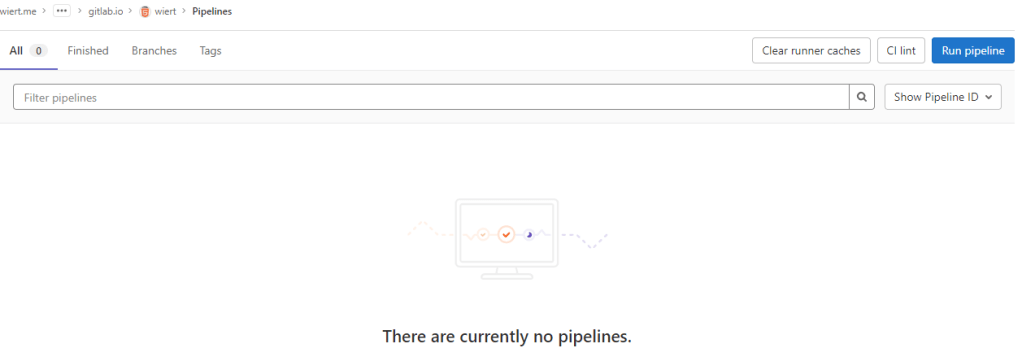
wiert” (with slug “wiert“) so it would appear at gitlab.com/wiert.me/public/web/sites/gitlab.io/wiertBy default there is no CI/CD pipeline, but there is an enabled blue “Run pipeline” button: confusing.
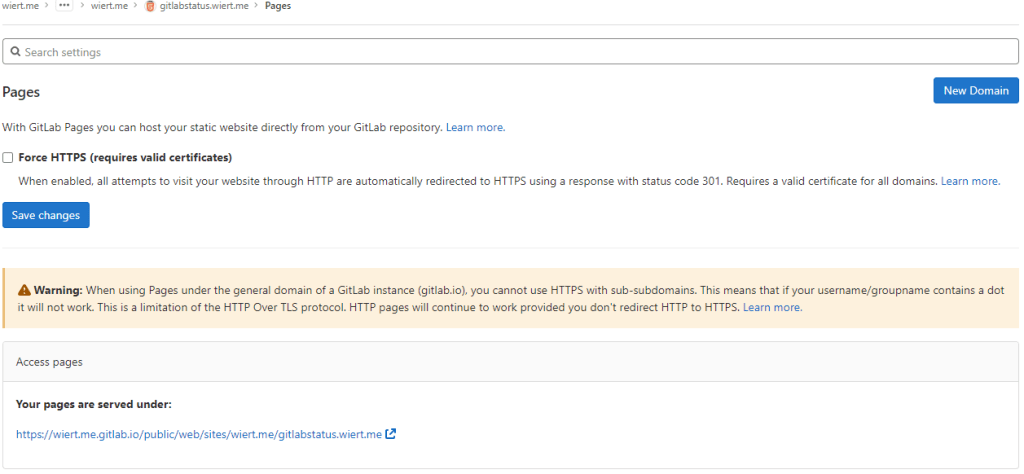
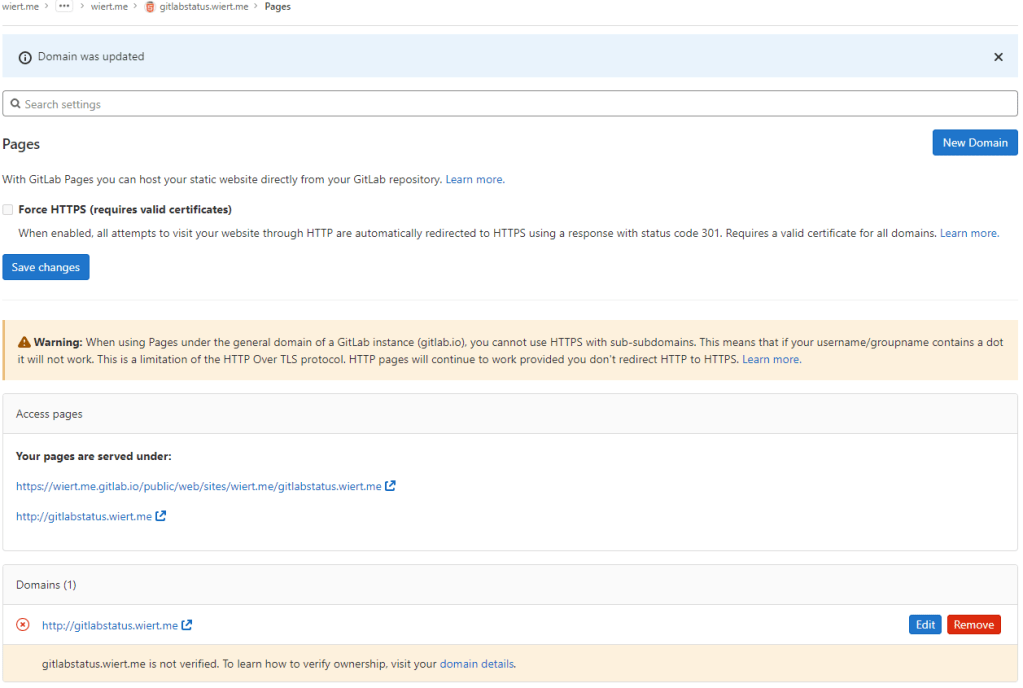
Warning: When using Pages under the general domain of a GitLab instance (gitlab.io), you cannot use HTTPS with sub-subdomains.
The sites do work (see the [Archive.is http version] and [Archive.is https version]), but the HTTPS fails because wiert.me.gitlab.io does not match the SANs (Subject Alternative Names) in the certificate: *.gitlab.io, gitlab.io
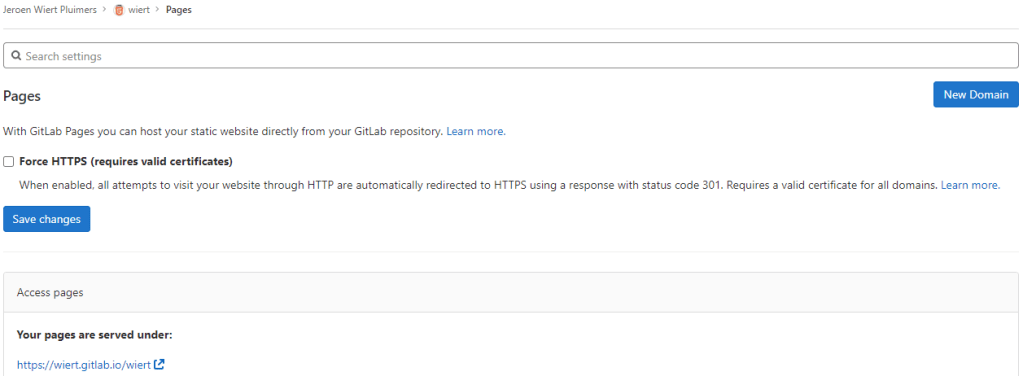
wiertgitlab.com/wiert/public/web/sites/gitlab.io which as URL is gitlab.com/wier1/public/web/sites/gitlab.io because user account wiert already occupies gitlab.com/wiert.wiert” (with slug “wiert“) so it would appear at gitlab.com/wiert.me/public/web/sites/gitlab.io/wiertwiert.gitlab.io/wiert I hoped for☐ Force HTTPS (requires valid certificates)
wiert exists and occupies gitlab.com/wiert, then a group named wiert cannot occupy gitlab.com/wiert, and therefore a project named wiert within that group won’t be deployed to wiert.gitlab.io/wiert.wiert, then no group named wiert cannot be used to contain a project named wiert to host as wiert.gitlab.io/wiert“.wiert” (with slug “wiert“) so it would appear at gitlab.com/wiertwiert.gitlab.io/wiert I hoped for:
Success: published at https://wiert.gitlab.io/wiert/
The sites do work fine (see the [Archive.is http version] and [Archive.is https version]). The HTTP does not redirect to the HTTP version, as I did not tick the
☐ Force HTTPS (requires valid certificates)
wiert.gitlab.io” (with slug “wiert.gitlab.io“) so it would appear at gitlab.com/wiert.me/public/web/sites/gitlab.io/wiert.gitlab.iowiert.gitlab.io I hoped for.
wiert.me.gitlab.io does not match the SANs (Subject Alternative Names) in the certificate: *.gitlab.io, gitlab.io. The HTTP does not redirect to the HTTP version, as I did not tick the☐ Force HTTPS (requires valid certificates)
wiert.gitlab.io” (with slug “wiert.gitlab.io“) so it would appear at gitlab.com/wier1/public/web/sites/gitlab.io/wiert.gitlab.iowiert.gitlab.io I hoped for☐ Force HTTPS (requires valid certificates)
wiert.gitlab.io” (with slug “wiert.gitlab.io“) so it would appear at gitlab.com/wiert/wiert.gitlab.io.wiert.gitlab.io I hoped for with working sites (see the [Archive.is http version] and [Archive.is https version]).☐ Force HTTPS (requires valid certificates)
Having learned from the GitHub githubstatus.wiert.me procedure (where I had to wait a long time for the default *.wiert.me domain mapping timeout and the githubstatus.wiert.me DNS CNAME record to become effective), I started on the DNS CNAME record side which is documented at [Wayback] Custom domains and SSL/TLS certificates: Section 3. Set up DNS records for Pages: For subdomains | GitLab:
Subdomains (
subdomain.example.com) require:
- A DNS
CNAMErecord pointing your subdomain to the Pages server.- A DNS
TXTrecord to verify your domain’s ownership.
From DNS Record To subdomain.example.comCNAMEnamespace.gitlab.io_gitlab-pages-verification-code.subdomain.example.comTXTgitlab-pages-verification-code=00112233445566778899aabbccddeeffNote that, whether it’s a user or a project website, the
CNAMEshould point to your Pages domain (namespace.gitlab.io), without any/project-name.
The value for the TXT record is only known after you created the pages project, but the value for the CNAME record is known beforehand:
From DNS Record To gitlabstatus.wiert.meCNAMEnamespace.gitlab.io
So let’s see if I can do this in one try, with these steps:
CNAME record from gitlabstatus.wiert.me to namespace.gitlab.io:

gitlabstatus.wiert.me CNAME record pointing to namespace.gitlab.io
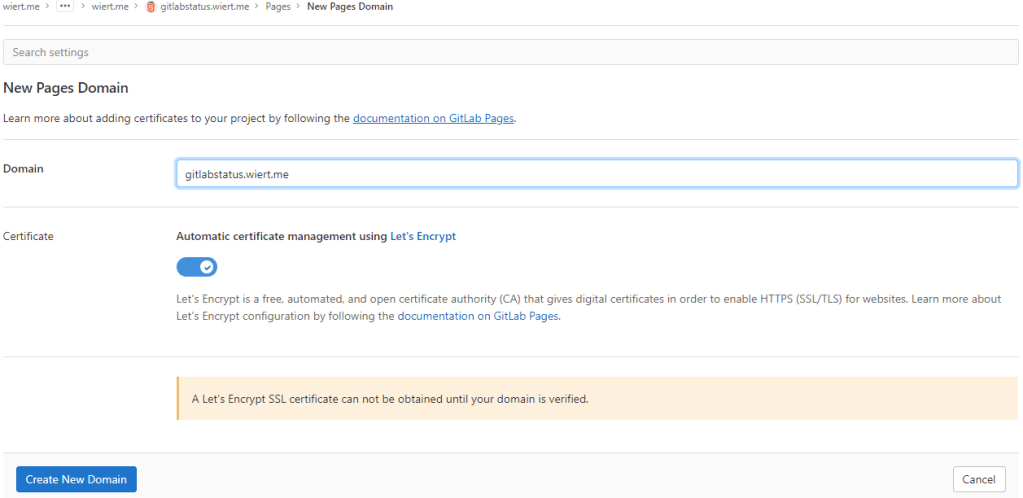
gitlabstatus.wiert.me” (with slug “gitlabstatus.wiert.me“) so it would appear at gitlab.com/wiert.me/public/web/sites/wiert.me/gitlabstatus.wiert.meCNAME record from gitlabstatus.wiert.me to namespace.gitlab.io into operation by clicking the “New Domain” button:“New Domain” button in the “Pages” settings.
There I filled in the correct gitlabstatus.wiert.me domain name, then pressed the “Create New Domain” button:
New domain becomes
gitlabstatus.wiert.me
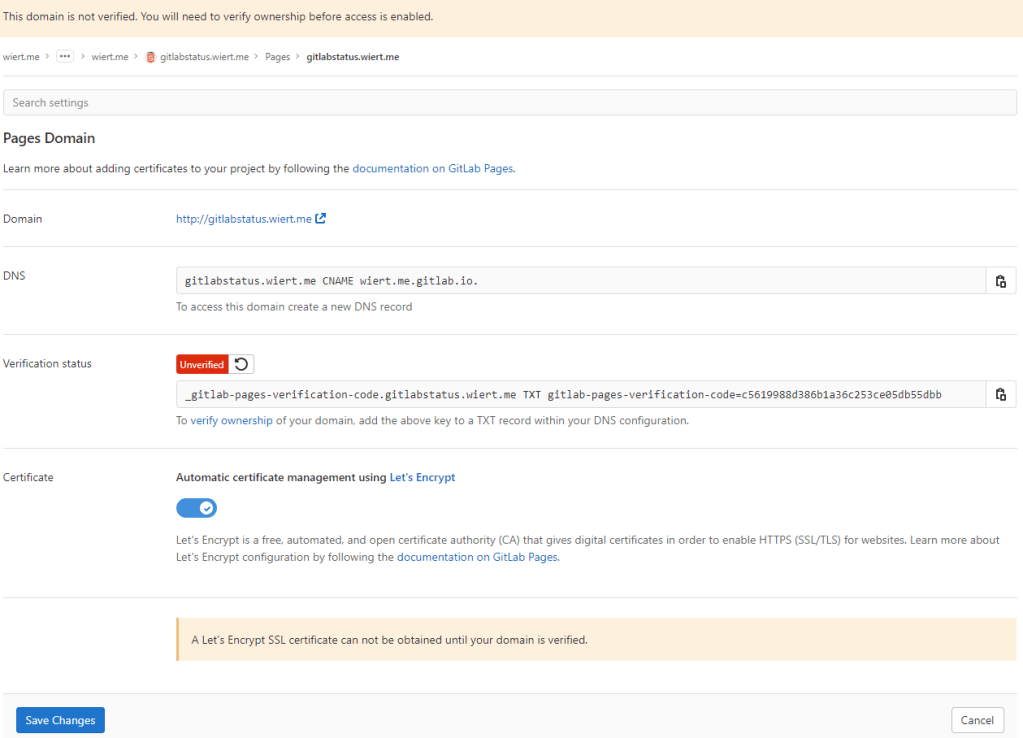
CNAME work I already did: the documentation is clearly wrong as these are the two DNS record entries to be made as shown by gitlab.com/wiert.me/public/web/sites/wiert.me/gitlabstatus.wiert.me/pages/domains/gitlabstatus.wiert.me:Correct instructions for the DNS records to get gitlabstatus.wiert.me working
Subdomains (gitlabstatus.wiert.me) require:
- A DNS
CNAMErecord pointing your subdomain to the Pages server.- A DNS
TXTrecord to verify your domain’s ownership.
From DNS Record To gitlabstatus.wiert.meCNAMEwiert.me.gitlab.io._gitlab-pages-verification-code.gitlabstatus.wiert.meTXTgitlab-pages-verification-code=c5619988d386b1a36c253ce05db55dbb
Basically the whole namespace.gitlab.io part of the documentation is a placeholder for the actual namespace that belongs to the leaf group the pages project is in (in my case wiert.me).
TTL to time out and effectuate:New DNS gitlabstatus.wiert.me
CNAMErecord pointing to wiert.me.gitlab.io
Note that this DNS administrative interface from WordPress.com does omit the final period of the CNAME destination (officially this would be wiert.me.gitlab.io.)
CNAME DNS record, I also made the TXT DNS record:New DNS TXT record for verification of gitlabstatus.wiert.me
Then I waited a little for the DNS TXT record to be saved and try the verification of the TXT record.
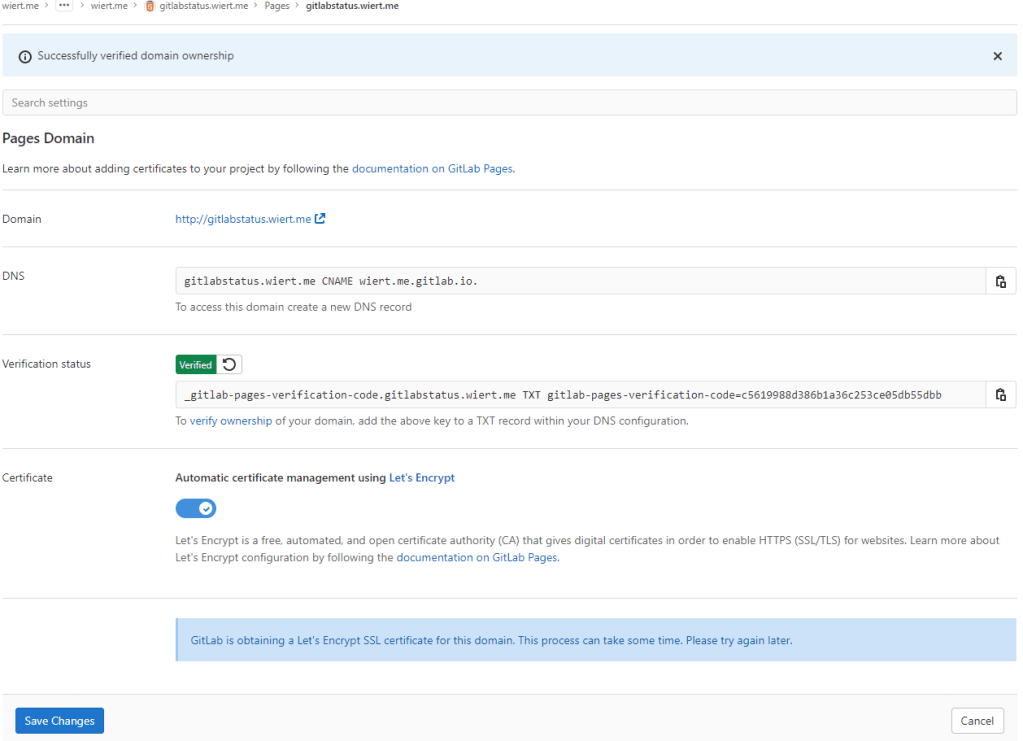
The DNS TXT record for gitlabstatus.wiert.me finally got verified
CNAME record DNS TTL to expire so I could check the domain and – hopefully – the TLS certificate to be requested by Let’s Encrypt:After the
gitlabstatus.wiertDNS TXT record got verified, I could save the domain information
CNAME record DNS TTL expired and the new CNAME record came into effect, the domain became available as http://gitlabstatus.wiert.me/:Waiting for
gitlabstatus.wiert.meto become active
Domain
gitlabstatus.wiert.meinformation before verification
to this:
Domain
gitlabstatus.wiert.meinformation after verification
gitlabstatus.wiert.me I hoped for with working sites (see the [Archive.is http version] and [Archive.is https version] for the wiert.me domain, and [Archive.is http version] and [Archive.is https version] for the wiert.me domain).☐ Force HTTPS (requires valid certificates)
In retrospect, this could have been shorter when I had done the DNS part later, which is contrary to how to do this with GitHub.
The conclusion seems this:
Gitlab Page repositories to be published as or under
wiert.gitlab.ioneed to reside directly under userwiert. Having them reside under a different group likewiertorwiert.mewon’t work.
Or in more generic terms:
When creating pages as
user.gitlab.ioyou have to put your pages projects directly under your user accountgitlab.com/user.Putting them under groups or leaf groups fails, no matter if the (leaf) group is named
useror otherwise.
In addition, you can add custom domains to any Gitlab repository (even one that never stated out as a GitLab Pages repository). It will work as soon as the domain DNS mapping is setup through both a CNAME mapping record and TXT verification record.
The steps for this in your GitLab repository are:
.gitlab-ci.yml file at the root of your repository; I used the [Wayback/Archive.is] one from [Wayback/Archive] GitLab Pages examples / plain-html · GitLab as my site is purely staticindex.html file in the public directory of your repository, similar to [Wayback/Archive] GitLab Pages examples / plain-html · GitLabgitlab.io, which allows the outside world to visit your GitHub Pages sie, and the Let’s Encrypt Certificate to be generated (and prevents this error: [Wayback/Archive] GitLab Pages integration with Let’s Encrypt | GitLab: “Something went wrong while obtaining the Let’s Encrypt certificate”).CNAME record and DNS TXT record; ensure both are applied on your primary DNS name server and replicated to all authoritative DNS name servers.Settings” -> “Pages” enable the “Force HTTPS (requires valid certificates)” option and save.Note: I saved the TLS information – including certificates here:
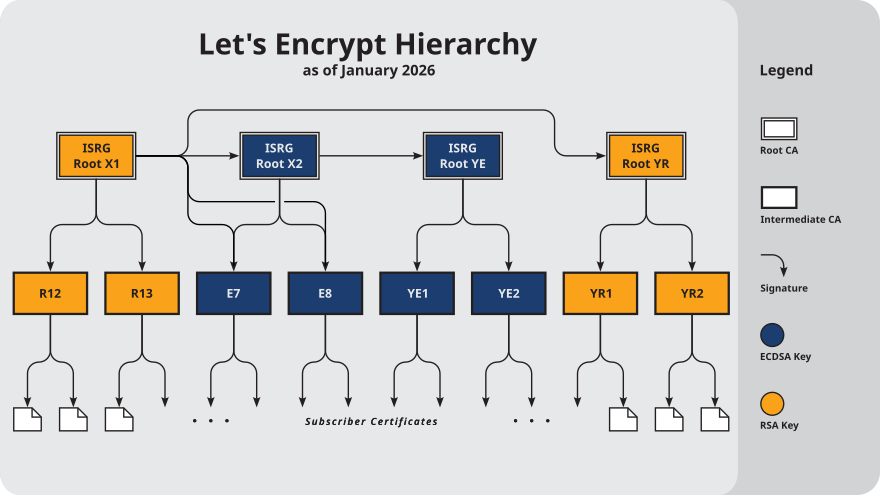
5B0C885BD0E0A1A52AD5C29D for *.gitlab.io, gitlab.io.5B0C885BD0E0A1A52AD5C29D for *.gitlab.io, gitlab.io.5B0C885BD0E0A1A52AD5C29D for *.gitlab.io, gitlab.io.3380904328FD4633E6CF27FE9B7D5BE25AE for gitlabstatus.wiert.me.912B084ACF0C18A753F6D62E25A75F5A for R3.4001772137D4E942B8EE76AA3C640AB7 for ISRG Root X1.More about the Let’s Encrypt certificates at [Wayback] Chain of Trust – Let’s Encrypt:
–jeroen

Posted in Cloud, Communications Development, Development, DNS, Encryption, GitLab, Hosting, HTML, HTTPS/TLS security, Infrastructure, Internet, Internet protocol suite, Let's Encrypt (letsencrypt/certbot), Power User, Software Development, Source Code Management, TCP, TLS, Web Development | Leave a Comment »







 The Wiert Corner - irregular stream of stuff