The Wiert Corner – irregular stream of stuff

Jeroen W. Pluimers on .NET, C#, Delphi, databases, and personal interests

  • My badges

  • Twitter Updates

  • My Flickr Stream

  • Pages

  • All categories

  • Enter your email address to subscribe to this blog and receive notifications of new posts by email.

    Join 1,854 other subscribers

Archive for the ‘Virtualization’ Category

Veeam Backup and Replication on ESXi 4.1: “Input string was not in a correct format.” -> Upgrade to 4.1.2

Posted by jpluimers on 2010/08/05

I’m in the process of moving the VMs on my ESX 3.5 box to an ESXi 4.1 box (so I can get ESXi 4.1 installed on the ESX 3.5 box).
I tried copying over the files using the free Veeam Backup and FastSCP 3.0.2.270, but that obviously does not work well:
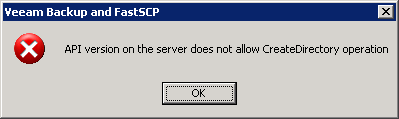
—————————
Veeam Backup and FastSCP
—————————
API version on the server does not allow CreateDirectory operation
—————————
OK
—————————

The free FastSCP works on a file by file base, but that won’t cut it.
Hoping the licensed product would work better, I registered for a trial of Veeam Backup and Replication (it is version 4.x in stead of FastSCP which is still 3.x).

The registration process went swift, but I was just a tad bit too early trying to run it against VMware ESXi 4.x: Read the rest of this entry »

Posted in ESXi4, Power User, Veeam, VMware | Leave a Comment »

Using a USB connected APC UPS with Windows Server 2008 and VMware Server 2.0

Posted by jpluimers on 2010/06/24

Recently I took over some system management at a client.

They run Windows 2008 Server x64 and a Windows Server 2008 VM under VMware Server 2.0 and a LAN with some client machines
A lot of things were not covered, backup, power outage, etc, so I’m implementing those step by step.

They now have an APC UPS connected through USB.
There are a lot of references on the internet about the APC software (well, more like UPS vendor supplied software in general) being crap.

Luckily, Windows Server 2008 (and 2003) have built-in support for APC UPSes.
Furthermore when Windows Server shuts down, VMware Server needs to perform some actions on the guests as well.

This post covers the configuration of both :-) Read the rest of this entry »

Posted in Power User, VMware | 8 Comments »

Changing a NIC in a VMware VM from a dynamic MAC into a static MAC address

Posted by jpluimers on 2010/06/23

Sometimes you want to hava a NIC in a VMware VM to have a static MAC address in stead of a dynamically generated one.

This sanbarrow.com page explains what to change in the VMX configuration file.

From:

ethernet0.addressType = "generated"
ethernet0.generatedAddress = "00:0c:29:40:7e:22"
ethernet0.generatedAddressOffset = "0"

To:

ethernet0.addressType = "static"
ethernet0.address = "00:50:56:3e:86:29"

VMware also has a few docs on this for workstation and ESX installs and a KB article for both.

–jeroen

Posted in Power User, VMware | 1 Comment »

VMware Converter 4.01: “Unable to obtain hardware information” or “Unable to determine Guest Operating System”

Posted by jpluimers on 2010/06/10

Sometimes you get an error message “Unable to obtain hardware information” or “Unable to determine Guest Operating System” when using VMware Converter 4.01.

This happens at least with VMware Converter 4.01 and converting x64 VM’s like “Windows 7” and “Windows Server 2008 R2” from ESXi 4 U1.
Others found out it also happens with some Linux VMs, I have not tried those yet.

A the VMware communitie, user wildblue posted a workaround: Read the rest of this entry »

Posted in ESXi4, Power User, Virtualization, VMware, VMware Converter, VMware ESXi | 27 Comments »

Control the VMware VMs from the commandline: vmrun – the successor of vmware-cmd

Posted by jpluimers on 2010/05/19

In the process of upgrading from VMware server 1.0 to 2.0, I found out that vmware-cmd.bat has been replaced by vmrun.exe.

The command-line options are different, and this link explains the vmrun command-line options in detail (well, much better than the vmrun.exe built-in help). The official documentation is available as a PDF.

One of the changes I had to make was from: Read the rest of this entry »

Posted in *nix, Power User, VMware | 2 Comments »

Simple solution for “VMware Communities: Problem installing vConverter 4.0.1”

Posted by jpluimers on 2010/04/16

Sometimes you get an error message when trying to install VMware Converter 4.x:

A previous installation/reboot is still pending. Please reboot to complete the installation and try again to install.

Contrary to most solutions, this one is easy:
The message means “vConverter is already installed“.

So: check if you did not have it installed (or a previous version) before starting with hard measures :-)

–jeroen

Posted in Power User, Virtualization, VMware, VMware Converter | Leave a Comment »

Reminder to self: what to do if RDP (MSTSC) or VMware clipboard sharing is broken

Posted by jpluimers on 2009/09/18

Some things to check when clipboard sharing for Remote Desktop (RDP/MSTSC) or VMware is broken. Read the rest of this entry »

Posted in Fusion, Power User, Remote Desktop Protocol/MSTSC/Terminal Services, View, VMware, VMware Workstation, Windows, Windows 7, Windows Server 2000, Windows Server 2003, Windows Server 2003 R2, Windows Server 2008, Windows Server 2008 R2, Windows Vista, Windows XP | Leave a Comment »