Archive for the ‘VMware’ Category
Posted by jpluimers on 2020/01/20
Rephrased from [WayBack] Jeroen Wiert Pluimers – Google+:
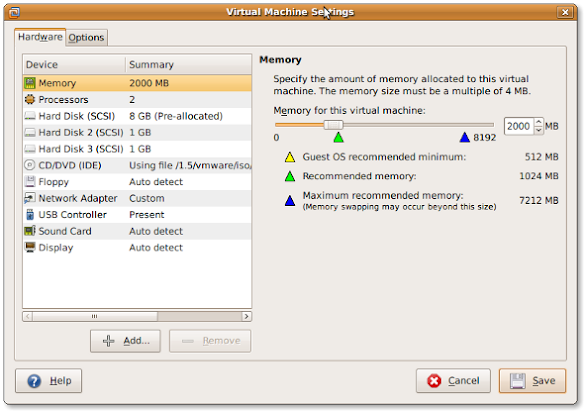
If you install a virtual machine, ensure the disk controller and disks are SCSI based.
This has many advantages, including:
- speed (usually the SCSI drivers can be paravirtualised)
- hot addition of new disks
It holds for virtually any virtualization platform including all non-ancient (less than ~10 year old) versions of:
- VMware (Workstation, Viewer, but I expect this also to work on vSphere, ESXI, Fusion)
- Hyper-V
- KVM (and therefore Proxmox)
- VirtualBox
Based on my notes in the above link and the links below:
Note this isn’t just for Linux guests/hosts: Most guests (including Windows) can do a SCSI bus re-scan and detect new SCSI devices.
The trick here is that the guest must already have a virtual SCSI controller (adding that will require a reboot of the guest).
Then adding a new SCSI disk on that controller from any host (Windows, Mac, ESXi, vSphere) should work fine.
–jeroen
Posted in ESXi4, ESXi5, ESXi5.1, ESXi5.5, ESXi6, ESXi6.5, Fusion, Hyper-V, KVM Kernel-based Virtual Machine, Power User, Proxmox, View, VirtualBox, Virtualization, VMware, VMware ESXi, VMware Workstation | Leave a Comment »
Posted by jpluimers on 2019/08/02
Since the VMware site is a maze, so below are some download and information links.
[WayBack] Upgraded to 6.1.1. build-3533064 – cannot restore from Acronis TrueImage TIB files… |VMware Communities -> you need 6.0 or earlier for that:
Support notice
VMware vCenter Converter Standalone 6.0 is the last release of the product to support third-party backup images and virtual machines as sources for conversion. This capability will be discontinued in the next release. If you use this capability, you should start planning your transition.
Interoperability
Third-party backup images and virtual machines – to be discontinued. See Support notice.
- Acronis True Image Echo 9.1 and 9.5, and Acronis True Image Home 10 and 11 (.tib)
- Symantec Backup Exec System Recovery (formerly LiveState Recovery) 6.5, 7.0, 8.0, and 8.5, and LiveState Recovery 3.0 and 6.0 (.sv2i format only)
- Norton Ghost version 10.0, 12.0, and 14.0 (.sv2i format only)
- Parallels Desktop 2.5, 3.0, and 4.0 (.pvs and .hdd). Compressed disks are not supported
- Parallels Workstation 2.x (.pvs). Compressed disks are not supported. Parallels Virtuozzo Containers are not supported.
- StorageCraft ShadowProtect Desktop, ShadowProtect Server, ShadowProtect Small Business Server (SBS), ShadowProtect IT Edition, versions 2.0, 2.5, 3.0, 3.1, and 3.2 (.spf)
- The Microsoft VHD format for the following sources:
- Microsoft Virtual PC 2004 and Microsoft Virtual PC 2007 (.vmc)
- Microsoft Virtual Server 2005 and 2005 R2 (.vmc)
For conditions and limitations about converting Backup Exec System Recovery, ShadowProtect, and Consolidated Backup images, see the VMware vCenter Converter Standalone User’s Guide.
Edit 20210810:
–jeroen
Read the rest of this entry »
Posted in Power User, Virtualization, VMware, VMware Converter | Leave a Comment »
Posted by jpluimers on 2019/07/29
Since “esxi write entry to syslog” didn’t return results on how to add new syslog entries, only how to configure syslog.
It was much easier than I hoped for:
logger TEST
With a default configuration this then ends up in /var/log/syslog.log:
grep TEST /var/log/syslog.log
2019-07-29T10:48:31Z root: TEST
Now I know the command, I found
–jeroen
Posted in Power User, Virtualization, VMware, VMware ESXi | Leave a Comment »
Posted by jpluimers on 2019/07/15
This version of the ESXi Embedded Host Client is written purely in HTML and JavaScript, and is served directly from your ESXi host and should perform much better than any of the existing solutions.
Installing went smooth:
# esxcli software vib install -v https://download3.vmware.com/software/vmw-tools/esxui/esxui-signed-6360286.vib -f

Installation Result

Message: Operation finished successfully.

Reboot Required: false

VIBs Installed: VMware_bootbank_esx-ui_1.23.0-6360286

VIBs Removed: VMware_bootbank_esx-ui_1.21.0-5724747

VIBs Skipped:
Source: ESXi Embedded Host Client
–jeroen
Posted in ESXi6.5, Power User, Virtualization, VMware, VMware ESXi | Leave a Comment »
Posted by jpluimers on 2019/07/10
Searching for esxi list usb devices on host console did not return meaningful results, but after a few more deeper tries I found that ESXi has lsusb at
Here the difference when connecting another USB hub with devices to an existing ESXi machine:
[root@ESXi-X10SRH-CF:~] lsusb
Bus 001 Device 005: ID 0781:5583 SanDisk Corp. Ultra Fit
Bus 001 Device 004: ID 0557:2419 ATEN International Co., Ltd
Bus 001 Device 003: ID 0557:7000 ATEN International Co., Ltd Hub
Bus 003 Device 002: ID 8087:8002 Intel Corp.
Bus 002 Device 002: ID 8087:800a Intel Corp.
Bus 001 Device 002: ID 0557:2221 ATEN International Co., Ltd Winbond Hermon
Bus 003 Device 001: ID 0e0f:8002 VMware, Inc.
Bus 002 Device 001: ID 0e0f:8002 VMware, Inc.
Bus 001 Device 001: ID 0e0f:8003 VMware, Inc.
[root@ESXi-X10SRH-CF:~] lsusb
Bus 001 Device 010: ID 0409:005a NEC Corp. HighSpeed Hub
Bus 001 Device 009: ID 0922:0019 Dymo-CoStar Corp. LabelWriter 400
Bus 001 Device 008: ID 06bc:0324 Oki Data Corp.
Bus 001 Device 007: ID 0409:005a NEC Corp. HighSpeed Hub
Bus 001 Device 006: ID 1a40:0101 Terminus Technology Inc. Hub
Bus 001 Device 005: ID 0781:5583 SanDisk Corp. Ultra Fit
Bus 001 Device 004: ID 0557:2419 ATEN International Co., Ltd
Bus 001 Device 003: ID 0557:7000 ATEN International Co., Ltd Hub
Bus 003 Device 002: ID 8087:8002 Intel Corp.
Bus 002 Device 002: ID 8087:800a Intel Corp.
Bus 001 Device 002: ID 0557:2221 ATEN International Co., Ltd Winbond Hermon
Bus 003 Device 001: ID 0e0f:8002 VMware, Inc.
Bus 002 Device 001: ID 0e0f:8002 VMware, Inc.
Bus 001 Device 001: ID 0e0f:8003 VMware, Inc.
A few odd things about the devices listed above:
- are in none of the
/var/log/* files when searching for Oki, Dymo or NEC
- are listed differently in Windows:
- Windows lists the
06bc:0324 Oki Data Corp. as a “Composite device” with a few sub-devices “MC5(3)x2/ES5(3)4×2” and “USB Printing Support”
- Windows lists the
0922:0019 Dymo-CoStar Corp. LabelWriter 400 as “USB Printing Support” with a subdevice “DYMO LabelWriter 400”
- are listed differently when assigning them to a VM:

Two indispensable tools on Windows for dealing with USB devices are:
They give a much easier to read view than devmgmt.msc, this despite the “hidden devices” trick at [WayBack] Tweak Device Manager for a more Complete View of Devices
Related:
–jeroen
Read the rest of this entry »
Posted in Power User, Virtualization, VMware, VMware ESXi | Leave a Comment »
Posted by jpluimers on 2019/05/31
Via [WayBack] Determining the ESXi installation type (2014558) | VMware KB
# esxcfg-info -e

boot type: visor-usb
That’s on my X10SRH-CF system which runs from USB.
Values you can get:
visor-pxe indicates a PXE deploymentvisor-thin indicates an installable deploymentvisor-usb indicates an embedded deployment
If your installation is visor-thin based (running from hard-disk), then you can convert it to visor-usb; the steps are at [WayBack] visor-thin & vsantraces – Hypervisor.fr (in French, but Google Translate is quite OK). It skips a few of the steps mentioned in [WayBack] How To Backup & Restore Free ESXi Host Configuration | virtuallyGhetto, so for saving your current config it’s best to follow these steps:
- Shutdown or suspend all VMs
vim-cmd hostsvc/firmware/sync_configvim-cmd hostsvc/firmware/backup_config- Copy the generated backup from
/scratch/downloads (a UUID directory under it)to a safe location
vim-cmd hostsvc/maintenance_mode_entershutdown- Install the same ESXi version on a USB disk
- Boot from the USB disk
- copy the backup to
/tmp/configBundle.tgz
vim-cmd hostsvc/firmware/restore_config /tmp/configBundle.tgzreboot
–jeroen
via [WayBack] How to tell if ESXi is installed to SD card or local HDD? : vmware
Posted in ESXi6.5, Power User, Virtualization, VMware, VMware ESXi | Leave a Comment »
Posted by jpluimers on 2019/05/27
For my own memory:
[WayBack] Best Hard Drives for ZFS Server (Updated 2017) | b3n.org
My blog post Best Buy Guides (BBGs) – mux’ blog – Tweakblogs – Tweakers.
ZFS, dedupe and RAM:
ZFS, FreeBSD, ZoL (ZFS on Linux) and SSDs:
- Via [WayBack] Solved – ZFS with only one ssd | The FreeBSD Forums
- [WayBack] How I Learned to Stop Worrying and Love RAIDZ | Delphix (backed with plenty of tables and graphs)
- TL;DR: Choose a RAID-Z stripe width based on your IOPS needs and the amount of space you are willing to devote to parity information.
- Guidance on a choice between:
- best performance on random IOPS
- best reliability
- best space efficiency
- A misunderstanding of this overhead, has caused some people to recommend using “(2^n)+p” disks, where p is the number of parity “disks” (i.e. 2 for RAIDZ-2), and n is an integer. These people would claim that for example, a 9-wide (2^3+1) RAIDZ1 is better than 8-wide or 10-wide. This is not generally true. The primary flaw with this recommendation is that it assumes that you are using small blocks whose size is a power of 2. While some workloads (e.g. databases) do use 4KB or 8KB logical block sizes (i.e. recordsize=4K or 8K), these workloads benefit greatly from compression. At Delphix, we store Oracle, MS SQL Server, and PostgreSQL databases with LZ4 compression and typically see a 2-3x compression ratio. This compression is more beneficial than any RAID-Z sizing. Due to compression, the physical (allocated) block sizes are not powers of two, they are odd sizes like 3.5KB or 6KB. This means that we can not rely on any exact fit of (compressed) block size to the RAID-Z group width.
- If you are using RAID-Z with 512-byte sector devices with recordsize=4K or 8K and compression=off (but you probably want compression=lz4): use at least 5 disks with RAIDZ1; use at least 6 disks with RAIDZ2; and use at least 11 disks with RAIDZ3.
- To summarize: Use RAID-Z. Not too wide. Enable compression.
- [NoWayBack/Archive] FreeNAS All SSDs? – Hardware / Build a PC – Level1Techs Forums
- [WayBack] ZFS on all-sdd storage | iXsystems Community
I wouldn’t worry so much about the cost of the drives if you have to replace them in a few years. They’re constantly getting bigger and cheaper. If you really need to replace them in 3 years it’s not going to be the end of the world. Just think, a 256GB SSD can be purchased for about $100 today and 3 years ago the same drives were like $400+. To boot, they are faster than they were 3 years ago.
It’s quite possible that by the time you need to be worried about buying replacement drives for your pool you’ll be able to buy a single drive that can hold 1/2 your pool’s data for $100.
Don’t fret it. Buy the SSDs and be happy. Tell your boss you did the analysis and all is well. Just don’t buy those TLC drives. Those seem very scary for ZFS IMO.
…
There are some companies that have forked ZFS and set it up as you describe (separate vdevs for metadata using high-endurance SLC NAND) but there’s nothing like that in OpenZFS at the moment.
- [WayBack] ZFS with SSDs: Am I asking for a headache in the near future? | Proxmox Support Forum
- [WayBack] SSD Over-provisioning using hdparm – Thomas-Krenn-Wiki
- [WayBack] Optimize SSD Performance – Thomas-Krenn-Wiki
OpenSuSE related
Samba/CIFS related
–jeroen
Posted in ESXi6.5, Power User, Virtualization, VMware, VMware ESXi | Leave a Comment »
Posted by jpluimers on 2019/05/24
Some wizardry: [WayBack] vmkfstools | virtualhobbit.
This includes:
- finding which VMFS partitions are there the hard way
- initialising partitions from known good data
vmkfstools -V (yes, capital V is for VMFS rescan, as lowercase v is for verbose)
Found after reading [WayBack] Datastore not mounted after reboot of ESXi5.5 |VMware Communities
Then found this: [Wayback] VMware Knowledge Base: Performing a rescan of the storage on an ESXi host (1003988); Using the ESXi Command Line Interface
…
- To search for new VMFS datastores, run this command:
vmkfstools -V
Note: This command does not generate any output.
That solved my problem!
# vmkfstools -V
# esxcfg-volume --list
Scanning for VMFS-3/VMFS-5 host activity (512 bytes/HB, 2048 HBs).
VMFS UUID/label: 532cd010-6e8c01d1-45be-001f29022aed/Raid6SSD
Can mount: Yes
Can resignature: Yes
Extent name: naa.600605b00aa054a0ff000021022683ae:1 range: 0 - 1830143 (MB)
# esxcfg-volume --mount 532cd010-6e8c01d1-45be-001f29022aed
Mounting volume volume 532cd010-6e8c01d1-45be-001f29022aed
And there it was:
# df -h
Filesystem   Size   Used Available Use% Mounted on
...
VMFS-5       1.7T   1.6T    169.6G  91% /vmfs/volumes/Raid6SSD
...
Note you can mount non-persistent (--mount) or persistent (--persistent-mount) by both UUID and label, so there are four choices for mounting:
esxcfg-volume --mount UUID
esxcfg-volume --mount label
esxcfg-volume --persistent-mount UUID
esxcfg-volume --persistent-mount label
–jeroen
Posted in ESXi5, ESXi5.1, ESXi5.5, ESXi6, ESXi6.5, Power User, Virtualization, VMware, VMware ESXi | Leave a Comment »
Posted by jpluimers on 2019/05/10
A while ago, I was surprised that in a Windows VM running under VMware Fusion, the Ctrl-Click performed a right click, despite me having changed the configuration:
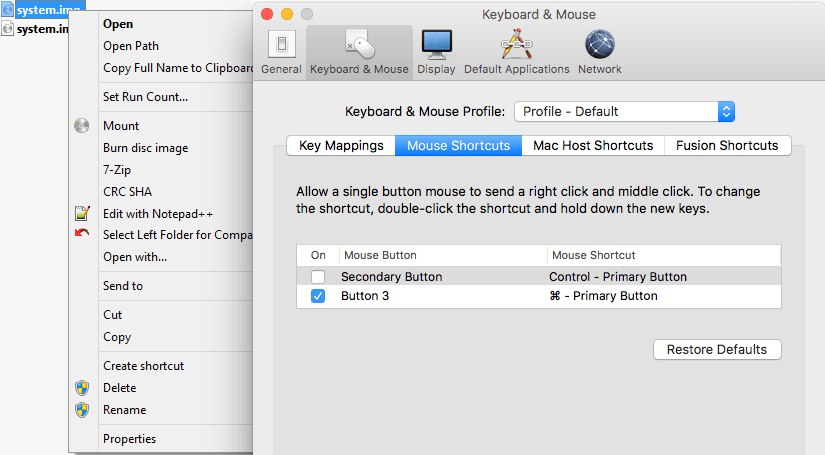
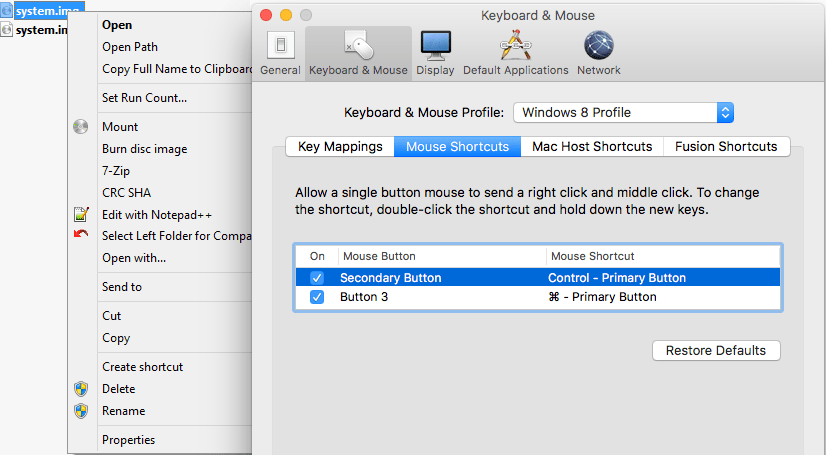
I was wrong, as I had forgotten I assigned the “Windows 8 Profile” tot hat VM (as it was running Windows 8.1), which had the Secondary Button still mapped to the Control+Primary Button:
Related:
–jeroen
Posted in Fusion, Power User, Virtualization, VMware, Windows | Leave a Comment »
Posted by jpluimers on 2019/05/10
Basically the boot delay during startup is so short that usually you cannot even choose the boot device.
Solution: edit the .vmx configuration file for the Virtual Machine, then change this value:
bios.bootDelay = "15000"
Source:
–jeroen
Posted in Fusion, Power User, Virtualization, VMware | Leave a Comment »


 The Wiert Corner - irregular stream of stuff