Archive for the ‘Chrome’ Category
Posted by jpluimers on 2022/01/20
For quite some time now, Chrome (think years) refuses to prompt for saving passwords whereas Firefox and Safari do prompt and save them, even for site types that it used to save passwords for in the past.
It has been annoying enough for too long now that I tried to do better than the Google searches I used back when I saw this happen first.
Below are some links based on new searches (starting with [Wayback] adding a password in chrome settings – Google Search); hopefully I can try them after I made a list of sites that Chrome does not show the password save prompt for.
Solutions I tried that failed (but maybe useful for others):
Solutions still to try:
Read the rest of this entry »
Posted in Chrome, Chrome, Communications Development, Development, Encryption, ESXi6, ESXi6.5, ESXi6.7, Firefox, Fritz!, Fritz!Box, Fritz!WLAN, Google, https, HTTPS/TLS security, Internet, Internet protocol suite, Let's Encrypt (letsencrypt/certbot), Power User, routers, Safari, Security, TCP, TLS, Virtualization, VMware, VMware ESXi, Web Browsers, Web Development | Leave a Comment »
Posted by jpluimers on 2022/01/14
If use the Chrome web browser, it’s fairly likely you will find Chrome autofill suggestions recommending things for various forms and text entry points. Sometimes those autofill suggestions c…
[Wayback] How to Delete Specific Chrome Autofill Suggestions
Most important are the steps:
- Open the related website which has a form entry where autofill suggestions appear
- Start typing so that the suggestion shows up as an option in Chrome
- Using the keyboard arrows, navigate down the suggestion list to the item(s) you want to remove from the Chrome autofill suggestions
- With the suggestion highlighted, use the appropriate keystroke sequence to delete the Chrome suggestion:
- Mac:
Shift + FN + Delete
- Windows:
Shift + Delete
- Chromebook / Chrome OS:
Alt + Shift + Delete
- Repeat with other suggestions to delete if desired
Via: [WayBack] edit google chrome autocomplete list – Google Search
–jeroen
Posted in Chrome, Chrome, Google, Power User, Web Browsers | Leave a Comment »
Posted by jpluimers on 2021/12/10
Only recently, I learned this works on just about any web-browser:
Ctrl-9 (macOS: Command-9) goes to LAST tabCtrl-1 (macOS: Command-1) goes go FIRST tab
Via: [WayBack] Switch Between Tabs in Any Browser Using Shortcut Keys
For those keyboard ninjas who hate using the mouse, switching between tabs in your browser window is essential since most people probably have a bunch of tabs open at once. […]
…
If you want to go to a specific tab, you can press CTRL + N, where N is a number between 1 and 8. Unfortunately, you can’t go past 8, so if you have more than eight tabs, you’ll have to use a different keyboard shortcut or just click on it. CTRL + 9 will take you to the last tab, even if there are more than 8!
–jeroen
Posted in Chrome, Firefox, Internet Explorer, Keyboards and Keyboard Shortcuts, Opera, Power User, Safari, Web Browsers | Leave a Comment »
Posted by jpluimers on 2021/11/11
For expired or self-signed certificates with an untrusted chain, you might want to by base the Chrome certificate/HSTS error message.
Instead of clicking a few times, you can also type ‘badidea’ (this used to be ‘thisisunsafe’ and might change again someday).
Based on: [WayBack] security – Does using ‘badidea’ or ‘thisisunsafe’ to bypass a Chrome certificate/HSTS error only apply for the current site? – Stack Overflow
Found via [WayBack] KPN-klanten kunnen Experiabox V10A niet benaderen door verlopen certificaat – Computer – Nieuws – Tweakers
Source code that handles this: [WayBack] components/security_interstitials/core/browser/resources/interstitial_v2.js – chromium/src – Git at Google
/**
 * This allows errors to be skippped by typing a secret phrase into the page.
 * @param {string} e The key that was just pressed.
 */
function handleKeypress(e) {
  var BYPASS_SEQUENCE = 'badidea';
  if (BYPASS_SEQUENCE.charCodeAt(keyPressState) == e.keyCode) {
    keyPressState++;
    if (keyPressState == BYPASS_SEQUENCE.length) {
      sendCommand(SecurityInterstitialCommandId.CMD_PROCEED);
      keyPressState = 0;
    }
  } else {
    keyPressState = 0;
  }
}
–jeroen
Posted in Chrome, Development, Encryption, https, HTTPS/TLS security, Power User, Security, Web Browsers, Web Development | Leave a Comment »
Posted by jpluimers on 2021/09/15
For my link archive:
Via:
–jeroen
Posted in .NET, .NET Core, ASP.NET, C#, Chrome, Chrome, Development, Firefox, Google, Power User, Safari, Software Development, Web Browsers | Leave a Comment »
Posted by jpluimers on 2021/08/19
I used [WayBack] html – How can I scale the content of an iframe? – Stack Overflow as starting point to scale some iframes.
In my case, I had to scale up (by a 25% so a factor 1.25) instead of scale down.
What I observed so far in recent Chrome versions is:
- The wrapping
div is still needed, otherwise the outer size and inner size of the frame mismatches
- The wrapping
div and the wrapped iframe need to have the same dimensions (so unlike the Stack Overflow answers, no need to scale the width/height of the div; keep the same values as the iframe)
The div uses class calendar_wrap.
The iframe uses class calendar_iframe.
This is part of my CSS:
body {
      margin: 0; /* override browser setting for body `margin: 8px;` */
      overflow: hidden; /* remove scroll bars; does not work for iframes  */
    }

    /* ... */

    iframe {
      border-width: 0; /* override browser setting for iframe `border-width: 2px; */
      height: 100vh;
      width:   50vw;
      overflow: hidden; /* remove scroll bars; does not work for iframes  */
    }

     /* wrap and iframe zoom as per https://stackoverflow.com/questions/166160/how-can-i-scale-the-content-of-an-iframe */
    .calendar_wrap {
      float: left;

      height: 70vh;
      width:  35vw; /* calc(35vw / 1.25); */

      padding: 0;
      background-color: blue;
    }

    .calendar_iframe {
      float: left;

      width:  35vw;

      -ms-transform: scale(1.25);
      -moz-transform: scale(1.25);
      -o-transform: scale(1.25);
      -webkit-transform: scale(1.25);
      transform: scale(1.25);

      -ms-transform-origin: 0 0;
      -moz-transform-origin: 0 0;
      -o-transform-origin: 0 0;
      -webkit-transform-origin: 0 0;
      transform-origin: 0 0;
    }

    /* ... */
–jeroen
Posted in Chrome, CSS, Development, HTML, Power User, Software Development, Web Browsers, Web Development | Leave a Comment »
Posted by jpluimers on 2021/02/19
[Archive.is] ColumnCopy – Chrome Web Store: Enables copying columns from tables.
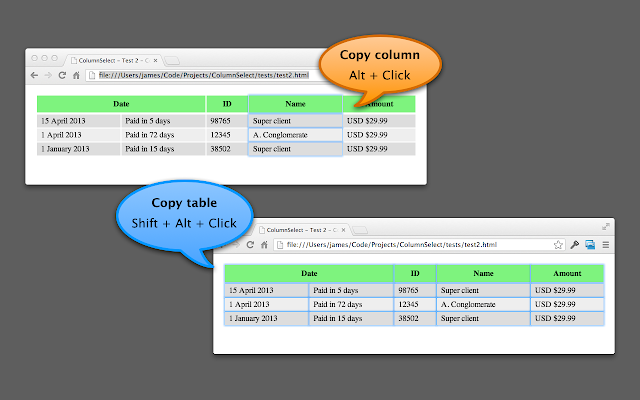
It can read anything on any web page, and it uses modifier keys, so I usually have it disabled until I need it.
You can disable/enable it on this page:
chrome://extensions/?id=lapbbfoohlcmlbdaakldmmallcbcbpjb
Via [WayBack] Select column from a table with Google Chrome – Super User
Sorry to dig up an old thread, but this might help someone in the future. I wrote a Chrome extension called ColumnCopy which accomplishes this task.
–jeroen
Posted in Chrome, LifeHacker, Power User, Web Browsers | Leave a Comment »
Posted by jpluimers on 2021/01/25
[Archive.is] PassProtect – Chrome Web Store:
Stop using bad passwords. PassProtect alerts you about breached credentials. Powered by “Have I Been Pwned?”.
Interesting plugin. Will try this soon.
Via:
–jeroen
Posted in Authentication, Chrome, Firefox, LifeHacker, Power User, Security, Web Browsers | Leave a Comment »


 The Wiert Corner - irregular stream of stuff